
1. Introdución
This manual provides instructions for the safe and efficient operation of your MEDION P64145 Stereo System. Please read this manual thoroughly before using the device and keep it for future reference. The MEDION P64145 is a compact audio system featuring DAB+ and PLL FM radio, a CD/MP3 player, Bluetooth connectivity, and USB playback.
2. Información de seguridade
Observe as seguintes precaucións de seguridade para evitar danos no dispositivo ou lesións a vostede mesmo:
- Non expoña o dispositivo á choiva nin á humidade.
- Non bloquee as aberturas de ventilación.
- Asegúrese de que o cable de alimentación non estea pisado nin pisado.
- Use só anexos/accesorios especificados polo fabricante.
- Desenchufe o dispositivo durante tormentas eléctricas ou cando non o use durante longos períodos.
- Encargue toda a reparación a persoal de servizo cualificado.
3. Contido do paquete
Comprobe que todos os elementos estean presentes na embalaxe:
- MEDION P64145 AiO Audio System (MD44125)
- Mando a distancia (con batería)
- Cable de alimentación
- Manual de usuario
- Tarxeta de garantía
4. Dispositivo rematadoview
Panel frontal
The front panel features the LCD display, CD tray, control buttons, and volume knob.

Imaxe: Fronte view of the MEDION P64145 stereo system, highlighting the central display, CD slot, and various control buttons.
Panel traseiro e conexións
The rear panel includes the power input, antenna connection, and auxiliary ports.

Imaxe: Traseira view of the MEDION P64145 stereo system, illustrating its dimensions (120mm height, 377mm width, 220mm depth) and available connection ports including Line In, USB, AUX-In (3.5 mm), and Headphone Jack.
5. Configuración
5.1 Conexión de alimentación
- Connect the power cable to the AC IN socket on the rear of the unit.
- Plug the other end of the power cable into a wall outlet (100-240V ~ 50/60 Hz).
5.2 Conexión de antena
For optimal radio reception, ensure the antenna is fully extended and positioned correctly.
5.3 Encendido inicial
Press the Power button on the unit or remote control to turn on the system. The LCD display will illuminate.
6. Instrucións de funcionamento
6.1 Funcionamento básico
- Encendido/apagado: Preme o POTENCIA botón.
- Control de volume: Xire o VOLUME botón ou use o VOL +/- botóns do control remoto.
- Selección da fonte: Preme o FONTE button to switch between DAB+, FM, CD, Bluetooth, USB, and AUX modes.
6.2 Radio Operation (DAB+/PLL FM)
The system supports both digital DAB+ radio and analog PLL FM radio.

Image: The MEDION P64145 stereo system with 'DAB+' shown on its display, signifying its capability for digital radio reception with high sound quality.
- Seleccione DAB+ or FM modo usando o FONTE botón.
- Escaneado automático: In DAB+ mode, the system will automatically scan for available stations upon first use. For FM, press and hold the ESCANEAR botón.
- Sintonización manual: Usa o TUNE+/- botóns para axustar manualmente a frecuencia.
- Estación predefinida: Save up to 30 stations by pressing and holding a preset number button (1-30) after tuning to a station. Recall saved stations by pressing the corresponding preset number.
6.3 CD/MP3 Player

Image: A hand inserting a compact disc into the front-loading CD player of the MEDION P64145 stereo system, demonstrating its CD/MP3 playback capability.
- Seleccione CD modo.
- Insert a CD (audio CD or MP3 CD) into the CD slot. The disc will load automatically.
- Use REPRODUCIR/PAUSA, PARA, SALTAR+/- botóns para o control da reprodución.
6.4 Transmisión por Bluetooth
Stream music wirelessly from your smartphone or tablet.

Image: A smartphone screen showing a music playback interface, positioned next to the MEDION P64145 stereo system. A Bluetooth symbol is visible, illustrating the wireless music streaming feature from a mobile device to the stereo system.
- Seleccione Bluetooth mode. The display will show "Pairing" or similar.
- On your mobile device, enable Bluetooth and search for "MEDION P64145" (or similar device name).
- Select the device to pair. Once connected, you can play music from your device through the stereo system.
- The effective range for Bluetooth streaming is up to 10 meters, depending on environmental conditions.
Reprodución por USB 6.5
- Introduza unha memoria USB que conteña MP3 files no porto USB.
- Seleccione USB mode. The system will automatically detect and begin playing MP3 files.
- Use playback controls to navigate tracks.
6.6 Entrada AUX
- Connect an external audio device (e.g., MP3 player) to the 3.5mm AUX IN port using an audio cable (not included).
- Seleccione AUX modo.
- Controla a reprodución desde o teu dispositivo externo.
6.7 Configuración de son
Axusta a saída de son segundo as túas preferencias.
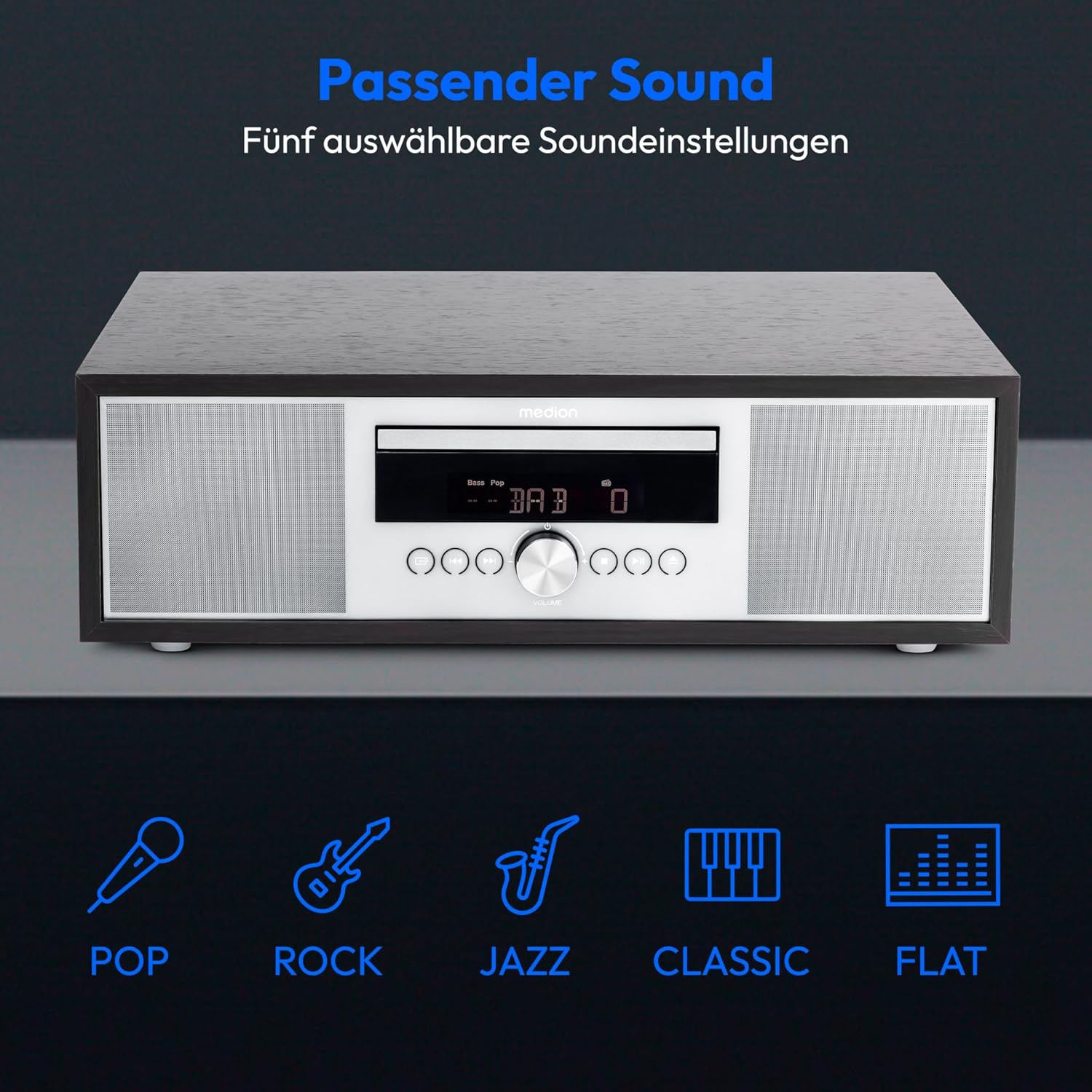
Image: The MEDION P64145 stereo system accompanied by graphical icons for five distinct sound equalization presets: Pop, Rock, Jazz, Classic, and Flat, indicating customizable audio profiles.
- Preconfiguracións do ecualizador: Usa o EQ button on the remote to cycle through preset sound modes: Pop, Rock, Jazz, Classic, and Flat.
- Axuste de graves/agudos: Usa o dedicado BAIXO+/- e TREBLE+/- buttons on the remote control to fine-tune the sound.
6.8 Alarma e temporizador de sono
- Función de alarma: Set an alarm to wake up to radio, CD, USB, or a standard alarm sound. Refer to the detailed instructions in the full manual for setting specific alarm times and sources.
- Función de Snooze: Cando soe a alarma, prema o botón AMORTAR botón para silencialo temporalmente.
- Función de sono automática: Set a timer for the system to automatically turn off after a specified period. Use the DURMIR botón do control remoto.
7. Mantemento
7.1 Limpeza da unidade
Limpe a unidade cun pano suave e seco. Non empregue produtos de limpeza abrasivos nin solventes.
7.2 Coidado do reprodutor de CD
Handle CDs by their edges. Clean dirty CDs with a soft, lint-free cloth, wiping from the center outwards. Do not use scratched or warped discs.
8 Solución de problemas
If you encounter issues, consult the following table before contacting support:
| Problema | Causa posible | Solución |
|---|---|---|
| Sen poder | Cable de alimentación non conectado; toma de corrente non activa. | Comprobe a conexión do cable de alimentación; probe cunha toma de corrente diferente. |
| Sen son | Volume too low; incorrect source selected; headphones connected. | Increase volume; select correct source; disconnect headphones. |
| Mala recepción de radio | Antenna not extended or positioned poorly. | Adjust antenna position; try automatic scan again. |
| Non se reproduce o CD | CD inserted incorrectly; disc scratched or dirty; unsupported format. | Reinsert CD correctly; clean or replace disc; ensure it's an audio CD or MP3 CD. |
| Fallou o emparejamento por Bluetooth | Device too far; Bluetooth not enabled on mobile device; system not in pairing mode. | Move device closer; enable Bluetooth; ensure system is in Bluetooth pairing mode. |
9. Especificacións
| Característica | Especificación |
|---|---|
| Número de modelo | P64145 (MD44125) |
| Marca | MEDION |
| Cor | Negro-Prateado |
| Tecnoloxía de conectividade | Bluetooth, USB |
| Características especiais | Bluetooth, DAB+, USB, AUX Input, CD Player, Alarm Function, Sleep Timer |
| Dimensións do produto (L x W x H) | 22 cm x 37.7 cm x 12 cm |
| Peso do elemento | 3.2 quilogramos |
| Tecnoloxía de sintonizador | DAB Plus |
| Bandas de radio compatibles | DAB+/PLL-UKW |
| Fonte de enerxía | Corded Electric (100-240V ~ 50/60 Hz) |
| Potencia máxima de saída do altofalante | 2 x 15 vatios RMS |
| Tipo de visualización | LCD |
| Modo de saída de son | Estéreo |
| Dispositivos compatibles | Teléfono intelixente, tableta, reprodutor de MP3 |
| Material | Aceiro inoxidable (panel frontal) |
10. Información da garantía
Your MEDION P64145 Stereo System comes with a 2-year limited warranty. Please retain your proof of purchase for warranty claims. For detailed terms and conditions, refer to the included warranty card or visit the official MEDION websitio.
11. Apoio
For further assistance, technical support, or service inquiries, please visit the official MEDION support website or contact their customer service. Contact details can typically be found on the warranty card or the manufacturer's websitio.
Official MEDION Websitio: www.medion.com