
1. Introdución
The IXTECH Portable Power Bank (Model IX-CD-08) is a versatile charging solution designed for mobile devices. Featuring a 10000mAh battery capacity, it supports both magnetic wireless charging (Mag-Safe compatible) and wired charging via USB-A and USB Type-C ports. This compact device allows for simultaneous charging of up to three devices, providing reliable power on the go.
2. Características do produto
- Fast-Charging Magnetic Phone Charger: Designed for quick and convenient charging of Mag-Safe compatible phones and cases.
- Ultra-Portable and Compact: Small form factor for easy portability, fitting into pockets or bags.
- Real-Time Power Monitoring LED Display: An advanced AI chip ensures stable output and battery protection, with a clear LED screen showing remaining power.
- Powerful 22.5W Charging Speeds: The 10000mAh battery delivers 22.5 watts of output, capable of charging devices from 0% to 50% in approximately 25 minutes.
- Intelligent Adaptive Device Support: Capable of charging up to three individual devices simultaneously.
- Compatibilidade de carga sen fíos: For phones without built-in Mag-Safe, a magnetic ring (included in the box) can be attached to the phone case to enable magnetic wireless charging.
3. Contido do paquete
Verifica que todos os elementos estean presentes no teu paquete:
- IXTECH Magnetic Wireless Charging Power Bank (Model IX-CD-08)
- Cable de carga USB tipo C
- Magnetic Ring (for non-Mag-Safe compatible phone cases)

Image: The IXTECH Power Bank and its packaging, illustrating the included charging cable.
4. Configuración
4.1 Carga inicial do banco de enerxía
Before first use, fully charge your IXTECH Power Bank. Connect the provided USB Type-C charging cable to the power bank's Type-C port and plug the other end into a compatible USB power adapter (not included). The LED display will show the charging progress, indicating 100% when fully charged.
4.2 Colocación do anel magnético (opcional)
If your phone case is not Mag-Safe compatible, you can use the included magnetic ring to enable magnetic wireless charging. Carefully align and attach the ring to the back of your phone case according to the instructions provided with the ring. Ensure it is centered for optimal magnetic connection and charging efficiency.
5. Instrucións de funcionamento
5.1 Encendido/apagado
To turn on the power bank, press the power button located on the side. The LED display will illuminate, showing the current battery percentage. The power bank will automatically turn off after a period of inactivity to conserve power.
5.2 Comprobación do nivel da batería
Preme o botón de acendido unha vez para view a batería restante percentage on the digital LED display.
5.3 Carga sen fíos
- Asegúrate de que o banco de enerxía estea acendido.
- Align your Mag-Safe compatible phone (or phone with attached magnetic ring) with the magnetic charging area on the power bank. The magnets will securely attach the phone to the power bank.
- Wireless charging will begin automatically. The LED display may show a wireless charging indicator.

Image: The IXTECH Power Bank wirelessly charging a smartphone, demonstrating the magnetic attachment.

Image: A visual representation of the 'Snap and Go' magnetic charging feature.

Image: A user holding a smartphone with the IXTECH Power Bank attached, demonstrating ease of use during charging.
Video: An official IXTECH video demonstrating the magnetic wireless charging feature of the power bank.
Carga con cable 5.4
The power bank features a USB-A output port and a USB Type-C input/output port. These ports can be used to charge devices that do not support wireless charging or for faster wired charging.
- Asegúrate de que o banco de enerxía estea acendido.
- Connect your device's charging cable to either the USB-A port or the USB Type-C port on the power bank.
- Conecta o outro extremo do cable ao teu dispositivo. A carga comezará automaticamente.

Image: A detailed diagram highlighting the magnetic wireless charger, digital display screen, USB-A output port, and USB Type-C input/output port.
5.5 Cargar varios dispositivos simultaneamente
The IXTECH Power Bank can charge up to three devices concurrently: one wirelessly and two via the USB-A and USB Type-C ports. Connect your devices as described in sections 5.3 and 5.4.

Image: The IXTECH Power Bank simultaneously charging three smartphones, one wirelessly and two via cables.
6. Mantemento
- Manteña o banco de enerxía seco e lonxe da humidade.
- Evita temperaturas extremas.
- Limpa o dispositivo cun pano suave e seco. Non empregues produtos químicos agresivos nin materiais abrasivos.
- Almacenar nun lugar fresco e seco cando non estea en uso.
7 Solución de problemas
- O dispositivo non se carga: Ensure the power bank is turned on and has sufficient charge. Check all cable connections. For wireless charging, ensure proper alignment and Mag-Safe compatibility (or use of magnetic ring).
- Carga lenta: Verify that your device and cable support fast charging. Charging multiple devices simultaneously may reduce individual charging speeds.
- O banco de enerxía non carga: Use the provided USB Type-C cable and a compatible power adapter. Ensure connections are secure.
- Magnetic attachment is weak: Ensure your phone case is Mag-Safe compatible or that the magnetic ring is correctly installed and centered on your case.
8. Especificacións
| Característica | Especificación |
|---|---|
| Marca | IXTECH |
| Número de modelo | IX-CD-08 |
| Capacidade da batería | 10000 millónsamp Horas (mAh) |
| Saída de carga sen fíos | 15 W (máx.) |
| Saída de carga con cable | 22.5 W (máx.) |
| Porto de entrada | USB Type-C (20W/18W) |
| Portos de saída | USB-A, USB Type-C, Wireless |
| Dimensións do produto | 4.29 x 2.59 x 0.62 polgadas |
| Peso do elemento | 6.7 onzas |
| Características especiais | Wireless Charging, Digital Display Screen |
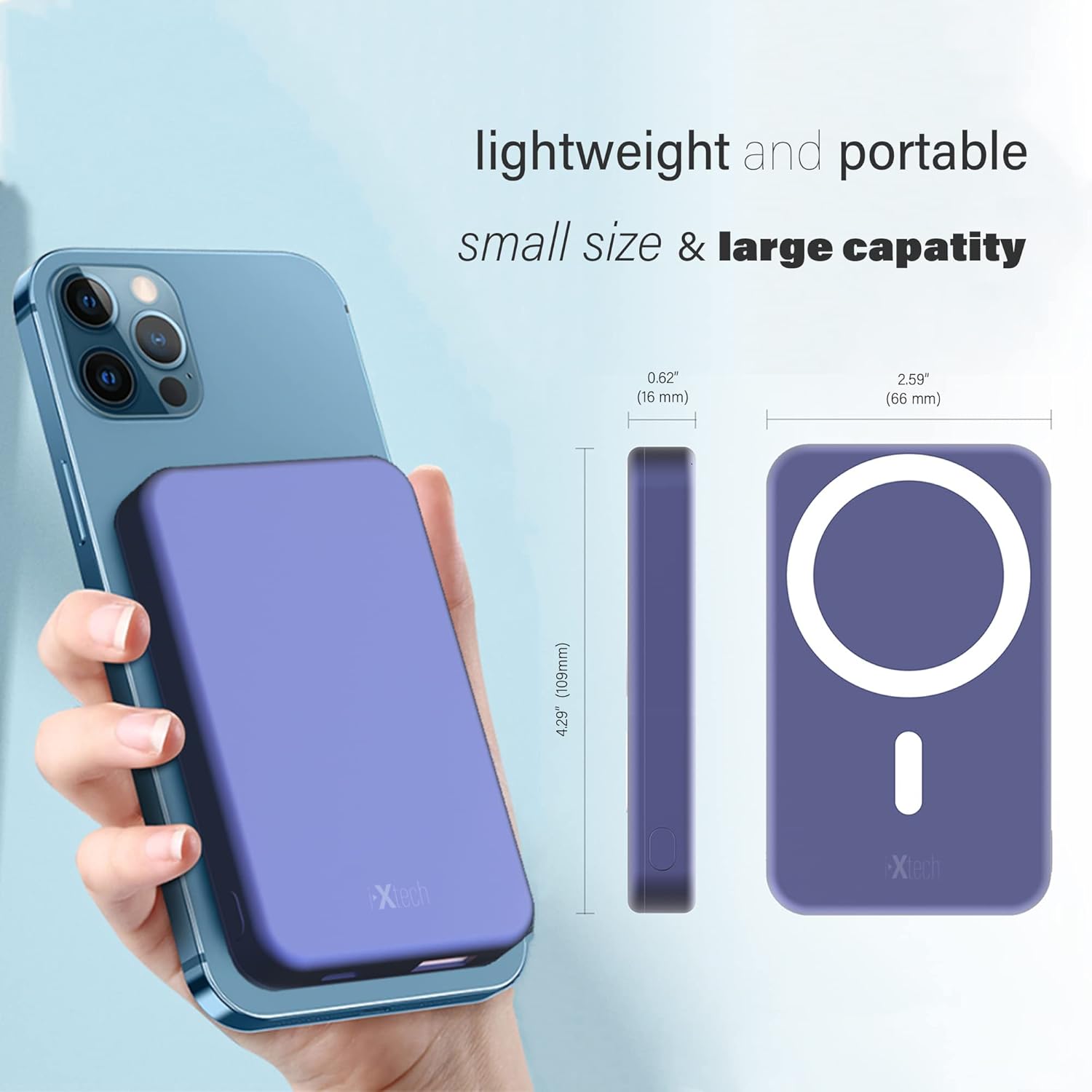
Image: The IXTECH Power Bank shown next to a smartphone, illustrating its compact size and dimensions.

Image: Close-up of the IXTECH Power Bank's digital display, showing the battery percentage.
9. Información de seguridade
- Non desmonte, modifique nin repare o dispositivo.
- Avoid dropping, hitting, or subjecting the device to strong impacts.
- Keep away from fire, water, and corrosive liquids.
- Do not expose to direct sunlight or high temperatures for extended periods.
- Eliminar o produto de forma responsable segundo a normativa local.
10. Garantía e soporte
For warranty information and customer support, please refer to the documentation included with your purchase or contact IXTECH directly through their official websitio web ou canles de atención ao cliente. Garda o comprobante de compra para calquera reclamación de garantía.