
Introdución
This manual provides comprehensive instructions for the installation, operation, and maintenance of your Vortopt DR2 1000 GPD Tankless Reverse Osmosis Water Filtration System. Please read this manual thoroughly before installation and use to ensure proper function and longevity of your system. This system is designed to provide clean, filtered water directly from your tap, reducing Total Dissolved Solids (TDS) and other impurities.

Image: The Vortopt DR2 1000 GPD Tankless Reverse Osmosis Water Filtration System, showcasing its compact design and smart faucet.
Configuración e instalación
The Vortopt DR2 system features a tankless, compact design for easy under-sink installation, typically completed within 30 minutes. Ensure you have all components and necessary tools before beginning.
Compoñentes incluídos:
- Vortopt DR2 Main Unit
- Smart Faucet with TDS Meter
- RO Filter (Reverse Osmosis)
- PAC Composite Filter (2-in-1)
- Adaptador de entrada de auga
- Selo de drenaxe
- Tubing and Connectors
- Adaptador de alimentación
- Manual de usuario (este documento)
Lista de verificación previa á instalación:
- Verify sufficient space under your sink for the main unit (dimensions: 39L x 39W x 15H cm).
- Ensure access to a cold water supply line and a drain pipe.
- Confirm availability of a standard electrical outlet.
- Gather basic tools: drill, wrench, screwdriver, utility knife.
Pasos de instalación:
- Desactivar o subministro de auga: Locate and turn off the cold water supply valve under your sink.
- Instalar billa: Drill a hole (if necessary) in your countertop or sink for the smart faucet. Secure the faucet according to the provided instructions.
- Conectar a entrada de auga: Disconnect the cold water line from your existing faucet. Install the water inlet adapter and connect the system's inlet tubing.
- Install Drain Saddle: Attach the drain saddle to the drain pipe under your sink. Drill a small hole through the drain pipe at the saddle location and connect the drain tubing.
- Instalar filtros: Insert the PAC and RO filters into their respective slots in the main unit. Ensure they are securely locked in place.
- Tubo de conexión: Connect all tubing (inlet, drain, faucet) to the main unit as indicated by the labels or diagrams.
- Position Main Unit: Place the main unit in a stable, upright position under the sink. Its compact design saves approximately 70% of under-sink space compared to traditional systems.
- Conectar enerxía: Plug the power adapter into the main unit and then into a grounded electrical outlet.
- Restaurar o subministro de auga: Slowly turn on the cold water supply valve. Check for any leaks.

Image: The Vortopt DR2 system installed under a sink, demonstrating its compact footprint.

Image: Illustration highlighting the space-saving, tankless design of the Vortopt DR2 system under a kitchen sink.
Instrucións de funcionamento
Lavado inicial:
After installation, it is crucial to flush the system to remove air and carbon fines from the new filters. Turn on the smart faucet and let the water run for at least 10-15 minutes, or until the water runs clear and the TDS reading stabilizes. The system has an automatic flushing feature to maintain membrane performance.
Using the Smart Faucet:
The smart faucet provides real-time information about your water quality and filter status.
- Real-time TDS Display: The digital display on the faucet shows the Total Dissolved Solids (TDS) level of the filtered water, allowing you to monitor water quality.
- Smart Filter Life Indicator: The faucet also indicates the remaining lifespan of both the PAC and RO filters, prompting you when it's time for replacement.
- Caudal rápido: The system delivers a high flow rate of up to 2.65 liters per minute, filling a 200ml cup in approximately 5 seconds.

Image: Close-up of the Vortopt smart faucet, showing the digital display for real-time TDS and filter life.

Image: Demonstration of the Vortopt DR2's high flow rate, filling a glass quickly.
Mantemento
Regular maintenance, primarily filter replacement, is essential for optimal performance and water quality.
Substitución do filtro:
The Vortopt DR2 system uses two filters: a PAC Composite Filter and an RO Filter. The smart faucet will indicate when a filter needs replacement.
- PAC Composite Filter: Typically lasts 6-12 months, depending on water quality and usage.
- Filtro de ósmose inversa: Typically lasts 24-36 months, depending on water quality and usage.
Para substituír un filtro:
- Peche o abastecemento de auga ao sistema.
- Twist the old filter counter-clockwise to unlock and remove it.
- Insert the new filter into the housing and twist clockwise to lock it in place.
- Turn on the water supply and flush the system as described in the "Initial Flush" section.
- Reset the filter life indicator on the smart faucet (refer to faucet instructions for specific steps).
Replacement Filter Models:
- For RO Filter: Busca model B0C5JDR5H5.
- For PAC Composite Filter: Busca model B0C5JBCCF8.

Image: Visual guide demonstrating the quick and easy filter replacement process for the Vortopt DR2 system.
Resolución de problemas
| Problema | Causa posible | Solución |
|---|---|---|
| High TDS reading initially | New filters need flushing. | Run water for 10-15 minutes during initial setup or after filter replacement until TDS stabilizes. |
| Caudal de auga lento | Clogged filters, low incoming water pressure, air in the system. | Check filter life indicator and replace filters if necessary. Ensure water supply valve is fully open. Check for kinks in tubing. |
| Fuga de auga | Loose connections, improperly installed O-rings, damaged tubing. | Turn off water supply immediately. Check all connections and tighten if loose. Inspect O-rings and tubing for damage. Re-seat filters. |
| Unusual taste or odor | Expired PAC filter, system not flushed properly. | Replace PAC filter. Flush the system thoroughly. |
| A pantalla da billa intelixente non funciona | No power, loose connection to faucet. | Ensure the system is powered on and the faucet cable is securely connected to the main unit. |
Especificacións
| Característica | Detalle |
|---|---|
| Marca | Vortopt |
| Nome / número do modelo | DR2-1000GPD |
| Método de purificación | Osmose inversa |
| Capacidade | 1000 Gallons Per Day (GPD) / 3785 Liters Per Day |
| Caudal máximo | 2.65 litros por minuto |
| Relación de pureza e drenaxe | 3:1 (Pure water to wastewater) |
| Precisión de filtración | 0.0001 µm |
| Impurity Removal | 99.99% (TDS, Rust, Sediment, Chlorine, Lead, Bacteria, Odor) |
| Filtros | 1x RO Filter, 1x PAC Composite Filter (2-in-1) |
| Max Supported TDS Hardness | 1500 ppm |
| Tipo de instalación | Baixo lavabo |
| Dimensións do produto (L x W x H) | 39 cm x 39 cm x 15 cm |
| Peso do elemento | 9.3 quilogramos |
| Material | Estirreno Acrilonitrilo Butadieno |
| Fonte de enerxía | Eléctrico con cable |
| Características especiais | TDS Reduction, Smart Faucet with Real-time TDS Display, Filter Life Indicator, Automatic Flushing, Tankless Design |

Image: Diagram illustrating the multi-stage filtration process of the Vortopt DR2 system, including the RO membrane.
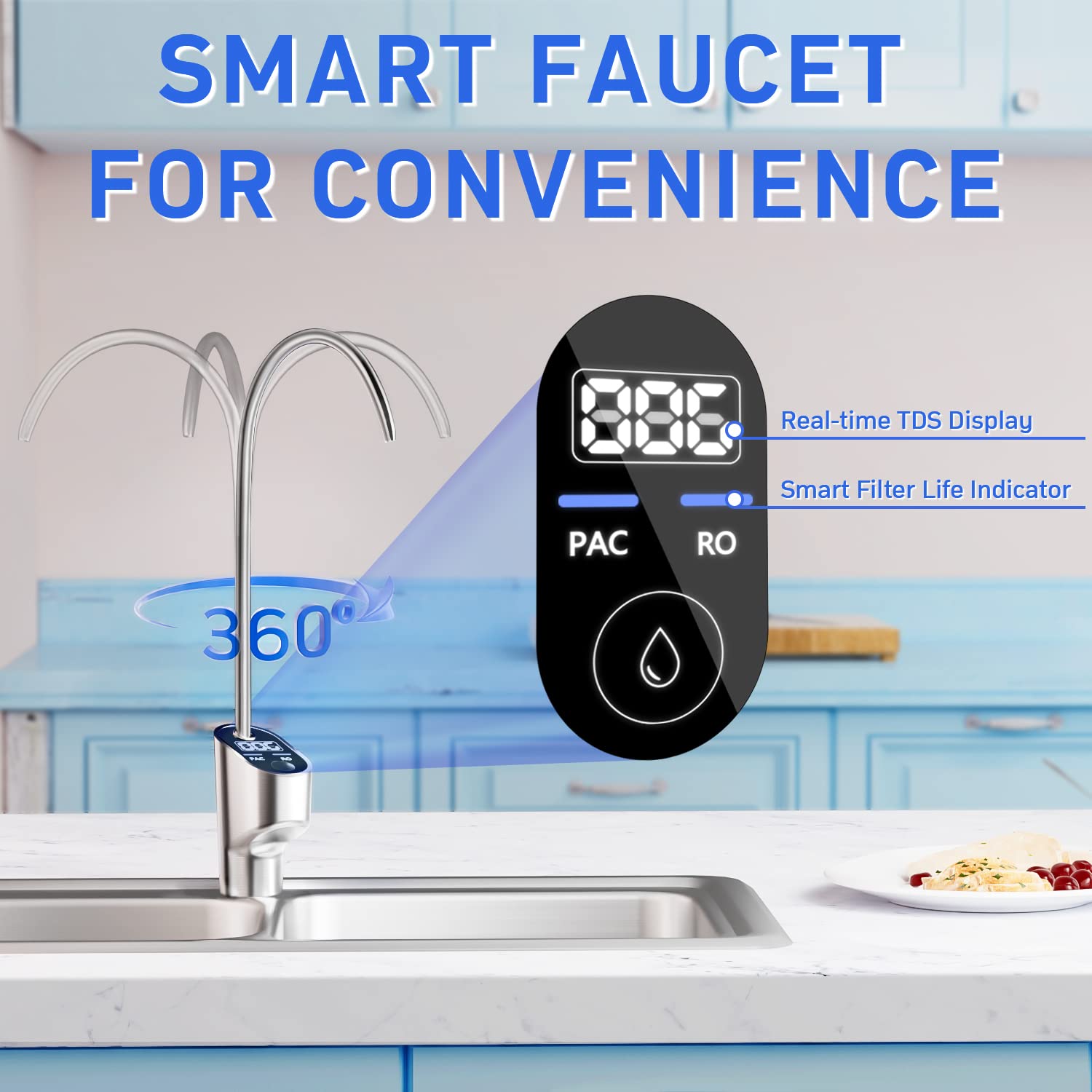
Image: Comparison showing the Vortopt DR2's efficient 3:1 pure to drain ratio versus traditional RO systems.
Información da garantía
For detailed warranty information regarding your Vortopt DR2 Reverse Osmosis Water Filtration System, please refer to the warranty card included with your product packaging or visit the official Vortopt websitio. Os termos e condicións da garantía poden variar segundo a rexión e a data de compra.
Atención ao cliente
Should you require technical assistance, have questions about installation, operation, or maintenance, or need to order replacement parts, please contact Vortopt customer service. Contact details can typically be found on the Vortopt official websitio web ou na embalaxe do produto.
Tamén podes visitar o Vortopt Store on Amazon para obter máis información sobre o produto e recursos de asistencia.