
Introdución
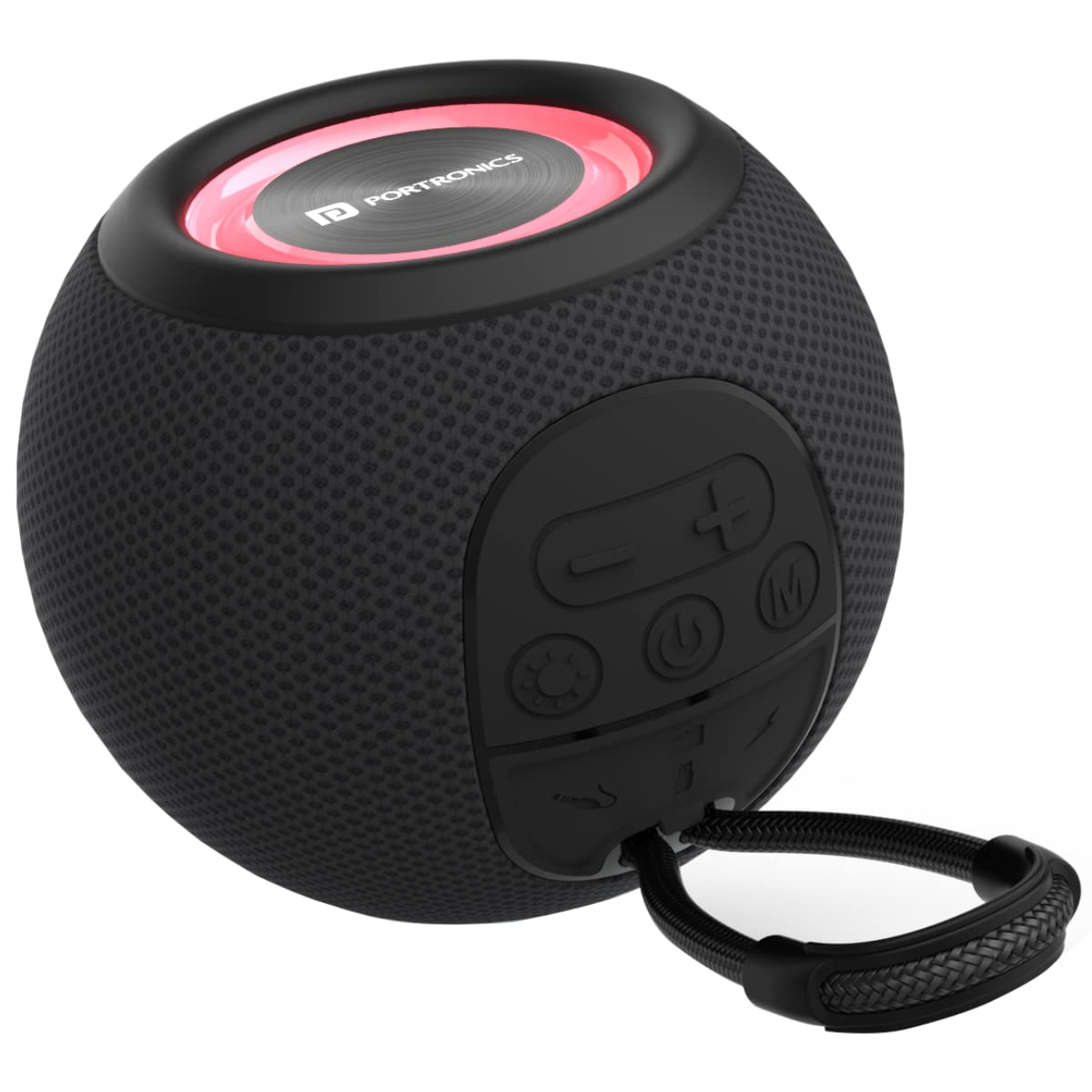
The Portronics Resound is a versatile 5W Bluetooth 5.3 wireless speaker designed to deliver clear audio with multiple connectivity options. This portable speaker features an integrated FM radio, True Wireless Stereo (TWS) functionality for pairing with another speaker, and multi-color LED lighting to enhance your listening experience. Weighing approximately 330 grams, it is ideal for indoor use and offers up to 8 hours of playtime on a single charge. This manual provides essential information for the proper setup, operation, and maintenance of your device.

The Portronics Resound speaker shown in an outdoor setting, demonstrating its portability and suitability for various environments.
Contido do paquete
Comprobe se o paquete contén os seguintes elementos:
- Portronics Resound Wireless Speaker (1N)
- AUX Cable (1N)
- Charging Cable (1N)
- User Manual (1N)
Produto rematadoview: Controis e portos
Familiarize yourself with the buttons and ports on your Portronics Resound speaker:

Un detallado view of the control panel and connectivity ports on the speaker.
- Botón de encendido (
 ): Press and hold to power on/off. Short press to play/pause in Bluetooth mode.
 - Volume Down / Previous Track Button (-): Short press to decrease volume. Long press to go to the previous track.
- Volume Up / Next Track Button (+): Short press to increase volume. Long press to go to the next track.
- Botón de modo (M): Short press to switch between Bluetooth, FM Radio, AUX, and USB modes.
- Porto de carga micro USB: Para cargar o altofalante.
- Porto AUX-in: For wired audio connection using the provided AUX cable.
- Porto USB: Para reproducir audio desde unha unidade flash USB.
- Ranura para tarxetas Micro SD: For playing audio from a Micro SD card (not explicitly mentioned in specs but common for such devices, if present).

Illustration of the various connectivity ports available on the speaker, including AUX, Micro SD, and USB.
Configuración
1. Cargando o altofalante
Before first use, fully charge the speaker. Connect the provided USB charging cable to the Micro USB port on the speaker and the other end to a USB power adapter (not included) or a computer's USB port. The LED indicator will show charging status and turn off or change color when fully charged.
- Tempo de carga: Aproximadamente 2 horas para unha carga completa.
- Hora de xogo: Up to 8 hours on a full charge (actual playtime may vary with volume and LED usage).

The speaker connected to a charging cable, illustrating the charging process while a smartphone plays music.
2. Acendido/apagado
Para acender o altofalante, manteña premido o botón de acendido () for a few seconds until you hear an audible prompt or see the LED lights activate. To power off, press and hold the Power button again.
Instrucións de funcionamento
1. Emparellamento Bluetooth
The speaker will automatically enter Bluetooth pairing mode when powered on for the first time or when the Bluetooth mode is selected. The LED indicator will flash, indicating it's ready to pair.
- Turn on the speaker. It will enter Bluetooth mode by default.
- Activa o Bluetooth no teu teléfono intelixente, tableta ou portátil.
- Busca available devices and select "Portronics Resound" from the list.
- Once connected, the speaker will indicate a successful pairing, and the LED light will stabilize.

The speaker positioned among various compatible devices such as smartphones, tablets, and laptops.
2. Función TWS (estéreo sen fíos verdadeiro)
The TWS function allows you to pair two Portronics Resound speakers together for a stereo sound experience.
- Ensure both Resound speakers are powered on and in Bluetooth pairing mode (not connected to any device).
- On one of the speakers (this will be the primary speaker), double-press the Power button. The speaker will search for another Resound speaker.
- Once successfully paired, you will hear an audible confirmation. The LED indicators on both speakers will synchronize.
- Now, connect your device (smartphone, etc.) to the primary speaker via Bluetooth as described in the Bluetooth Pairing section. Both speakers will play audio in stereo.

An illustration showing two Portronics Resound speakers wirelessly paired for a stereo audio experience.
3. Funcionamento da radio FM
Para usar a función de radio FM:
- Press the Mode button (M) repeatedly until you enter FM Radio mode.
- For better reception, connect the provided AUX cable to the AUX-in port; it acts as an external antenna.
- To auto-scan and save available stations, press and hold the Power button () for a few seconds. The speaker will scan and store stations automatically.
- Use the Volume Up (+) and Volume Down (-) buttons (short press) to switch between saved FM stations.
4. Modo AUX
To play audio via AUX cable:
- Press the Mode button (M) repeatedly until you enter AUX mode.
- Connect one end of the provided 3.5mm AUX cable to the AUX-in port on the speaker and the other end to the audio output jack of your device (e.g., smartphone, MP3 player).
- Audio will now play through the speaker. Control playback from your connected device.
5. USB Flash Drive Playback
Para reproducir música desde unha unidade flash USB:
- Insira unha unidade flash USB que conteña audio files no porto USB do altofalante.
- Press the Mode button (M) repeatedly until you enter USB mode.
- The speaker will automatically detect and begin playing audio files da unidade USB.
- Use the Volume Up (+) and Volume Down (-) buttons (long press) to navigate tracks.
6. Iluminación LED
The Portronics Resound speaker features multi-color RGB LED lights that synchronize with the audio. The lights automatically activate when the speaker is on. There is no specific button to control the LED patterns or turn them off, they are an integrated part of the listening experience.

The speaker showcasing its dynamic RGB LED lighting feature, adding a visual element to the audio experience.
7. Control de volume e pista
- Axuste de volume: Short press the Volume Up (+) or Volume Down (-) buttons to increase or decrease the volume.
- Navegación por pistas: Long press the Volume Up (+) button for the next track, and long press the Volume Down (-) button for the previous track (applicable in Bluetooth and USB modes).
Mantemento
To ensure the longevity and optimal performance of your Portronics Resound speaker, follow these maintenance guidelines:
- Limpeza: Use a soft, dry cloth to wipe the speaker's surface. Do not use abrasive cleaners, alcohol, or chemical solvents, as these may damage the finish.
- Almacenamento: Store the speaker in a cool, dry place away from direct sunlight and extreme temperatures.
- Resistencia á auga: This speaker is not waterproof. Avoid exposing it to water, rain, or excessive moisture.
- Manexo: Handle the speaker with care. Avoid dropping it or subjecting it to strong impacts.
- Cargando: Use only the provided charging cable or a certified equivalent. Do not attempt to charge the speaker with damaged cables or chargers.
Resolución de problemas
If you encounter issues with your Portronics Resound speaker, refer to the following common problems and solutions:
| Problema | Causa posible | Solución |
|---|---|---|
| O altofalante non se acende. | Batería baixa. | Cargue o altofalante completamente. |
| Sen son. | Volume demasiado baixo; modo incorrecto; dispositivo non conectado. | Increase volume; ensure correct mode (Bluetooth, AUX, USB, FM); re-pair Bluetooth device or check AUX/USB connection. |
| Falla o emparellamento Bluetooth. | O altofalante non está en modo de emparellamento; o dispositivo está demasiado lonxe; interferencias. | Asegúrate de que o altofalante estea en modo de emparellamento (LED intermitente); achega o dispositivo; apaga outros dispositivos Bluetooth. |
| Mala recepción de radio FM. | Sen antena conectada; sinal débil. | Connect the AUX cable to act as an antenna; try auto-scanning again; move to an area with better signal. |
| Fallou o emparellamento de TWS. | Speakers already connected to a device; incorrect pairing procedure. | Asegúrate de que ambos altofalantes estean desconectados doutros dispositivos; segue atentamente os pasos de emparellamento TWS. |
Especificacións
Detailed technical specifications for the Portronics Resound speaker:

Dimensional drawing of the Portronics Resound speaker, indicating its compact size.
- Nome do modelo: Resound
- Número de modelo: POR-1687
- Marca: Portronics
- Tipo de altofalante: Portable Speaker
- Potencia máxima de saída: 5 vatios
- Tecnoloxía de conectividade: AUX, Bluetooth, USB, Wireless
- Tecnoloxía de comunicación sen fíos: Bluetooth 5.3
- Modo de saída de audio: Estéreo
- Características especiais: Aux-In Slot, Bluetooth V5.3, Built-in FM Radio, Micro SD Slot, TWS Function, USB Slot (Pen Drive), Multi-color LED Lighting
- Uso recomendado: Interior
- Dispositivos compatibles: Laptop, Smartphone, Tablet
- Tipo de montaxe: Montaxe de mesa
- Método de control: Botón
- Relación sinal-ruído: 90 dB
- Tipo de batería: 1 Lithium-polymer battery (included)
- Duración da batería (tempo de reprodución): Ata 8 horas
- Tempo de carga: 2 horas
- Dimensións do produto: 11.5 x 11.5 x 8.7 cm
- Peso do elemento: 332 gramos
- Cor: Negro
Garantía e Soporte
For warranty information or technical support, please refer to the warranty card included in your package or visit the official Portronics websitio. Garde o recibo da compra como proba de compra para calquera reclamación de garantía.
