
Introdución
This manual provides essential information for the safe and efficient operation of your E-Lektron Live Power Mixer ST-62P. Please read it thoroughly before using the device and keep it for future reference.
Instrucións de seguridade importantes
- Fonte de alimentación: Connect the mixer only to a grounded AC outlet with the specified voltage (230 Volts). Ensure the power cable is not damaged or pinched.
- Ventilación: Non bloquee as aberturas de ventilación. Asegúrese de que haxa un fluxo de aire axeitado arredor da unidade para evitar o sobrequecemento.
- Humidade: Do not expose the unit to rain, moisture, or liquids. Avoid placing liquid-filled objects on the mixer.
- Servizo: Non intente atender este produto vostede mesmo. Remita todo o servizo a persoal de servizo cualificado.
- Colocación: Place the mixer on a stable, flat surface. Avoid extreme temperatures, direct sunlight, and strong vibrations.
- Limpeza: Disconnect the power before cleaning. Use a dry, soft cloth. Do not use liquid cleaners or aerosols.
Produto rematadoview
The E-Lektron ST-62P is a versatile live power mixer designed for various audio applications. It features multiple input channels, an integrated amplifier, a media player with Bluetooth, and built-in effects.
Características principais:
- Live mixer with 4 microphone or instrument channels, 2 stereo channels, stereo media player channel, and stereo CD/TAPE input.
- Features a powerful integrated amplifier, making the ST-62P central to any performance.
- Fully equipped with a media player, Bluetooth connectivity, channel monitoring, and echo/reverb effects.
- The versatile integrated media player supports playback from an SD card or USB stick, and streams music via Bluetooth from devices like mobile phones.
- The media player also includes a recording function.
- Integrated powerful amplifier with 2 x 250 W music power.
Controis do panel frontal:
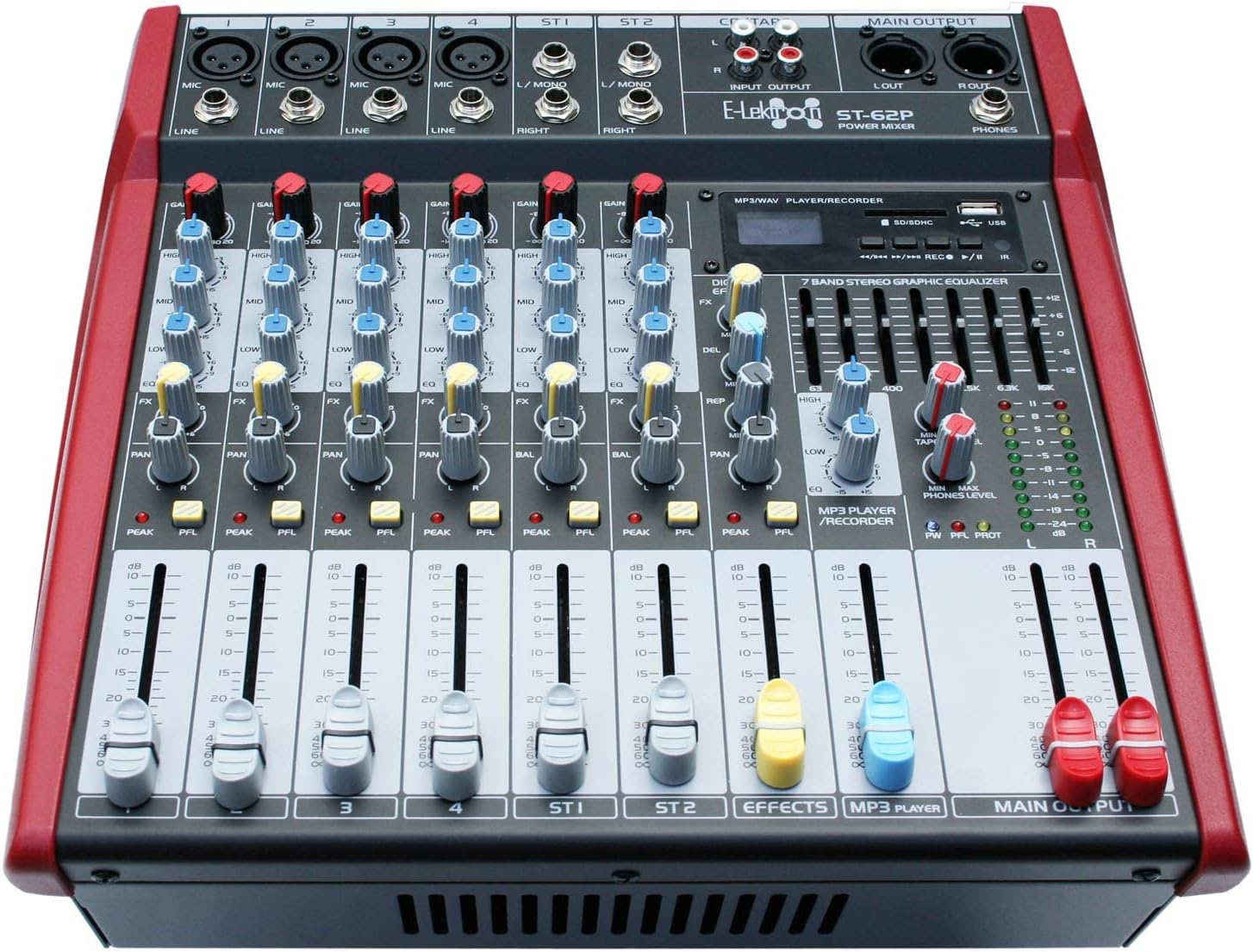
The front panel provides access to all mixing controls, including input gains, equalization, pan, effects sends, and channel faders. The integrated media player and 7-band stereo graphic equalizer are also located here.
Configuración
1. Desembalaxe:
Carefully remove the mixer from its packaging. Verify that all included components are present: the ST-62P mixer, power cable, and user manual.
2. Conexión de alimentación:
Connect the supplied power cable to the AC IN socket on the rear panel of the mixer and then to a suitable 230V AC grounded power outlet. Ensure the power switch is in the OFF position before connecting.
3. Conexións de entrada:
- Entradas de micrófono/liña (canais 1-4): Use XLR cables for microphones or 1/4-inch (6.35mm) jack cables for line-level instruments (e.g., keyboards, guitars with preamps).
- Stereo Inputs (ST1, ST2): Use 1/4-inch (6.35mm) jack cables for stereo line-level sources.
- CD/TAPE Input: Use RCA cables to connect external audio sources like CD players or tape decks.
4. Conexións de saída:
- Speaker Outputs (AMP R OUT, AMP L OUT): Connect your passive speakers to these outputs using NL-2 Speaker plug cables. Ensure your speakers have a rated load impedance of 4 Ohms.
- Main Output (L/R): Use XLR cables to connect to external power amplificadores ou dispositivos de gravación.
- Saída de teléfonos: Connect headphones to the 1/4-inch (6.35mm) jack for monitoring.

Instrucións de funcionamento
1. Acendido/apagado:
After all connections are made, switch the main power button on the rear panel to the ON position. To power off, switch the button to OFF and then disconnect the power cable.
2. Controis de canle:
- GAÑA: Adjusts the input sensitivity for each channel. Set this to achieve a strong signal without clipping (PEAK LED should not light up consistently).
- Ecualizador (ALTO, MEDIO, BAIXO): Three-band equalizer for tone shaping. Adjust HIGH for treble, MID for mid-range, and LOW for bass frequencies.
- FX: Controls the amount of signal sent to the internal effects processor.
- PAN/BAL: Pans the mono signal left or right in the stereo field (PAN) or adjusts the balance of a stereo signal (BAL).
- PFL (Escoita previa ao atenuador): Activates channel monitoring through headphones, independent of the channel fader.
- Fader de canle: Adjusts the output level of each individual channel to the main mix.
3. Media Player Functions:
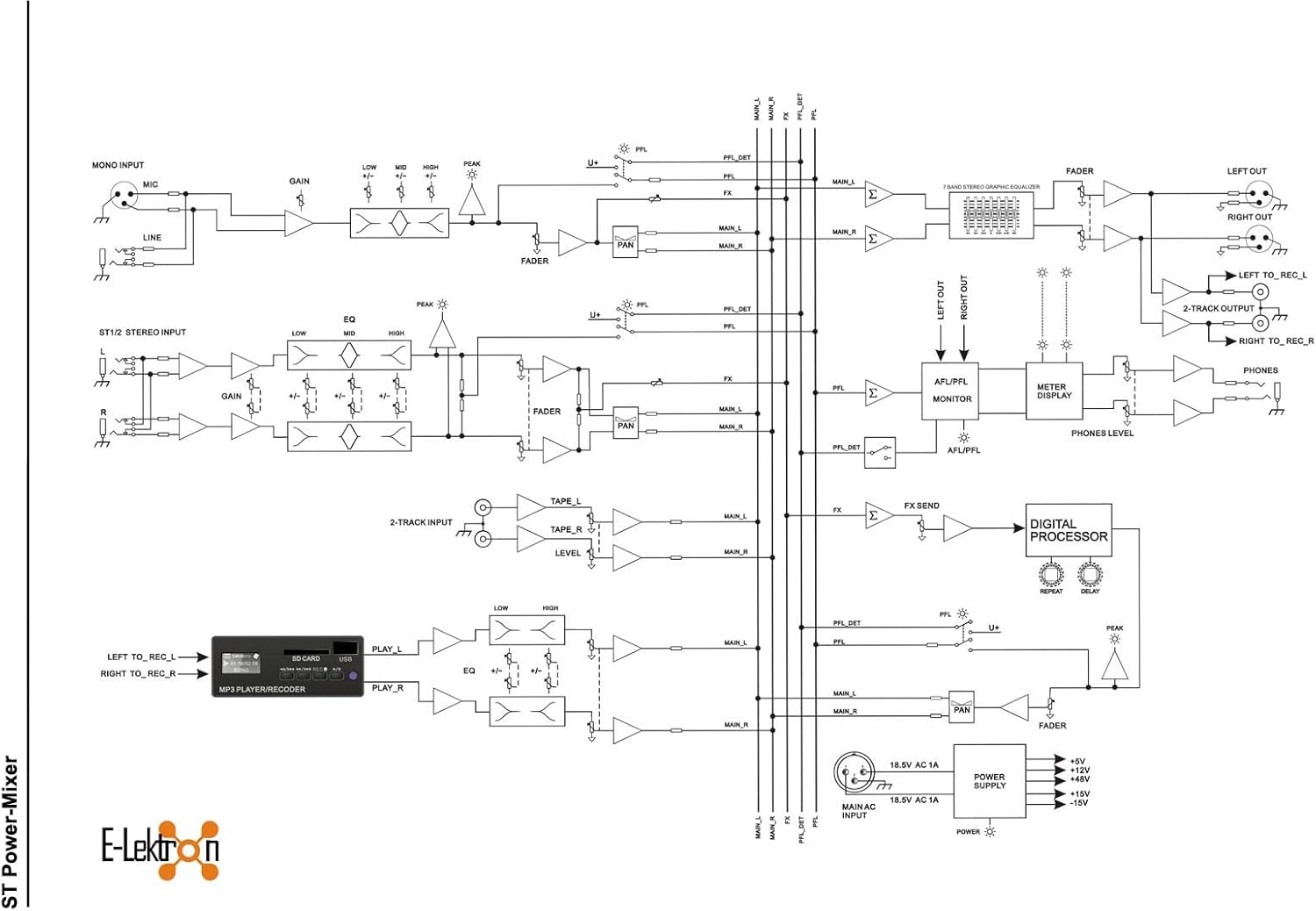
The integrated media player supports USB, SD card, and Bluetooth connectivity. It also has a recording function.
- Reproducción USB/SD: Insert a USB stick or SD card into the respective slot. Use the player controls (Play/Pause, Next, Previous) to navigate and play audio files.
- Bluetooth: Activate Bluetooth on your mobile device and search for the mixer. Pair the devices to stream audio wirelessly.
- Gravación: The media player can record the main mix directly to a USB stick or SD card. Refer to the media player's specific controls for recording activation.
4. Effects Section:
The mixer includes built-in echo/reverb effects. Use the FX controls on each channel to send signal to the effects processor, and adjust the overall effect level with the dedicated FX RETURN fader.
5. 7-Band Stereo Graphic Equalizer:
Use the sliders on the 7-band graphic equalizer to fine-tune the overall frequency response of the main mix. Each slider corresponds to a specific frequency band, allowing you to boost or cut frequencies as needed.
6. Main Output:
The MAIN OUTPUT faders control the overall volume of the stereo mix. Adjust these to the desired listening level.
Mantemento
Limpeza:
Regularly clean the exterior of the mixer with a soft, dry, lint-free cloth. Do not use abrasive cleaners, solvents, or waxes. Ensure no dust accumulates in the ventilation grilles.
Almacenamento:
When not in use for extended periods, store the mixer in a cool, dry place, away from direct sunlight and extreme temperatures. Cover the unit to protect it from dust.
Resolución de problemas
| Problema | Causa posible | Solución |
|---|---|---|
| Sen poder | Power cable disconnected; Power switch off; Outlet fault | Comprobe a conexión do cable de alimentación; asegúrese de que o interruptor de alimentación estea aceso; probe a toma de corrente con outro dispositivo. |
| Sen saída de son | Main faders down; Channel faders down; Speaker cables disconnected; Amplifier off/faulty | Raise MAIN OUTPUT faders; Raise individual channel faders; Check speaker connections; Verify external amplifier (if used) is on and working. |
| Son distorsionado | GAIN too high; Input signal too strong; Speaker impedance mismatch | Reduce GAIN on input channels; Reduce input signal level from source; Ensure speakers are 4 Ohms. |
| Bluetooth non se conecta | Bluetooth not enabled on device; Mixer not in pairing mode; Interference | Ensure Bluetooth is active on your device; Check mixer's media player for Bluetooth mode; Move closer to the mixer or reduce other wireless devices. |
Especificacións técnicas
| Característica | Especificación |
|---|---|
| Número de modelo | ST-62P |
| Marca | Electrón |
| Fabricante | E-Lektron |
| Nome do tipo de produto | Mixer en directo |
| Número de canles | 6 |
| Dimensións do produto (L x W x H) | 32.2 x 32 x 15.3 cm |
| Peso do elemento | 7.2 quilogramos |
| Tecnoloxía de conectividade | Auxiliar, Bluetooth, USB |
| Fonte de enerxía | Cable eléctrico |
| Voltage | 230 voltios |
| Frecuencia | 30000 Hz |
| Entrada de audio | XLR |
| Tipo de conector de saída | NL-2 Speaker plug, XLR |
| Compoñentes incluídos | Power cable, User manual, Mixer |

Garantía e Soporte
E-Lektron provides a spare parts availability for 5 years from the date of purchase. For technical support or warranty claims, please contact your retailer or the E-Lektron customer service department. Keep your proof of purchase for warranty validation.