
Introdución
Thank you for choosing the Ledwood Apollo S True Wireless Stereo (TWS) Earphones. This manual provides essential instructions for setting up, operating, and maintaining your earphones to ensure optimal performance and longevity. The Apollo S earphones feature a sleek design, sensitive touch controls, and a wireless charging case with a digital battery level display.
Contido do paquete
- Ledwood Apollo S TWS Earphones (Left and Right)
- Estuche de carga sen fíos
- Cable de carga USB
- Manual de usuario
Note: Please check all items are present upon unboxing.
Configuración
1. Carga dos auriculares e da funda
Before first use, fully charge the earphones and the charging case. The charging case features a digital screen that displays the battery level percentage.
- Carga do estuche: Connect the provided USB charging cable to the charging port on the case and to a USB power adapter (not included). The digital display will show the charging progress.
- Carga dos auriculares: Place the earphones into their respective slots in the charging case. Ensure they are correctly seated. The earphones will automatically begin charging. The case's digital display may indicate the charging status of the earphones.
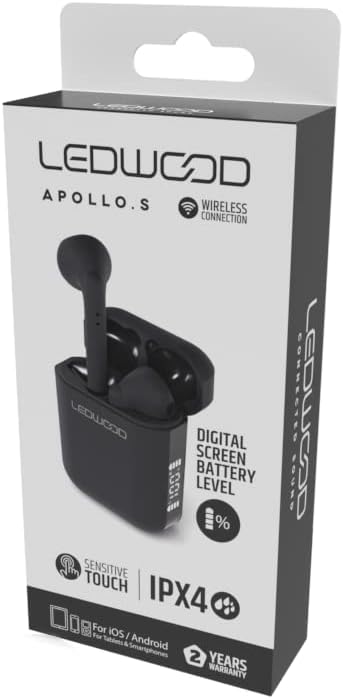
Image: Ledwood Apollo S TWS Earphones shown inside their open charging case. The earphones are black, and the case is also black with a sleek design. This image illustrates the product components.
2. Emparejamento cun dispositivo Bluetooth
- Paso 1: Ensure the earphones are charged. Open the charging case. The earphones will automatically enter pairing mode, indicated by a flashing LED light on one or both earphones.
- Paso 2: No teu dispositivo móbil (teléfono intelixente, tableta, etc.), vai á configuración de Bluetooth.
- Paso 3: Activa o Bluetooth. Busca dispositivos dispoñibles.
- Paso 4: Select "Ledwood Apollo S" from the list of available devices.
- Paso 5: Once connected, the LED indicator on the earphones will stop flashing, and you will hear a confirmation tone.
- Nota: Os auriculares volverán conectarse automaticamente ao último dispositivo emparellado ao retiralos da funda, se o Bluetooth está activado no dispositivo.
Instrucións de funcionamento
Usando os auriculares
Gently insert the earphones into your ears, ensuring a comfortable and secure fit. Adjust them slightly to achieve optimal sound quality and passive noise isolation.
Controis táctiles
The Ledwood Apollo S earphones feature sensitive touch controls on each earbud. The functions may vary slightly depending on your device and operating system.
- Reproducir/Pausa: Toca un só auricular en calquera dos auriculares.
- Próxima pista: Toca dúas veces no auricular dereito.
- Pista anterior: Toca dúas veces no auricular esquerdo.
- Responder/Finalizar chamada: Toque unha vez en calquera dos auriculares durante unha chamada entrante ou activa.
- Rexeitar a chamada: Manteña premido calquera dos auriculares durante 2 segundos durante unha chamada entrante.
- Activar o asistente de voz: Toca tres veces en calquera dos auriculares (por exemplo, Siri, Asistente de Google).
- Encendido/apagado: Earphones power on automatically when removed from the case and power off when placed back into the case. Manual power on/off may be available by pressing and holding the touch area for an extended period (refer to specific device behavior).
Mantemento
- Limpeza: Usa un pano suave, seco e sen pelusa para limpar os auriculares e a caixa de carga. Non empregues produtos de limpeza abrasivos nin disolventes.
- Almacenamento: Cando non estean en uso, garde os auriculares no seu estoxo de carga para protexelos e mantelos cargados.
- Resistencia á auga: The earphones are rated IPX4, meaning they are resistant to splashing water from any direction. They are not waterproof and should not be submerged in water. Avoid exposure to heavy rain or sweat for extended periods.
- Temperatura: Avoid exposing the earphones to extreme temperatures (hot or cold) or high humidity.
Resolución de problemas
- Auriculares sen emparellamento:
- Asegúrate de que ambos auriculares estean cargados.
- Desactiva o Bluetooth no teu dispositivo e volve activalo.
- Forget "Ledwood Apollo S" from your device's Bluetooth list and try pairing again.
- Place earphones back in the case, close the lid, wait a few seconds, then open again to reset.
- Sen son dun auricular:
- Asegúrate de que os dous auriculares estean cargados.
- Tenta volver colocar os dous auriculares na funda e sacalos de novo.
- Comproba a configuración do balance de son do teu dispositivo.
- Estuche de carga que non se carga:
- Asegúrate de que o cable de carga estea conectado correctamente tanto á carcasa como á fonte de alimentación.
- Proba cun cable USB ou adaptador de corrente diferente.
- Os controis táctiles non responden:
- Asegúrate de que os dedos estean limpos e secos.
- Reinicia o teu dispositivo e téntao de novo.
Especificacións
| Marca | Ledwood |
| Nome do modelo | APOLLO S (LD-APOLLO-S-BLK) |
| Factor de forma | En Orella |
| Tecnoloxía de conectividade | Sen fíos (Bluetooth) |
| Método de control | Toca |
| Clasificación de resistencia á auga | IPX4 |
| Medios incorporados | Estuche de carga sen fíos |
| Características adicionais | Carga rápida |
| Material | Plástico |
| Cor | Negro |
| Compatibilidade | For iOS / Android (Tablets & Smartphones) |
Garantía e Soporte
The Ledwood Apollo S TWS Earphones come with a 2 ano de garantía desde a data de compra. Esta garantía cobre defectos de fabricación. Conserve o comprobante de compra para reclamacións de garantía.
For technical support or warranty inquiries, please contact your retailer or visit the official Ledwood website for customer service information. Ensure you have your model number (LD-APOLLO-S-BLK) and purchase details ready.