
Introdución
Welcome to the user manual for your new VERTU iVERTU-81 5G smartphone. This guide provides essential information to help you set up, operate, maintain, and troubleshoot your device. Please read this manual thoroughly to ensure optimal performance and longevity of your smartphone.
O que hai na caixa
Upon unboxing your VERTU iVERTU-81, please verify that all components are present:
- VERTU iVERTU-81 5G Smartphone
- Adaptador de alimentación
- USB-C Cable (not explicitly listed but implied for charging)
- SIM Ejector Tool (not explicitly listed but implied for SIM tray)
- Guía de inicio rápido (non aparece explicitamente na lista, pero si implícita)
Se falta algún elemento ou está danado, póñase en contacto co servizo de atención ao cliente.
Configuración
1. Inserción de tarxetas SIM
The VERTU iVERTU-81 supports dual Nano SIM cards for 5G dual card dual standby functionality.
- Localiza a bandexa da tarxeta SIM no lateral do teu teléfono.
- Insira a ferramenta de expulsión da tarxeta SIM no pequeno orificio que hai xunto á bandexa e empurre suavemente ata que esta saia.
- Place your Nano SIM cards into the designated slots on the tray, ensuring the gold contacts face down.
- Volva inserir a bandexa da tarxeta SIM no teléfono con coidado ata que encaixe no seu lugar.
2. Acendido e configuración iniciais
- Press and hold the power button until the VERTU logo appears.
- Segue as instrucións na pantalla para seleccionar o idioma, conectarte a unha rede wifi e configurar a túa conta de Google.
- Configure security settings such as fingerprint, face unlock, or a PIN/pattern.
3. Cargando a batería
Before first use, it is recommended to fully charge your device. Use the provided power adapter and USB-C cable.
- Conecta o cable USB-C ao porto de carga que se atopa na parte inferior do teléfono.
- Conecta o outro extremo do cable ao adaptador de corrente e, a seguir, conecta o adaptador a unha toma de corrente.
- The phone supports 55W fast charging. A full charge can be achieved rapidly.

Image: The VERTU iVERTU-81 smartphone connected to a charger, displaying a '55W Fast Charge' notification on its screen, indicating rapid battery replenishment.
Operando o seu dispositivo
Visualización e navegación
The iVERTU-81 features a 6.67-inch OLED FHD+ display with a 120Hz high refresh rate, providing a clear and immersive viewing experience. The display is designed to adapt to blue light, caring for your eyes.
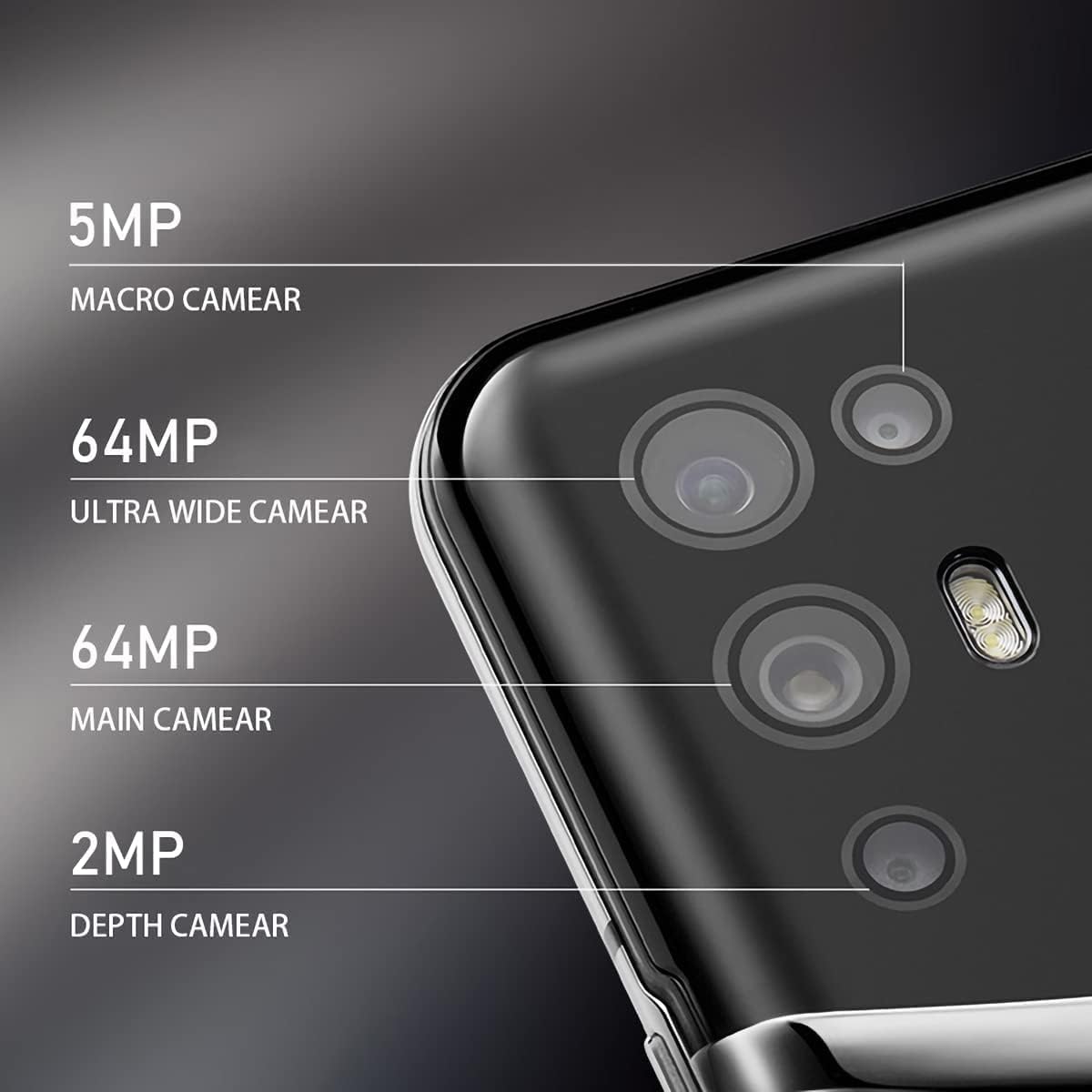
Image: The VERTU iVERTU-81 smartphone showcasing its 6.67-inch OLED display with vibrant colors, featuring a dancer and text highlighting '6.67" OLED Display' and '90hZ' (likely indicating refresh rate).
Rendemento
Powered by a Snapdragon 888 octa-core chip and 12GB RAM, the iVERTU-81 delivers powerful performance for a smooth gaming and multitasking experience.

Image: Two hands holding the VERTU iVERTU-81 smartphone, which displays a graphically intensive game, illustrating the device's 'Powerful Performance'.
Calidade de audio
Experience master sound quality with 3D audio technology and HiFi sound. The device also features exclusive ringtones compiled by the London Symphony Orchestra.

Image: The VERTU iVERTU-81 smartphone displaying an image of an orchestra, accompanied by text highlighting 'Master Sound Quality', '3D audio technology', 'HiFi sound quality', and 'London Symphony Orchestra compiled exclusive ringtones'.
Características da cámara
The iVERTU-81 is equipped with a professional photography configuration, allowing you to capture high-quality images and videos.
Sistema de cámara traseira
- Cámara principal de 64 MP: Para fotos de alta resolución.
- Cámara ultra gran angular de 64 MP: For expansive landscape and group shots.
- Cámara macro de 5MP: Para fotografía detallada de primeiros planos.
- Cámara de profundidade de 2MP: For enhanced portrait mode with bokeh effects.
Cámara frontal
- Cámara frontal de 16 MP: Para selfies e videochamadas nítidas.
Gravación de vídeo
Support for 4K 60FPS high-definition video shooting with two-way anti-shake technology ensures smooth and stable video capture. Intelligent focus assists in sharp and clear recordings.

Imaxe: Unha detallada view of the VERTU iVERTU-81's rear camera module, labeling its four lenses: 5MP Macro, 64MP Ultra Wide, 64MP Main, and 2MP Depth cameras.

Image: The VERTU iVERTU-81 smartphone displaying its camera interface, capturing a snowboarder in action, with text emphasizing 'Professional Photography' and support for '4K 60FPS HD video shooting, two-way anti-shake, intelligent focus'.
Mantemento
To ensure the longevity and optimal performance of your VERTU iVERTU-81 smartphone, follow these maintenance guidelines:
- Limpeza: Usa un pano suave e sen pelusa para limpar a pantalla e a carcasa do teléfono. Evita materiais abrasivos ou produtos químicos agresivos.
- Actualizacións de software: Comproba e instala regularmente actualizacións do sistema para asegurarte de que o teu dispositivo teña os parches e as funcións de seguridade máis recentes.
- Coidado da batería: Avoid extreme temperatures. Do not fully discharge the battery frequently. Use only the provided or certified charging accessories.
- Xestión de almacenamento: Limpar periodicamente o innecesario files and apps to maintain optimal performance. The phone comes with 512GB ROM.
- Protección: Considera usar unha funda protectora e un protector de pantalla para evitar danos físicos.
Resolución de problemas
If you encounter issues with your VERTU iVERTU-81, refer to the following common troubleshooting steps:
O dispositivo non se acende
- Asegúrate de que a batería estea cargada. Conecta o teléfono ao cargador durante polo menos 15 minutos antes de tentar acendelo de novo.
- Mantén premido o botón de acendido durante 10-15 segundos para forzar un reinicio.
Sinal de rede deficiente
- Comprobe se a súa tarxeta SIM está inserida correctamente.
- Móvete a unha zona con mellor cobertura de rede.
- Reinicia o teu teléfono.
- Verify that your mobile data or 5G settings are correctly configured.
As aplicacións fallan ou conxélanse
- Pecha a aplicación problemática e ábrea de novo.
- Clear the app's cache and data in the phone's settings.
- Asegúrate de que a aplicación estea actualizada á súa última versión.
- Reinicia o teu teléfono.
A batería esgotando rapidamente
- Reduce o brillo da pantalla e define un tempo de espera máis curto.
- Disable unused features like Wi-Fi, Bluetooth, GPS, or 5G when not needed.
- Identifica e pecha as aplicacións que consumen moita enerxía e que se executan en segundo plano.
- Check for system updates, as they often include battery optimizations.

Image: The VERTU iVERTU-81 smartphone connected to a charger, displaying '4200mAh Long Battery Life' and '55W fast charge' text, emphasizing its battery capacity and quick charging capability.
Communication Encryption
The device features communication encryption for double protection of your data and privacy.

Image: A visual representation of a safe door, overlaid with various security-related terms such as 'encryption', 'firewalls', 'privacy', and 'information security', illustrating the concept of 'Communication Encryption Double Protection'.
Especificacións
| Característica | Especificación |
|---|---|
| Nome do modelo | iVERTU-81 |
| Sistema Operativo | Android |
| Procesador | Snapdragon 888 (Octa-core) |
| RAM | 12 GB |
| Capacidade de almacenamento da memoria | 512 GB |
| Tamaño da pantalla | 6.67 polgadas |
| Tipo de visualización | OLED |
| Resolución | 2400 x 1080 |
| Taxa de actualización | 120 Hz |
| Cámara traseira | 64MP Main + 64MP Ultra Wide + 5MP Macro + 2MP Depth |
| Cámara frontal | 16 MP |
| Capacidade da batería | 4200 millónsamp Horario |
| Cargando | Carga rápida de 55 W |
| Portador sen fíos | Desbloqueado |
| Tecnoloxía Celular | 5G |
| Tecnoloxías de Conectividade | Wi-Fi, GPS |
| Cor | Calf Leather-Brown |
Garantía e Soporte
For warranty information and customer support, please refer to the warranty card included with your product or visit the official VERTU websitio. Garda o comprobante de compra para reclamacións de garantía.
For technical assistance or service inquiries, please contact VERTU customer service through the channels provided on their official websitio.