
1. Introdución
The Concept OV2012 is a versatile appliance designed to improve indoor air quality by combining dehumidification with air purification. This device effectively reduces excess humidity, which can contribute to mold growth and discomfort, while simultaneously filtering airborne pollutants. It features a triple filtration system, intuitive touch controls, and smart app connectivity for convenient operation.

Figura 1: Fronte view of the Concept OV2012 Dehumidifier.
2. Información de seguridade
Lea atentamente todas as instrucións de seguridade antes de usar o aparello. O incumprimento destas instrucións pode provocar descargas eléctricas, incendios ou lesións graves.
- Asegúrese de que a fonte de alimentación voltage coincide coa etiqueta de clasificación do electrodoméstico.
- Non utilice a unidade cun cable de alimentación ou un enchufe danados.
- Manteña o aparello lonxe da auga e outros líquidos. Non o mergulle.
- Non bloquee as entradas nin as saídas de aire. Asegúrese de que haxa espazo suficiente arredor da unidade para un fluxo de aire axeitado.
- Desconecte a unidade antes de limpala, realizando mantemento ou cando non a use durante períodos prolongados.
- Este aparello non está destinado ao uso por parte de persoas (incluídos nenos) con capacidades físicas, sensoriais ou mentais reducidas, ou con falta de experiencia e coñecementos, a menos que reciban supervisión ou instrucións.
- Do not use the appliance in areas where flammable gases or vapors are present.
3. Compoñentes do produto
Familiarize yourself with the main parts of your Concept OV2012 dehumidifier.
- Panel de control: Touch-sensitive interface for setting modes and functions.
- Saída de aire: Where processed air is released.
- Tapa de entrada/filtro de aire: Located at the rear, provides access to the air filters.
- Depósito de auga: Recolle auga condensada.
- Saída de drenaxe continua: Port for attaching a hose for continuous water drainage.
- 360° Rolling Wheels: For easy movement of the unit.

Figura 2: Traseira view of the dehumidifier, showing air intake and water tank.
4. Panel de control e pantalla
The OV2012 features an intuitive touch control panel with a digital display and LED indicators.
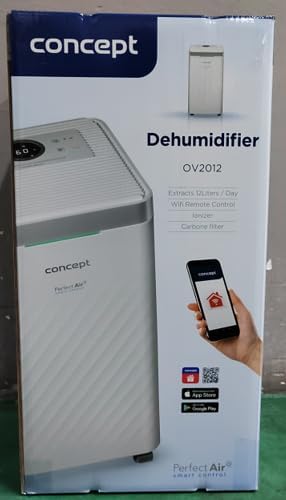
Figura 3: detallada view do panel de control táctil.
- Botón de encendido: Acende ou apaga a unidade.
- Selección de modo: Cycles through operating modes (Automatic, Continuous, Laundry Drying, Fan).
- Humidity Slider/Buttons: Axusta o nivel de humidade desexado.
- Botón do temporizador: Sets the delayed on/off time (up to 24 hours).
- Velocidade do ventilador: Adjusts fan speed (usually two levels).
- Ionizer Button: Activates or deactivates the ionizer function.
- Indicador LED de humidade: Changes color based on current room humidity:
- Vermello: High humidity (RH > 70%)
- Verde: Satisfactory humidity (70% ≥ RH ≥ 50%)
- Azul: Low humidity (RH < 50%)
5. Configuración inicial
- Desembalaxe: Retire con coidado o deshumidificador da súa embalaxe. Garde a embalaxe para o seu almacenamento ou transporte futuros.
- Colocación: Place the unit on a firm, level surface. Ensure there is at least 20 cm of clear space around all sides for optimal airflow. The 360° rolling wheels allow for easy positioning.
- Conexión de alimentación: Enchufe o cable de alimentación a unha toma eléctrica conectada a terra.
- Depósito de auga: Asegúrese de que o depósito de auga estea inserido correctamente na unidade.
6. Modos de funcionamento
The OV2012 offers four distinct operating modes to suit various needs:
- Modo automático: The dehumidifier automatically maintains the humidity level you select. The unit will cycle on and off to achieve and sustain the target humidity.
- Funcionamento continuo: Ideal for long-term drying of very wet areas. In this mode, the unit runs continuously regardless of the ambient humidity. It is recommended to use the continuous drainage hose in this mode.
- Modo de secado de roupa: Accelerates the drying of laundry and helps prevent moisture buildup in the room, reducing the risk of mold.
- Fan Mode (Air Purification without Dehumidification): In this mode, the compressor is off, and only the fan and filtration system operate to purify the air without removing moisture.
Using the Concept Home Mobile Application
The OV2012 can be controlled remotely via the Concept Home mobile application, available for iOS and Android devices. This app allows you to:
- Encender ou apagar a unidade.
- Select desired operating modes.
- Check the current air status in the room.
- Create a precise operating schedule for the dehumidifier.

Figure 4: The Concept Home mobile application for remote control.
7. Drenaxe da auga
Drenaxe do tanque de auga
When the 2.2-liter water tank is full, the unit will automatically shut off, and an indicator light will illuminate. Carefully remove the water tank, empty it, and reinsert it securely to resume operation.
Drenaxe Continua
For continuous operation without needing to empty the water tank, attach the included hose to the continuous drainage outlet. Direct the hose to a suitable drain, ensuring it is sloped downwards for proper water flow. This allows the unit to operate uninterrupted.
8. Mantemento e Limpeza
Un mantemento regular garante un rendemento óptimo e unha maior duración do seu deshumidificador.
Filter System
The OV2012 features a triple filter system:
- Filtro de po: Captures coarse impurities like dust particles, hair, fur, and pollen. This filter should be cleaned regularly.
- Filtro de carbón activado: Absorbs toxic, suffocating, and foul-smelling gases and vapors, such as formaldehyde, benzene, and cigarette smoke. This filter requires periodic replacement (Optional accessory: Carbon filter - 42394390).
- Ionizador: Refreshes and purifies the air by increasing negatively charged ions, neutralizing odors and absorbing positively charged particles, viruses, and bacteria.
To clean the dust filter, remove the rear filter cover, gently remove the filter, and clean it with a vacuum cleaner or rinse it with water. Ensure it is completely dry before reinserting. Replace the activated carbon filter as recommended by the manufacturer or when you notice a decrease in odor removal effectiveness.

Figure 5: Illustration of the triple filtration system.
Limpeza do depósito de auga
Periodically clean the water tank with mild detergent and warm water to prevent mold and bacterial growth. Rinse thoroughly and dry before reinserting.
Limpeza exterior
Limpe o exterior da unidade cun suave, damp pano. Non use produtos de limpeza ou disolventes abrasivos.
9. Guía de solución de problemas
Se tes problemas co teu deshumidificador, consulta os seguintes problemas e solucións comúns:
| Problema | Causa posible | Solución |
|---|---|---|
| A unidade non se acende | No power supply; Water tank full or incorrectly inserted. | Check power cord connection; Empty and reinsert water tank correctly. |
| Sen deshumidificación | Room temperature too low; Air filters clogged; Humidity setting too high. | Ensure room temperature is above 5°C; Clean or replace filters; Lower the desired humidity setting. |
| A unidade é ruidosa | Unidade non sobre unha superficie nivelada; filtro de aire obstruído. | Place unit on a flat, stable surface; Clean or replace air filters. |
| Water tank full indicator remains on after emptying | Water tank not fully inserted; Sensor malfunction. | Push the water tank firmly into place; If problem persists, contact customer support. |
Se o problema persiste despois de intentar estas solucións, póñase en contacto co servizo de atención ao cliente.
10. Especificacións técnicas
| Característica | Especificación |
|---|---|
| Número de modelo | OV2012 |
| Dehumidification Performance (max) | 12 liters/day (at 30°C, 80% RH) |
| Volume do depósito de auga | 2.2 litros |
| Consumo de enerxía | 210 W (Note: Product description also mentions 245W, refer to product label for exact value) |
| Nivel de ruído | ≤ 45 dB |
| Dimensións (ancho x profundo x alto) | 250 x 250 x 460 mm (25 x 25 x 46 cm) |
| Peso do elemento | 10.82 kg |
| Lonxitude do cable | 1.8 m |
| Modos de funcionamento | 4 (Automatic, Continuous, Laundry Drying, Fan) |
| Filter System | Dust filter, Activated Carbon filter, Ionizer |
| Control | Touch control, Mobile App (Concept Home) |
| Características especiais | Automatic Shut-off, Timer, 360° wheels, LED Humidity Indicator |

Figura 6: Dimensións do produto.
11. Garantía e atención ao cliente
For warranty information, please refer to the warranty card included with your product or contact your local Concept distributor. For technical support, spare parts, or service inquiries, please contact Concept customer service. Contact details may be found on the product packaging or the official Concept websitio.
Example contact information from product packaging (may vary by region):
- CZ: Zavolejte nám +420 465 471 400, www.my-concept.cz
- SK: Zavolajte nám +421 326 583 465, www.my-concept.sk
- PL: Zadzwoń do nas +48 71 339 04 44, www.my-concept.pl