
1. Introdución
The Med-Fit Dual Channel Combo 3 is a versatile 3-in-1 device designed for pain relief, muscle stimulation, and massage therapy. It combines Transcutaneous Electrical Nerve Stimulation (TENS), Electrical Muscle Stimulation (EMS), and massage functions into a single, powerful wireless unit. This professional-grade, rechargeable device features 18 clinically tested pre-defined programs to address various needs. Its independent module control allows for tailored treatment across multiple body areas simultaneously.

Imaxe 1.1: Acabadoview of Med-Fit Combo 3 Wireless TENS features for pain relief.

Image 1.2: Key features of the Med-Fit Combo 3, emphasizing its TENS, EMS, and Massage capabilities.
2. Información importante de seguridade
Please read all instructions carefully before using the Med-Fit Dual Channel Combo 3. Failure to follow these instructions could result in injury or damage to the device.
- Non use if you have a pacemaker, implanted defibrillator, or other implanted metallic or electronic device.
- Non use if you are pregnant or suspect you might be pregnant.
- Non use on areas of skin that are broken, damaged, or have open wounds.
- Non use over the carotid sinus nerves (front of the neck), on the head, or over the eyes.
- Consult your doctor before use if you have epilepsy, heart disease, cancer, or any other serious medical condition.
- Manter fóra do alcance dos nenos.
- Discontinue use immediately if you experience any adverse reactions such as skin irritation, discomfort, or dizziness.
- This device is for external use only.
- Do not operate heavy machinery or drive while using the device.
3. Contido do paquete
The Med-Fit Dual Channel Combo 3 kit includes everything necessary for your wireless TENS, EMS, and massage treatment. Please check that all items listed below are present in your package.
- 1 x Mando a distancia sen fíos
- 2 x Wireless Modules
- 1 x Large Lumbar Electrode (20cm x 10cm)
- 2 x Butterfly Electrodes (15cm x 10cm)
- 1 x Small Electrode (12cm x 6cm)
- 1 x Range Extended Electrode (9cm x 7cm)
- 1 cable de carga dual USB-C
- 1 x Single USB-C Charging Cable
- 1 x adaptador de alimentación
- 1 x Protective Storage Pouch
- 1 x Manual de usuario (este documento)
- 1 x Quick Start User Guide
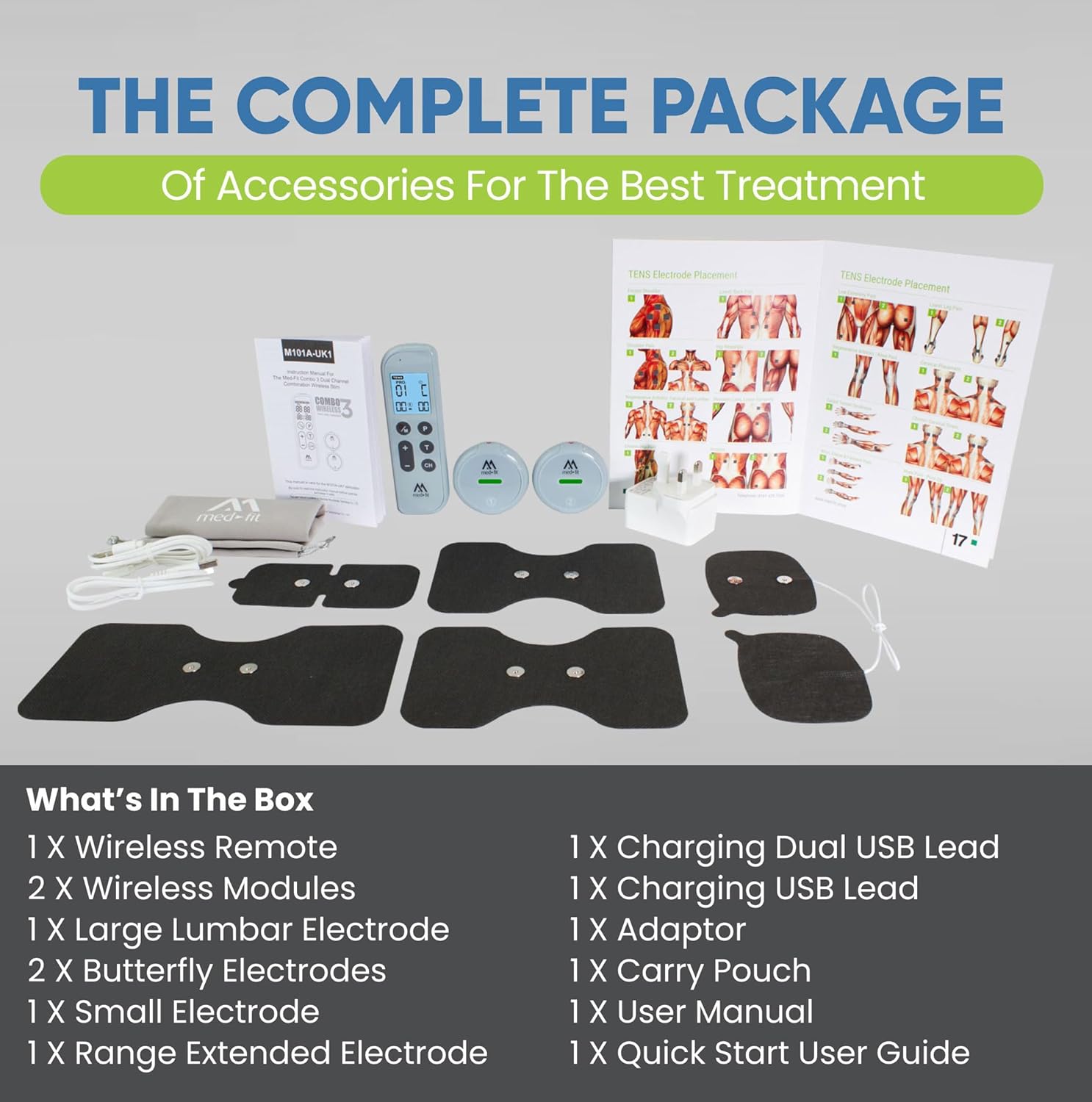
Image 3.1: The complete accessory package for the Med-Fit Combo 3.
4. Compoñentes do dispositivo
The Med-Fit Combo 3 consists of a wireless remote control, two wireless modules, and various self-adhesive electrode pads.
4.1 Control remoto sen fíos
The ergonomic remote control features a large, clear display for easy navigation through settings. It allows you to select programs, adjust intensity, and set the treatment timer.
4.2 Wireless Modules
The two wireless modules are designed with a flat, round profile, making them discreet and comfortable to wear under clothing. Each module can be controlled independently, allowing for different programs to run simultaneously on separate body areas.
4.3 Self-Adhesive Electrodes
The kit includes various sizes of self-adhesive electrodes with magnetic clip-on connections for enhanced durability and a secure link to the modules. These electrodes feature 35mm wide magnetic studs, are super flexible, conform to body contours, and use highly conductive carbon with top-quality hypoallergenic gel.

Imaxe 4.1: Detallada view of the high-quality self-adhesive electrodes.

Image 4.2: Different sizes of electrode pads included in the standard package.
5. Configuración
5.1 Carga do dispositivo
Before first use, fully charge the wireless remote and both modules.
- Connect the dual USB-C charging cable to the power adaptor.
- Plug one USB-C end into the charging port of the remote control and the other into one of the wireless modules.
- Use the single USB-C charging cable to charge the second wireless module.
- Conecte o adaptador de alimentación a unha toma de corrente.
- The charging indicator on the remote and modules will show charging status. Charge until fully charged (indicator light changes or turns off).
5.2 Attaching Electrodes to Modules
The electrodes feature magnetic clip-on connections for easy and secure attachment.
- Ensure the wireless module is turned off.
- Align the magnetic studs on the back of the wireless module with the corresponding magnetic connectors on the self-adhesive electrode pad.
- Gently press the module onto the electrode until it snaps securely into place.
6. Instrucións de funcionamento
6.1 Acendido/Apagado
- To turn on the remote: Press and hold the power button until the screen illuminates.
- To turn on a module: Press and hold the power button on the module until the indicator light turns on.
- To turn off: Press and hold the power button on the remote or module until the device powers down.
6.2 Selección de programas
The Med-Fit Combo 3 offers 18 pre-defined programs, including TENS for pain relief, EMS for muscle stimulation, and massage therapy.
- After powering on the remote, the device will automatically activate TENS Program 1.
- Use the 'P' button on the remote to cycle through the available programs (TENS, EMS, Massage).
- Once a program type is selected, use the '+' and '-' buttons to select a specific program number within that category.
6.3 Axuste da intensidade
The device features dual intensity control, allowing you to adjust the intensity for each module independently.
- Press the 'CH' button to select the channel (Module 1 or Module 2) you wish to adjust.
- Use the '+' button to increase intensity and the '-' button to decrease intensity.
- Adjust the intensity to a comfortable, yet effective, level. Avoid setting it too high, which may cause discomfort.
6.4 Configuración do temporizador
The versatile timer allows you to set treatment durations from 10 minutes to continuous operation.
- Press the 'T' button to cycle through the pre-set timer options.
- Select your desired treatment duration. For continuous operation, select the 'C' or 'Continuous' setting.
7. Colocación de electrodos
Proper electrode placement is crucial for effective treatment. The Med-Fit Combo 3 allows for treatment of various body areas, including the back, shoulders, knees, and elbows.
- Clean and dry the skin area where electrodes will be placed.
- Remove the protective film from the electrode pads.
- Place the electrodes directly onto the skin, ensuring good contact. For TENS, place electrodes around the painful area, not directly on it. For EMS, place electrodes on the muscle belly.
- The unique dual-range extension electrode allows for treatment around joints like the knee, ankle, elbow, and shoulder.

Image 7.1: Recommended electrode placement for various body areas.
Refer to the included "TENS Electrode Placement" chart for detailed diagrams specific to different conditions and body parts.
8. Mantemento
8.1 Limpeza do dispositivo
- Wipe the remote control and wireless modules with a soft, damp pano. Non use produtos de limpeza abrasivos nin mergullo en auga.
- Asegúrate de que o dispositivo estea completamente seco antes de gardalo ou recargalo.
8.2 Coidado e almacenamento dos eléctrodos
Proper care extends the life of your electrode pads, which can be used up to 30 times.
- After each use, gently re-apply the protective film to the adhesive side of the electrodes.
- Store electrodes in the provided protective storage pouch in a cool, dry place.
- If the adhesive becomes less effective, gently dab the adhesive surface with a drop of water to reactivate it. Replace electrodes when they no longer adhere well to the skin.
8.3 Coidado coa batería
- Recharge the device regularly, even if not in frequent use, to maintain battery health.
- Non expoña o dispositivo a temperaturas extremas.
9 Solución de problemas
If you encounter any issues with your Med-Fit Dual Channel Combo 3, please refer to the following common problems and solutions.
| Problema | Causa posible | Solución |
|---|---|---|
| O dispositivo non se acende. | Batería baixa ou sen carga. | Ensure the device is fully charged. Press and hold the power button firmly. |
| Sen sensación ou sensación débil. | Electrodes not properly attached, low intensity, or worn-out electrodes. |
|
| Irritación da pel despois do uso. | Allergic reaction, prolonged use in one spot, or dirty electrodes. |
|
| Modules lose connection. | Out of range, low battery, or interference. |
|
10. Especificacións
| Número de modelo | 2 EV |
| Marca | Med-Fit |
| Dimensións do dispositivo (L x A x H) | 10 x 15 x 3 cm |
| Peso do dispositivo | 630 gramos |
| Tipo de batería | 1 batería de ións de litio (incluída) |
| Programas | 18 pre-defined (TENS, EMS, Massage) |
| Canles | Dual Channel (independent control) |
| Temporizador | Adjustable (10 minutes to continuous) |
11. Garantía e soporte
Med-Fit products are manufactured to high standards and undergo rigorous quality control.
11.1 Información da garantía
Your Med-Fit Dual Channel Combo 3 device comes with a standard manufacturer's warranty against defects in materials and workmanship. Please refer to the warranty card included in your package or visit the official Med-Fit websitio web para coñecer os termos e condicións específicos da garantía. Garda o comprobante de compra para reclamacións de garantía.
11.2 Atención ao cliente
For technical assistance, troubleshooting beyond this manual, or to inquire about replacement parts and accessories, please contact Med-Fit customer support.
- Websitio: Visit the official Med-Fit websitio web con preguntas frecuentes, recursos de asistencia e información de contacto.
- Correo electrónico/Teléfono: Refer to the contact details provided in your product packaging or on the Med-Fit websitio.
When contacting support, please have your model number (2EV) and purchase date ready.