
Introdución
Grazas pola compraasing the SJRC F7 PRO Drone. This advanced quadrocopter features a 4K HD camera with a 3-axis mechanical gimbal, 5G FPV transmission, and powerful brushless motors. It is designed for users seeking a professional-grade aerial photography and videography experience. This manual provides essential information for safe operation, setup, maintenance, and troubleshooting to ensure optimal performance of your drone.
Pautas de seguridade
Adhering to these safety guidelines is crucial for preventing accidents, injuries, and property damage.
- Comprobación previa ao voo: Always inspect the drone, remote controller, and batteries before each flight. Ensure all components are in good working order.
- Condicións ambientais: Do not fly in strong winds (above Level 5), heavy rain, snow, or fog. Avoid flying near power lines, buildings, or crowded areas.
- Liña de visión: Manteña a liña de visión co dron en todo momento durante o voo.
- Seguridade da batería: Use only original or approved batteries. Do not overcharge or puncture batteries. Discontinue use if batteries are damaged or swollen.
- Seguridade da hélice: Keep hands, face, and loose clothing away from rotating propellers. Ensure propellers are correctly installed and free from damage.
- Respecta a privacidade: Ten en conta as leis e regulamentos de privacidade ao usar a cámara.
- Normativa local: Familiarize yourself with and adhere to all local aviation laws and regulations regarding drone operation.
Contido do paquete
Verifica que todos os elementos estean presentes no teu paquete:
- SJRC F7 PRO Drone
- Mando a distancia
- Baterías de voo intelixentes (x2)
- Cable de carga USB
- Hélices de recambio
- Desaparafusador
- Manual de usuario
- Bolsa de almacenamento
Drone Components Overview
Familiarize yourself with the main components of your SJRC F7 PRO drone.

Image: The SJRC F7 PRO drone, showcasing its foldable design, four propellers, and the integrated camera with gimbal at the front. This view provides a general understanding of the drone's overall structure.
- Hélices: Four sets of propellers for lift and thrust.
- Motores sen escobillas: Provide efficient and powerful flight.
- Flight Battery Compartment: Situado na parte traseira do dron.
- Cámara 4K HD: Captures high-resolution photos and videos.
- Cardán mecánico de 3 eixes: Stabilizes the camera for smooth footage.
- Módulo GPS: Enables precise positioning and intelligent flight features.
- Vision Positioning System: Assists with stable hovering in environments without GPS.

Imaxe: Unha detallada view of the drone's 3-axis mechanical gimbal and camera. Arrows indicate the approximate range of motion for pitch (about 120 degrees), lateral (about 70 degrees), and direction (about 60 degrees), highlighting its stabilization capabilities.
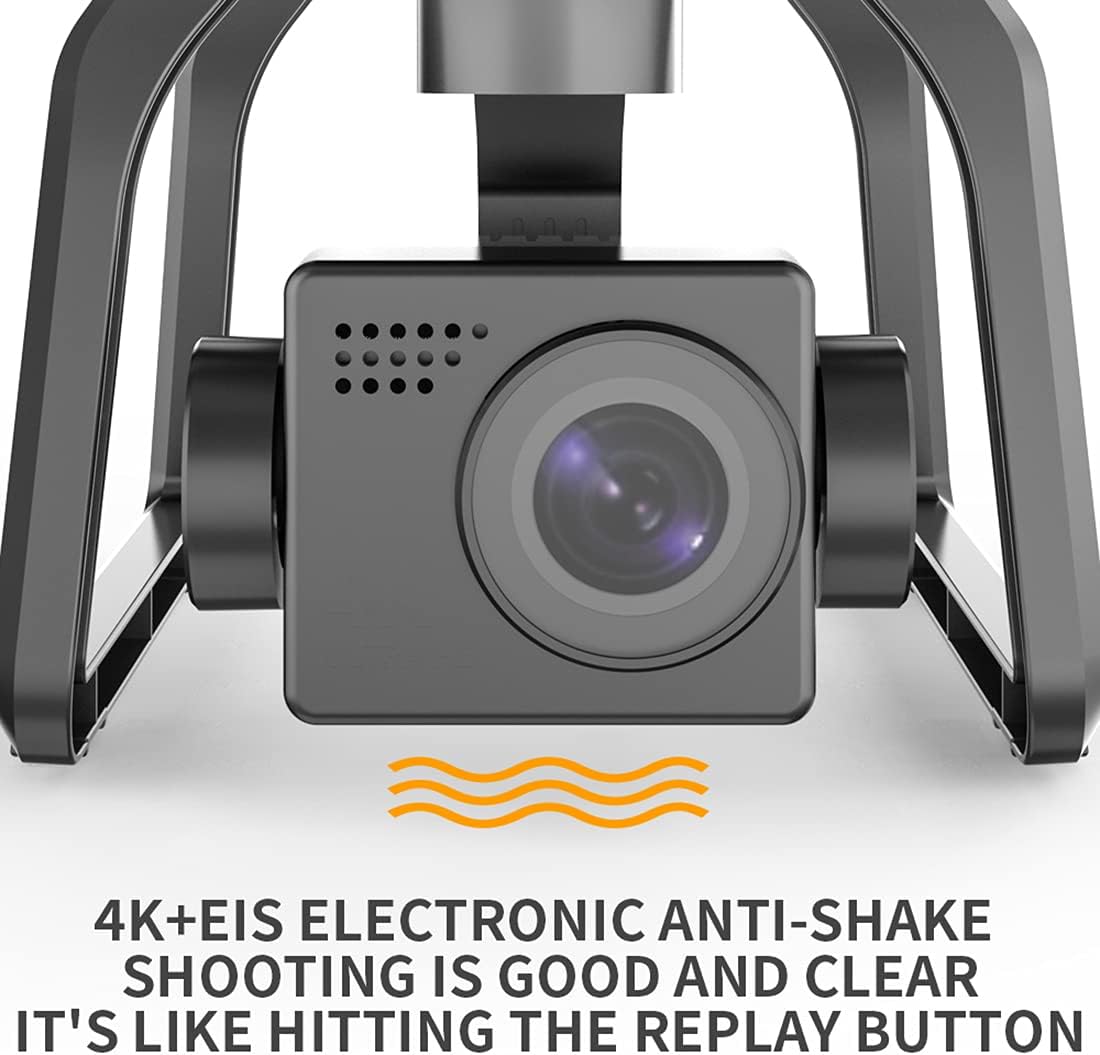
Image: A close-up of the drone's 4K camera, emphasizing its Electronic Image Stabilization (EIS) feature. The text indicates that '4K+EIS Electronic Anti-Shake shooting is good and clear', ensuring stable and high-quality video recording.
Carga de batería
Batería de avións non tripulados
- Connect the drone battery to the provided USB charging cable.
- Conecta o cable USB a un adaptador de corrente USB de 5 V/2 A (non incluído).
- The charging indicator on the battery will show its status (e.g., red for charging, green for fully charged).
- A carga completa adoita tardar entre 4 e 5 horas.
Batería do mando a distancia
- Connect the remote controller to the USB charging cable.
- Plug the USB cable into a 5V/1A USB power adapter.
- The indicator lights on the remote controller will show charging status.
- A carga completa adoita tardar entre 1 e 2 horas.
Configuración
1. Despregando o dron
- Desprega con coidado primeiro os brazos dianteiros e despois os traseiros ata que encaixen no seu lugar.
- Ensure all arms are fully extended and locked.
2. Instalación da hélice
- Match the propellers with the corresponding motor shafts (A to A, B to B).
- Securely fasten the propellers using the provided screws and screwdriver.
- Ensure propellers are free from damage and installed correctly to avoid flight instability.
3. Instalación da batería
- Insert the fully charged intelligent flight battery into the battery compartment at the rear of the drone until it clicks securely.
- Press the power button on the battery to turn on the drone.
4. Remote Controller Pairing
- Acende o mando a distancia.
- Acende o dron.
- The drone and remote controller should automatically pair. If not, follow the specific pairing instructions in the quick start guide (usually involves holding a button on the remote while powering on).
5. Descarga e conexión da aplicación
- Download the official SJRC F7 PRO app from your mobile device's app store.
- Connect your mobile device to the drone's Wi-Fi network (usually named 'SJRC-F7PRO-XXXXXX').
- Abre a aplicación para view the FPV feed and access intelligent flight modes.
6. Compass and Gimbal Calibration
- Perform compass calibration before the first flight and whenever flying in a new location. Follow the instructions in the app or quick start guide (typically involves rotating the drone horizontally and vertically).
- The gimbal will self-calibrate upon powering on. Ensure the drone is on a flat, stable surface during startup.
Instrucións de funcionamento
1. Comprobacións previas ao voo
- Asegúrate de que as baterías do dron e do control remoto estean completamente cargadas.
- Check propellers for damage and correct installation.
- Verify GPS signal strength (at least 7-8 satellites for stable flight).
- Confirm successful connection between drone, remote, and app.
2. Take-Off
- Despegue manual: Push both joysticks down and outwards to start the motors. Then, slowly push the left joystick up to ascend.
- Auto Take-Off: Press the one-key take-off button on the remote or in the app. The drone will automatically ascend to a safe height and hover.

Image: The SJRC F7 PRO drone in flight over a lush forest, demonstrating its aerial capabilities. The image suggests smooth and stable flight, suitable for capturing scenic views.
3. Controis básicos de voo
- Left Joystick (Mode 2):
- Arriba/Abaixo: Subir/Baixar
- Esquerda/Dereita: Xirar á esquerda/dereita (guiñar)
- Right Joystick (Mode 2):
- Arriba/Abaixo: Voar cara adiante/cara atrás (Toque)
- Esquerda/Dereita: Voar á esquerda/dereita (Rodar)
4. Funcionamento da cámara
- Foto: Press the photo button on the remote or in the app to capture a still image.
- Vídeo: Press the video button to start/stop recording.
- Control de cardán: Use the gimbal dial on the remote to adjust the camera's pitch angle.
5. Modos de voo intelixentes
- Mantemento de altitude: The drone maintains a stable altitude, allowing the pilot to focus on direction.
- Sígueme: The drone will automatically follow the remote controller or mobile device, recording your movements. Ensure sufficient space and clear line of sight.
- Retorno automático (RTH): When activated or if signal is lost, the drone will automatically return to its take-off point using GPS. Ensure the RTH point is accurately recorded before flight.

Image: The SJRC F7 PRO drone with an overlay illustrating its GPS Positioning System. The text 'FLYING AS STEADY AS MOUNT TAI' emphasizes the stability provided by GPS, ensuring precise flight control and hovering.

Image: A hand holding a smartphone displaying a live FPV feed from the drone, with the drone flying in the background over a mountainous landscape. Text highlights 'About 3000m' range, '4K The big shot', and 'Repeater + 5G system Strong signal', indicating extended range and high-quality video transmission.
6. Desembarco
- Aterraxe manual: Slowly pull the left joystick down to descend. Once landed, push both joysticks down and inwards to stop the motors.
- Auto Landing: Press the one-key landing button on the remote or in the app. The drone will automatically descend and land.
Mantemento
- Limpeza: Use a soft, dry cloth to clean the drone body and camera lens. Avoid using liquids or solvents.
- Inspección da hélice: Regularly check propellers for cracks, bends, or chips. Replace damaged propellers immediately.
- Coidados do motor: Keep motors free from dust and debris. Do not attempt to lubricate motors.
- Almacenamento da batería: Garde as baterías nun lugar fresco e seco, parcialmente cargadas (arredor do 50-60 %) se non as usa durante períodos prolongados.
- Actualizacións de firmware: Check the official SJRC website or app for any available firmware updates to ensure optimal performance and new features.
Resolución de problemas
| Problema | Causa posible | Solución |
|---|---|---|
| O dron non se acende | Batería baixa; batería non inserida correctamente | Cargar a batería; Volver a inserir a batería de forma segura |
| O mando a distancia non se conecta | Not paired; Low remote battery | Perform pairing procedure; Charge remote battery |
| Voo inestable/deriva | No GPS signal; Compass not calibrated; Damaged propellers | Fly in open area with strong GPS; Calibrate compass; Replace propellers |
| Non hai transmisión FPV na aplicación | Not connected to drone Wi-Fi; App not open | Connect to drone's Wi-Fi; Open the app |
| Mala calidade de imaxe/vídeo | Dirty camera lens; Gimbal not stable; Insufficient light | Clean lens; Ensure gimbal calibration; Fly in good lighting conditions |
Especificacións
| Característica | Detalle |
|---|---|
| Modelo | SJRC F7 PRO |
| Marca | SJRC |
| Cámara | 4K HD with EIS Electronic Anti-Shake |
| Gimbal | Cardán mecánico de 3 eixes |
| Tipo de motor | Motor sen escobillas |
| Conectividade | 5G FPV |
| Características especiais | Foldable, Integrated Camera, Rechargeable, GPS Positioning System, Auto Return, Altitude Hold, Follow Me |
| Tipo de control | Control remoto |
| Nivel de habilidade | Advanced, Professional |
| Resistencia ao vento | Level 5 (approximate) |
| Compoñentes incluídos | Drone, Remote Controller, Batteries (x2), USB Charging Cable, Spare Propellers, Screwdriver, Storage Bag |

Image: The SJRC F7 PRO drone positioned against a split background of ocean and mountains, illustrating its capability in varied environments. Text highlights 'Wind resistance level 5', 'Four Brushless motor', and '3200 r Power output', indicating robust performance.
Garantía e Soporte
For warranty information and technical support, please refer to the warranty card included in your package or visit the official SJRC websitio. Garde o recibo da compra como proba de compra para calquera reclamación de garantía.
If you encounter issues not covered in this manual, please contact SJRC customer service for assistance.