
1. Instrucións de seguridade importantes
Lea estas instrucións atentamente antes de usar o aparello e gárdeas para futuras consultas. O incumprimento destas instrucións pode provocar descargas eléctricas, incendios ou lesións graves.
- Asegúrese sempre do voltagO volume indicado na etiqueta de clasificación coincide co volume da túa rede eléctricatage.
- Non use este aquecedor no entorno inmediato dun baño, unha ducha ou unha piscina.
- Do not cover the heater. Overheating can occur if the heater is covered or obstructed.
- Keep flammable materials such as furniture, curtains, and other combustible items at least 1 meter (3.3 feet) from the front and sides of the heater.
- Este aparello non está pensado para o seu uso por persoas (incluídos nenos) con capacidades físicas, sensoriais ou mentais reducidas, ou con falta de experiencia e coñecementos, a menos que teñan supervisión ou instrucións sobre o uso do aparello por unha persoa responsable da súa seguridade.
- Desconecte o quentador cando non o use ou antes de limpalo.
- Non faga funcionar ningún quentador cun cable ou enchufe danados, ou despois de que o quentador funcione de forma avariada, se deixe caer ou se dane de calquera xeito.
- Avoid using extension cords as they may overheat and cause a fire risk.
2. Produto rematadoview
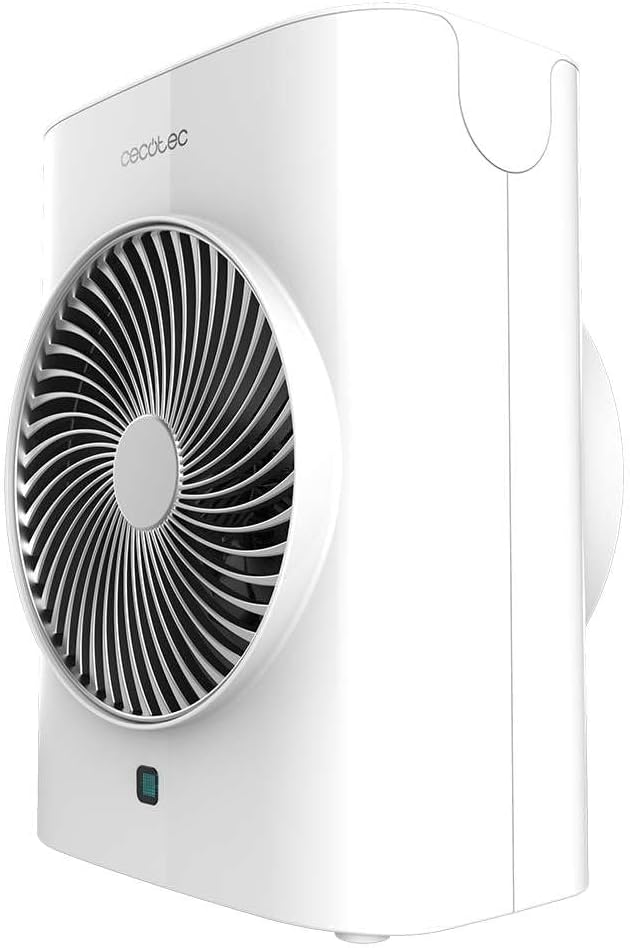
The Cecotec ReadyWarm 2070 Max Force Smart White is a powerful and versatile fan heater designed for efficient heating and air circulation. It features 2000W power, two power levels, three operating modes, an LED display, and a remote control for convenient operation.
2.1 Compoñentes
- Reixa de saída de aire
- Panel de control con pantalla LED
- Receptor de control remoto
- Cable de alimentación
- Anti-Tip Safety Switch (located at the bottom)
- Asa de transporte



3. Configuración
Follow these steps to set up your fan heater for the first time:
- Desempaquetar: Retire con coidado o quentador da súa embalaxe. Garde a embalaxe para o seu almacenamento ou transporte futuros.
- Colocación: Place the heater on a firm, level surface. Ensure there is at least 1 meter (3.3 feet) of clear space around the heater to allow for proper airflow and to prevent fire hazards. Do not place it near curtains, drapes, or other objects that could block the air inlets or outlets.
- Conexión de alimentación: Plug the power cord into a suitable 220-240V, 50/60Hz grounded electrical outlet. Ensure the outlet is easily accessible.

4. Instrucións de funcionamento
The Cecotec ReadyWarm 2070 Max Force Smart White can be operated using the touch control panel on top of the unit or the included remote control.
4.1 Panel de control

The control panel features touch-sensitive buttons and an LED display:
- Botón de encendido (O): Acende ou apaga o quentador.
- Botón de modo (≡): Cycles through the operating modes: Fan (Cool Air), Low Heat (1000W), High Heat (2000W). The LED display color changes to indicate the mode: Blue for Fan, Green for Low Heat, Red for High Heat.
- Temperature/Timer Button (A): Adjusts the desired temperature in heating modes or sets the timer.
- Botón de oscilación (|i|): Activates or deactivates the oscillation function, allowing the heater to rotate and distribute heat more widely.
4.2 Control remoto

The remote control duplicates the functions of the control panel, offering convenient operation from a distance. Ensure batteries are correctly inserted (not included).
4.3 Modos de funcionamento e configuracións
- Fan Mode (Cool Air): Provides a refreshing breeze without heat. Ideal for air circulation.
- Baixo calor (1000 W): Provides gentle heating for smaller spaces or energy-saving operation.
- Alta calor (2000 W): Delivers maximum heating power for rapid warming of larger areas.
- Axuste de temperatura: In heating modes, use the Temperature/Timer button to set your desired room temperature. The heater will automatically maintain this temperature.
- Función de temporizador: Set the heater to operate for a specific duration (e.g., 1-12 hours) before automatically turning off.
- Oscilación: Activate oscillation to distribute warm air evenly across a wider area.

5. Mantemento
Un mantemento regular garante un rendemento óptimo e prolonga a vida útil do teu calefactor.
- Antes da limpeza: Desconecte sempre o quentador da toma de corrente e deixe que arrefríe completamente antes de limpalo.
- Limpeza exterior: Limpe as superficies exteriores cun suave, damp pano. Non empregue produtos de limpeza abrasivos, solventes nin produtos químicos agresivos, xa que poden danar o acabado.
- Entradas/Saídas de aire: Use a vacuum cleaner with a brush attachment to gently remove dust and debris from the air inlet and outlet grilles. Ensure these areas remain clear for efficient operation.
- Almacenamento: If storing the heater for an extended period, clean it thoroughly and place it back in its original packaging. Store in a cool, dry place.

6 Solución de problemas
Se tes problemas co teu quentador, consulta os seguintes problemas e solucións comúns:
| Problema | Causa posible | Solución |
|---|---|---|
| O quentador non se acende. | Sen fonte de alimentación. Interruptor antivuelco activado. Protección contra sobrecalentamento activada. | Comprobe se o cable de alimentación está ben conectado. Asegúrate de que o quentador estea sobre unha superficie plana e estable. Unplug, let cool for 30 minutes, then restart. |
| Sen saída de calor. | Seleccionouse o modo incorrecto. Axuste de temperatura demasiado baixo. | Select Low Heat or High Heat mode. Aumente a configuración de temperatura desexada. |
| O calefactor apágase inesperadamente. | Protección contra sobrecalentamento activada. Interruptor antivuelco activado. A función do temporizador expirou. | Unplug, let cool for 30 minutes, then restart. Asegúrate de que o quentador estea sobre unha superficie plana e estable. Check timer settings. |
| Ruído insólito. | Po ou residuos no ventilador. | Unplug and clean air inlets/outlets as per maintenance section. |
Se o problema persiste despois de intentar estas solucións, póñase en contacto co servizo de atención ao cliente.
7. Especificacións
| Característica | Detalle |
|---|---|
| Marca | Cecotec |
| Modelo | ReadyWarm 2070 Max Force Smart White |
| Número de modelo | 08260 |
| Poder | 2000 W |
| Niveis de potencia | 2 (1000 W / 2000 W) |
| Modos de funcionamento | 3 (Fan, Low Heat, High Heat) |
| Dimensións (L x W x H) | 23 x 15 x 28 cm |
| Peso | 1.38 kg |
| Características especiais | Remote Control, LED Display, Oscillation, Automatic Shut-off, Anti-tip Safety Switch |
| Vol. De entradatage | 220-240 V ~ 50/60 Hz |
8. Garantía e soporte
This Cecotec product comes with a standard manufacturer's warranty. Please refer to the warranty card included with your purchase for specific terms and conditions, including the warranty period and coverage details.
Para asistencia técnica, servizo ou reclamacións de garantía, póñase en contacto co servizo de atención ao cliente de Cecotec a través do seu servizo oficial websitio web ou a información de contacto proporcionada na documentación do produto.
You can find more information about Cecotec products and support at the official Cecotec store: Cecotec Store