
isinwheel E9
Manual de usuario do patinete eléctrico isinwheel S9 Pro
Model: S9 Pro (E9)
1. Introdución
This user manual provides essential information for the safe operation, maintenance, and troubleshooting of your isinwheel S9 Pro Electric Scooter. Please read this manual thoroughly before your first ride to ensure proper use and to maximize the lifespan of your scooter.
The isinwheel S9 Pro Electric Scooter is designed for personal urban commuting and recreational use, offering a portable and efficient mode of transport. It features a powerful motor, long-range battery, dual suspension, and a smart app for enhanced control.
2. Pautas de seguridade
A súa seguridade é primordial. Siga sempre as seguintes pautas:
- Usa sempre casco e equipamento de seguridade axeitado (rodilleras, cóbadas) cando conduzas.
- Non conduza baixo choiva forte nin en charcos de máis de 2 cm de profundidade.
- Asegúrate de que ambos os freos funcionen correctamente antes de cada viaxe.
- Observe todas as leis e regulamentos locais de tráfico.
- Do not allow children under 16 to ride the scooter.
- Avoid riding on slippery surfaces, steep inclines, or uneven terrain.
- Manter unha distancia de seguridade con outros vehículos e peóns.
- Non realices acrobacias nin manobras bruscas.
- The maximum weight limit for the rider is 220 lbs (100 kg).

Image: A person riding the isinwheel S9 Pro Electric Scooter, demonstrating safe operation in an urban environment.
3. Compoñentes do produto
Familiarize yourself with the main parts of your isinwheel S9 Pro Electric Scooter:
- Manillar: Controls steering and houses the display, accelerator, and brake levers.
- Smart LED Dashboard: Displays speed, battery level, and riding mode.
- Palanca de freo: Activates the dual braking system (Disc brake & EABS anti-lock brake).
- Acelerador: Controls the scooter's speed.
- Faro principal: Front illumination for visibility.
- Mecanismo de plegado: Permite un almacenamento e transporte compactos.
- Cuberta: Foot platform for the rider.
- Soporte: Supports the scooter when parked.
- 8.5-inch Pneumatic Tires: Provide shock absorption and traction.
- Rear Dual Suspension: Enhances ride comfort over uneven surfaces.
- Taillight/Brake Light: Rear illumination and brake indication.
- Porto de carga: Para conectar o cargador.

Imaxe: Máis deview of the isinwheel S9 Pro Electric Scooter, showing its main components and the accompanying mobile application interface.

Imaxe: Detallada view of the Smart LED Dashboard, highlighting the brake lever and accelerator controls.
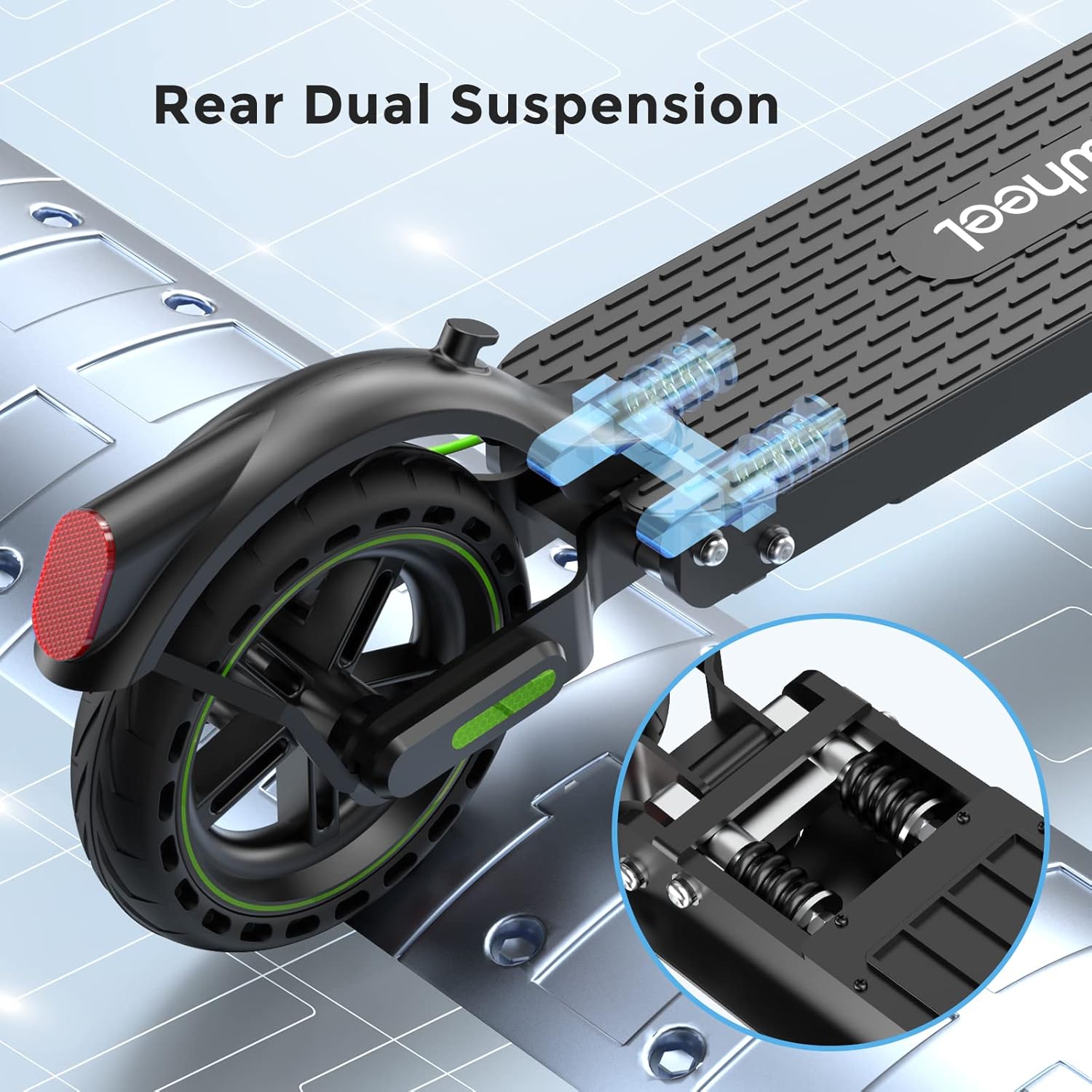
Image: Illustration of the rear dual suspension system, showing the shock-absorbing springs for a smoother ride.
4. Configuración e primeiro uso
4.1 Desembalaxe e montaxe
- Retire coidadosamente todos os compoñentes da embalaxe.
- Despregue o scooter soltándooasino mecanismo de pregamento. Asegúrate de que encaixa firmemente no seu lugar.
- Attach the handlebar to the stem, ensuring all cables are properly connected and secured.
- Tighten all screws and bolts as per the quick start guide.
4.2 Carga inicial
Before your first ride, fully charge the scooter's battery. This typically takes approximately 5 hours.
- Localiza o porto de carga no scooter.
- Conecta o cargador á scooter e, a seguir, conéctao a unha toma de corrente.
- O indicador luminoso do cargador cambiará (por exemplo, de vermello a verde) cando remate a carga.
4.3 App Connection (MiniRobot APP)
Enhance your riding experience by connecting to the MiniRobot APP:
- Download the "MiniRobot" app from the App Store (iOS) or Google Play Store (Android).
- Acenda o seu scooter e active o Bluetooth no seu teléfono intelixente.
- Open the MiniRobot app and follow the on-screen instructions to pair with your scooter.
- The app allows you to lock/unlock the scooter, control lights, adjust gears, set start mode (zero/non-zero), and manage maximum speed and cruise control.

Image: The isinwheel S9 Pro Electric Scooter alongside a smartphone displaying the MiniRobot App interface, showing various control options.

Image: A close-up of the MiniRobot App settings screen, demonstrating options like unit selection, cruise control, battery capacity, energy recovery, riding mode, and zero start.
5. Instrucións de funcionamento
5.1 Starting the Scooter
- Preme o botón de acendido para acender o scooter.
- For non-zero start mode (default): Kick off with one foot to gain a little speed (approx. 1.8 mph / 3 km/h), then press the accelerator.
- For zero start mode (can be enabled via app): Press the accelerator directly from a standstill.
5.2 Montar
- Place both feet firmly on the deck.
- Gently press the accelerator to increase speed. The scooter has a top speed of 15.6 mph (25 km/h).
- Steer by leaning slightly in the desired direction and turning the handlebar.
5.3 Freada
The S9 Pro features a dual brake system for effective stopping:
- Gently squeeze the brake lever on the handlebar to engage both the disc brake and EABS anti-lock brake.
- Apply brakes smoothly to avoid sudden stops, especially at higher speeds.

Image: Illustration of the dual brake system, showing the brake lever on the handlebar and the disc brake on the rear wheel, along with the headlight and taillight.
5.4 Plegar e transportar
- Asegúrese de que o scooter estea apagado.
- Localice e libere o mecanismo de pregamento.
- Fold the stem down until it locks into place with the rear fender.
- The scooter weighs approximately 26 lbs (11.8 kg), making it portable for carrying or storing in compact spaces.

Image: A diagram illustrating the dimensions of the isinwheel S9 Pro Electric Scooter in both its unfolded and folded states, highlighting its compact design.
6. Mantemento
6.1 Limpeza
- Limpa o scooter cun pano suave eamp pano. Non empregue chorros de auga a alta presión nin produtos de limpeza agresivos.
- Asegúrese de que a tapa do porto de carga estea ben pechada antes de limpala.
6.2 Coidado dos pneumáticos
- Regularly check tire pressure. Proper inflation ensures optimal performance and range.
- Inspeccione os pneumáticos antes de cada saída para ver se teñen desgaste, pinchazos ou danos.
6.3 Coidado coa batería
- Cargue a batería completamente antes de almacenala durante longos períodos.
- Store the scooter in a cool, dry place between 50°F and 77°F (10°C and 25°C).
- Recharge the battery every 30-60 days if not in use to prevent deep discharge.
- The battery has over-charge and over-discharge protection and can be recharged more than 1000 times.
6.4 Inspección xeral
- Comprobe periodicamente que todos os parafusos e bulóns estean ben axustados.
- Asegúrate de que o mecanismo de pregamento funcione sen problemas e se bloquee de forma segura.
- Verify that the brake levers, accelerator, and lights are functioning correctly.
7 Solución de problemas
| Problema | Causa posible | Solución |
|---|---|---|
| A scooter non se acende. | Batería baixa; Botón de acendido non premido correctamente. | Cargar a batería; Premer e manter premido firmemente o botón de acendido. |
| Alcance ou velocidade reducidos. | Low tire pressure; Overloaded; Riding uphill; Cold weather. | Check and inflate tires; Reduce load; Ride on flatter terrain; Battery performance decreases in cold. |
| Os freos parecen frouxos ou ineficaces. | Necesítase axuste do cable de freo; pastillas de freo gastadas. | Axuste a tensión do cable de freo; inspeccione e substitúa as pastillas de freo se están desgastadas. |
| Problemas de conexión coa aplicación. | Bluetooth off; Scooter off; App not updated. | Ensure Bluetooth is on and scooter is powered; Restart app/scooter; Update app. |
| Error Code E-14 (as per customer review). | Accelerator malfunction or wiring issue. | Contact customer support for diagnosis and replacement parts. Do not attempt to disassemble without proper knowledge. |
If you encounter issues not listed here or if solutions do not resolve the problem, please contact isinwheel customer support.
Video: Official isinwheel S9Pro & S9MAX Electric Scooter overview, demonstrating features and usage scenarios. This video provides a visual guide to the scooter's capabilities and general operation.
8. Especificacións
| Característica | Detalle |
|---|---|
| Nome do modelo | E9 (S9 Pro) |
| Potencia do motor | 350W Brushless Motor (Peak Power: 700W) |
| Velocidade máxima | Ata 15.6 mph (25 km/h) |
| Rango máximo | Ata 18 millas (29 km) |
| Capacidade da batería | Ión de litio de 7.5 Ah |
| Tempo de carga | Aprox. 5 horas |
| Límite de peso | 220 libras (100 kg) |
| Tamaño do pneumático | Pneumáticos de 8.5 polgadas |
| Sistema de freos | Dual Brake System (Disc brake & EABS anti-lock brake) |
| Suspensión | Rear Dual Suspension |
| Material do marco | Aluminio tipo aviación |
| Peso do elemento | Aprox. 26 libras (11.8 kg) |
| Dimensións (LxWxH) | 45 x 5 x 20 polgadas (despregado) |

Imaxe: Unha explosión view illustrating the 8.5-inch tires and the internal motor components of the isinwheel S9 Pro Electric Scooter, highlighting its power and load capacity.
9. Garantía e soporte
9.1 Información da garantía
The isinwheel S9 Pro Electric Scooter comes with a limited warranty. Specific warranty periods may vary for different parts (e.g., 12-month or 180-day for different components). Please refer to your purchase documentation for detailed warranty terms and conditions.
9.2 Atención ao cliente
For any questions, technical assistance, or warranty claims, please contact isinwheel customer support. Contact information can typically be found on the official isinwheel websitio web ou a través da túa plataforma de compra.
When contacting support, please have your model number (E9) and purchase details ready to expedite the process.
Ask a question about this manual
Ask about setup, troubleshooting, compatibility, parts, safety, or missing instructions. Manuals+ will review the question and use this page’s manual context to help answer it.