
1. Introdución
This manual provides essential instructions for the safe operation, maintenance, and troubleshooting of your A-iPower AP3700i Portable Inverter Generator. This generator is designed to provide clean, stable power for various applications, from sensitive electronics to power tools, with 3700 starting watts and 3200 running watts. Please read this manual thoroughly before operating the generator to ensure safe and efficient use.

Image: The A-iPower AP3700i Inverter Generator highlighting its less than 3% Total Harmonic Distortion (THD) for pure power output, suitable for sensitive electronics like phones, laptops, and TVs.
2. Información de seguridade
WARNING: Carbon Monoxide Hazard.
Using a generator indoors CAN KILL YOU IN MINUTES. Generator exhaust contains carbon monoxide (CO), a poisonous gas you cannot see or smell. NEVER use in an enclosed area or partially enclosed area. Always use OUTDOORS and far away from windows, doors, and vents.
AVISO: Risco de descarga eléctrica.
Do not operate in wet conditions. Ensure all connections are dry and secure. Ground the generator properly to prevent electrical shock.
AVISO: Risco de incendio.
Gasoline is highly flammable. Refuel in a well-ventilated area with the engine off and cool. Do not smoke or allow open flames near the generator. Store fuel in approved containers only.
AVISO: Superficies quentes.
The generator engine and muffler become very hot during operation and remain hot for a period after shutdown. Avoid contact to prevent burns.
Always read and understand the complete safety instructions in the full owner's manual before operating this equipment.
3. Compoñentes Overview
Familiarize yourself with the key components of your A-iPower AP3700i generator:
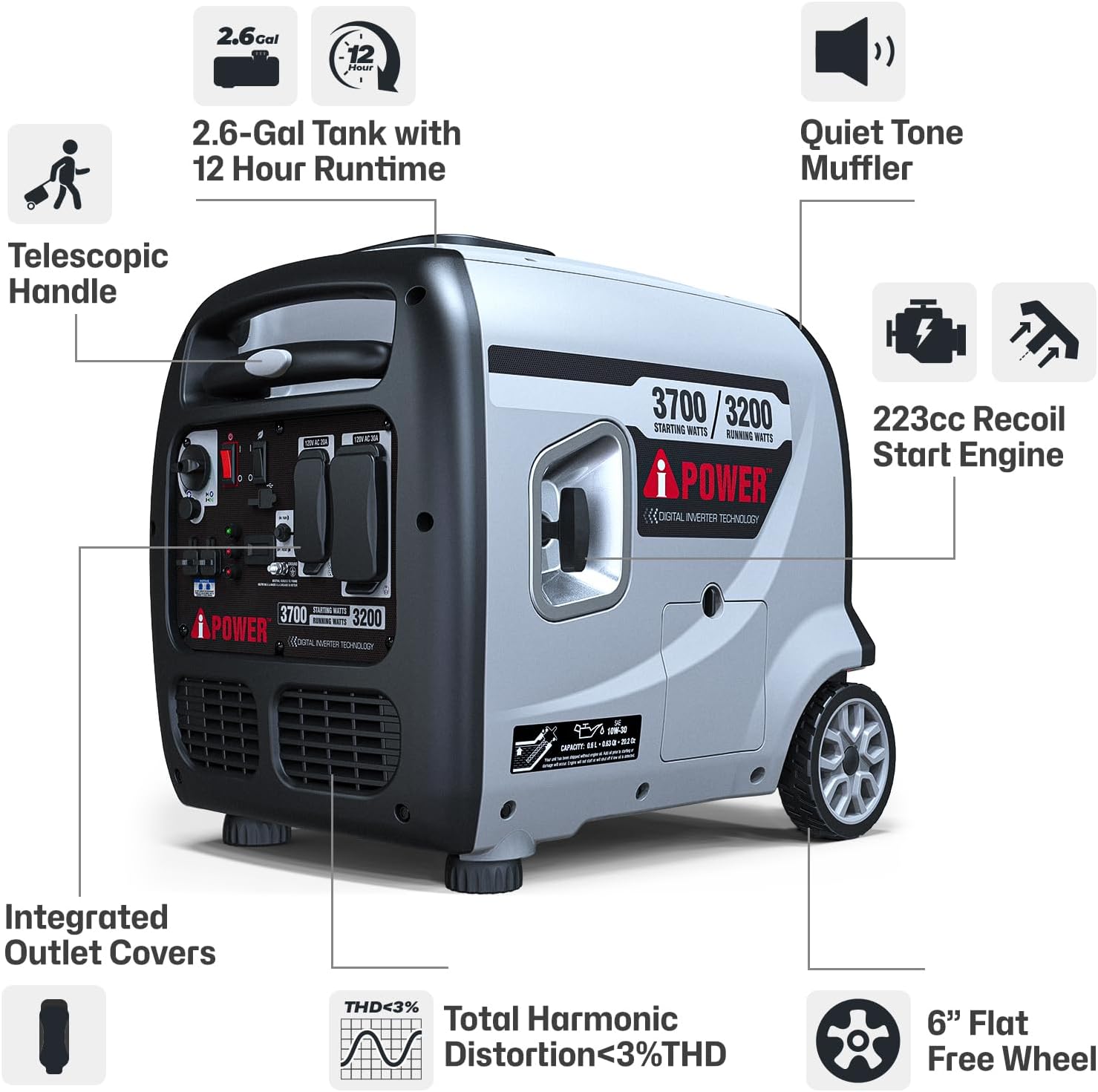
Image: A detailed diagram illustrating the main features and components of the AP3700i generator, such as the telescopic handle, fuel tank, engine, and control panel.
- Motor: 223cc OHV 4-cycle engine provides reliable power.
- Depósito de combustible: 2.6-gallon capacity for extended run times.
- Panel de control: Centralized interface for power outlets, indicator lights, and switches.
- Telescopic Handle & Wheels: Para facilitar o transporte e a mobilidade.
- Silenciador: Designed for quiet operation.
- Integrated Outlet Covers: Protect outlets from dust and debris.
Detalles do panel de control
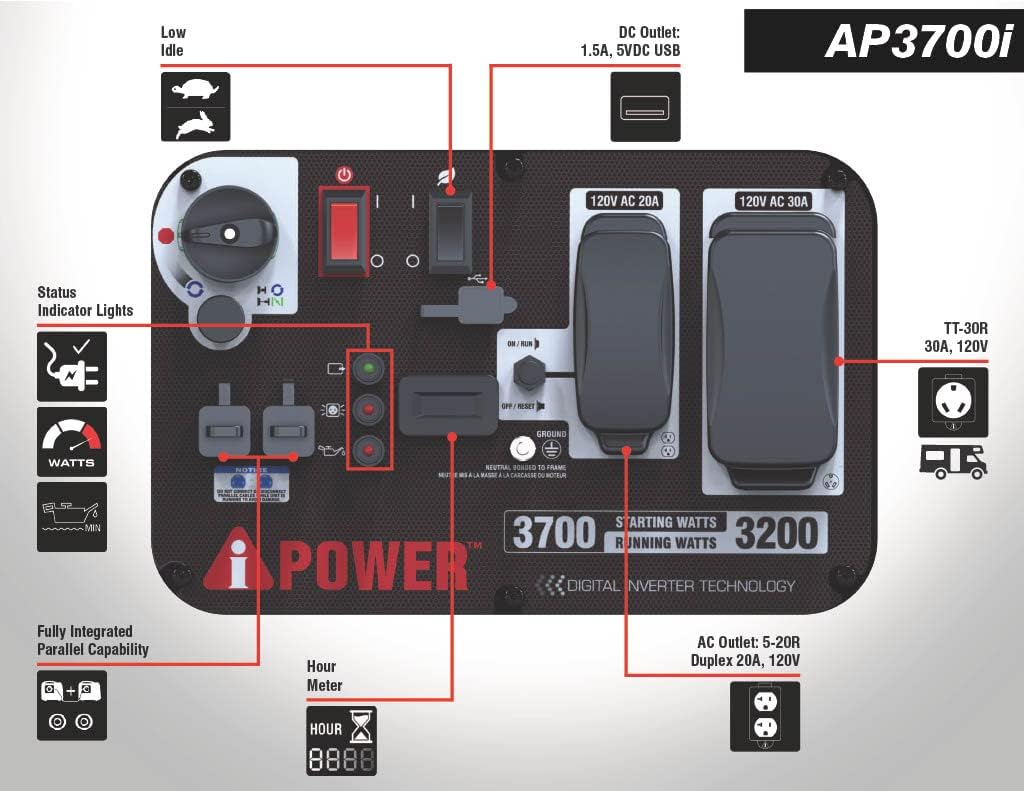
Image: A close-up diagram of the AP3700i control panel, clearly labeling all outlets, switches, and indicator lights for user reference.
- Low Idle Switch (Eco-Mode): Reduces engine speed for lighter loads, saving fuel and reducing noise.
- Luces indicadoras de estado: Indicate output, overload, and low oil conditions.
- Contador de horas: Tracks engine run time for maintenance scheduling.
- USB Outlets (2x 2.4A 5VDC): Para cargar pequenos dispositivos electrónicos.
- Tomas de CA: 1x Duplex 5-20R 20A 120VAC and 1x L5-30R 30A 120VAC Twist Lock (RV Ready).
- Parallel Connectivity Port: Allows connection of two compatible generators for increased power.
4. Configuración
Follow these steps for initial setup before operating your generator:
- Desembalaxe: Carefully remove the generator from its packaging. Inspect for any damage. Ensure all included accessories (oil funnel, spark plug wrench, etc.) are present.
- Engadir aceite de motor: The engine is shipped without oil. Place the generator on a level surface. Remove the oil fill cap/dipstick. Using the provided funnel, slowly add 10W-30 engine oil until it reaches the upper mark on the dipstick. Do not overfill. (Capacity: approximately 0.6 quarts).
- Engadir combustible: Ensure the generator is off and cool. Open the fuel tank cap. Slowly add fresh, unleaded gasoline (minimum 87 octane) to the fuel tank. Do not fill above the red indicator ring inside the tank. Securely close the fuel cap. (Tank Volume: 2.6 Gallons).
- Conexión a terra: Connect a grounding wire from the generator's grounding terminal to a suitable ground source, as per local electrical codes.

Image: A person demonstrating the portability of the A-iPower AP3700i generator, easily moving it with its integrated telescopic handle and wheels.
5. Instrucións de funcionamento
Follow these steps to safely start and operate your generator:
- Preparación: Ensure the generator is on a level, outdoor surface, away from combustible materials and at least 20 feet from any building openings. Check oil and fuel levels.
- Procedemento de inicio:
- Xire a válvula de combustible á posición "ON".
- Xire a chave do motor á posición "ON".
- Pull the choke lever to the 'CHOKE' position (if the engine is cold).
- Firmly pull the recoil starter handle until the engine starts. Allow the engine to run for a few seconds.
- Slowly push the choke lever to the 'RUN' position.
- Conexión de dispositivos eléctricos: Once the engine is running smoothly and the green 'Output Indicator' light is on, you can connect your electrical devices to the appropriate outlets. Do not exceed the generator's running wattage (3200W).
- Eco-Mode Operation: For lighter loads, activate the 'Eco-Mode' switch. This reduces engine speed, saving fuel and lowering noise levels. The engine will automatically adjust speed based on load demand.
- Operación en paralelo: This generator is equipped with a parallel connectivity port. Refer to the full manual for instructions on connecting two compatible A-iPower inverter generators for increased power output.
- Apagado:
- Desconectar todos os dispositivos eléctricos.
- Xire o interruptor do motor á posición "OFF".
- Xire a válvula de combustible á posición "OFF".

Image: The AP3700i generator providing power to a home, illustrating its capability to run essential household appliances.

Image: The AP3700i generator in a camping setting, demonstrating its use for powering outdoor and recreational equipment.

Image: The AP3700i generator providing power for heavy-duty tools, showcasing its versatility for work and DIY projects.
6. Mantemento
Regular maintenance ensures optimal performance and longevity of your generator. Always perform maintenance with the engine off and cool.
- Aceite de motor: Comprobe o nivel de aceite antes de cada uso. Cambie o aceite despois das primeiras 20 horas de funcionamento, despois cada 100 horas ou anualmente, o que ocorra primeiro.
- Filtro de ar: Inspect every 50 hours or monthly. Clean or replace if dirty.
- Buxía: Inspect and clean every 100 hours or annually. Replace if worn or damaged.
- Sistema de combustible: For long-term storage (over 30 days), drain the fuel tank and carburetor, or use a fuel stabilizer to prevent fuel degradation.
- Limpeza: Manteña o xerador limpo e libre de residuos. Use o anuncioamp cloth to wipe down exterior surfaces.
Refer to the complete maintenance schedule in the full owner's manual for detailed instructions and additional maintenance tasks.
7 Solución de problemas
Esta sección aborda problemas comúns que podes atopar co teu xerador.
| Problema | Causa posible | Solución |
|---|---|---|
| O motor non arrancará | Baixo nivel de combustible Baixo nivel de aceite do motor Interruptor do motor OFF Válvula de combustible OFF Bujía ensuciada Incorrect choke position | Engade combustible fresco Engade aceite para o motor Acende o interruptor do motor Turn fuel valve ON Limpar ou substituír a bujía Adjust choke for starting (CHOKE for cold, RUN for warm) |
| Sen saída de enerxía | O interruptor automático disparou Sobrecarga Eco-mode with heavy load | Restablecer o interruptor automático Reducir a carga conectada Turn off Eco-mode for heavy loads |
| O motor funciona áspero | Combustible rancio Filtro de aire sucio Bujía ensuciada | Baleirar e reencher con combustible novo Limpar ou substituír o filtro de aire Limpar ou substituír a bujía |
For other issues, consult the detailed troubleshooting guide in the full owner's manual or contact customer support.
8. Especificacións
Key technical specifications for the A-iPower AP3700i Portable Inverter Generator:

Image: A visual representation of the A-iPower AP3700i generator's dimensions and weight for planning storage and transport.
| Especificación | Valor |
|---|---|
| Nome do modelo | AP3700i |
| Marca | A-iPower |
| Comezando Wattage | 3700 vatios |
| Correndo Wattage | 3200 vatios |
| Tipo de motor | 223cc OHV 4-Stroke |
| Tipo de combustible | Gasolina |
| Volume do tanque | 2.6 litros |
| Run Time (at 50% load) | 7 horas |
| Distorsión harmónica total (THD) | <3 % |
| Puntos de venda | 1x L5-30R 30A 120VAC Twist Lock, 1x Duplex 5-20R 20A 120VAC, 2x USB 2.4A 5VDC |
| Dimensións do produto (L x W x H) | 26" x 21.7" x 23" |
| Peso do elemento | 103.6 libras |
| Sistema de ignición | Inicio de retroceso |
9. Garantía e soporte
This A-iPower generator comes with a limited warranty. Please refer to the warranty card included with your product for specific terms and conditions regarding coverage and duration.
For technical assistance, parts, or warranty inquiries, please contact A-iPower Customer Support. Keep your model number (AP3700i) and serial number ready when contacting support for faster service.