
Walfront WALFRONTnvmfsr1ioe
Upoty 4-in-1 Fiber OTDR & Power Meter User Manual
Model: WALFRONTnvmfsr1ioe
Brand: Walfront
1. Introdución
This manual provides comprehensive instructions for the Upoty 4-in-1 Fiber OTDR & Power Meter, a portable fiber optic testing device. This versatile instrument integrates an Optical Time Domain Reflectometer (OTDR), Visual Fault Locator (VFL), Optical Power Meter (OPM), and Optical Light Source (OLS) into a single unit, designed for efficient fiber network construction, fault identification, length measurement, and power loss calculation.
As características principais inclúen:
- Wide application for network construction, optical fiber breakpoint identification, optical cable length measurement, and relative optical power loss calculation.
- Durable ABS plastic housing for various environments.
- Optical power meter with 800-1650nm wavelength range, supporting 6 calibration wavelengths and a measurement range of -50~+26dBm.
- Equipped with a USB data interface, built-in 4400mAh lithium battery, and a 3.97-inch 800x480 IPS color touchable screen for easy operation.
- Portable design for practical multiple usages.
2. Configuración e uso inicial
2.1 Desembalaxe e compoñentes
Desembala con coidado todos os compoñentes da caixa. Comprobe que estean presentes todos os elementos que se indican a continuación:
- Upoty 4-in-1 Fiber OTDR & Power Meter Mainframe
- Cargador
- Instrument Bag
- Correa traseira
- Adaptador OTDR SC
- OPM SC Adapter
- Manual de instrucións (este documento)
- CD-ROM
- Cable de datos USB
- Cleaning Cotton Swabs

Figura 2.1: Máisview of the Upoty 4-in-1 Fiber OTDR & Power Meter and its included accessories.
Para obter unha guía visual sobre o desembalaxe e a configuración inicial, consulta o vídeo a continuación:
Vídeo 2.1: Desempaquetado e máisview of the Upoty 4-in-1 Fiber OTDR & Power Meter components. This segment demonstrates the contents of the product packaging, including the main unit, charger, and various accessories.
2.2 Carga do dispositivo
The device is equipped with a built-in 4400mAh lithium battery. Before first use, ensure the device is fully charged. Connect the provided charger to the device's charging port and plug it into a 100-240V AC power outlet. The charging indicator will illuminate during charging and turn off when fully charged.
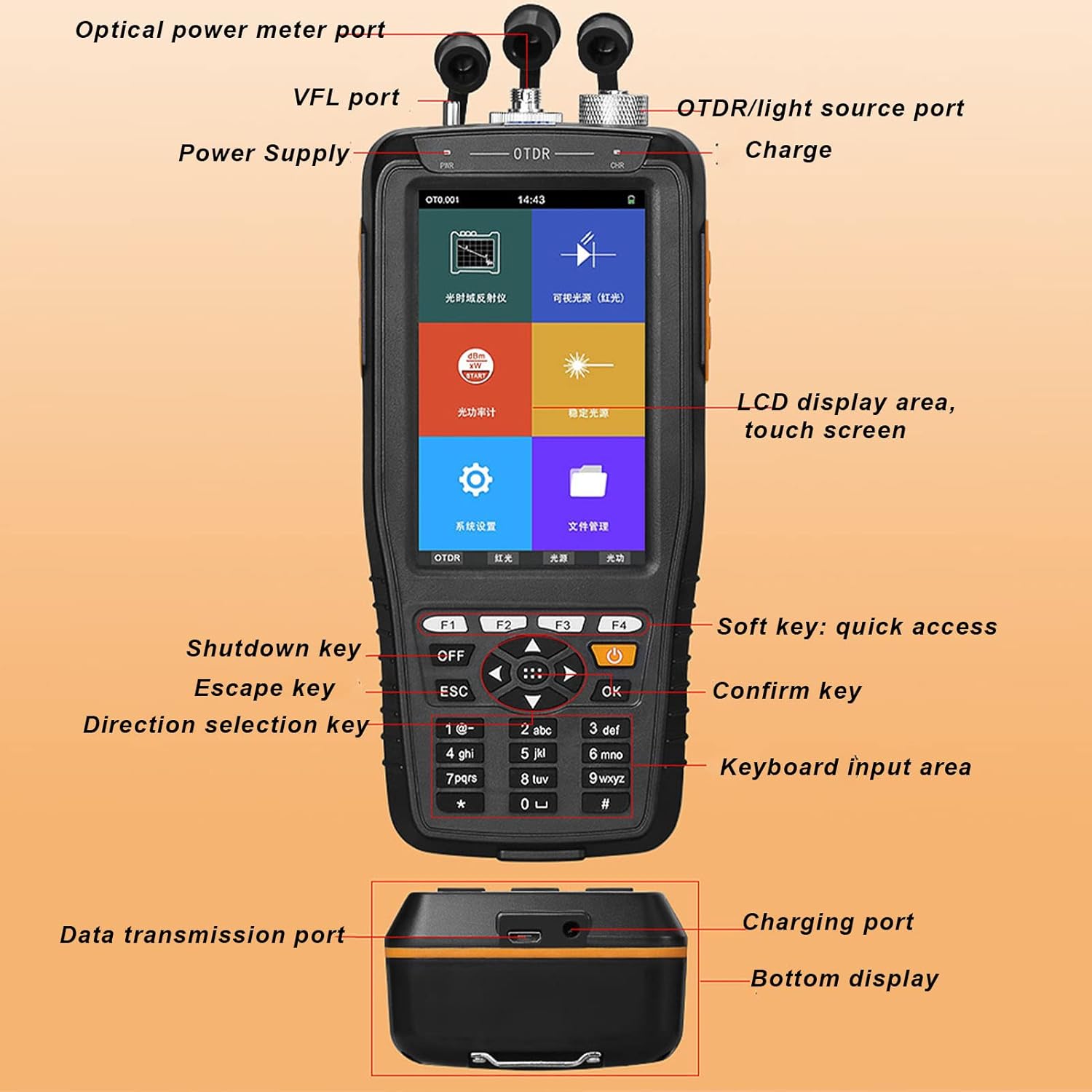
Figure 2.2: The device's battery compartment, highlighting the 4400mAh lithium battery.
2.3 Connecting Adapters
The OTDR and OPM ports support SC/FC adapters. Ensure the correct adapter is securely connected for accurate measurements. The VFL port is compatible with a 2.5mm interface.
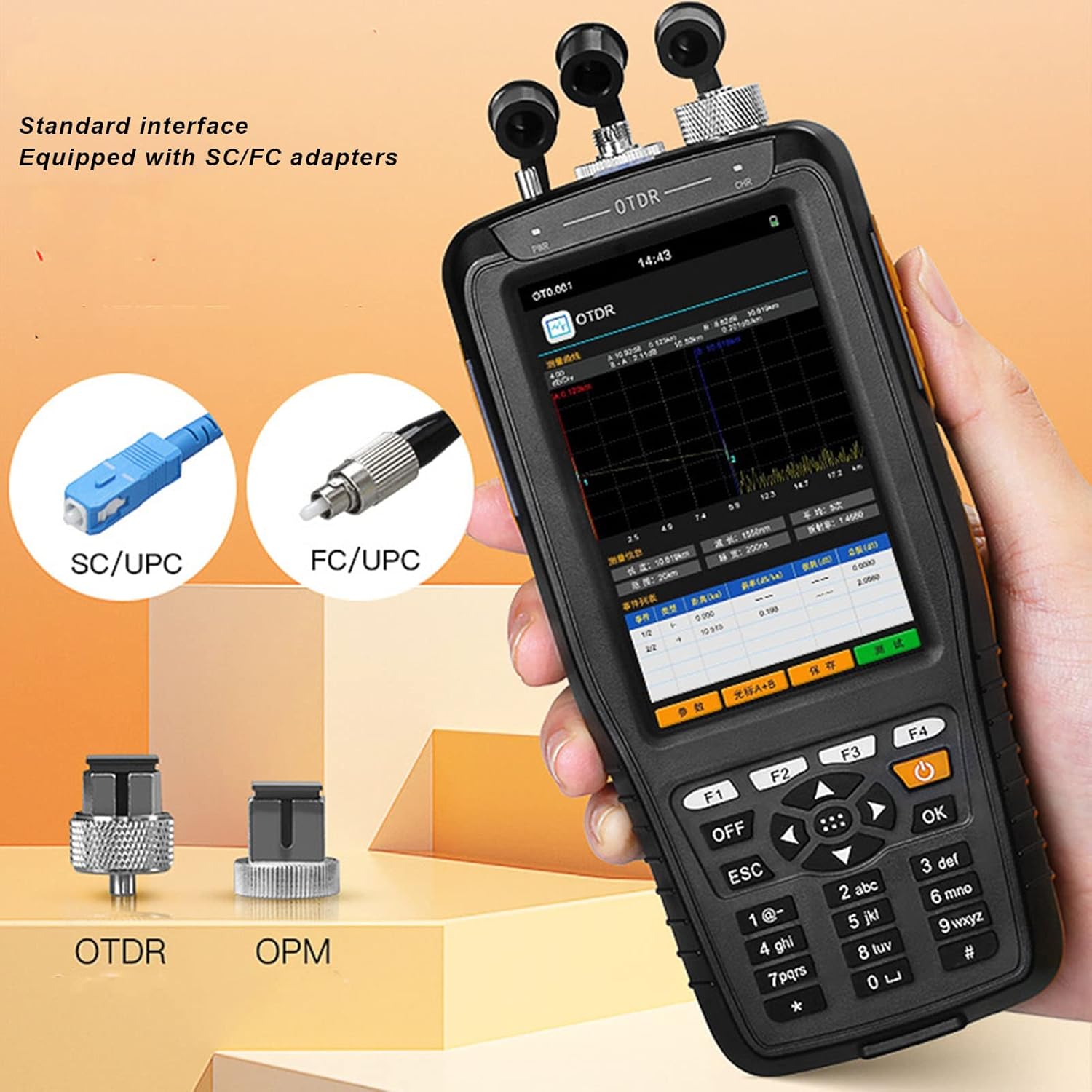
Figure 2.3: Standard interface adapters for the OTDR and OPM ports, showing SC/UPC and FC/UPC types.
3. Instrucións de funcionamento
3.1 dispositivo sobreview e Navegación
The device features a 3.97-inch 800x480 IPS color touchable screen and a physical keypad for navigation. You can interact with the device using either the touch screen or the physical buttons.
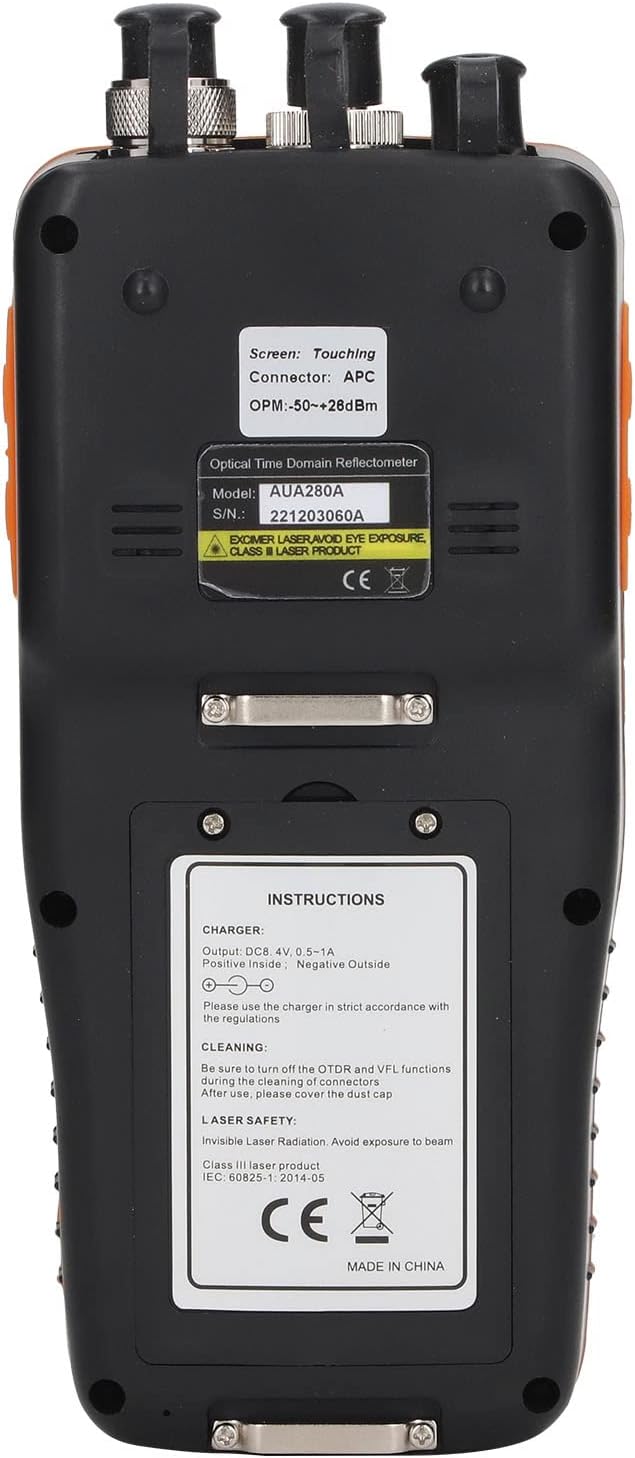
Figura 3.1: detallada view of the device's interface and ports.
3.2 OTDR Function
The OTDR (Optical Time Domain Reflectometer) function is used to characterize optical fibers, measure fiber length, and locate faults. To use the OTDR function, select "OTDR" from the main menu. Ensure the fiber is properly connected to the OTDR port. The device will display a trace of the fiber, showing events like splices, connectors, and breaks.

Figure 3.2: Main menu of the device, showing access to various functions.
Watch the video below for a demonstration of the OTDR function:
Video 3.1: Demonstration of the OTDR test function, showing how to initiate a test and interpret the fiber trace.
3.3 Función do localizador visual de fallos (VFL)
The VFL function emits a visible red laser light into the fiber, allowing for quick identification of breaks, bends, or poor connections over short distances. Select "VFL" from the main menu and connect the fiber to the VFL port. The red light will be visible at the fault location.

Figure 3.3: Multi-function display highlighting the VFL (Red Light) capability.
See the VFL function in action:
Video 3.2: Demonstration of the Visual Fault Locator (VFL) function, showing how the red light helps identify fiber faults.
3.4 Función do medidor de potencia óptica (OPM)
The OPM measures the optical power of a fiber optic signal. Select "OPM" from the main menu. The device supports 6 calibration wavelengths (850nm, 1300nm, 1310nm, 1490nm, 1550nm, 1625nm) and has a measurement range of -50~+26dBm. Ensure the correct wavelength is selected for accurate readings.
Observe the OPM function demonstration:
Video 3.3: Demonstration of the Optical Power Meter (OPM) function, showing how to select wavelengths and read power measurements.
3.5 Optical Light Source (OLS) Function
The OLS provides a stable light source for testing fiber optic cables, often used in conjunction with an OPM for attenuation measurements. Select "OLS" from the main menu. The light source offers optional 1550nm wavelength.
See the OLS function in operation:
Video 3.4: Demonstration of the Stable Light Source (OLS) function, showing wavelength selection.
3.6 Xestión de datos
The device supports data saving in SOR format and allows for keyboard input to edit file names and line numbers. You can access saved data through the "File" menu. The USB data interface allows for data transmission to a computer.

Figura 3.4: Arriba view of the device showing the various ports for fiber connections.
4. Mantemento
4.1 Limpeza
Regular cleaning of the optical ports and connectors is crucial for accurate measurements and device longevity. Use the provided cleaning cotton swabs or other approved fiber optic cleaning tools. Always turn off the OTDR and VFL functions before cleaning to prevent eye exposure to laser radiation. After cleaning, ensure to cover the dust caps on all ports.

Figure 4.1: Back panel of the device with important instructions, including cleaning guidelines.
4.2 Coidado coa batería
To maximize battery life, avoid fully discharging the battery frequently. Recharge the device when the battery level is low. If the device will not be used for an extended period, charge it to approximately 50% and store it in a cool, dry place.
4.3 Coidados xerais
Store the device in its instrument bag when not in use to protect it from dust and physical damage. Avoid exposing the device to extreme temperatures or humidity.
5 Solución de problemas
This section provides solutions to common issues you might encounter with your Upoty 4-in-1 Fiber OTDR & Power Meter.
| Problema | Causa posible | Solución |
|---|---|---|
| O dispositivo non se acende. | Batería baixa; Botón de acendido non premido correctamente. | Carga o dispositivo completamente. Mantén premido o botón de acendido/acendido durante uns segundos. |
| Inaccurate OPM/OTDR readings. | Dirty optical connectors; Incorrect wavelength selected; Damaged fiber. | Clean all optical connectors. Ensure the correct wavelength is selected for OPM. Inspect the fiber for damage. |
| VFL light is dim or not visible. | Dirty VFL port; Fiber not properly connected; VFL function not activated. | Clean the VFL port. Ensure the fiber is securely connected. Activate the VFL function from the menu. |
| A pantalla táctil non responde. | Fallo temporal do software; Interferencia do protector de pantalla. | Restart the device. If a screen protector is installed, ensure it is properly applied or try removing it temporarily. Use physical buttons if touch is completely unresponsive. |
Se o problema persiste despois de intentar estas solucións, póñase en contacto co servizo de atención ao cliente para obter máis axuda.
6. Especificacións
| Característica | Detalle |
|---|---|
| Número de modelo | WALFRONTnvmfsr1ioe |
| Fonte de enerxía | Battery Powered (Built-in 4400mAh Lithium Battery) |
| Min. Vol. Operativotage | 100 voltios (CA) |
| Clasificación de temperatura superior | 85 graos centígrados |
| Tipo de medida | Optical Power Meter, OTDR, VFL, OLS |
| Pantalla | 3.97-inch 800x480 IPS Color Touchable Screen |
| Wavelength Range (OPM) | 800-1650 nm |
| Measurement Range (OPM) | -50~+26dBm |
| OTDR Test Distance | Up to 60km (as per product images) |
| Potencia de saída VFL | 10mW (as per product images) |
| Lonxitude de onda da fonte de luz | 1550nm (optional) |
| Dimensións do produto | 8.62 x 7.36 x 3.9 polgadas (dimensións do paquete) |
| Peso do elemento | 1.85 libras |
| País de Orixe | China |
Figura 6.1: Dimensións do dispositivo.
7. Garantía e soporte
For information regarding warranty coverage, technical support, or service, please refer to the official Walfront websitio web ou póñase en contacto directamente co seu servizo de atención ao cliente. Os datos de contacto adoitan aparecer na embalaxe do produto ou nas canles en liña oficiais do fabricante.
Ask a question about this manual
Ask about setup, troubleshooting, compatibility, parts, safety, or missing instructions. Manuals+ will review the question and use this page’s manual context to help answer it.