
Produto rematadoview
The Clarion JM-Carry On is a portable speaker designed for versatile audio playback. It features a wired microphone input, multi-color light effects, and an in-built battery for on-the-go use. Its compact and portable design allows for easy transport and setup in various environments.

Image: Clarion JM-Carry On Portable Bluetooth Speaker shown with its wired microphone.
Vídeo: Un overview of the Clarion Portable Bluetooth Speaker, highlighting its features and audio performance.
Contido do paquete
Marque a caixa para os seguintes elementos:
- Clarion JM-Carry On Portable Bluetooth Speaker
- Micrófono con fíos
- Cable de carga
Configuración inicial
- Cargando o altofalante: Connect the provided charging cable to the speaker's charging port and a suitable power source. The LED indicator will show charging status. Ensure the speaker is fully charged before first use for optimal battery life.
- Encendido/apagado: Locate the power switch on the speaker. Slide it to the 'ON' position to power on the device. Slide it to 'OFF' to power off.
- Emparellamento Bluetooth:
- Acenda o altofalante. Entrará automaticamente no modo de emparellamento Bluetooth, o que se indicará cun LED intermitente.
- No teu teléfono intelixente ou tableta, activa o Bluetooth e busca os dispositivos dispoñibles.
- Select "Clarion JM-Carry On" from the list. A confirmation tone will sound upon successful pairing.
- Connecting Wired Microphone: Insert the wired microphone's plug into the designated microphone input jack on the speaker.
Guía de operación
- Selección de modo: Use the 'Mode' button to switch between Bluetooth (BT), FM Radio, USB, and AUX input modes.
- Modo Bluetooth: Once paired, audio from your connected device will play through the speaker. Use your device or the speaker's controls for volume and track navigation.
- Modo de radio FM: In FM mode, press and hold the 'Play/Pause' button to auto-scan and save available radio stations. Use the 'Next/Previous' buttons to navigate through saved stations.
- Modo USB/AUX: Insert a USB drive into the USB port for MP3 playback or connect an external audio device via the AUX input using a 3.5mm audio cable.
- TWS (True Wireless Stereo) Functionality: To connect two JM-Carry On speakers for stereo sound, ensure both speakers are in Bluetooth mode and not connected to any device. Press and hold the TWS button on one speaker until you hear a pairing tone. The two speakers will connect, and then you can pair your device to the primary speaker.
- Control de son: Adjust the master volume using the main rotary knob. Separate controls may be available for microphone volume and echo effects.
- Efectos de luz LED: The speaker features multi-color LED light effects. Use the dedicated 'Light' button to cycle through different light modes or turn them off.
Coidados e Mantemento
- Limpeza: Usa un pano suave e seco para limpar o exterior do altofalante. Non empregues produtos de limpeza abrasivos nin disolventes.
- Almacenamento: Garde o altofalante nun lugar fresco e seco, lonxe da luz solar directa e de temperaturas extremas.
- Coidado da batería: Para prolongar a duración da batería, evite descargala completamente con frecuencia. Cargue o altofalante regularmente, mesmo se non o usa durante períodos prolongados.
- Resistencia á auga: Este altofalante non é impermeable. Evite a exposición á auga ou a unha humidade elevada.
Guía de resolución de problemas
| Problema | Solución |
|---|---|
| O altofalante non se acende. | Ensure the battery is charged. Connect the charging cable and try again. Check the power switch position. |
| Non hai son do altofalante. | Check the volume level on both the speaker and the connected device. Ensure the correct input mode (BT, AUX, USB) is selected. |
| Falla o emparellamento Bluetooth. | Ensure the speaker is in pairing mode. Turn off and on Bluetooth on your device. Move the device closer to the speaker. Disconnect from other Bluetooth devices. |
| O micrófono non funciona. | Ensure the microphone is securely plugged into the correct jack. Check the microphone volume control on the speaker. |
| A recepción da radio FM é deficiente. | Adjust the speaker's position. Extend any external antenna if available. |
Especificacións técnicas
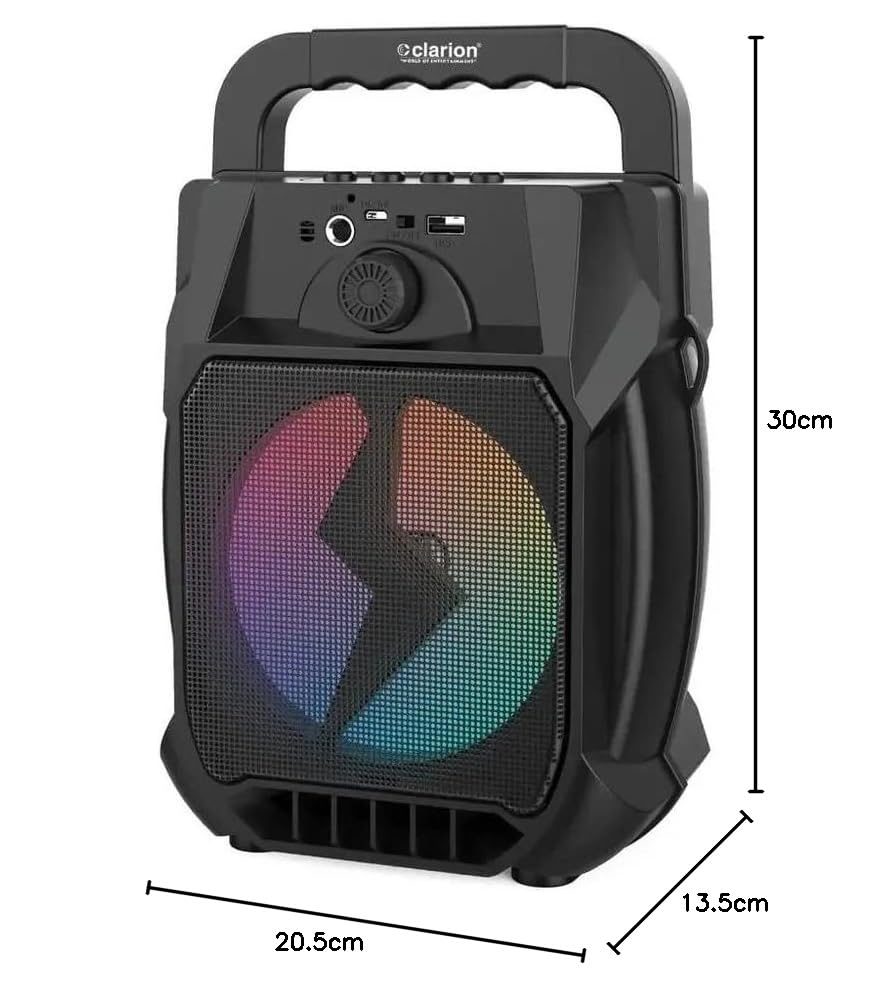
Image: Clarion JM-Carry On Portable Bluetooth Speaker with its dimensions indicated.
- Marca: Clarion (Generic)
- Nome do modelo: JM-Carry On
- Potencia de saída máxima do altofalante: 20 vatios RMS
- Tecnoloxía de conectividade: Auxiliar, Bluetooth, USB
- Modo de saída de audio: Estéreo
- Tipo de montaxe: Piso de pé
- Tipo de altofalante: Satélite
- Características do produto: Built-In Microphone, Radio, Subwoofer, Multi-color Light Effect, Sound Controller
- Método de control: Toca
- Woofer Driver Diameter: 6.5 polgadas
- Duración media da batería: 3-4 horas
- Capacidade da batería: 1.2 Amp Horas (3.7 V)
- Dimensións do artigo (D x W x H): 13.5 x 20.5 x 30 centímetros
- Dispositivos compatibles: Smartphone, Tablet
- Fonte de enerxía: Alimentado por batería
Garantía e Atención ao Cliente
This Clarion JM-Carry On Portable Bluetooth Speaker comes with a 1 ano de garantía on the speaker unit from the date of purchase. Please retain your purchase receipt as proof of warranty.
For any technical assistance, troubleshooting, or warranty claims, please contact Clarion Computers customer support. Refer to your purchase documentation for specific contact details or visit the official Clarion Computers websitio para obter información de soporte.
Note: The warranty typically covers manufacturing defects and does not cover damage caused by misuse, accidents, unauthorized modifications, or normal wear and tear.