
Edifier CX7
Manual do usuario do sistema de entretemento doméstico Edifier CX7 Active 2.1
Modelo: CX7
Introdución
The Edifier CX7 is an active 2.1 home entertainment system designed to deliver high-quality audio for various devices, including televisions, personal computers, and notebooks. This system features Bluetooth V5.0 connectivity, an 8-inch subwoofer, and an infrared remote control for convenient operation. This manual provides essential information for setting up, operating, and maintaining your CX7 system.
Contido do paquete
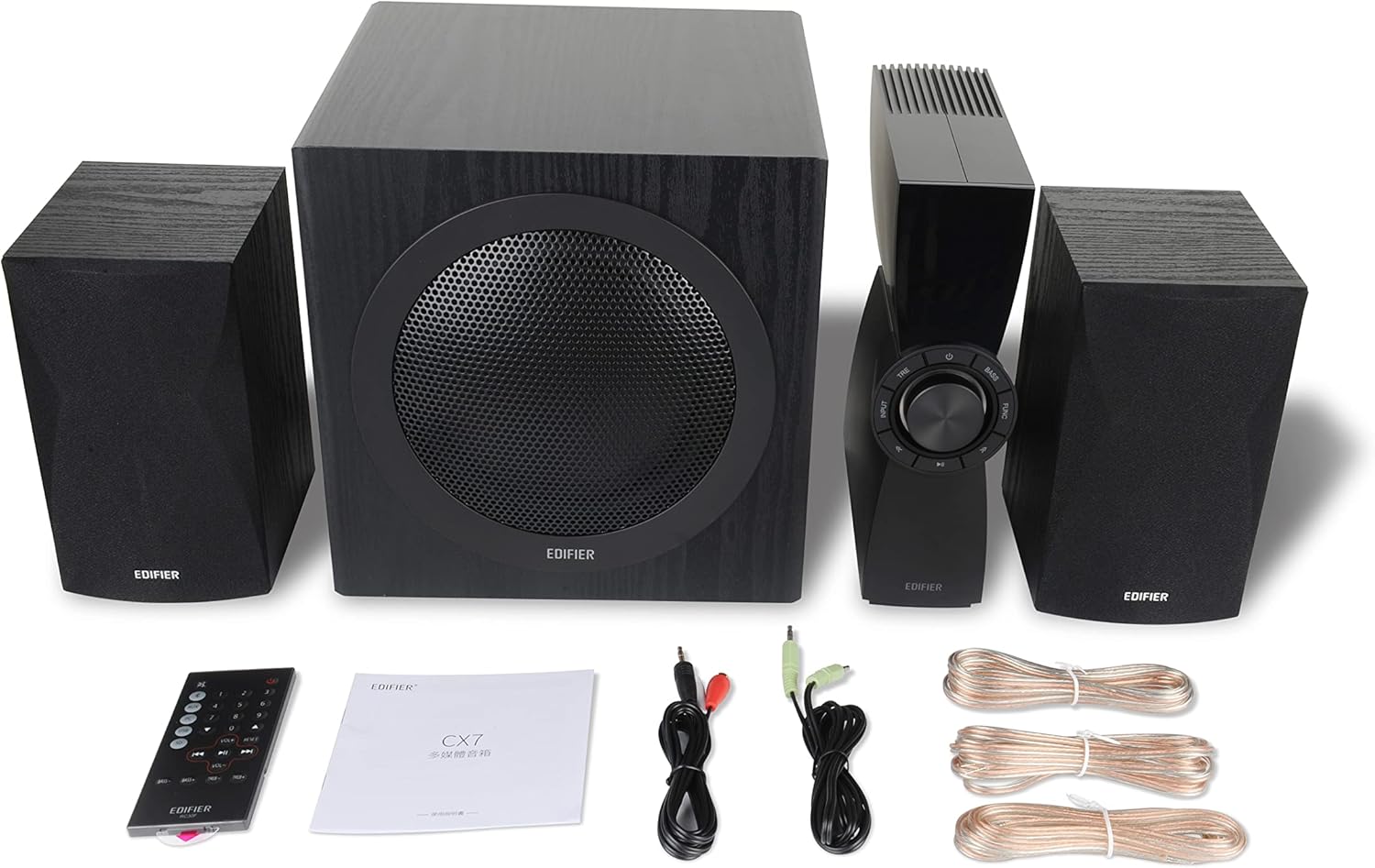
Figure 1: Edifier CX7 System Components
Verifique que todos os elementos que se indican a continuación estean incluídos no seu paquete:
- Subwoofer (1)
- Altofalantes satélite (2)
- Control Unit (1)
- Infrared Remote Control (1)
- 3.5mm to RCA Audio Cable (1)
- RCA to RCA Audio Cable (1)
- Speaker Connection Cables (2)
- Manual de usuario (1)
Guía de configuración
1 Colocación
Position the subwoofer on the floor, preferably in a corner or near a wall for optimal bass response. Place the satellite speakers on either side of your listening area, equidistant from the listener, and at ear level if possible. Ensure the control unit is easily accessible.

Figure 2: Recommended System Placement
2. Conexión de altofalantes
Connect the satellite speakers to the speaker output terminals on the rear of the control unit using the provided speaker cables. Ensure correct polarity (red to red, black to black) for each speaker.
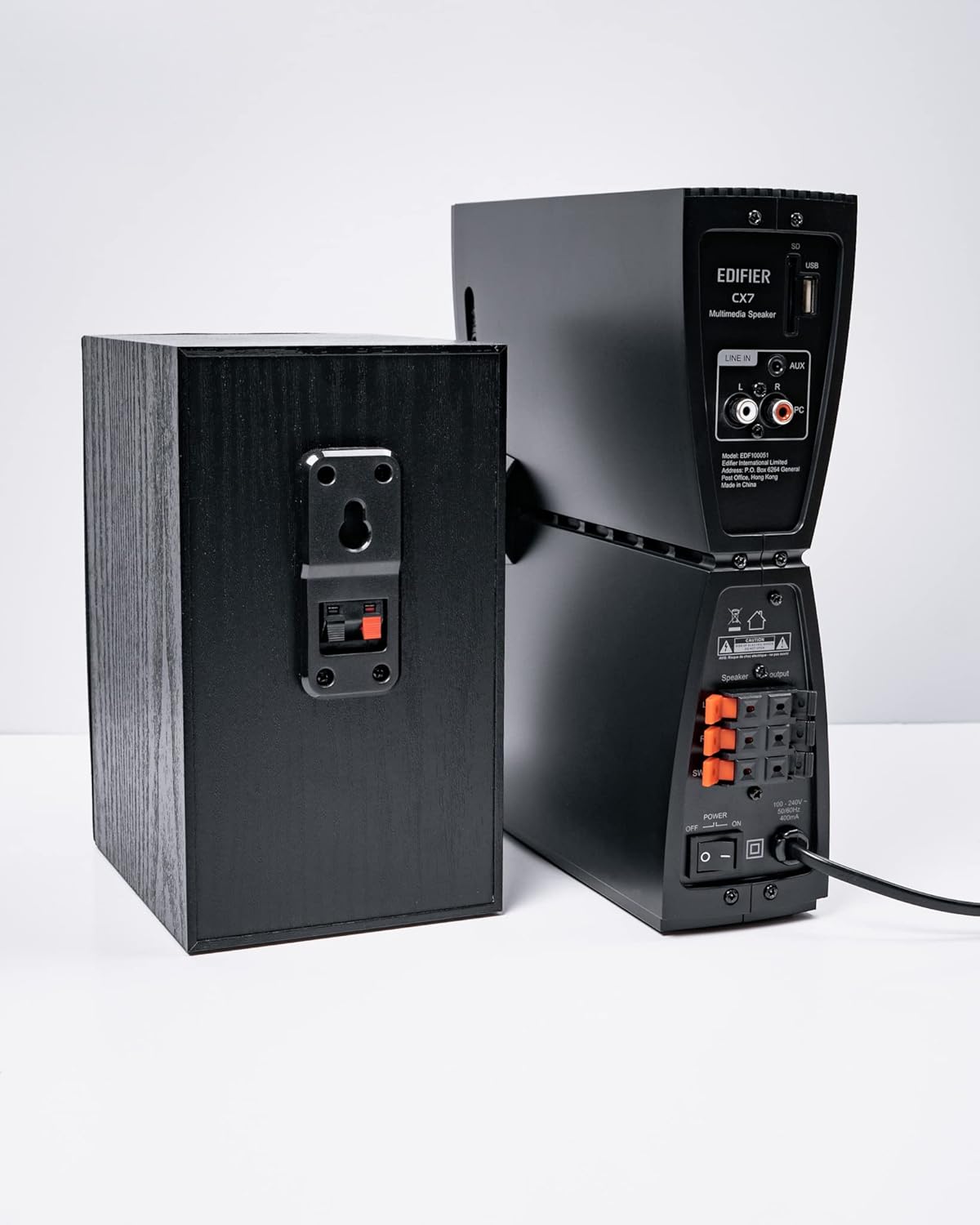
Figura 3: Conexións dos altofalantes
3. Conexión de fontes de son
The CX7 system supports multiple audio input options:
- Entrada AUX: Use the 3.5mm to RCA audio cable to connect devices like smartphones, tablets, or computers to the AUX input on the control unit.
- Entrada de PC: Use the RCA to RCA audio cable to connect your PC's audio output to the PC input on the control unit.
- Bluetooth: Para a conexión sen fíos, consulte a sección "Emparellamento Bluetooth" nas instrucións de funcionamento.
4. Conexión de alimentación
Connect the power cable to the control unit and then plug it into a standard wall outlet. Turn on the power switch located on the rear of the control unit.
Instrucións de funcionamento
1. Acendido/apagado
After connecting the power, press the power button on the control unit or the remote control to turn the system on or off. The display on the control unit will illuminate when powered on.

Figure 4: Control Unit Display
2. Selección de entrada
Press the "INPUT" button on the control unit or the remote control to cycle through available audio sources: AUX, PC, and Bluetooth. The selected input will be displayed on the control unit's screen.

Figure 5: Control Knob and Input Buttons
3. Control de volume
Rotate the large knob on the control unit clockwise to increase volume and counter-clockwise to decrease it. Alternatively, use the "VOL+" and "VOL-" buttons on the remote control.
4. Axuste de graves e agudos
Press the "BASS" or "TRE" (Treble) buttons on the control unit or remote control, then rotate the main knob to adjust the respective levels. The display will show the current bass/treble setting.
5. Emparellamento Bluetooth
- Select the Bluetooth input on the CX7 system. The display will show "BT" and flash, indicating it's in pairing mode.
- No teu dispositivo (teléfono intelixente, tableta, etc.), activa o Bluetooth e busca os dispositivos dispoñibles.
- Select "EDIFIER CX7" from the list of found devices.
- Once paired, the "BT" indicator on the CX7 display will stop flashing and remain solid.
To disconnect a Bluetooth device, press and hold the "FUNC" button on the control unit or the Bluetooth button on the remote control for a few seconds.
6. Funcións de control remoto

Figure 6: Infrared Remote Control
The remote control provides convenient access to all major functions:
- Potencia: Activa/desactiva o sistema.
- Selección de entrada: Cycles through AUX, PC, Bluetooth.
- Volume: Axusta o volume mestre.
- Graves/Agudos: Axusta os niveis de graves e agudos.
- Silenciar: Silencia/activa o audio.
- Controis de reprodución: Play/Pause, Previous/Next track (for Bluetooth mode).
Mantemento
- Limpeza: Use a soft, dry cloth to clean the surfaces of the speakers and control unit. Do not use liquid cleaners or abrasive materials.
- Ventilación: Ensure adequate ventilation around the control unit and subwoofer to prevent overheating. Do not block ventilation openings.
- Ambiente: Evite expoñer o sistema a temperaturas extremas, humidade, po ou luz solar directa.
- Apagado: If the system will not be used for an extended period, disconnect it from the power outlet.
Resolución de problemas
| Problema | Causa posible | Solución |
|---|---|---|
| Sen son |
|
|
| A conexión Bluetooth falla |
|
|
| Son distorsionado |
|
|
Especificacións
| Característica | Detalle |
|---|---|
| Nome do modelo | CX7 |
| Tipo de altofalante | Sistema de altofalantes 2.1 |
| Tecnoloxía de conectividade | Bluetooth |
| Tecnoloxía de comunicación sen fíos | Bluetooth V5.0 |
| Alcance Bluetooth | 10 metros |
| Modo de saída de audio | Envolvente |
| Potencia de saída máxima do altofalante | 69 vatios |
| Tecnoloxía de conectividade do subwoofer | Sen fíos |
| Diámetro do woofer | 8 polgadas |
| Material | Polipropileno |
| Cor | Negro |
| Dimensións do produto | 16.93" D x 17.72" W x 13.39" H |
| Peso do elemento | 29 libras (13.2 quilogramos) |
| Fonte de enerxía | Eléctrico con cable |
| Tipo de controlador | Control remoto |
| Usos recomendados | Para Televisores, Para Ordenadores, Para Smartphones ou Tablets |
Garantía e Soporte
Para obter información sobre a garantía e asistencia técnica, consulte a tarxeta de garantía incluída co produto ou visite o sitio web oficial de Edifier. websitio. Garde o recibo da compra como xustificante de compra para reclamacións de garantía.
Edificador Oficial Websitio: www.edifier.com
Ask a question about this manual
Ask about setup, troubleshooting, compatibility, parts, safety, or missing instructions. Manuals+ will review the question and use this page’s manual context to help answer it.