
Xiaomi Note 11 SE
Manual do usuario do teléfono intelixente Xiaomi Redmi Note 11 SE 5G + 4G LTE
Model: Note 11 SE (d73deecb-3476-4617-8b92-7e546165ac54)
Produto rematadoview
The Xiaomi Redmi Note 11 SE is a powerful smartphone designed for modern communication and multimedia. It features a MediaTek MT6833 Dimensity 700 Octa-core processor, a vibrant 6.5-inch display, and a robust 5000 mAh battery. This manual provides essential information for setting up, operating, maintaining, and troubleshooting your device.
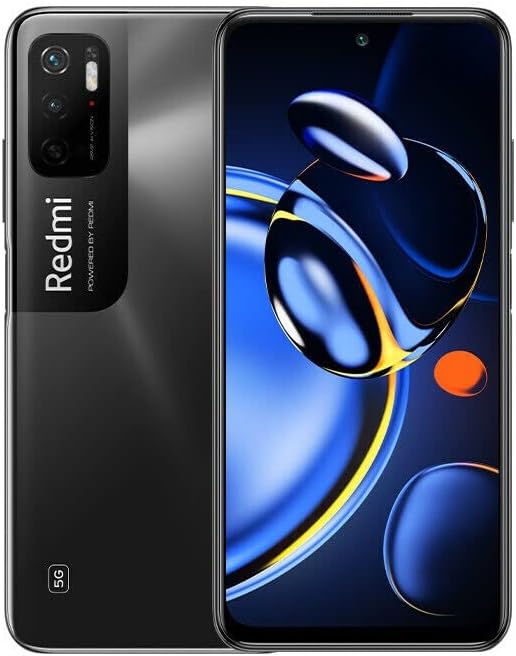
Figura 1: Parte dianteira e traseira view of the Xiaomi Redmi Note 11 SE smartphone.
Guía de configuración
Follow these steps to set up your new Xiaomi Redmi Note 11 SE smartphone.
1. Desembalaxe e Inspección Inicial
Carefully unbox your device. The package should include:
- Xiaomi Redmi Note 11 SE Smartphone
- Adaptador de alimentación
- Cable USB
- Fast Car Charger (included in bundle)
Inspect the phone for any physical damage before proceeding.
2. Inserción de tarxetas SIM
The Redmi Note 11 SE supports Dual Nano SIM cards. Locate the SIM card tray on the side of the device. Use the provided SIM ejector tool to open the tray. Insert your Nano SIM cards into the designated slots. Ensure the SIM cards are correctly oriented as shown in the diagram below. This device does not support an SD card.
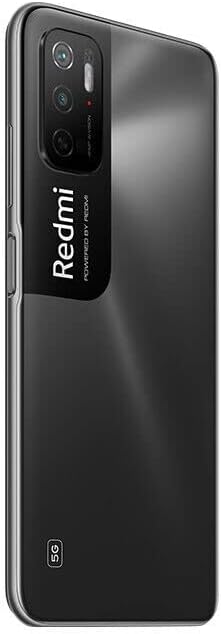
Figura 2: Lateral view of the smartphone, indicating the SIM card tray.
3. Cargando a batería
Before first use, fully charge the device battery. Connect the USB cable to the power adapter and then to the phone's charging port. Plug the power adapter into a wall outlet. The battery indicator on the screen will show charging progress. The device supports 18W fast charging.
4. Acendido e configuración inicial
Press and hold the Power button (located on the side) until the Xiaomi logo appears. Follow the on-screen prompts to complete the initial setup, including language selection, Wi-Fi connection, Google account setup, and fingerprint sensor registration (side-mounted).
Operando o seu dispositivo
This section covers the basic operations of your Xiaomi Redmi Note 11 SE.
1. Navegación e interface de usuario
The phone runs on Android 11 with MIUI 12.5. Navigate the interface using touch gestures. Swipe up from the bottom for the app drawer, swipe down from the top for notifications and quick settings. The 6.5-inch display provides ample space for interaction.
2. Chamadas e mensaxes
Use the Phone app to make calls. The device supports 4G VoLTE for high-quality voice calls over LTE networks. Use the Messaging app for SMS and MMS. Ensure your SIM card is active and has network coverage.
Nota importante sobre a compatibilidade da rede: Este dispositivo fará NON work on Verizon, AT&T, Boost, Cricket, Metro PCS, or any CDMA Carrier. It is designed for 4G VoLTE Worldwide Unlocked Dual Nano SIM usage.
3. Funcións da cámara
The Redmi Note 11 SE features a 48 MP + 2 MP dual rear camera system and an 8 MP front camera. Open the Camera app to capture photos and videos. Explore various modes such as Portrait, Night, and Pro mode for enhanced photography.
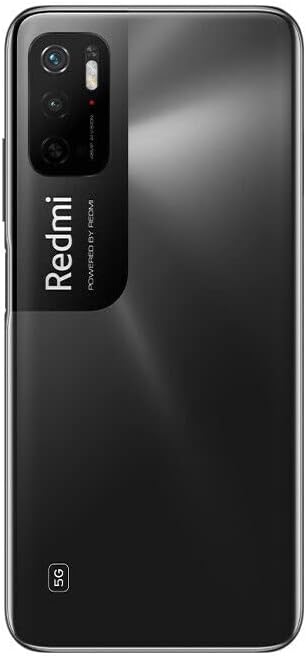
Figura 3: Traseira view of the smartphone, highlighting the camera module.
4. Conectividade
Your device supports 5G and 4G LTE cellular networks, Wi-Fi 802.11 a/b/g/n/ac (dual-band), Wi-Fi Direct, and hotspot functionality. Bluetooth connectivity is also available for pairing with accessories. GPS is integrated for location services.
5. Características de seguridade
The phone includes a side-mounted fingerprint sensor for quick and secure unlocking. You can also set up a PIN, pattern, or password for additional security.
Mantemento
Proper maintenance ensures the longevity and optimal performance of your smartphone.
1. Coidado da batería
- Evite expoñer o dispositivo a temperaturas extremas.
- Non deixes que a batería se descargue completamente con frecuencia.
- Empregue só os accesorios de carga orixinais ou certificados.
- The 5000 mAh Lithium Polymer battery is built-in and not user-replaceable.
2. Limpeza do dispositivo
Usa un pano suave e sen pelusa para limpar a pantalla e a carcasa do teléfono. Evita o uso de produtos químicos agresivos ou materiais abrasivos. Para manchas difíciles, lixeiramenteampEnxágüe o pano con auga ou cun limpador de pantallas deseñado para dispositivos electrónicos.
3. Actualizacións de software
Regularly check for and install system updates to ensure your device has the latest features, security patches, and performance improvements. You can usually find this option in the phone's Settings menu under "About phone" or "System update."
Resolución de problemas
This section addresses common issues you might encounter with your Xiaomi Redmi Note 11 SE.
1. O dispositivo non se acende
- Ensure the battery is charged. Connect the phone to the charger for at least 15 minutes.
- Manteña premido o botón de acendido durante 10-15 segundos para realizar un reinicio forzado.
2. Problemas de conectividade de rede
- Verify that your SIM card is correctly inserted and active.
- Check if you are within your carrier's coverage area.
- Reinicie o dispositivo.
- Go to Settings > SIM cards & mobile networks and ensure mobile data is enabled.
- Lembra: This phone is not compatible with Verizon, AT&T, Boost, Cricket, Metro PCS, or any CDMA networks.
3. Problemas de conexión wifi
- Ensure Wi-Fi is enabled on your phone and the router is working.
- Esquece a rede na configuración do wifi e volve conectar.
- Reinicia o teu enrutador Wi-Fi.
4. As aplicacións fallan ou conxélanse
- Pecha e volve abrir a aplicación.
- Borra a caché e os datos da aplicación en Configuración > Aplicacións.
- Asegúrate de que a aplicación estea actualizada á súa última versión desde Google Play Store.
- Reinicia o teu teléfono.
Especificacións
Detailed technical specifications for the Xiaomi Redmi Note 11 SE.

Figure 4: Smartphone display showing certification details and key specifications.
| Característica | Especificación |
|---|---|
| Nome do modelo | Note 11 SE |
| Dimensións | 161.8 x 75.3 x 8.9 mm |
| Peso | 190 gramos (6.7 onzas) |
| Sistema Operativo | Android 11, MIUI 12.5 |
| Procesador | MediaTek MT6833 Dimensity 700 Octa-core (2x2.2 GHz Cortex-A76 & 6x2.0 GHz Cortex-A55) |
| GPU | Mali-G57 MC2 |
| RAM | 4 GB |
| Almacenamento interno | 128 GB |
| Tamaño de visualización | 6.5 polgadas |
| Resolución de visualización | 1080 x 2400 píxeles |
| Cámara traseira | 48 MP + 2 MP |
| Cámara frontal | 8 MP |
| Capacidade da batería | 5000 mAh (polímero de litio) |
| Cargando | Carga rápida de 18 W |
| Conectividade | 5G, 4G LTE, Wi-Fi 802.11 a/b/g/n/ac (dual-band), Bluetooth, GPS |
| Sensores | Side-mounted Fingerprint, Accelerometer, Gyro, Proximity, Compass |
| Jack de audio | 3.5 mm |
| Tipo de SIM | Dual Nano SIM (No SD Slot) |
Garantía e Soporte
Para obter información sobre a garantía e asistencia técnica, consulte a páxina oficial de Xiaomi. websitio web ou póñase en contacto co servizo de atención ao cliente. Garde o comprobante de compra para reclamacións de garantía.
Fabricante: Xiaomi
For further assistance, visit the official Xiaomi Store: Tenda Xiaomi en Amazon
Ask a question about this manual
Ask about setup, troubleshooting, compatibility, parts, safety, or missing instructions. Manuals+ will review the question and use this page’s manual context to help answer it.