
1. Introdución
This manual provides comprehensive instructions for the setup, operation, maintenance, and troubleshooting of your HP Color LaserJet Pro 4201dn Printer. This printer is designed for small teams, offering fast color printing, automatic two-sided printing, and robust security features. It connects via Ethernet and USB, and does not support wireless connectivity.
2. Produto rematadoview
The HP Color LaserJet Pro 4201dn is a high-performance color laser printer built for efficiency and security in office environments. Key features include:
- Fast Color Printing: Up to 35 pages per minute.
- Impresión automática a dúas caras: For efficient paper usage.
- Seguridade avanzada: HP Wolf Pro Security protects your data and network.
- Impresión móbil: Print from various devices including PCs, tablets, and smartphones via supported applications.
- Conectividade por cable: Ethernet and USB ports for reliable connections.
2.1 Compoñentes da impresora


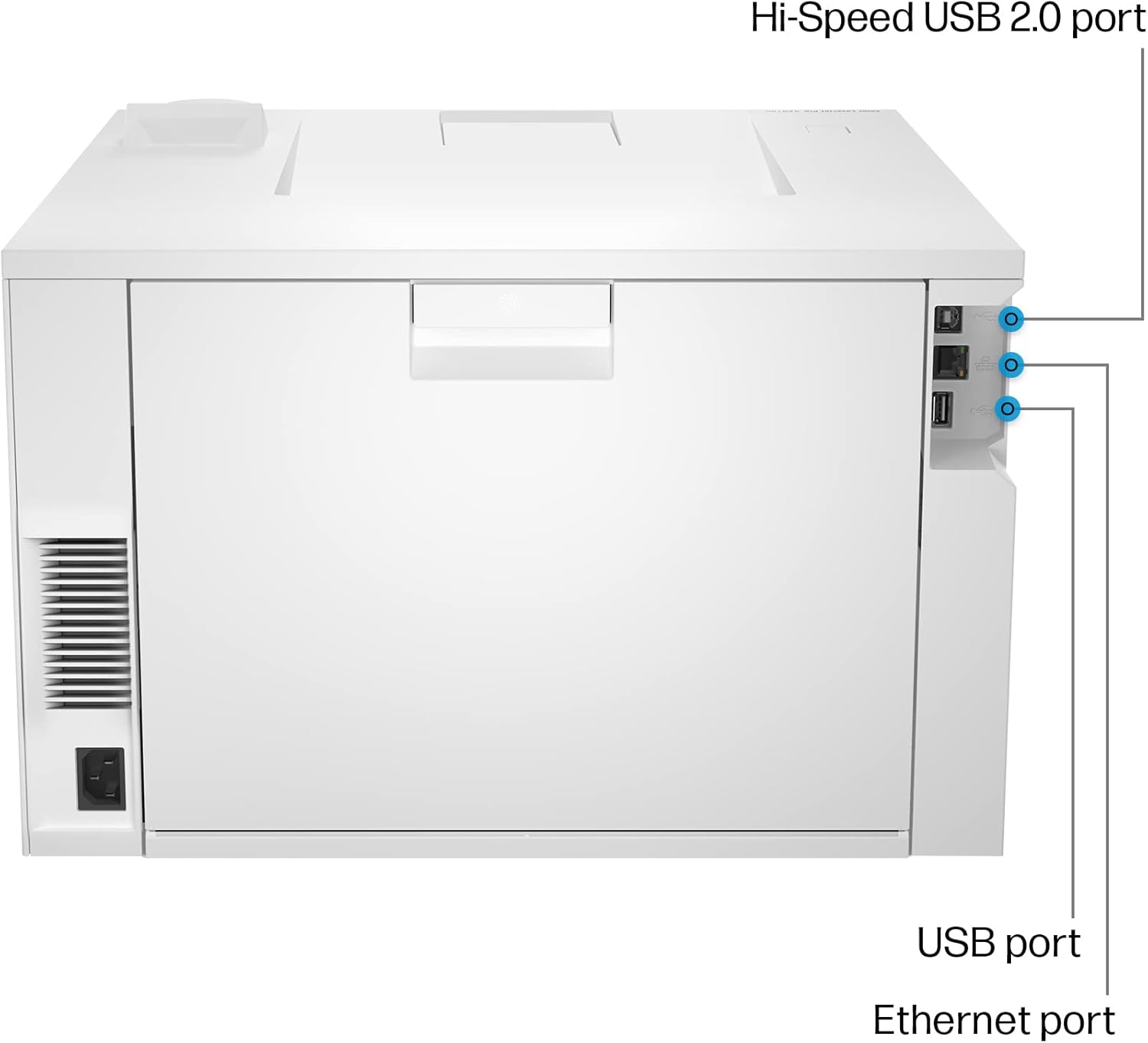
3. Configuración
3.1 Desembalaxe e inspección inicial
Carefully remove the printer from its packaging. Ensure all packing materials and tapes are removed from the exterior and interior of the printer. Verify that the following items are included:
- HP Color LaserJet Pro 4201dn Printer
- Pre-installed Black, Cyan, Magenta, and Yellow introductory toner cartridges
- Cable de alimentación
- Setup card and documentation

3.2 Conexión de alimentación
- Conecte o cable de alimentación á entrada de alimentación da impresora.
- Conecte o outro extremo do cable de alimentación a unha toma eléctrica conectada a terra.
- Press the power button, located on the top right of the front panel, to turn on the printer.
3.3 Carga de papel
Load paper into the main 250-sheet paper tray or the 50-sheet multipurpose tray. Adjust the paper guides to fit the paper size.
3.4 Conectividade
The HP Color LaserJet Pro 4201dn supports Ethernet and USB connections. It does not have wireless capabilities.
- Conexión Ethernet: Conecte un cable Ethernet desde o seu enrutador de rede ou cambie ao porto Ethernet na parte traseira da impresora.
- Conexión USB: Connect a USB cable from your computer to the USB port on the back of the printer.
3.5 Instalación do controlador
After connecting the printer, install the necessary drivers on your computer. Visit the official HP support website and search for "HP Color LaserJet Pro 4201dn" to download the latest drivers and software for your operating system (Windows, macOS, Linux).
4. Instrucións de funcionamento
4.1 Impresión básica
Para imprimir un documento:
- Abre o documento ou a imaxe que queres imprimir no teu ordenador.
- Seleccione Imprimir desde o menú da aplicación (por exemplo, File > Imprimir).
- Choose the "HP Color LaserJet Pro 4201dn" from the list of available printers.
- Adjust print settings such as number of copies, paper size, color/monochrome, and duplex printing (automatic two-sided printing is supported).
- Fai clic Imprimir.
4.2 Impresión móbil
The printer supports mobile printing from various devices. Ensure your mobile device is connected to the same network as the printer (via Ethernet for the printer). Use compatible applications like HP Smart App, Apple AirPrint, or Mopria Print Service for Android devices.
4.3 Advanced Security (HP Wolf Pro Security)
Your printer is equipped with HP Wolf Pro Security to protect against cyber threats. This includes customizable settings to secure your printer and network information. Regularly update printer firmware to maintain security effectiveness.

5. Mantemento
5.1 Substitución do cartucho de tóner
The printer uses HP 210A toner cartridges (Black, Cyan, Magenta, Yellow). When a cartridge runs low, the printer's control panel will display a notification. To replace a cartridge:
- Open the front access door to the toner cartridges.
- Pull out the old cartridge by its handle.
- Unpack the new HP 210A toner cartridge and gently shake it to distribute the toner.
- Insira o novo cartucho na ranura correspondente ata que encaixe no seu lugar.
- Peche a porta de acceso frontal.
Nota: This printer is designed to work only with cartridges that have a new or reused HP chip. Firmware updates may block cartridges using non-HP chips.
5.2 Manexo do papel
Use recommended paper types and sizes for optimal print quality. Avoid overfilling paper trays. The printer supports various media, including plain paper, glossy photo paper, and envelopes, with a maximum media size of 8.5 x 14 inches.
5.3 Limpeza
Periodically clean the exterior of the printer with a soft, lint-free cloth. Refer to the full user guide on the HP support website for detailed internal cleaning procedures.
6 Solución de problemas
This section addresses common issues you might encounter. For more detailed troubleshooting, consult the HP support websitio.
- A impresora non responde:
- Comprobe as conexións de alimentación e asegúrese de que a impresora estea acendida.
- Verify network cable (Ethernet) or USB cable connections.
- Reinicie a impresora e o ordenador.
- Asegúrate de que os controladores da impresora estean instalados e actualizados correctamente.
- Problemas de calidade de impresión:
- Comprobe os niveis de tóner e substitúa os cartuchos con pouco nivel.
- Asegúrate de usar o papel axeitado para o teu traballo de impresión.
- Realiza un diagnóstico da calidade de impresión desde o panel de control ou o software da impresora.
- Atascos de papel:
- Follow the instructions on the printer's control panel to clear paper jams.
- Ensure paper is loaded correctly and not creased or damaged.
- Do not force jammed paper; gently pull it in the direction of the paper path.
7. Especificacións
| Característica | Detalle |
|---|---|
| Nome do modelo | HP Color LaserJet Pro 4201dn |
| Dimensións do produto (P x A x A) | 16.6" x 11.3" x 16.8" |
| Peso do elemento | 36 libras |
| Tecnoloxía de impresión | Láser |
| Saída da impresora | Cor |
| Velocidade máxima de impresión (cor) | 33 ppm |
| Velocidade máxima de impresión (monocromo) | 35 ppm |
| Resolución máxima de impresión en cor | 601 x 600 DPI |
| Resolución máxima de impresión en branco e negro | 600 x 600 DPI |
| Impresión dúplex | Automático |
| Tecnoloxía de conectividade | Ethernet, USB |
| Capacidade máxima da folla de entrada | 300 sheets (2 trays) |
| Capacidade de follas de saída | 150 follas |
| Tamaño máximo do soporte | 8.5 x 14 polgadas |
| Consumo de enerxía | 580 vatios |
| Compoñentes incluídos | Printer, toner cartridges, documentation, power cord, setup card |

8. Garantía e soporte
8.1 Información da garantía
Your HP Color LaserJet Pro 4201dn Printer comes with a Standard Warranty. For specific terms and conditions, please refer to the warranty documentation included with your product or visit the official HP websitio.
It is recommended to register your product online with HP to activate and manage your warranty.
8.2 Atención ao cliente
Para obter asistencia técnica, descargas de controladores ou máis solucións de problemas, visite o soporte oficial de HP website or contact HP customer service. Have your printer's serial number and model information ready when contacting support.