
Introdución
This manual provides detailed instructions for the proper use and maintenance of your Sunny CRS-300AT Android Smart LED TV Remote Control. This remote is designed for compatibility with AXEN LED TVs and features a dedicated Live TV button for convenient access to live broadcasts. Please read this manual carefully before using the remote control to ensure optimal performance and longevity.
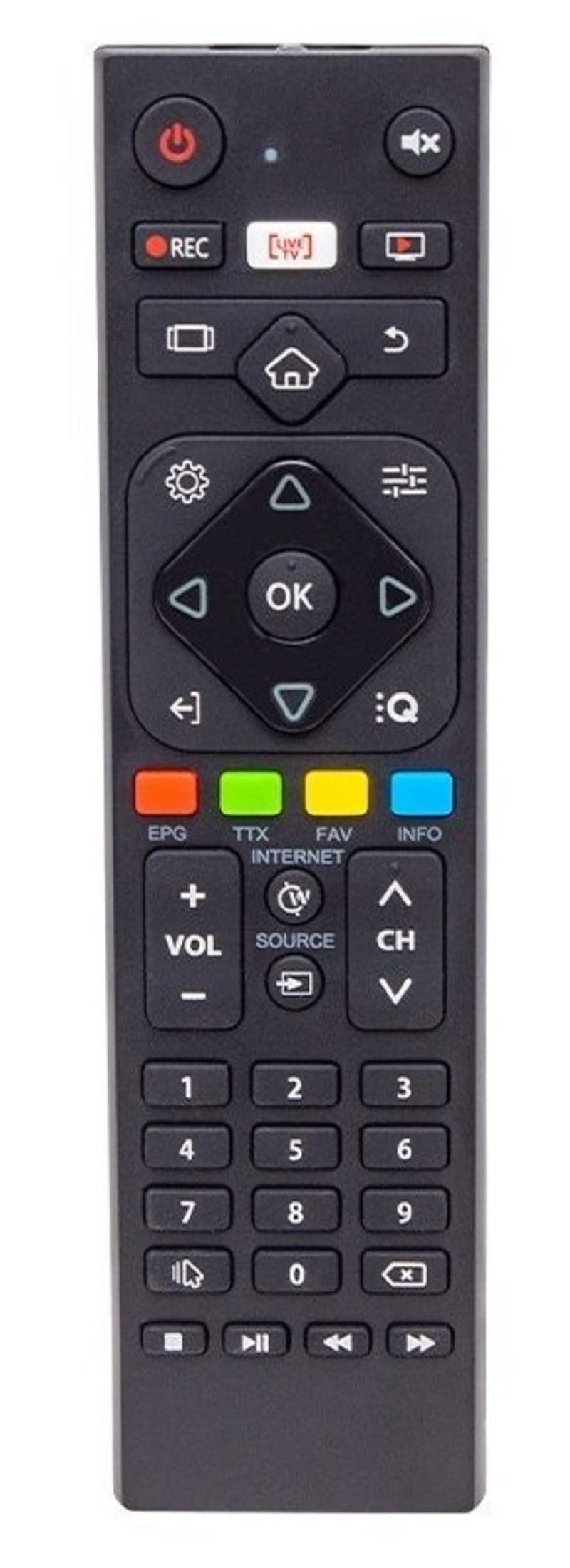
Image of the Sunny CRS-300AT remote control, showing its ergonomic design and button layout, including the dedicated Live TV button.
Configuración
Instalación de baterías
- Localice o compartimento da batería na parte traseira do control remoto.
- Deslice a tapa do compartimento da batería cara abaixo ou na dirección indicada por unha frecha para abrila.
- Insert two AAA batteries (not included), ensuring the positive (+) and negative (-) terminals align correctly with the markings inside the compartment. Incorrect battery orientation can prevent the remote from functioning.
- Volva colocar a tapa do compartimento da batería deslizándoa de volta ao seu lugar ata que faga clic de forma segura.
The remote control is an infrared (IR) device and does not require pairing. Once batteries are installed, it is ready for use with compatible AXEN LED TVs.
Instrucións de funcionamento
Point the remote control directly at your television's IR receiver. Ensure there are no obstructions between the remote and the TV.
Funcións clave
- Botón de encendido (⏻): Acende ou apaga o televisor.
- Subir/Baixar o volume (Vol +/-): Axusta o volume do son.
- Canle arriba/abajo (Ch+/-): Cambia as canles de televisión.
- Silenciar (🔇): Silencia ou activa o son do televisor.
- Botóns numéricos (0-9): Directly select TV channels or input numbers.
- Botóns de navegación (▲ ▼ ◀ ▶): Navega polos menús e opcións.
- Botón Aceptar/Intro: Confirma as seleccións nos menús.
- Botón Atrás/Intro: Volve á pantalla ou menú anterior.
- Botón de inicio (🏠): Accede á pantalla de inicio ou ao menú principal da Smart TV.
- Botón de TV en directo: Directly switches to live television broadcasting.
- Botón de entrada/fonte: Changes the input source (e.g., HDMI 1, HDMI 2, AV).
- Botón de menú: Abre o menú principal de configuración do televisor.
Specific button layouts and functions may vary slightly depending on your TV model, but the core functions remain consistent.
Mantemento
Limpeza
- Limpe o mando a distancia cun pano suave e seco.
- Para a sucidade persistente, d lixeiramenteampen the cloth with water or a mild, non-abrasive cleaner. Do not spray liquids directly onto the remote.
- Avoid using harsh chemicals, solvents, or abrasive cleaning materials, as these can damage the remote's surface or internal components.
Coidado da batería
- Substitúa as pilas cando a resposta do mando a distancia se volva lenta ou deixe de funcionar.
- Se o mando a distancia non se vai usar durante un período prolongado, retire as pilas para evitar fugas e posibles danos.
- Elimina as baterías usadas segundo a normativa local.
Almacenamento
Garde o mando a distancia nun lugar fresco e seco, lonxe da luz solar directa, de temperaturas extremas e de alta humidade.
Resolución de problemas
| Problema | Causa posible | Solución |
|---|---|---|
| O control remoto non funciona. | Baterías gastadas ou instaladas incorrectamente. | Substitúa as pilas por outras novas, asegurándose de manter a polaridade correcta (+/-). |
| O control remoto non funciona. | Obstruction between remote and TV's IR receiver. | Ensure a clear line of sight between the remote and the TV. Remove any objects blocking the signal. |
| O control remoto non funciona. | O mando a distancia está demasiado lonxe da televisión. | Move closer to the TV. The effective range for IR remotes is typically up to 7 meters (23 feet). |
| Algúns botóns non responden. | Lixo ou restos baixo os botóns. | Limpe o mando a distancia como se describe na sección Mantemento. |
| TV is not responding to any remote commands. | TV's IR receiver might be faulty or blocked. | Check your TV's user manual for troubleshooting its IR receiver. Try restarting the TV by unplugging it for a few minutes. |
Especificacións
- Modelo: Sunny CRS-300AT
- Marca: Sunny (Compatible with AXEN)
- Dispositivos compatibles: Televisions (specifically AXEN LED TVs)
- Tecnoloxía de conectividade: Infravermello (IR)
- Fonte de enerxía: 2 pilas AAA (non incluídas)
- ASIN: B0BW4M6SRC
Información da garantía
This product is typically covered by a manufacturer's warranty. For specific details regarding warranty duration, coverage, and claims process, please refer to the documentation provided with your purchase or contact the retailer where the product was acquired. Keep your proof of purchase for warranty purposes.
Apoio
If you encounter issues that cannot be resolved using the troubleshooting guide, or if you require further assistance, please contact:
- The retailer from whom you purchased the remote control.
- The manufacturer's customer support (refer to product packaging or manufacturer's websitio web para obter información de contacto).
When contacting support, please have your product model (CRS-300AT) and proof of purchase readily available.