
Introdución
This manual provides essential information for the safe and efficient use of your ONN 42-Inch Full HD LED Smart TV, Model 100018254. Please read these instructions thoroughly before operating your television and retain them for future reference.
O que hai na caixa
Verifique que estean presentes todos os compoñentes antes de continuar coa configuración.
- ONN 42-Inch Full HD LED Smart TV
- Control remoto
- Soporte para TV (2 pezas)
- Tornillos para soporte de TV
- Cable de alimentación
- Guía de inicio rápido (non incluída neste manual)

Imaxe: Fronte view of the ONN 42-inch Smart TV displaying the Roku TV home screen with various streaming app icons like Netflix, Disney+, Apple TV, Hulu, Peacock, and Roku Channel. The TV is black with slim bezels and two stand feet.
Configuración
1. Fixación do soporte para TV
- Coloque con coidado a pantalla do televisor sobre unha superficie suave e limpa para evitar danala.
- Aliñe cada peza do soporte cos orificios para parafusos correspondentes na parte inferior do televisor.
- Fixa cada peza do soporte cos parafusos proporcionados. Asegúrate de que estean ben apertados.

Image: A diagram illustrating the dimensions of the ONN 42-inch TV, showing its width as 43 inches and height as 37 inches when placed on its stand.
2. Montaxe na parede (opcional)
This TV is compatible with VESA standard wall mounts. Refer to your wall mount's instructions for proper installation. Ensure the wall mount can support the weight of the television.

Imaxe: Traseira view of the ONN 42-inch TV, highlighting the VESA mounting screw holes in a square pattern and various input ports on the side and bottom right.
3. Dispositivos de conexión
Conecta os teus dispositivos externos, como descodificadores de cable, consolas de xogos ou reprodutores de Blu-ray, aos portos de entrada do televisor.
- HDMI: For high-definition audio and video. Use an HDMI cable to connect devices like set-top boxes, game consoles, or streaming sticks.
- USB: Para conectar dispositivos de almacenamento USB para reproducir contido multimedia files.
- Wi-Fi: For internet connectivity to access smart TV features and streaming services.
4. Asistente de acendido inicial e configuración
- Conecta o cable de alimentación ao televisor e despois a unha toma de corrente.
- Prema o botón de acendido/apagado do mando a distancia ou do propio televisor.
- Follow the on-screen instructions to complete the initial setup, including language selection, network connection (Wi-Fi), channel scanning, and linking to your Roku account (if applicable).
Funcionamento da TV
1. Control remotoview
The remote control allows you to navigate the TV's interface and control various functions.
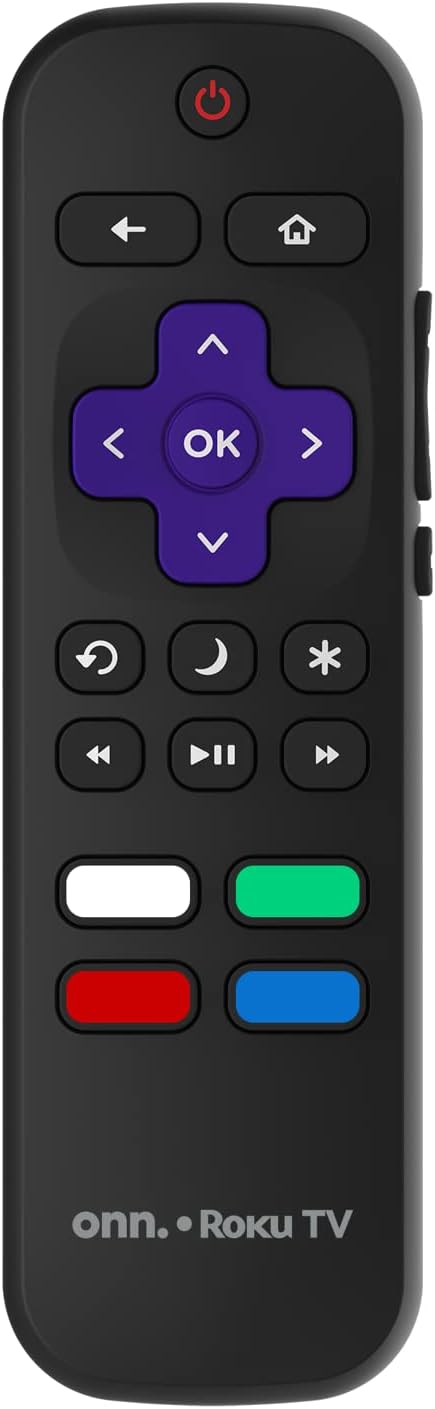
Image: The ONN Roku TV remote control, featuring a power button, directional pad, OK button, home button, back button, volume controls, and dedicated buttons for popular streaming services.
- Botón de encendido: Acende ou apaga o televisor.
- Directional Pad (D-Pad) & OK: Navega polos menús e confirma as seleccións.
- Botón de inicio: Volve á pantalla de inicio do televisor Roku.
- Botón Atrás: Volve á pantalla ou menú anterior.
- Subir/Baixar o volume: Axusta o volume de audio.
- Botón de silencio: Silencia ou activa o audio.
- Canle arriba/abajo: Changes channels (for antenna/cable inputs).
- Botóns de aplicación dedicados: Quick access to popular streaming services like Netflix, Hulu, etc.
2. Funcións da televisión intelixente
Your ONN Smart TV provides access to a wide range of streaming content and smart functionalities.
- Servizos de streaming: Access pre-installed apps like Netflix, YouTube, and many more through the Roku Channel Store.
- Control de voz: Compatible with Alexa and Google Assistant for hands-free control (requires a separate compatible voice assistant device).
- Actualizacións automáticas de software: The TV will automatically update its software when connected to the internet, ensuring you have the latest features and security.
3. Selección de entrada
To switch between connected devices (e.g., cable box, game console), use the Entrada button on your remote or select the desired input from the Roku TV home screen.
4. Axustes de imaxe e son
Access the TV's settings menu to customize picture and sound preferences. Navigate to Configuración > Configuración da imaxe do televisor or Configuración > Audio to adjust options like brightness, contrast, color, sound mode, and equalizer settings.
Mantemento
1. Limpeza da pantalla
- Always turn off the TV and unplug it before cleaning.
- Use un pano suave e sen fiapos, lixeiramente damplavado con auga ou cun limpador de pantallas especializado.
- Non pulverices o limpador directamente sobre a pantalla. Aplícao primeiro sobre o pano.
- Evita usar produtos de limpeza abrasivos, alcol, benceno ou disolventes, xa que poden danar a pantalla.
2. Actualizacións de software
Ensure your TV is connected to the internet to receive automatic software updates. These updates improve performance, add features, and enhance security. You can manually check for updates in the Configuración > Sistema > Actualización do sistema menú.
Resolución de problemas
Se tes problemas co teu televisor, consulta as seguintes solucións habituais:
Sen Poder
- Comprobe se o cable de alimentación está conectado correctamente tanto ao televisor como á toma de corrente.
- Verifica que a toma de corrente funcione conectando outro dispositivo.
- Tenta premer o botón de acendido do propio televisor, non só o mando a distancia.
Sen imaxe / Imaxe distorsionada
- Asegúrate de que estea seleccionada a fonte de entrada correcta (por exemplo, HDMI 1, HDMI 2).
- Comprobe todas as conexións de cable entre o televisor e os dispositivos externos.
- Try a different HDMI cable if possible.
- Adjust picture settings (brightness, contrast) in the TV menu.
Sen son / Son baixo
- Check if the TV is muted or if the volume is turned down.
- Ensure external audio devices (soundbars, receivers) are properly connected and powered on.
- Comprobe a configuración de son no menú da televisión.
Problemas de conexión de rede
- Verify your Wi-Fi router is powered on and functioning.
- Reinicia o teu enrutador e o módem.
- Ir a Configuración > Rede > Comprobar conexión no teu televisor para diagnosticar o problema.
- Asegúrate de introducir o contrasinal wifi correcto.
Especificacións
| Característica | Detalle |
|---|---|
| Número de modelo | 100018254 |
| Tamaño da pantalla | 42 polgadas |
| Tecnoloxía de visualización | LED |
| Resolución | 1080p (Full HD) |
| Taxa de actualización | 60 Hz |
| Conectividade | USB, Wi-Fi |
| Servizos de Internet compatibles | Netflix, YouTube (and others via Roku platform) |
| Método de control | Voice (via Alexa & Google Assistant compatible devices), Remote Control |
| Tipo de montaxe | Soporte de parede (compatible con VESA) |
| Cor | Negro |
| UPC | 671227025567 |

Image: Energy Guide label for Television Model 100018254, indicating an estimated yearly energy cost of $11 based on 12 cents per kWh and 5 hours use per day.
Garantía e Soporte
For warranty information and technical support, please refer to the documentation included with your purchase or visit the official ONN support websitio. Conserve o recibo de compra para reclamacións de garantía.