
1. Introdución
Grazas pola compraasing the LFF LDR113-EU Kitchen Radio. This manual provides essential information for the safe and efficient operation of your device. Please read it thoroughly before use and retain it for future reference.
The LFF LDR113-EU is a versatile kitchen radio featuring DAB+, FM, and Bluetooth connectivity. It includes dual alarms, a sleep timer, and 60 station presets, designed for both tabletop use and under-cabinet mounting.
2. Información de seguridade
- Fonte de enerxía: Use só o adaptador de corrente fornecido. Asegúrese de que o volumetage coincide coa súa fonte de alimentación local.
- Auga e humidade: Do not expose the device to water, rain, or excessive moisture. Avoid placing liquids near the radio.
- Ventilación: Asegúrese de que haxa unha ventilación axeitada arredor do dispositivo. Non bloquee as aberturas de ventilación.
- Calor: Manteña o dispositivo lonxe de fontes de calor como radiadores, reixas de calor, estufas ou outros aparellos que produzan calor.
- Limpeza: Desconecte da corrente antes de limpar. Use un pano suave e seco. Non empregue produtos de limpeza líquidos nin produtos de limpeza en aerosol.
- Servizo: Non intente atender este produto vostede mesmo. Remita todo o servizo a persoal de servizo cualificado.
- Colocación: Place the radio on a stable, level surface or mount it securely according to the instructions.
3. Contido do paquete
Comprobe que todos os elementos estean presentes no paquete:
- LFF LDR113-EU Kitchen Radio
- Adaptador de alimentación
- Mounting Kit (screws, spacers, mounting template)
- Manual de usuario (este documento)
4. Produto rematadoview
Familiarízate cos compoñentes e controis da radio.

Figura 4.1: Fronte view of the LFF LDR113-EU Kitchen Radio, showing the LCD display on the left, control buttons in the center, and a large rotary knob on the right. The buttons include power, mode, menu, info, preset, timer/sleep, and navigation arrows. The rotary knob is for volume and selection.

Figura 4.2: Diagram illustrating the key features of the LFF Kitchen Radio, including DAB/DAB+ radio, FM radio, two alarms, sleep timer, Bluetooth connectivity, and 60 station presets.
4.1. Controles e pantalla
- Pantalla LCD en cor: Shows current mode, station information, time, and settings.
- Botón de encendido: Acende/apaga a radio.
- Botón de modo: Switches between DAB+, FM, and Bluetooth modes.
- Botón de menú/información: Accesses menu options or displays station information.
- Botóns predefinidos (1-5): Quick access to saved stations.
- Timer/Sleep Button: Configura as funcións do temporizador de sono ou da alarma.
- Botóns de navegación (Arriba/Abaixo/Esquerda/Dereita): Navigates through menus and station lists.
- Rotary Knob (Volume/Enter): Adjusts volume, scrolls through options, and confirms selections.
5. Configuración
5.1. Conexión de alimentación
- Connect the power adapter to the DC IN port on the back of the radio.
- Enchufe o adaptador de alimentación a unha toma de corrente.
- A radio acenderase ou entrará no modo de espera.
5.2. Initial Scan (DAB+ and FM)
Upon first power-on, the radio will typically perform an automatic scan for DAB+ and FM stations. If not, follow these steps:
- Preme o Modo botón para seleccionar o modo DAB+ ou FM.
- For DAB+, the radio will usually initiate a full scan automatically. If not, navigate to the 'Full Scan' option in the DAB+ menu and press the rotary knob to confirm.
- For FM, navigate to the 'Auto Scan' option in the FM menu and press the rotary knob to confirm.
- The radio will search for available stations and store them.

Figura 5.1: The LFF Kitchen Radio's LCD color screen displaying the main menu with icons for Digital Radio (DAB+), FM Radio, and Bluetooth, indicating available modes.
6. Instrucións de funcionamento
6.1. Acendido/apagado
Preme o Poder button to turn the radio on or off (standby mode).
6.2. Selección de modo
Preme o Modo button repeatedly to cycle through DAB+, FM, and Bluetooth modes.
6.3. Funcionamento da radio DAB+
- In DAB+ mode, use the Arriba/Abaixo navigation buttons or the rotary knob to browse available stations.
- Press the rotary knob to select a station.
- Preme Menú/Información a view station information (e.g., program type, signal strength).
6.4. Funcionamento da radio FM
- No modo FM, use a Arriba/Abaixo navigation buttons to tune to stations manually.
- Manteña premido o Arriba/Abaixo buttons for automatic station seeking.
- Preme Menú/Información a view información da estación.
6.5. Conectividade Bluetooth
Connect your smartphone or other Bluetooth-enabled device to the radio.
- Preme o Modo button to select Bluetooth mode. The display will show 'Bluetooth Pairing'.
- No teu dispositivo móbil, activa o Bluetooth e busca os dispositivos dispoñibles.
- Select 'LFF LDR113-EU' from the list of devices.
- Once connected, the radio display will show 'Bluetooth Connected'. You can now play audio from your device through the radio.
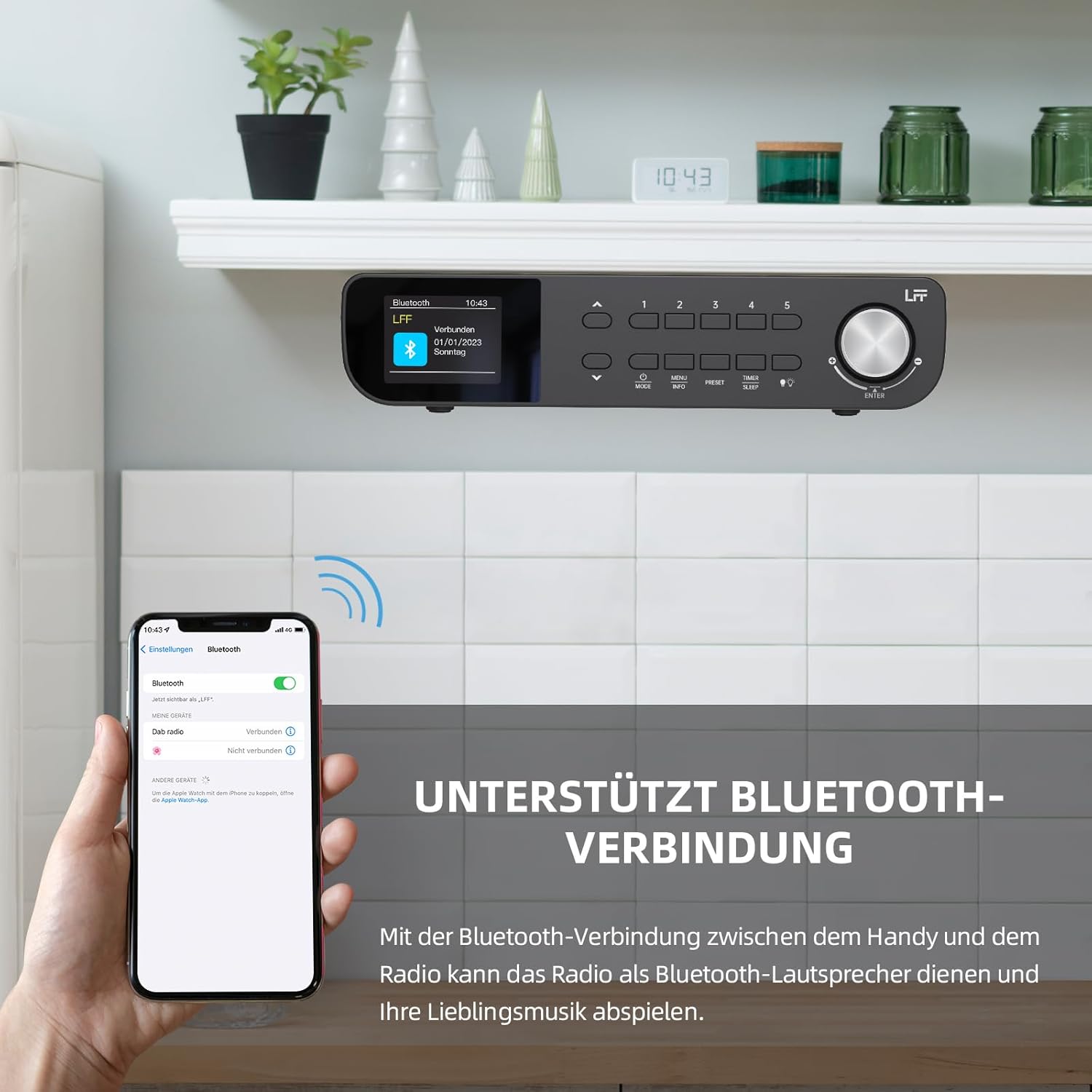
Figura 6.1: The LFF Kitchen Radio displaying a successful Bluetooth connection, with a smartphone screen showing the radio as a connected device.

Figura 6.2: Primeiro plano view of the radio's display indicating 'LFF' and 'Connected' under the Bluetooth menu, confirming a successful pairing.
6.6. Configuración de alarmas
The radio features two independent alarms.
- Preme o Temporizador/Son button repeatedly until 'Alarm 1' or 'Alarm 2' appears.
- Use the navigation buttons and rotary knob to set the alarm time, source (DAB+, FM, or Buzzer), and frequency (daily, weekdays, weekends, once).
- Confirm settings by pressing the rotary knob.

Figura 6.3: Close-up of the radio's display showing the current time and options to activate or deactivate Alarm 1 and Alarm 2.
6.7. Temporizador de sono
O temporizador de sono permite que a radio se apague automaticamente despois dun período de tempo definido.
- Preme o Temporizador/Son button repeatedly until 'Sleep Timer' appears.
- Use the navigation buttons or rotary knob to select the desired sleep duration (e.g., 15, 30, 60 minutes).
- Confirme premendo o botón rotativo.

Figura 6.4: Close-up of the radio's display showing the 'Sleep Timer' setting, with an option to set the duration, for example, to 30 minutes.
6.8. Presets
Save up to 60 favorite stations for quick access.
- Para gardar unha predefinición: Tune to the desired station. Press and hold one of the Predefinido (1-5) buttons until 'Preset Saved' appears. For additional presets, use the 'Preset Store' option in the menu.
- Para recuperar un preselección: Prema brevemente un dos Predefinido (1-5) buttons. For other presets, navigate to 'Preset Recall' in the menu.
6.9. Luz LED
The radio includes an integrated LED light, useful for illuminating the area below if mounted under a cabinet.
- Preme o Luz button (if available, or navigate through menu) to turn the LED light on or off.

Figura 6.5: The LFF Kitchen Radio mounted under a kitchen cabinet, with its integrated LED light providing illumination to the countertop below.
6.10. Brillo da pantalla
Adjust the display backlight brightness to suit your environment.
- Access the 'Display' or 'Settings' menu.
- Select 'Brightness' and choose from High, Medium, or Low settings.

Figura 6.6: A visual comparison of the LFF Kitchen Radio's display at three different backlight brightness levels: High, Medium, and Low, demonstrating the adjustable visibility.
7. Instrucións de montaxe
The LFF LDR113-EU Kitchen Radio offers flexible placement options: tabletop or under-cabinet mounting.
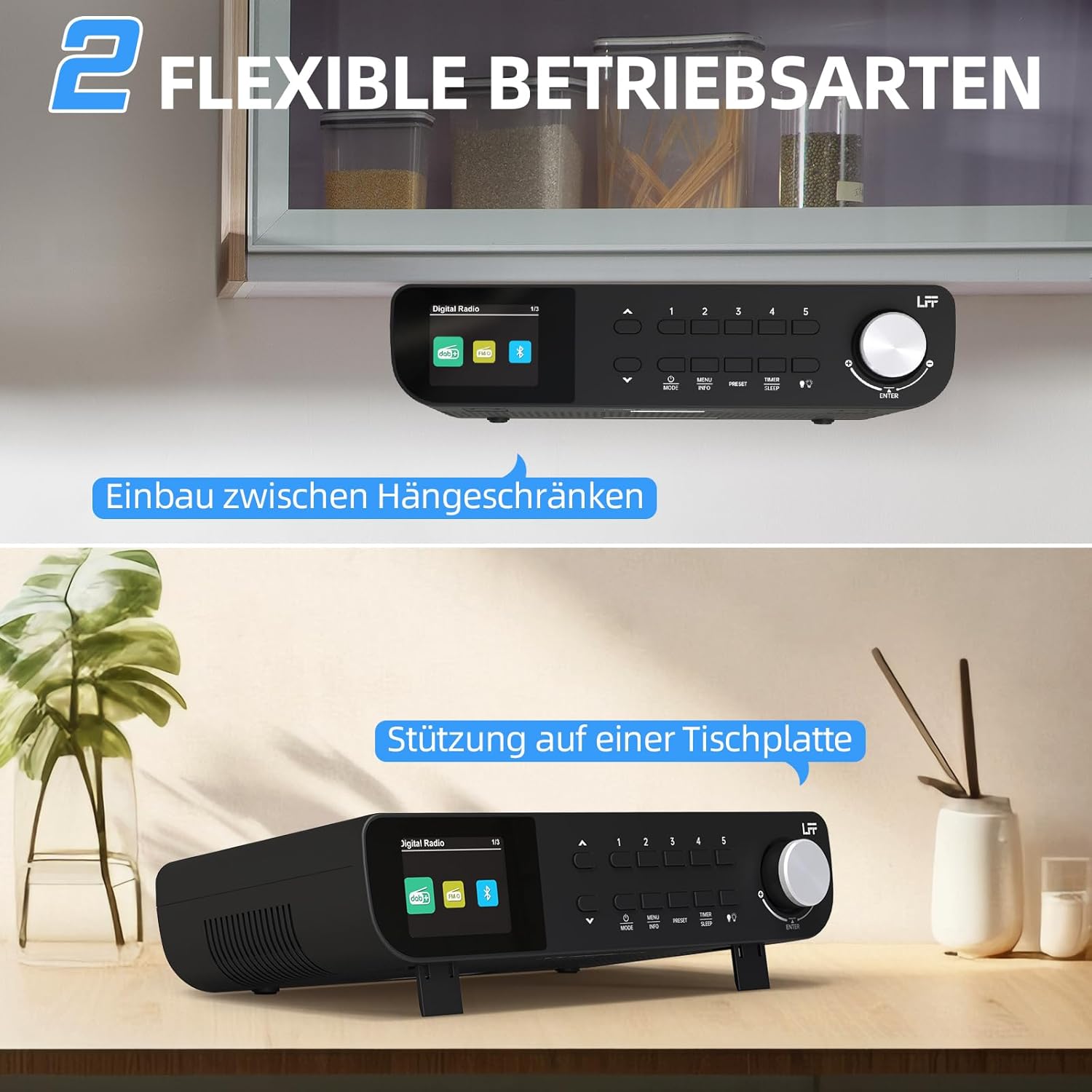
Figura 7.1: The LFF Kitchen Radio displayed in two common installation scenarios: mounted underneath a kitchen cabinet and placed freestanding on a tabletop.
7.1. Colocación da mesa
Simply place the radio on a stable, flat surface. Ensure it is not near the edge to prevent accidental falls.
7.2. Under-Cabinet Mounting
For under-cabinet installation, use the provided mounting kit.
- Preparar a localización: Choose a suitable location under a kitchen cabinet, ensuring there is enough space and access to a power outlet.
- Marcar os buratos: Use the provided mounting template to mark the drill holes on the underside of the cabinet.
- Perforar buratos piloto: Perforar orificios piloto nas posicións marcadas.
- Attach Mounting Plate (if applicable): Some models may include a separate mounting plate. Attach this to the cabinet using the screws.
- Secure the Radio: Align the radio with the mounting holes or plate and secure it using the provided screws. Ensure it is firmly attached.
- Conectar enerxía: Enchufe o adaptador de alimentación.

Figura 7.2: Detailed diagram showing the steps for under-cabinet mounting, including measuring distances (e.g., 58mm) and securing the radio with screws.
8. Mantemento
- Limpeza: To clean the radio, disconnect it from the power supply. Use a soft, dry, lint-free cloth. Do not use abrasive cleaners, waxes, or solvents.
- Antena: Ensure the antenna is extended for optimal reception in DAB+ and FM modes. Handle it gently to avoid damage.
- Almacenamento: If storing the radio for an extended period, disconnect it from power and store it in a cool, dry place.
9 Solución de problemas
| Problema | Causa posible | Solución |
|---|---|---|
| Sen poder | O adaptador de corrente non está conectado ou a toma de corrente está defectuosa. | Check power connection. Try a different outlet. |
| Mala recepción DAB+/FM | Antena non estendida, sinal débil ou interferencias. | Fully extend the antenna. Reposition the radio. Perform a full scan. |
| Bluetooth non se conecta | Radio not in pairing mode, device too far, or already connected to another device. | Ensure radio is in Bluetooth mode. Move device closer. Disconnect from other devices. |
| Sen son | Volume too low, mute activated, or incorrect mode. | Increase volume. Check if mute is active. Ensure correct mode (DAB+, FM, Bluetooth). |
| A pantalla non funciona | Brightness too low or device malfunction. | Adjust display brightness. If problem persists, contact support. |
10. Especificacións

Figura 10.1: Diagram showing the dimensions of the LFF Kitchen Radio: 250mm length, 146mm width, and 55mm height.
| Característica | Detalle |
|---|---|
| Marca | LFF |
| Número de modelo | LDR113-EU |
| Cor | Negro |
| Conectividade | Bluetooth |
| Tecnoloxía de afinación | DAB Plus, FM |
| Fonte de enerxía | Cable eléctrico |
| Frecuencia | 108 MHz (FM max) |
| Dimensións (L x W x H) | 250 mm x 146 mm x 55 mm |
| Presets | 60 |
| Mostrar | LCD Color Screen |
| Características especiais | Dual Alarms, Sleep Timer, Under-cabinet mounting option, LED Light |
11. Garantía e soporte
This product comes with a standard manufacturer's warranty. Please refer to the warranty card included in your package for specific terms and conditions. For technical support, troubleshooting assistance, or warranty claims, please contact your retailer or the LFF customer service department.