
Introdución
Thank you for choosing the Genai True Wireless Earphones. This manual provides detailed instructions on how to set up, operate, maintain, and troubleshoot your new earphones. Please read this manual carefully before use to ensure optimal performance and longevity of your device.
Produto rematadoview
The Genai True Wireless Earphones feature a digital intelligence LED display on the charging case, tap control for easy operation, and Bluetooth 5.0 for stable connectivity. They are designed for comfortable in-ear wear and deliver clear stereo sound.
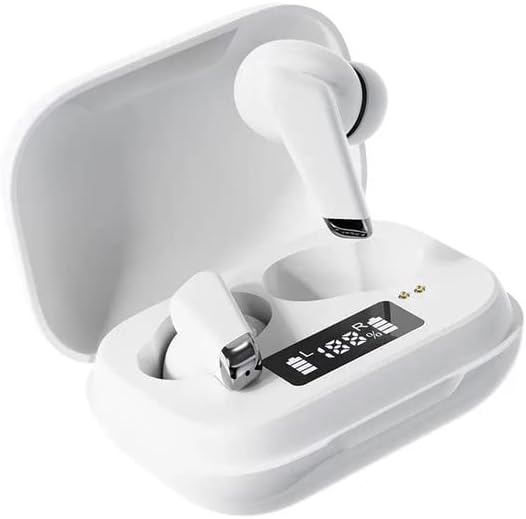
Image: Genai True Wireless Earphones in their charging case, showcasing the digital LED display indicating battery levels.
Características principais:
- True Wireless Stereo (TWS): Seamless audio experience without cables.
- Toca Control: Intuitive touch-sensitive controls for music and calls.
- Digital Intelligence LED Display: Shows real-time battery status of earbuds and charging case.
- Bluetooth 5.0: Garante unha conexión sen fíos estable e eficiente.
- Deseño ergonómico intraauricular: Axuste cómodo e seguro.
Guía de configuración
1. Carga dos auriculares e da funda
- Carga inicial: Before first use, fully charge the charging case and earbuds. Place the earbuds into the charging case.
- Conectar o cargador: Conecta a caixa de carga a unha fonte de alimentación mediante un cable USB compatible.
- Pantalla LED do monitor: The digital LED display on the case will show the charging status and battery percentage. Ensure both earbuds and the case are fully charged before proceeding.

Image: The charging case with its digital LED display, indicating the charge level of both the case and the individual earbuds.
2. Emparellamento co teu dispositivo
- Encendido: Open the charging case. The earbuds will automatically power on and enter pairing mode. You may hear an audible prompt.
- Activar Bluetooth: No teu teléfono intelixente ou noutro dispositivo con Bluetooth, vai á configuración de Bluetooth e activa Bluetooth.
- Seleccione o dispositivo: Look for "Genai Earphones" (or similar name) in the list of available devices and select it to connect.
- Confirmación: Once successfully paired, you will hear a confirmation sound, and the earbuds will be ready for use.

Image: A visual representation of the Bluetooth 5.0 chipset, highlighting the stable wireless connection technology.
Instrucións de funcionamento
The Genai True Wireless Earphones feature intuitive tap controls. The specific functions may vary slightly, but common controls are listed below:
Encendido/apagado
- Encendido: Abre a caixa de carga ou mantén premida a zona táctil de ambos auriculares durante uns segundos.
- Apagado: Place the earbuds back into the charging case and close the lid, or long-press the touch area on both earbuds for several seconds until they power off.
Reprodución de música
- Reproducir/Pausa: Toca un só auricular en calquera dos auriculares.
- Próxima pista: Toca dúas veces no auricular dereito.
- Pista anterior: Toca dúas veces no auricular esquerdo.
Xestión de chamadas
- Responder/Finalizar chamada: Toque unha vez en calquera dos auriculares durante unha chamada entrante ou activa.
- Rexeitar a chamada: Manter premido calquera dos auriculares durante unha chamada entrante.
Asistente de voz
- Activar o asistente de voz: Triple tap on either earbud (functionality may vary by device).
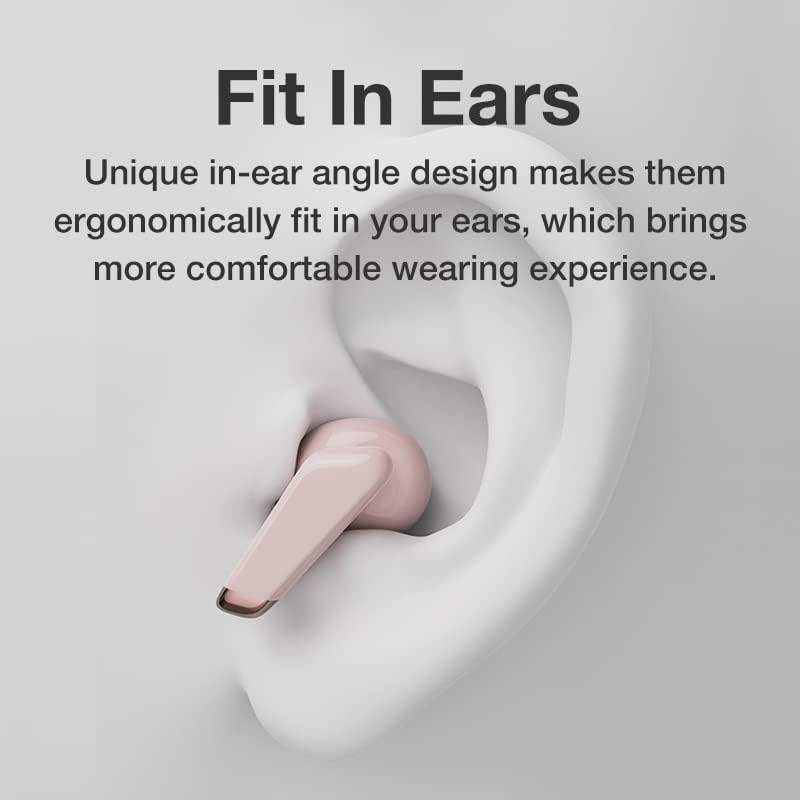
Image: An illustration showing an earbud comfortably and ergonomically fitted within the ear canal.
Mantemento
Limpeza
- Usa un pano suave, seco e sen fiapos para limpar os auriculares e a caixa de carga.
- Non empregue produtos de limpeza abrasivos, solventes nin aerosois en aerosol.
- Limpa con coidado as almofadas e a malla do altofalante para eliminar calquera cerumen ou residuos.
Almacenamento
- Garda os auriculares no seu estoxo de carga cando non os uses para protexelos e mantelos cargados.
- Avoid storing in extreme temperatures, direct sunlight, or high humidity.
Resolución de problemas
- Earbuds not pairing with each other or with device:
- Asegúrate de que os dous auriculares estean cargados.
- Volva colocar os dous auriculares na caixa de carga, peche a tapa, agarde uns segundos e, a seguir, ábraa de novo.
- On your device, forget/delete the "Genai Earphones" from the Bluetooth list and try pairing again.
- Sen son ou volume baixo:
- Comproba o nivel de volume tanto no dispositivo como nos auriculares.
- Asegúrate de que os auriculares estean conectados correctamente ao dispositivo.
- Limpa calquera residuo da malla do altofalante dos auriculares.
- Problemas de carga:
- Asegúrate de que o cable de carga estea conectado correctamente tanto á carcasa como á fonte de alimentación.
- Verifica que a fonte de alimentación estea activa.
- Limpa os contactos de carga tanto dos auriculares como da funda.
Especificacións
| Característica | Detalle |
|---|---|
| Modelo | B0BX5G53VT |
| Tecnoloxía de conectividade | Sen fíos (Bluetooth 5.0) |
| Tipo de auriculares | Semiaberto |
| Número de controladores | 2 |
| Método de carga | Estuche de carga |
| Material das almofadas dos auriculares | Silicona |
| Diámetro do controlador | 10 mm |
| Distorsión harmónica total | 0.02 % |
| Rango de impedancia | Ata 32 Ω |
| Material | Silicona |
| Colocación do oído | En Orella |
| Factor de forma | True Wireless |
Garantía e Soporte
The Genai True Wireless Earphones come with a 12 meses de garantía from the date of purchase, covering manufacturing defects. For any quality problems or support inquiries, please contact the seller directly through your purchase platform.
We are committed to ensuring 100% customer satisfaction. If you encounter any issues, please do not hesitate to reach out for assistance, including full refunds or replacements as applicable.