
ZOUKAI F3
Manual do usuario dos auriculares con clip para a orella aberta ZOUKAI con condución ósea Bluetooth 5.3
Modelo: F3
1. Introdución
Thank you for choosing the ZOUKAI Bone Conduction Bluetooth 5.3 Open Ear Clip Headphones. This manual provides essential information for the proper use, setup, and maintenance of your new headset. Please read it thoroughly before use to ensure optimal performance and longevity.
2. Produto rematadoview
2.1 Características principais
- Deseño de orella aberta: Allows you to enjoy audio while remaining aware of your surroundings, enhancing safety during outdoor activities.
- Tecnoloxía de condución ósea: Delivers sound through vibrations to your cheekbones, bypassing the eardrum.
- Conectividade Bluetooth 5.3: Garante unha conexión sen fíos estable e eficiente con dispositivos compatibles.
- Deseño cómodo de clip para a orella: Lightweight (4.5g per earbud) and ergonomic for pain-free, secure wearing, even with glasses.
- Emparejamento automático: Simplifies connection after initial setup.
- Controis intuitivos: Easy single-hand operation for music playback, calls, and voice assistant.
- Redución de ruído ENC: Enhances call clarity.
- Deseño impermeable: Suitable for use during exercise and in wet conditions.
- Batería de longa duración: Up to 72 hours music time (with charging case), 30 days standby, 1 hour fast charging.
2.2 Contido do paquete
The ZOUKAI Bone Conduction Bluetooth 5.3 Open Ear Clip Headphones package includes:
- ZOUKAI Bone Conduction Bluetooth 5.3 Open Ear Clip Headphones (Left and Right Earbuds)
- Estuche de carga
- Cable de carga
- Manual de usuario (este documento)
2.3 Diagrama do produto

Image: ZOUKAI Bone Conduction Bluetooth 5.3 Open Ear Clip Headphones with their charging case. The earbuds are white and have an open-ear clip design. The charging case is also white with a green indicator light.
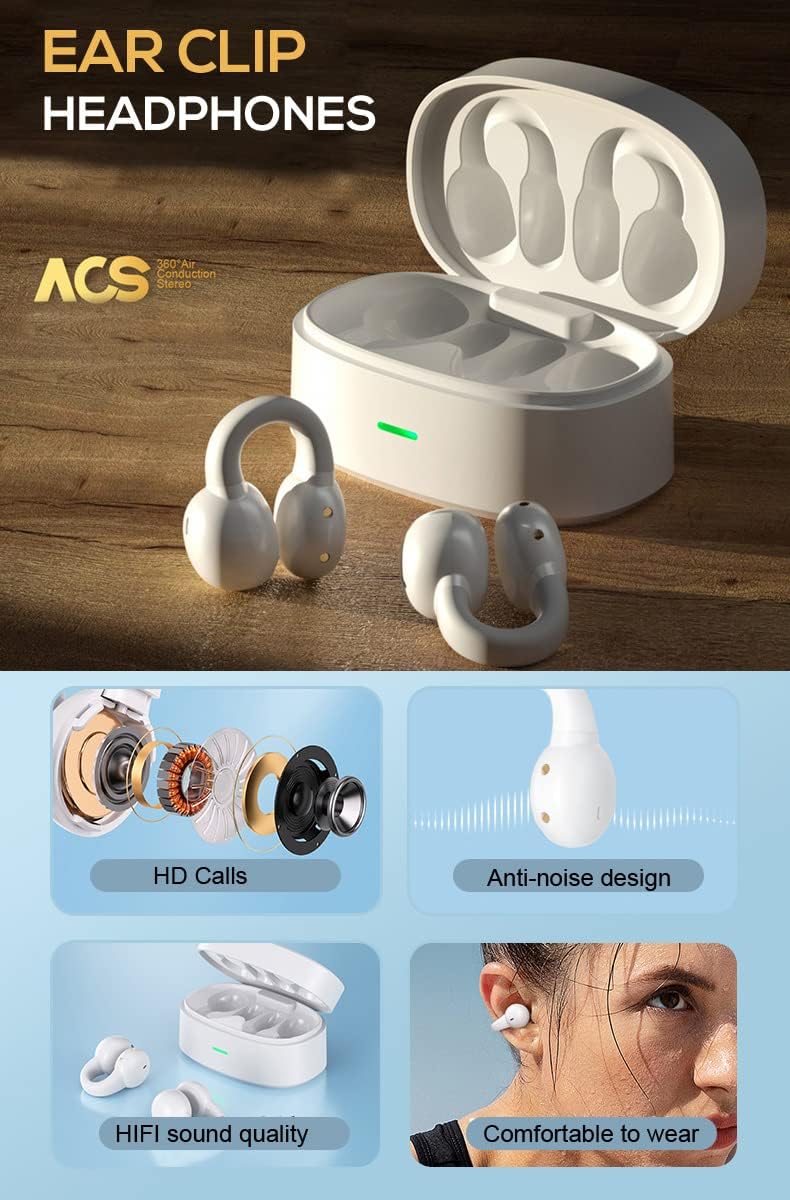
Image: A detailed diagram showing the internal components of the ZOUKAI ear clip headphones, including the bone conduction driver, coil, and other sound elements. Also shows the headphones in their charging case.
3. Configuración
3.1 Carga inicial
Before first use, ensure the headphones and charging case are fully charged. Connect the provided charging cable to the charging case and a compatible USB power source. The indicator light on the case will show charging status.
- A carga completa leva aproximadamente 1 hora.
- The charging case provides multiple charges for the earbuds.

Image: An illustration highlighting the long battery life of the ZOUKAI headphones, showing 72 hours music time, 30 days standby time, and 1 hour fast charging, with the charging case and earbuds in the background.
3.2 Emparellamento cun dispositivo Bluetooth
- Asegúrate de que os auriculares estean cargados e dentro da caixa de carga.
- Open the lid of the charging case. The headphones will automatically enter pairing mode.
- No teu dispositivo (teléfono intelixente, tableta, portátil), vai á configuración de Bluetooth e activa Bluetooth.
- Busca available devices. Select "ZOUKAI F3" (or similar name) from the list.
- Once connected, the headphones will indicate successful pairing (e.g., a voice prompt or indicator light change).
Note: After the first successful pairing, the headphones will automatically connect to the last paired device when the charging case lid is opened, provided Bluetooth is enabled on the device.

Image: An illustration demonstrating the broad compatibility of the ZOUKAI headphones with Bluetooth 5.3 enabled devices, including smartphones and tablets. It also shows the ear clip design being comfortable even for users wearing glasses.
4. Instrucións de funcionamento
4.1 Como usar os auriculares
Gently clip the headphones onto your earlobe. The open-ear design ensures comfort and allows ambient sound awareness. Adjust for a secure and comfortable fit.

Image: A man wearing the white ZOUKAI ear clip headphones, demonstrating their comfortable and discreet fit.

Image: Close-up illustrations showing how the ZOUKAI ear clip headphones are worn, highlighting their secure and comfortable placement on the earlobe for sports and daily use.
4.2 Controis básicos (sensibles ao tacto)
The headphones feature touch controls for easy operation:
| Acción | Función |
|---|---|
| Toque un só | Reproducir/Pausar música, Responder/Finalizar chamada |
| Toca dúas veces (auricular esquerdo) | Baixar o volume |
| Toca dúas veces (auricular dereito) | Subir volume |
| Toca tres veces (auricular esquerdo) | Canción anterior |
| Toca tres veces (auricular dereito) | Próxima canción |
| Prema longa (2 segundos) | Rexeitar chamada, activar asistente de voz |
5. Mantemento
5.1 Limpeza
Regular cleaning helps maintain the performance and hygiene of your headphones.
- Limpe os auriculares e a caixa de carga cun pano suave, seco e sen fiapos.
- Para a sucidade persistente, d lixeiramenteampEnxágüe o pano con auga. Evite o uso de produtos químicos agresivos ou materiais abrasivos.
- Do not submerge the headphones or charging case in water, despite their waterproof rating, to prevent damage to charging contacts or internal components.
5.2 Almacenamento
When not in use, store the headphones in their charging case to protect them from dust, dirt, and physical damage.
- Gardar nun lugar fresco e seco, lonxe de temperaturas extremas e da luz solar directa.
- Avoid storing in highly humid environments.
5.3 Coidado coa batería
- Charge the headphones regularly, even if not used frequently, to prolong battery life.
- Evite descargar completamente a batería antes de recargala.
- Emprega só o cable de carga incluído ou un equivalente certificado.
6 Solución de problemas
If you encounter issues with your ZOUKAI headphones, refer to the following common solutions:
| Problema | Posible causa/solución |
|---|---|
| Os auriculares non se acenden. | Battery is low. Place headphones in the charging case and charge fully. |
| Non se pode emparellar co dispositivo. |
|
| Sen son ou volume baixo. |
|
| Intermittent connection / audio drops. |
|
| O micrófono non funciona durante as chamadas. |
|
7. Especificacións
| Característica | Detalle |
|---|---|
| Nome do modelo | F3 |
| Tecnoloxía de conectividade | Sen fíos (Bluetooth) |
| Versión Bluetooth | 5.3 |
| Tipo de controlador de audio | Condutor de condución ósea |
| Colocación do oído | Orella aberta |
| Factor de forma | Ear-Clip |
| Tipo de control | Volume Control, Voice Control, Noise Control (Touch) |
| Control de ruído | Cancelación activa de ruído (ENC para chamadas) |
| Nivel de resistencia á auga | Impermeable |
| Rango de frecuencias | 20 Hz a 20,000 Hz |
| Material | Plástico |
| Peso do elemento | 4.2 onzas (paquete total) |
| Cor | Branco |
| Compoñentes incluídos | Cable |
| Fabricante | ZOUKAI |
| UPC | 768399192675 |
8. Garantía e soporte
For warranty information and customer support, please refer to the purchase platform or contact ZOUKAI customer service directly. Keep your proof of purchase for warranty claims.
Soporte en liña: Visit the official ZOUKAI websitio web ou a páxina do produto na páxina web do vendedor websitio para preguntas frecuentes e recursos de asistencia adicionais.
Ask a question about this manual
Ask about setup, troubleshooting, compatibility, parts, safety, or missing instructions. Manuals+ will review the question and use this page’s manual context to help answer it.