
1. Introdución
Grazas pola compraasing the Kapbom KA-3199 Retro Bluetooth Radio. This portable audio device combines classic aesthetics with modern functionality, offering multiple playback options including Bluetooth, FM radio, USB, Micro SD, and AUX input. It features a powerful 5W RMS speaker for excellent sound quality and a built-in flashlight for added utility. Please read this manual carefully before use to ensure proper operation and to maximize your listening experience.
2. Información de seguridade
- Non expoñas o dispositivo á auga, á humidade nin a temperaturas extremas.
- Evite deixar caer ou someter o dispositivo a fortes impactos.
- Non intente desmontar nin reparar a unidade vostede mesmo. Póñase en contacto co persoal de servizo cualificado.
- Manteña o dispositivo lonxe de fontes de calor e da luz solar directa.
- Use só o cable de carga e o adaptador de corrente especificados.
- Elimina as baterías segundo a normativa local.
3. Contido do paquete
Comprobe que todos os elementos estean presentes no paquete:
- 1 x Kapbom KA-3199 Portable Speaker
- 1 x AC Power Cable (1.5m)
- 1 x Manual de usuario
4. Produto rematadoview
Familiarize yourself with the various parts and controls of your Kapbom KA-3199 radio.
Controis do panel frontal
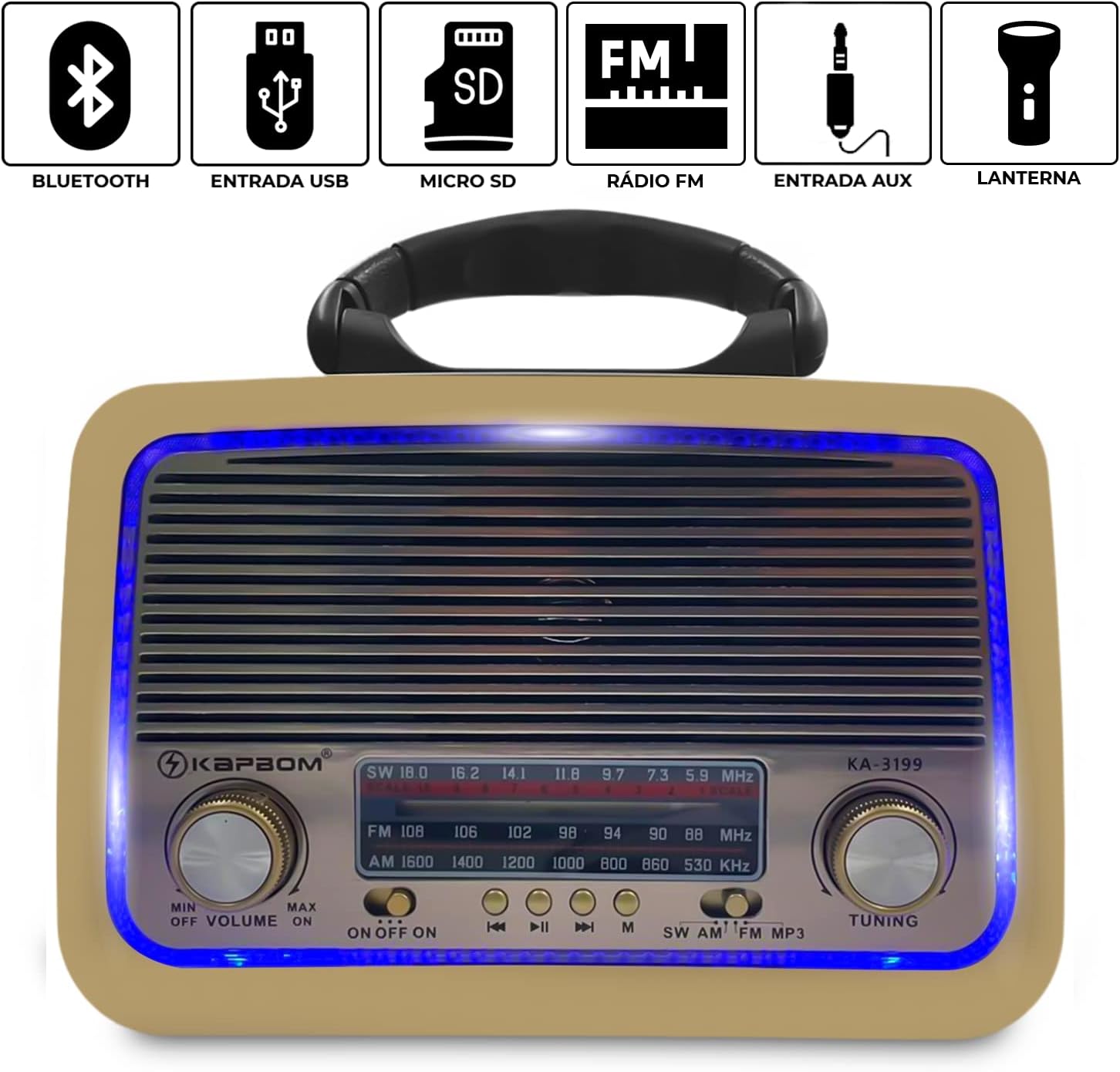
Figura 4.1: Fronte view of the Kapbom KA-3199 radio. This image highlights the main control panel, including the volume knob on the left, the tuning knob on the right, the mode selector switch (SW/AM/FM/MP3), and playback control buttons (Previous, Play/Pause, Next) located below the frequency display. Icons above the display indicate Bluetooth, USB, Micro SD, FM Radio, AUX, and Flashlight capabilities.
- Volume Knob (MIN/OFF/ON/MAX): Rotate to adjust volume. Turn to 'OFF' to power down the device.
- Botón de afinación: Rotate to tune into radio stations in FM, AM, or SW modes.
- Mode Switch (SW/AM/FM/MP3): Selects the operating mode (Shortwave, AM, FM Radio, or MP3 playback from USB/Micro SD/Bluetooth/AUX).
- Botóns de control de reprodución: For skipping tracks, playing/pausing audio in MP3/Bluetooth modes.
- Visualización de frecuencia: Mostra a frecuencia de radio actual.
Side Panel and Rear Features

Figura 4.2: Lado view of the Kapbom KA-3199 radio, illustrating the USB port, Micro SD card slot, and DC 5V charging input. These ports allow for various audio input methods and charging.

Figura 4.3: Lado view of the Kapbom KA-3199 radio, highlighting the integrated flashlight. This feature provides illumination when needed.

Figura 4.4: Traseira view of the Kapbom KA-3199 radio, displaying the battery compartment and the telescopic antenna. The antenna can be extended for improved radio reception.
- Porto USB: Para reproducir audio files dunha unidade flash USB.
- Ranura para tarxeta Micro SD: Para reproducir audio files desde unha tarxeta Micro SD.
- Entrada DC 5V: For charging the internal battery using the provided AC power cable.
- Lanterna: Integrated light source on the side.
- Antena telescópica: Extend for better FM/SW radio reception.
- Compartimento de batería: Houses the internal rechargeable battery.
5. Configuración
5.1. Cargando a batería
- Ensure the radio is powered off by turning the Volume Knob to 'OFF'.
- Connect the provided AC power cable to the DC 5V input port on the side of the radio.
- Conecte o outro extremo do cable a unha toma de parede estándar.
- The charging indicator (if present) will illuminate. Allow approximately 3-4 hours for a full charge.
- Disconnect the charger once fully charged or when not in use.
5.2. Acendido inicial
Turn the Volume Knob from 'OFF' to 'ON'. The radio will power on and typically default to the last used mode or FM radio mode.
6. Instrucións de funcionamento
6.1. Selección dun modo
Use the Mode Switch (SW/AM/FM/MP3) on the front panel to cycle through the available audio sources.
6.2. Funcionamento da radio FM
- Switch the mode to 'FM'.
- Estenda a antena telescópica para unha recepción óptima.
- Rotate the Tuning Knob to scan for and select your desired FM radio station. The frequency will be displayed on the screen.
6.3. Modo Bluetooth
- Switch the mode to 'MP3'. The radio will automatically enter Bluetooth pairing mode, indicated by an audible prompt.
- No teu dispositivo móbil, activa o Bluetooth e busca os dispositivos dispoñibles.
- Select 'KA-3199' from the list of devices to pair.
- Once paired, you can play audio from your device through the radio. Use the playback control buttons on the radio or your device to manage music.
6.4. USB/Micro SD Card Playback
- Switch the mode to 'MP3'.
- Insert a USB flash drive or a Micro SD card (pre-loaded with MP3 audio files) into the respective port on the side of the radio.
- The radio will automatically detect the storage device and begin playing audio files.
- Use the playback control buttons (Previous, Play/Pause, Next) to navigate through tracks.
6.5. Modo de entrada AUX
The device supports AUX input, though a dedicated AUX port is not explicitly shown in all images, it is listed as a compatible device. If an AUX port is present (often shared with another port or a 3.5mm jack), connect an external audio device using a 3.5mm audio cable. Switch the mode to 'MP3' and the radio should automatically detect the AUX input.
6.6. Usando a lanterna
The flashlight is typically activated by a dedicated switch or button on the side of the unit, near the light itself. Refer to the physical unit for the exact location and operation of the flashlight switch.
7. Mantemento
7.1. Limpeza
Wipe the exterior of the radio with a soft, dry cloth. Do not use abrasive cleaners, waxes, or solvents as they may damage the finish.
7.2. Almacenamento
When not in use for extended periods, store the radio in a cool, dry place away from direct sunlight and extreme temperatures. Ensure the battery is partially charged (around 50%) before storage to prolong its lifespan.
7.3. Coidado da batería
To maintain battery health, avoid fully discharging the battery frequently. Recharge the battery regularly, even if the device is not used often.
8 Solución de problemas
| Problema | Causa posible | Solución |
|---|---|---|
| Sen poder | Battery discharged; Power switch off | Charge the battery; Turn the Volume Knob to 'ON' |
| Sen son | Volume too low; Incorrect mode selected; Device not paired (Bluetooth) | Increase volume; Select correct mode; Pair Bluetooth device |
| Mala recepción de radio | Antena non estendida; Zona de sinal débil | Extend the telescopic antenna; Move to an area with better signal |
| Bluetooth non se conecta | Radio not in pairing mode; Device too far; Already connected to another device | Ensure radio is in MP3 mode; Keep devices within 10m; Disconnect from other devices |
| Non se reproduce o USB/Micro SD | Incorrecto file formato; Corrompido files; Drive/card not inserted correctly | Garantir files are MP3; Try another drive/card; Reinsert securely |
9. Especificacións
Detailed technical specifications for the Kapbom KA-3199 Retro Bluetooth Radio.
| Característica | Especificación |
|---|---|
| Modelo | KA-3199 |
| Marca | Kapbom |
| Potencia de saída | 5 W RMS |
| Capacidade da batería | 1200 mAh |
| Duración da batería (media) | Ata 4 horas |
| Resposta en frecuencia | 150 - 20000 Hz |
| Sensibilidade | 80 dB |
| Impedancia | 8 ohmios |
| Diámetro do altofalante | 75 mm |
| Conectividade | Bluetooth, USB, Micro SD, AUX, FM Radio |
| Rango de frecuencia FM | Ata 108 MHz |
| Tipo de visualización | LCD |
| Dimensións (L x W x H) | 20.5 cm x 8.5 cm x 15 cm |
| Características especiais | Portable, Lightweight, Built-in Flashlight |
Figura 9.1: Dimensions of the Kapbom KA-3199 Retro Bluetooth Radio.

10. Garantía e soporte
Specific warranty information for the Kapbom KA-3199 Retro Bluetooth Radio is not provided in this manual. Please refer to the retailer or manufacturer's website for details regarding warranty coverage and customer support. Keep your purchase receipt as proof of purchase for any warranty claims.