
1. Introdución
This manual provides essential instructions for the safe and effective use of your Technical Precision replacement battery, designed for compatibility with Black & Decker CD431 power tools. This product is a high-quality replacement part and is not manufactured by Black & Decker. Please read this manual thoroughly before installation and use to ensure optimal performance and safety.
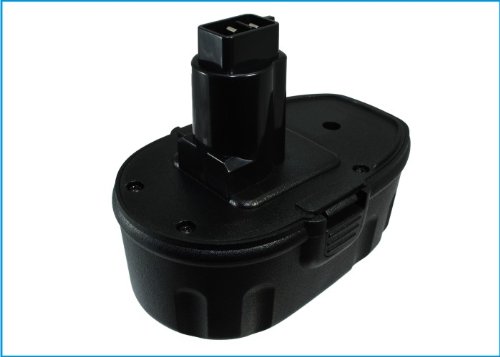
Image: Technical Precision Replacement Battery. This image shows the general appearance of the replacement battery unit.
2. Información importante de seguridade
Always follow basic safety precautions when using battery-powered devices to reduce the risk of fire, electric shock, and personal injury. Keep this manual for future reference.
- Non desmonte, abra nin triture a batería.
- Non expoña a batería a calor ou lume. Evite o almacenamento á luz solar directa.
- Non cortocircuite unha batería. Non garde os paquetes de baterías ao azar nunha caixa ou caixón onde poidan curtocircuírse entre si ou curtocircuírse por materiais condutores.
- Non someta as baterías a golpes mecánicos.
- En caso de fuga da batería, non permita que o líquido entre en contacto coa pel ou cos ollos. Se se produciu contacto, lave a zona afectada con abundante auga e busque consello médico.
- Manteña as baterías fóra do alcance dos nenos.
- Busque atención médica inmediatamente se se tragou unha pila ou unha batería.
- Empregue a batería só na aplicación para a que foi destinada.
- Only use chargers specified by the manufacturer for recharging.
- Observe as marcas máis (+) e menos (-) da batería e do equipo e asegúrese de usar correctamente.
3. Configuración e instalación
Before installing the new battery, ensure your Black & Decker CD431 power tool is turned off and disconnected from any power source. Always handle batteries with care.
- Retirar a batería vella: Locate the battery release latch on your Black & Decker CD431 tool. Press the latch and slide the old battery pack out of the tool's handle or compartment.
- Inspect New Battery: Carefully unpackage your Technical Precision replacement battery. Inspect it for any visible damage. Do not use if damaged.
- Inserir batería nova: Align the new battery with the battery slot on your Black & Decker CD431 tool. Slide the battery firmly into place until you hear a click, indicating it is securely latched.
- Verificar a conexión: Gently tug on the battery to ensure it is properly seated and will not accidentally dislodge during use.
It is recommended to fully charge the new battery before its first use. Refer to the "Operating Instructions" section for charging details.
4. Instrucións de funcionamento
4.1 Carga da batería
Use only a charger compatible with Black & Decker CD431 batteries. This replacement battery is designed to work with your original charger.
- Conecte o cargador a unha toma de corrente de CA estándar.
- Slide the Technical Precision replacement battery into the charger. Ensure it is fully seated.
- Observe the charger's indicator lights. These lights typically show the charging status (e.g., charging, fully charged, error). Refer to your original charger's manual for specific light indications.
- Once fully charged, remove the battery from the charger. Do not leave batteries on the charger indefinitely after they are fully charged to prolong battery life.
4.2 Using the Battery with Your Tool
Once installed and charged, the battery powers your Black & Decker CD431 tool. Operate your tool according to its original instruction manual. The battery provides consistent power until its charge is depleted.
- Se o rendemento da ferramenta diminúe significativamente, indica que é necesario recargar a batería.
- Avoid completely draining the battery repeatedly, as this can shorten its lifespan.
5. Mantemento e almacenamento
Proper maintenance and storage will extend the life of your Technical Precision replacement battery.
- Limpeza: Keep the battery terminals clean and free of dirt or debris. Use a dry cloth to wipe them if necessary. Do not use liquids or solvents.
- Almacenamento: When not in use for extended periods, store the battery in a cool, dry place, away from direct sunlight and extreme temperatures. Ideally, store batteries with a partial charge (around 50%) rather than fully charged or fully depleted.
- Temperatura: Avoid storing or operating the battery in temperatures below 0°C (32°F) or above 40°C (104°F).
- Ciclos de carga: For optimal battery health, allow the battery to cool down after heavy use before recharging.
6 Solución de problemas
If you encounter issues with your Technical Precision replacement battery, refer to the following common solutions:
| Problema | Causa posible | Solución |
|---|---|---|
| A batería non se está cargando | Charger not plugged in; faulty charger; dirty battery terminals; battery too hot/cold. | Ensure charger is plugged in. Try a different outlet. Clean battery terminals. Allow battery to reach room temperature before charging. Test with another known good battery/charger if possible. |
| A ferramenta non se acende coa batería | Battery not fully charged; battery not properly seated; faulty tool. | Ensure battery is fully charged. Re-seat the battery firmly into the tool. Test the tool with another known good battery if available. |
| Tempo de execución reducido | Battery not fully charged; battery nearing end of life; heavy tool usage. | Ensure battery is fully charged before use. Consider replacing the battery if it's old and consistently has short run times. |
If the problem persists after trying these solutions, please contact Technical Precision customer support.
7. Especificacións
Key specifications for the Technical Precision Replacement Battery for Black & Decker CD431:
- Marca: Precisión técnica
- Nome do modelo: CD431 BATTERY-AY-8DLZ-3
- Compatibilidade: Designed for Black & Decker CD431 power tools
- Compoñentes incluídos: 1 x Replacement Part (Battery)
- Tipo de material: Plástico
- Fonte de enerxía: AC (for charging via compatible charger)
- Característica especial: Alta Eficiencia
- Fabricante: Precisión técnica
8. Garantía e soporte
8.1 Garantía do fabricante
This Technical Precision replacement battery comes with a 1 anos de garantía do fabricante desde a data de compra. Esta garantía cobre defectos de materiais e fabricación en condicións de uso normal. Non cobre danos causados por mal uso, abuso, modificación non autorizada ou desgaste normal.
8.2 Atención ao cliente
For technical assistance, warranty claims, or any questions regarding your Technical Precision replacement battery, please contact our customer support team. Refer to the retailer's websitio web ou na documentación da súa compra para obter información de contacto específica.
Tamén podes visitar o Tenda de precisión técnica en Amazon para obter máis información e recursos de apoio.