
Radtel RT-890 Dual-Band Amateur Radio Walkie Talkie User Manual
Modelo: RT-890
1. Introdución
The Radtel RT-890 is a versatile dual-band amateur radio walkie talkie designed for reliable communication. It features a color LCD display, dual-band TX/RX capabilities, airband reception, FM radio, and VOX functionality. This manual provides essential information for the safe and efficient operation of your device.

Fronte view of the Radtel RT-890 walkie talkie, showcasing its color LCD display and keypad.
2. Contido do paquete
Comprobe o contido do paquete ao desembalar. Se falta algún artigo ou está danado, póñase en contacto co seu vendedor.
- Radtel RT-890 Walkie Talkie Unit
- Antena
- 1 x batería de iones de litio
- Cargador de escritorio
- Clip para cinto
- Manual de usuario
3. Configuración
3.1. Instalación e carga da batería
- Aliñe a batería coas ranuras da parte traseira da radio.
- Deslice a batería cara arriba ata que encaixe no seu lugar.
- To charge, place the radio (with battery installed) into the desktop charger. Ensure the charging indicator light illuminates.
- Charge the battery fully before first use. A full charge typically takes several hours.
3.2. Conexión da antena
- Atornille a antena no conector da parte superior da radio en sentido horario ata que estea apertada cos dedos. Non a aperte demasiado.
4. Instrucións de funcionamento
The Radtel RT-890 features dual band, dual display, and dual standby mode with a large, color LCD display for easy viewing of main functions.
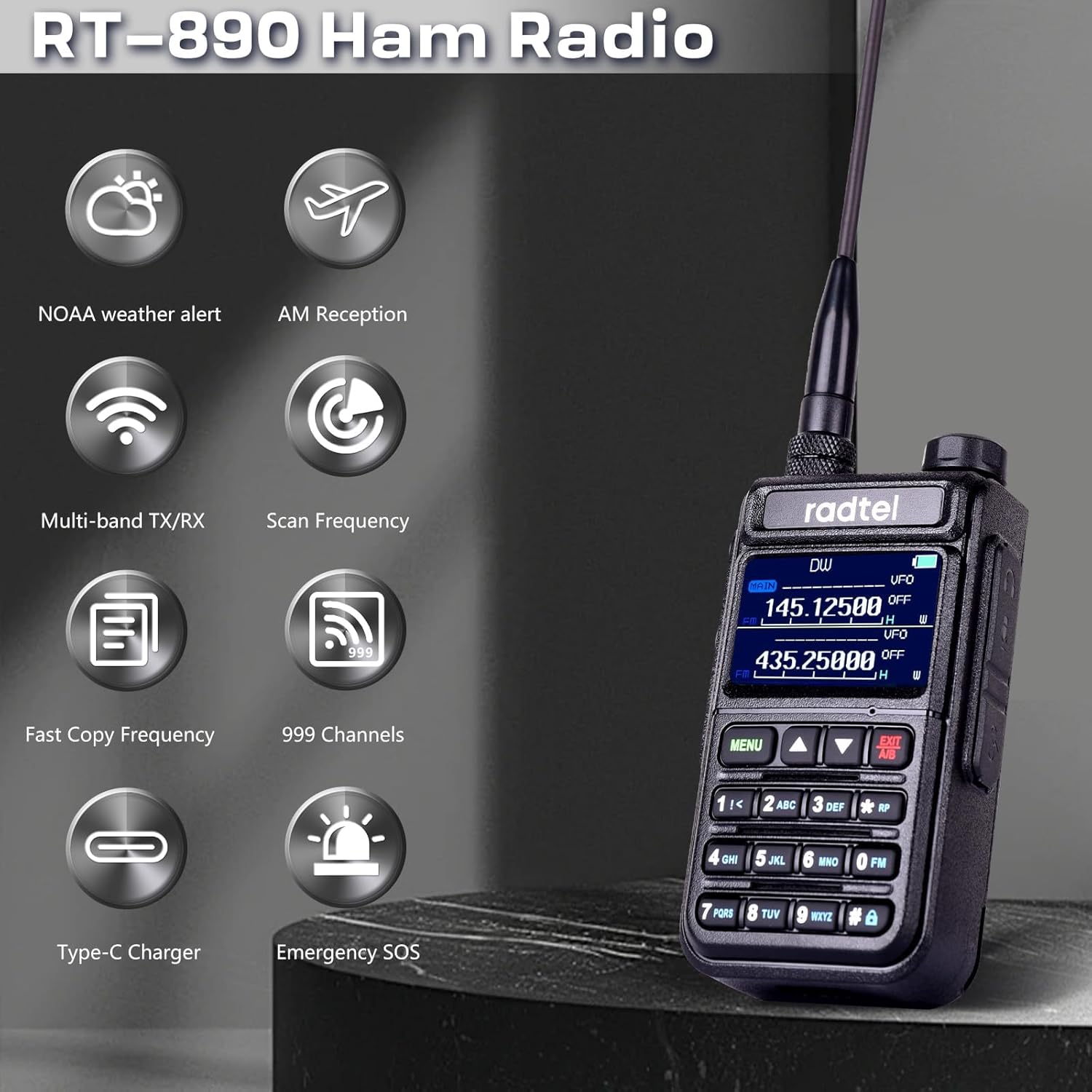
An illustration highlighting key features of the Radtel RT-890, such as NOAA weather alerts, AM reception, multi-band transmit/receive, frequency scanning, fast frequency copying, 999 channel capacity, Type-C charging, and emergency SOS.
4.1. Acendido/apagado e volume
- To power on, rotate the volume knob clockwise until you hear a click.
- Para apagar, xira o botón de volume en sentido antihorario ata que escoites un clic.
- Axuste o volume xirando o mesmo botón.
4.2. Selección de frecuencia e canle
- The radio supports 999 channels. Use the keypad to directly input frequencies or navigate through channels.
- The RT-890 operates on dual-band TX/RX amateur frequencies (144-146 MHz and 430-440 MHz).
- It also supports reception on Airband (108-136 MHz) and FM Radio (64-108 MHz).
4.3. Características especiais
- Función VOX: Voice-operated transmission allows hands-free operation. Activate via the menu.
- Radio FM: Sintoniza emisoras de FM para entreterte.
- Recepción de banda aérea: Monitor aircraft communications within the 108-136 MHz range.
- Medición de frecuencia: Utilize the built-in frequency measurement function for analysis.
- Frecuencia de copia sen fíos: Quickly seek and copy frequencies and CTCSS tones from other radios.
- Alertas meteorolóxicas da NOAA: Receive alerts for severe weather conditions.
- SOS de emerxencia: Activate the SOS function in emergency situations.

The Radtel RT-890 walkie talkie shown in an outdoor setting, emphasizing its NOAA Weather Alert capability for monitoring severe weather conditions.

Two Radtel RT-890 radios in a car, illustrating the wireless copy frequency feature for quickly seeking and replicating frequencies and CTCSS tones.
5. Mantemento
5.1. Coidado da batería
- Para maximizar a duración da batería, evite sobrecargala ou descargala completamente.
- Garde a batería nun lugar fresco e seco cando non a use durante períodos prolongados.
- The typical battery life is 3 years under normal usage conditions.
5.2. Limpeza
- Limpe a radio cun suave, damp pano. Non use produtos químicos agresivos ou produtos de limpeza abrasivos.
- Asegúrate de que a radio estea seca antes de usala ou cargala.
5.3. Nivel de impermeabilidade
The Radtel RT-890 is designed to be waterproof. However, it is not intended for submersion. Avoid exposing the radio to extreme water pressure or prolonged immersion.
6 Solución de problemas
If you encounter issues with your Radtel RT-890, please refer to the following common problems and solutions:
- Sen enerxía:
- Ensure the battery is properly installed and fully charged.
- Check if the volume knob is turned on. - Sen sinal/Recepción deficiente:
- Comprobe que a antena estea ben conectada.
- Check if you are within range of other compatible devices or repeaters.
- Ensure the correct frequency or channel is selected.
- Environmental factors (buildings, terrain) can affect signal strength. - Sen audio:
- Adjust the volume level.
- Check if an external earpiece/microphone is connected and functioning correctly.
- Ensure the squelch level is not set too high.
Para problemas persistentes, póñase en contacto co servizo de atención ao cliente.

A collage showing the Radtel RT-890 being used in diverse environments, including a factory warehouse, an outdoor field, and during a 'secret mission', highlighting its versatility.
7. Especificacións
| Característica | Especificación |
|---|---|
| Marca | Radtel |
| Número de modelo | RT-890 |
| Cor | Negro |
| Número de canles | 999 |
| Rango de frecuencias | 144 MHz - 430 MHz (TX/RX), 108-136 MHz (Airband RX), 64-108 MHz (FM Radio RX) |
| Alcance máximo de conversa | 10 Quilómetros |
| Voltage | 7.4 voltios |
| Nivel impermeable | Impermeable |
| Número de baterías | 1 batería de ións de litio (incluída) |
| Compoñentes incluídos | 1 x batería de iones de litio |
| Duración da batería | 3 Anos |
| Tecnoloxía de sintonizador | AM/FM |
| Dispositivos compatibles | Other Radtel two-way radios on the same frequency band, Airband or FM Radio devices |
| Fabricante | Xiamen Radtel Electronics Co., Ltd. |
| UPC | 729162472882 |
| Número de peza | rt890 |
8. Garantía e soporte
8.1. Información da garantía
Consulte a información oficial do fabricante website or contact customer support for detailed warranty information regarding your Radtel RT-890.
8.2. Atención ao cliente
For technical assistance, troubleshooting, or any inquiries about your Radtel RT-890, please contact Xiamen Radtel Electronics Co.,Ltd customer support through their official channels.


