
1. Introdución
Thank you for choosing the Jesebang BD86 Bluetooth 5.4 Wireless Earbuds. This manual provides detailed instructions on how to set up, operate, and maintain your new earbuds. Please read this manual carefully before use to ensure optimal performance and longevity of your device.

Image 1.1: Jesebang BD86 Wireless Earbuds and Charging Case.
2. Contido do paquete
Comprobe se o paquete contén os seguintes elementos:
- Jesebang BD86 Wireless Earbuds (Left and Right)
- Estuche de carga sen fíos
- Cable de carga USB-C
- Manual de usuario
3. Produto rematadoview
Familiarize yourself with the components of your Jesebang BD86 earbuds and charging case.
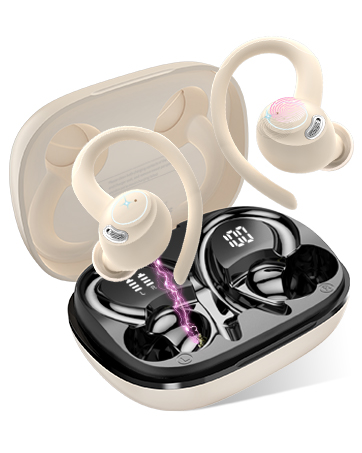
Image 3.1: Component Diagram. This image illustrates the key parts of the earbuds and charging case, including Mic 1, LED Indicator, Mic 2, Charging Pin on the earbuds, and the Dual LED Display and Type-C Input on the charging case.
- Auriculares: Equipped with Mic 1, LED Indicator, Mic 2, and Charging Pins.
- Estuche de carga: Features a Dual LED Display for battery status and a Type-C Input for charging.
4. Configuración
4.1. Carga dos auriculares e da funda
Antes do primeiro uso, carga completamente os auriculares e a caixa de carga.
- Connect the USB-C charging cable to the Type-C input port on the charging case.
- Conecte o outro extremo do cable a unha fonte de alimentación USB (por exemplo, un ordenador, un adaptador de parede).
- Coloca os auriculares na caixa de carga. Asegúrate de que estean correctamente colocados para iniciar a carga.
A pantalla LED da caixa de carga mostrará a porcentaxe da bateríatage of the case and individual charge levels for each earbud. A full charge takes approximately 1.5 hours. The earbuds provide up to 6 hours of playback on a single charge, with the charging case extending total playback to 30 hours.

Image 4.1: Charging Case LED Display. This image shows the charging case with its LED display indicating the battery levels for both the case and the individual left and right earbuds.
4.2. Emparellamento co teu dispositivo
The Jesebang BD86 earbuds feature one-touch automatic pairing.
- Asegúrate de que o Bluetooth do teu dispositivo estea activado.
- Abre a caixa de carga e retira os dous auriculares. Acenderanse automaticamente e entrarán no modo de emparellamento.
- On your device, search for Bluetooth devices and select "BD86" from the list.
- Once connected, you will hear a confirmation prompt, and the earbuds' LED indicators will stop flashing.
Despois do emparellamento inicial, os auriculares conectaranse automaticamente co último dispositivo emparellado ao retiralos da funda.

Image 4.2: Bluetooth Pairing. This image displays a smartphone screen with the Bluetooth settings open, showing the "BD86" earbuds available for connection.
5. Instrucións de funcionamento
5.1. Toca Controis
The Jesebang BD86 earbuds feature intuitive touch controls for managing audio playback and calls.

Image 5.1: Smart Touch Controls. This diagram illustrates the various touch gestures and their corresponding functions on the earbuds, including changing tracks, play/pause, rejecting calls, activating voice assistants, power on/off, and answering calls.
| Xesto | Función |
|---|---|
| Touch and hold (L/R) for 2 seconds | Cambiar pista |
| Toca dúas veces (L/R) | Play/Pause, Reject Call |
| Toca tres veces (L/R) | Activar o Asistente de voz (Siri, Asistente de Google) |
| Touch and hold (L/R) for 5 seconds | Encendido/apagado |
| Toque un só (L/R) | Responder chamada |
5.2. Funcións de audio
The BD86 earbuds are designed for an immersive audio experience:
- Son estéreo de alta fidelidade: Equipped with 14.2mm composite titanized diaphragm dynamic drivers, these earbuds restore high-frequency elements for rich, detailed audio.
- Borrar chamadas: Integrated with 4 HD microphones and ENC (Environmental Noise Cancellation) technology to ensure clear call quality by reducing background noise.
- Redución do ruído do vento: Advanced wind flow technology minimizes wind noise, ensuring clear communication even in windy conditions.

Image 5.2: Acoustic Design. This image illustrates the internal acoustic components of the earbud, highlighting the 13mm drivers, ENC Noise Cancelling, and HD Call capabilities.
5.3. Resistencia á auga
The earbuds are rated IP7 waterproof, providing protection against sweat and rain. This allows for use during sports and in various weather conditions.

Image 5.3: IP7 Water Resistance. The image shows the earbuds with water droplets, symbolizing their IP7 dust and water resistance, suitable for daily use.
6. Mantemento
Para garantir a lonxevidade e o rendemento óptimo dos seus auriculares, siga estas pautas de mantemento:
- Limpeza: Limpa regularmente os auriculares e a funda de carga cun pano suave, seco e sen pelusa. Evita o uso de materiais abrasivos ou produtos químicos agresivos.
- Contactos de carga: Periodically clean the charging contacts on both the earbuds and inside the case with a dry cotton swab to ensure a good connection.
- Almacenamento: Cando non os uses, garda os auriculares na súa funda de carga para protexelos do po e dos danos.
- Evita condicións extremas: Do not expose the earbuds to extreme temperatures, high humidity, or direct sunlight for extended periods.
7 Solución de problemas
If you encounter any issues with your Jesebang BD86 earbuds, refer to the following common solutions:
| Problema | Posible Solución |
|---|---|
| Os auriculares non se emparejan | Ensure earbuds are charged. Turn off and on your device's Bluetooth. Place earbuds back in case, close, then reopen and try pairing again. |
| Non hai son dun auricular | Check individual earbud charge. Try re-pairing both earbuds. Ensure both earbuds are removed from the case simultaneously. |
| Volume baixo ou mala calidade de son | Adjust volume on both your device and the earbuds. Clean any debris from the earbud speakers. Ensure earbuds are properly seated in your ears. |
| Problemas de carga | Ensure the charging cable is securely connected. Clean the charging contacts on both earbuds and the case. Try a different USB power source or cable. |
| Os auriculares desconéctanse con frecuencia | Ensure you are within the Bluetooth range (up to 15 meters). Avoid obstacles between your device and the earbuds. Try re-pairing. |
8. Especificacións
| Característica | Detalle |
|---|---|
| Modelo | BD86 |
| Marca | Xesebang |
| Versión Bluetooth | 5.4 |
| distancia wireless | Ata 15 metros |
| Duración da batería dos auriculares | Ata 6 horas (unha soa carga) |
| Tempo de reprodución total (con estuche) | Ata 30 horas |
| Tempo de carga | Aprox. 1.5 horas |
| Resistencia á auga | IP7 (Impermeabile) |
| Micrófono | 4 HD Mics with ENC Noise Cancellation |
| Tamaño do controlador | 14.2mm Composite Titanized Diaphragm Dynamic Driver |
| Método de control | Control táctil |
| Soporte de asistente de voz | Siri, Asistente de Google |
| Porto de carga | USB-C |
| Peso (por auricular) | 3.3 gramos |
| Dimensións (produto) | 5.5 x 4.5 x 1.8 cm |
| Dispositivos compatibles | IOS, Android, PC, Tablets, Laptops, Car Audio Systems |
9. Garantía e soporte
9.1. Garantía do produto
Jesebang offers a 2 ano de garantía for the BD86 Wireless Earbuds. This warranty covers manufacturing defects and ensures that any issues arising within this period will be addressed. Please retain your proof of purchase for warranty claims.

Image 9.1: 2 Years Warranty. This image displays a badge indicating a 2-year warranty, highlighting Jesebang's commitment to quality.
9.2. Atención ao cliente
Our professional customer support team is available 24/7 to assist you with any questions or concerns you may have regarding your product. Our goal is to provide high-level customer support to ensure a satisfying purchase experience.
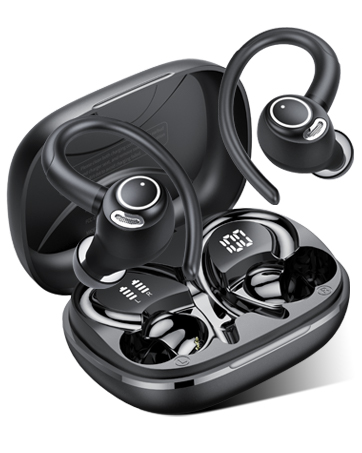
Image 9.2: 24/7 Customer Support. This image shows hands holding a glowing clock icon with '24/7', representing continuous customer support.
For support, please refer to the contact information provided with your product packaging or visit the official Jesebang websitio.