
Introdución
This manual provides detailed instructions for the installation, operation, and maintenance of your Strong SRT 7040 Digital Satellite HD Receiver. Please read this manual carefully before using the device to ensure proper functionality and to prevent damage.

Image: The Strong SRT 7040 DTT Tuner and its retail packaging.
The Strong SRT 7040 is a Full HD digital satellite receiver designed for Free-To-Air (FTA) channels. It features a USB port for multimedia playback and software updates, and supports Dolby Audio for enhanced sound quality.
1. Configuración
1.1 Desembalaxe
Retire con coidado todos os compoñentes da embalaxe. Asegúrese de que estean presentes os seguintes elementos:
- Strong SRT 7040 DTT Tuner
- Mando a distancia (con 2 pilas AAA)
- Adaptador de alimentación
- Manual de usuario
1.2 Conectando o dispositivo
Follow these steps to connect your SRT 7040 receiver:
- Entrada de satélite: Connect your satellite dish cable to the SENTADO porto na parte traseira do receptor.
- Saída de vídeo (HDMI): Conecte un cable HDMI desde o HDMI port on the receiver to an HDMI input on your television.
- Video Output (SCART): Alternatively, for older televisions, connect a SCART cable from the SCART TV porto SCART do receptor á entrada SCART do televisor.
- Audio Output (Digital): For digital audio, connect a coaxial cable from the COAXIAL S/PDIF port to your digital audio ampmáis vivo.
- Audio Output (Analog): For analog audio, connect RCA cables from the AUDIO R/L ports to your audio Hi-Fi ampmáis vivo.
- Dispositivo USB: If desired, connect a USB storage device to the USB port for multimedia playback or software updates.
- Potencia: Conecte o adaptador de enerxía ao 12 V === 1.5 A input on the receiver, then plug the adapter into a wall outlet.

Image: Rear panel connections of the Strong SRT 7040 DTT Tuner, showing SAT IN, HDMI, TV SCART, COAXIAL S/PDIF, AUDIO R/L, USB, and Power input.
1.3 Primeira instalación e busca de canles
Upon first power-on, the receiver will guide you through an initial setup wizard. Follow the on-screen prompts to select your language, country, and perform an automatic channel scan. This process will detect and store all available satellite channels.
2. Instrucións de funcionamento
2.1 Control remotoview
The included remote control allows you to access all functions of the SRT 7040. Insert the two AAA batteries into the remote control, ensuring correct polarity.

Image: The remote control for the Strong SRT 7040 DTT Tuner, showing buttons for power, numbers, volume, channel, menu, and special functions.
2.2 Funcións básicas
- Potencia: Preme o POTENCIA button to turn the receiver on or off (standby mode).
- Selección de canles: Usa o CH+ / CH- buttons to change channels sequentially, or use the numeric keypad to enter a channel number directly.
- Control de volume: Usa o VOL+ / VOL- botóns para axustar o volume do son.
- Silenciar: Preme o MUTO botón para silenciar o audio temporalmente.
2.3 Navegación por menús
Preme o MENÚ botón para acceder ao menú principal. Use as teclas de frecha (UP, ABAIXO, ESQUERDO, DEREITO) to navigate through options and OK to confirm selections. Press SAIR para volver á pantalla anterior ou á televisión en directo.
2.4 Características especiais
- Temporizadores: The receiver supports programming timers for recording or switching to specific channels at scheduled times. Access this feature via the menu.
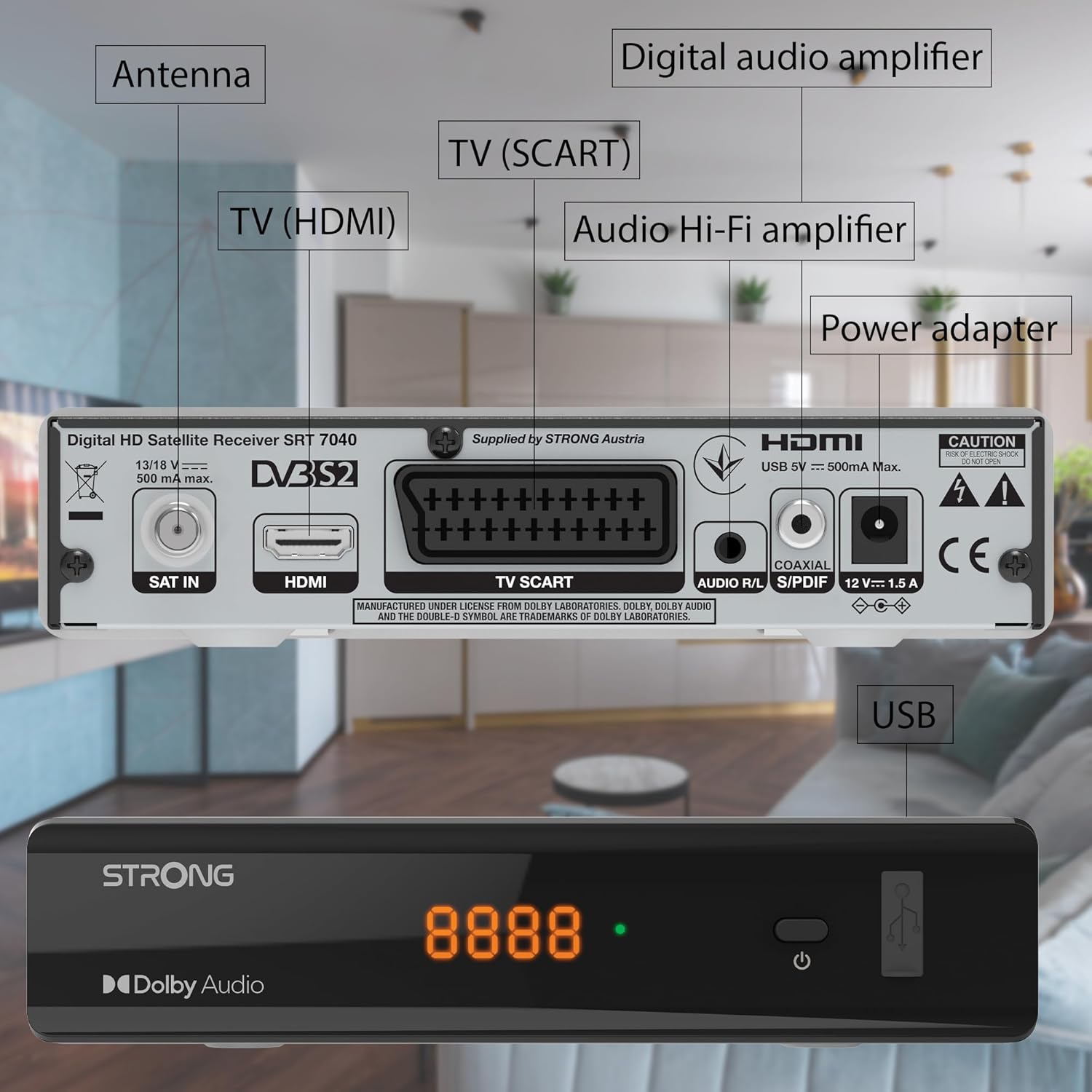
Image: The Strong SRT 7040 DTT Tuner displaying a timer icon, indicating its scheduling capabilities.
- Listas de favoritos: Create customized lists of your preferred channels for quick access.
- Subtítulos: Enable or disable subtitles for compatible broadcasts using the SUB botón do control remoto.
- Guía electrónica de programas (EPG): Preme o EPG botón para view program information for upcoming broadcasts.
- Audio Dolby: The receiver supports Dolby Audio for a high-quality sound experience.

Image: The Strong SRT 7040 DTT Tuner with the Dolby Audio logo, illustrating its sound processing capability.
3. Mantemento
3.1 Limpeza
To clean the receiver, disconnect it from the power supply. Use a soft, dry cloth to wipe the exterior. Do not use liquid cleaners, aerosols, or abrasive materials, as these can damage the finish or internal components.
3.2 Actualizacións de software
Comprobe periodicamente o fabricante website for available software updates. Updates can improve performance, add new features, or resolve issues. Software updates are typically performed via the USB port following specific instructions provided with the update file.
3.3 Información de seguridade
- Non abra o receptor casing. Non hai pezas que o usuario poida reparar no interior. Encomende calquera mantemento a persoal cualificado.
- Keep the receiver away from direct sunlight, heat sources, and moisture.
- Asegúrese de que haxa unha ventilación axeitada arredor do dispositivo para evitar o sobrequecemento.
- Use só o adaptador de alimentación proporcionado.
4 Solución de problemas
If you encounter problems with your SRT 7040, consult the following table before contacting support.
| Problema | Causa posible | Solución |
|---|---|---|
| Sen poder | Adaptador de corrente non conectado; toma de corrente avariada | Check power adapter connection; Try a different power outlet |
| Sen sinal / Pantalla negra | Satellite cable loose or disconnected; Incorrect input selected on TV; Satellite dish alignment issue | Check SAT IN cable connection; Ensure TV is on correct HDMI/SCART input; Perform a channel scan; Consult a professional for dish alignment if necessary |
| O control remoto non funciona | Batteries depleted or incorrectly inserted; Obstruction between remote and receiver | Replace batteries; Ensure correct polarity; Remove any obstructions; Point remote directly at receiver |
| Mala calidade de imaxe | Weak satellite signal; Incorrect display settings | Check satellite signal strength in menu; Adjust TV display settings; Ensure Full HD content is being broadcast |
5. Especificacións
The following are the technical specifications for the Strong SRT 7040 Digital Satellite HD Receiver:
- Modelo: SRT 7040 (SAT FTA Full HD)
- Marca: Forte
- Dimensións: 3.39 x 6.46 x 1.38 polgadas (8.6 x 16.4 x 3.5 cm)
- Peso do artigo: 9.2 onzas (260 gramos)
- Cor: Negro
- Tecnoloxía de conectividade: USB
- Voltage: 100 - 240 V
- Frecuencia: 50 - 60 Hz
- Consumo de enerxía: 18 kWh (operational, typical)
- Rango de temperatura de traballo: 0ºC a 40ºC
- Humidade relativa: 10% - 95%
- Baterías: 2 pilas AAA (incluídas para o mando a distancia)
- Especificación cumprida: DVB-S2
- Incluído: Wally Receiver
6. Garantía e soporte
For warranty information and technical support, please refer to the warranty card included in your product packaging or visit the official Strong websitio. Garde o recibo da compra como xustificante de compra para reclamacións de garantía.
For further assistance, you may contact Strong customer service through the contact details provided on their official websitio.