1. Introdución
Thank you for choosing the XTUOES Automatic Cat Feeder. This 5L WiFi-enabled food dispenser is designed to provide convenient and consistent feeding for your cats and dogs. Featuring dual hoppers, compatibility with various food sizes (2-18mm), timed meal scheduling, a 30-second voice recording function, and a dual power system, this feeder ensures your pet receives balanced nutrition even when you are away.
Please read this manual carefully to understand the product's features and ensure proper operation and maintenance.

Image: The XTUOES Automatic Cat Feeder, showcasing its sleek design and the accompanying mobile application for remote control.
2. Guía de configuración
2.1. Desembalaxe e compoñentes
Carefully remove all components from the packaging. Ensure you have the main feeder unit, the stainless steel food bowl, and the USB power cable. No power adapter or AA batteries are included.
2.2. Fonte de alimentación
The feeder supports a dual power system for reliable operation:
- Potencia USB: Connect the provided 5V DC USB power cable to the feeder and a compatible USB power adapter (not included).
- Copia de seguridade da batería: Para poder outage protection, insert 4 AA batteries (not included) into the battery compartment located at the bottom of the unit. The feeder will automatically switch to battery power during a power interruption.

Image: Illustration of the dual power system, highlighting the battery compartment for 4 AA batteries and the USB power input.
2.3. Food Loading
The feeder features dual hoppers, allowing you to store and dispense two different types of food. Open the top lid and pour kibble or freeze-dried food into the respective compartments. The feeder is compatible with food sizes ranging from 2mm to 18mm.
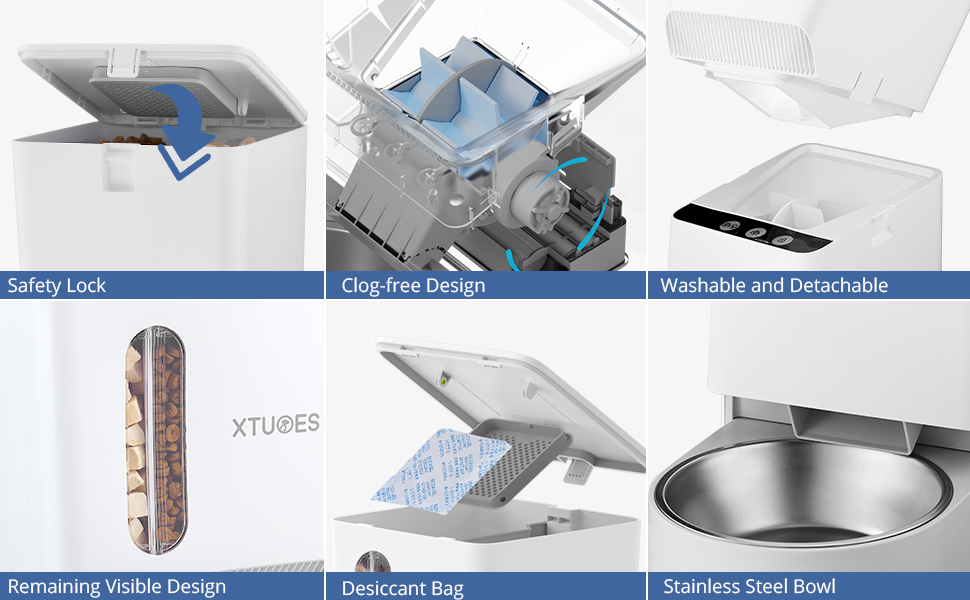
Imaxe: Unha detallada view of the dual hoppers, designed to store two distinct types of pet food, such as kibble and freeze-dried options.
2.4. Instalación e conexión da aplicación
Download the 'Smart Life' app from your smartphone's app store. Follow the in-app instructions to connect the feeder to your 2.4GHz WiFi network. This will enable remote control and scheduling features.

Image: The feeder's mobile app interface, demonstrating how to set feeding schedules and adjust portion sizes for each container.
3. Instrucións de funcionamento
3.1. Timed Feeding
Use the Smart Life app to set up to 10 meals per day. Each meal can be programmed with up to 20 portions, with each portion being approximately 8-10 grams. This allows for precise control over your pet's diet.
3.2. 30-Second Voice Record
The feeder includes a 30-second voice recorder. Press and hold the recording button for 3 seconds until the unlock button's white light flashes. Record your voice, then press the recording button again to save. This feature allows you to call your pet to eat with a familiar sound.
3.3. Alimentación manual
To manually dispense food, press the feeding button on the unit when the feeder is unlocked (indicated by a white light). Each press dispenses approximately 0.05 cups (one portion).
3.4. Independent Feeding Systems
The dual hoppers can be controlled independently via the app. You can specify which hopper (Container 1 or Container 2) dispenses food and the number of portions for each scheduled meal. This is ideal for pets with different dietary needs or for mixing food types.
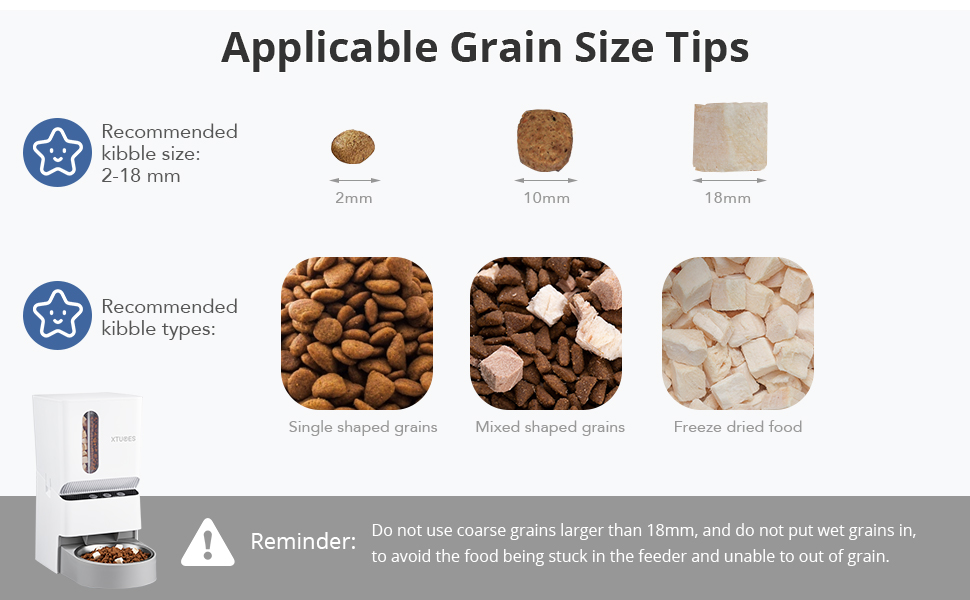
Image: Visual representation of the independent feeding systems, demonstrating how the app allows selection of food portions from either the left or right hopper.
4. Mantemento
4.1. Limpeza
The feeder is designed for easy cleaning. The stainless steel bowl is detachable and can be hand washed. The food storage container can also be detached from the main unit for thorough cleaning. Ensure all parts are completely dry before reassembling.

Image: The feeder's food container being cleaned under running water, demonstrating its washable and detachable design.
4.2. Food Size Guidelines
To prevent jamming and ensure smooth dispensing, use kibble or freeze-dried food within the recommended size range of 2-18mm. Do not use coarse grains larger than 18mm or wet grains, as this can cause blockages and damage the feeder mechanism.
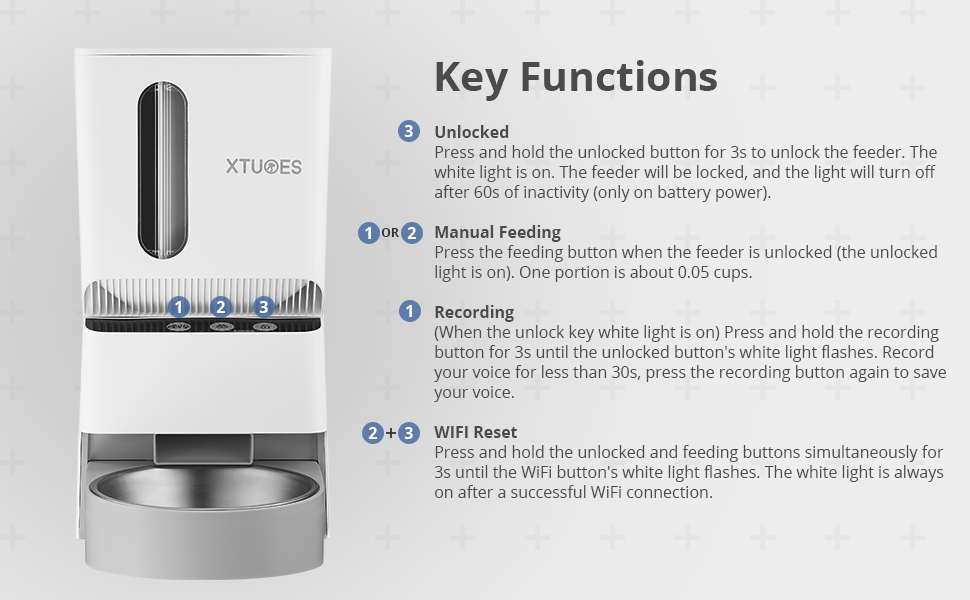
Image: Visual guide for applicable grain sizes, showing examples of 2mm, 10mm, and 18mm kibble, along with a reminder about unsuitable food types.
5 Solución de problemas
- O alimentador non dispensa comida: Check if the food hoppers are empty. Ensure the feeder is powered on and connected to the app. Verify that the food size is within the 2-18mm range and that no wet or overly coarse food is causing a jam.
- Problemas de conectividade da aplicación: Ensure your WiFi network is 2.4GHz. Restart the feeder and your router. Try resetting the WiFi connection on the feeder by pressing and holding the unlock and feeding buttons simultaneously for 3 seconds until the WiFi light flashes.
- Voice recording not working: Ensure the feeder is unlocked (white light on). Press and hold the recording button for 3 seconds until the unlock button's white light flashes before speaking.
- Inconsistent portion sizes: Ensure the food is dry and free-flowing. Large or irregularly shaped kibble might affect consistency.
6. Especificacións
| Característica | Detalle |
|---|---|
| Marca | XTUOS |
| Nome do modelo | XTUOES-M254153 |
| Capacidade | 5 litros |
| Compatibilidade alimentaria | 2-18mm kibble/freeze-dried food |
| Comidas por día | 1-10 comidas |
| Porcións por comida | Up to 20 portions (approx. 8-10g per portion) |
| Gravación de voz | 30 segundos |
| Conectividade | WiFi 2.4 GHz |
| Sistema de potencia | 5V DC USB (adapter not included) & 4 AA batteries (not included) |
| Material | Plastic (feeder), Stainless Steel (bowl) |
| Dimensións (LxWxH) | 7 x 12 x 13.6 polgadas |
| Peso do elemento | 3.29 libras (1492 gramos) |
| Instrucións de coidado | Hand Wash Only (detachable parts) |
7. Garantía e soporte
This XTUOES Automatic Cat Feeder comes with a 1-year warranty from the date of purchase. This warranty covers manufacturing defects and malfunctions under normal use.
For any questions, issues, or warranty claims, please contact XTUOES customer support through Amazon email. Our support team is committed to assisting you within 24 hours.