1. Introdución
This manual provides detailed instructions for the PTHTECHUS S80K Smart Watch. Please read this manual thoroughly before using the device to ensure proper operation and to maximize its features. This smartwatch is designed to assist in activity tracking, communication, and health monitoring for young users.

Image 1.1: The PTHTECHUS S80K Smart Watch, showcasing its display and pink strap.
2. Que hai na caixa
Upon unpacking your PTHTECHUS S80K Smart Watch, please verify that all the following items are included:
- 1 x PTHTECHUS S80K Smart Watch
- 1 x cable de carga
- 1 x Manual de usuario (este documento)

Image 2.1: Contents of the PTHTECHUS S80K Smart Watch package, including the watch and its charging cable, with dimensions.
3. Configuración
3.1. Carga do reloxo intelixente
Before initial use, fully charge the smartwatch. Connect the magnetic charging cable to the charging contacts on the back of the watch and plug the USB end into a compatible power adapter (not included) or a computer's USB port. The watch display will indicate charging status.
3.2. Instalación da aplicación
To utilize all features of your smartwatch, download and install the companion application, CO-FIT, on your smartphone. The app is compatible with Android 4.4 and above, and iOS 8.0 and above.
- Scan the QR code provided in the quick start guide or search for "CO-FIT" in your smartphone's app store (Google Play Store for Android, Apple App Store for iOS).
- Descarga e instala a aplicación.
- Sigue as instrucións en pantalla para crear unha conta e configurar o teu profesionalfile.
3.3. Emparejamento de dispositivos
Pair your smartwatch with the CO-FIT app via Bluetooth:
- Asegúrate de que o Bluetooth estea activado no teu smartphone.
- Open the CO-FIT app and navigate to the "Device" or "Add Device" section.
- The app will search for available devices. Select "S80K" or the corresponding device name from the list.
- Confirma a solicitude de emparellamento tanto no teu teléfono intelixente como no reloxo intelixente.
- Unha vez emparellado, o reloxo sincronizará os datos coa aplicación.
4. Instrucións de funcionamento
4.1. Navegación básica
- Pantalla táctil: Desliza o dedo cara á esquerda, á dereita, cara arriba ou cara abaixo para navegar polos menús e as funcións. Toca para seleccionar unha opción.
- Botón lateral: Prema para volver á pantalla de inicio ou activar o dispositivo.
4.2. Realización e recepción de chamadas
After connecting the smartwatch to your phone via Bluetooth, you can manage calls directly from your wrist.
- Facer chamadas: Access the dial pad or synchronized contacts on the watch to initiate a call.
- Recepción de chamadas: Cando entre unha chamada, o reloxo mostrará o identificador da persoa que chama. Toca a icona verde para responder ou a icona vermella para rexeitar.
- The built-in microphone and speaker allow for hands-free communication.

Image 4.1: The smartwatch displaying an incoming call, demonstrating its communication capabilities.

Image 4.2: Visual representation of making and answering calls directly from the smartwatch interface.
4.3. Notificacións
Receive SMS and app notifications directly on your smartwatch. Ensure notification permissions are granted in the CO-FIT app and your phone's settings.
- The watch supports notifications from various applications such as WhatsApp, Facebook, InstagRAM, Twitter e moito máis.
- Nota: Replying to messages directly from the watch is not supported.

Image 4.3: The smartwatch showing incoming message notifications and the voice assistant interface.

Image 4.4: Illustration of smart notifications being displayed on the watch, keeping the user informed.
4.4. Monitorización da saúde
The smartwatch offers 24-hour health monitoring features to help track well-being. Nota: This data is for reference only and cannot be used for medical diagnosis or treatment.
- Monitorización da frecuencia cardíaca: O reloxo monitoriza continuamente a túa frecuencia cardíaca. View real-time data on the watch or in the CO-FIT app.
- Monitorización de osíxeno no sangue (SpO2): Mide os teus niveis de saturación de osíxeno no sangue.
- Monitorización do sono: Tracks sleep patterns, including deep sleep, light sleep, and awake times, providing a comprehensive analysis of sleep quality.
- Monitorización da presión arterial: Ofrece lecturas estimadas da presión arterial.

Image 4.5: The smartwatch interface showing continuous heart rate monitoring.

Image 4.6: The smartwatch displaying blood oxygen monitoring results.

Image 4.7: The smartwatch showing sleep tracking data, encouraging healthy sleep habits.
4.5. Modos deportivos
The watch supports 37 different sports modes to track various physical activities. It records steps, distance, and calorie consumption.
- Select your desired sport mode (e.g., mountaineering, running, cycling, yoga) from the watch menu.
- The watch will display real-time statistics during your workout.
- Review your activity data in the CO-FIT app for detailed analysis.

Image 4.8: Visual representation of the 37 available sport modes, including skiing, running, and cycling.

Image 4.9: The smartwatch interface showing a list of sports modes for selection.
4.6. Personalización das esferas do reloxo
Personalize your smartwatch with over 120 available watch face styles or create custom dials using your own photos.
- Access the watch face gallery through the CO-FIT app.
- Select from various online styles or upload a personal photo to create a unique watch face.
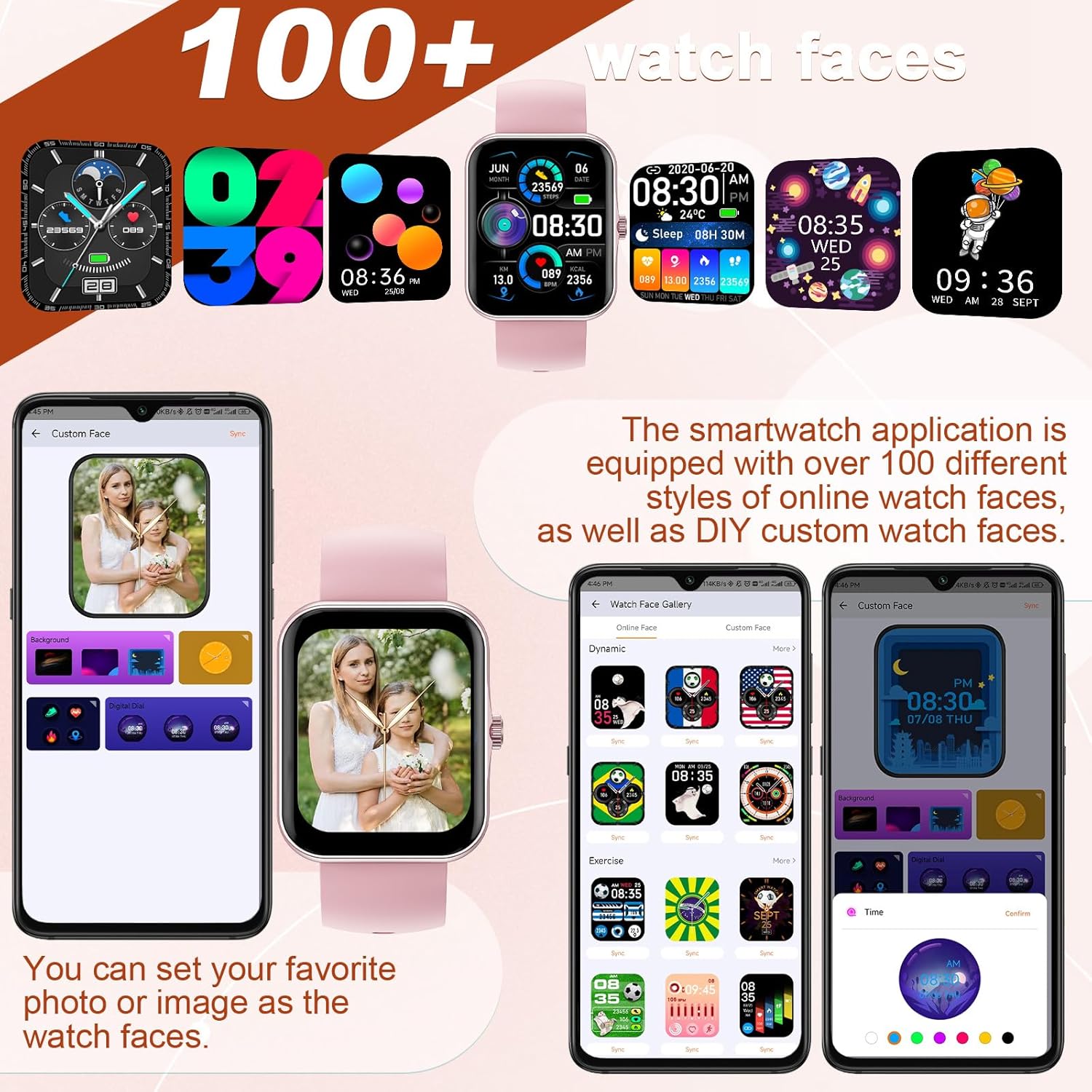
Image 4.10: A selection of watch faces and the interface for customizing them with personal photos.

Image 4.11: A collage of diverse watch faces and custom dial options available for the smartwatch.
4.7. Control da música
Control your smartphone's music playback directly from the smartwatch.
- Play, pause, skip tracks, and adjust volume without needing to access your phone.

Image 4.12: The smartwatch interface for music control and remote camera operation.
4.8. Control da cámara
Use your smartwatch as a remote shutter for your smartphone's camera.
- Open the camera function in the CO-FIT app and then use the watch to trigger photos.
4.9. Asistente de voz
The integrated voice assistant allows for hands-free control and information retrieval.
- Activate the voice assistant on the watch to make calls, check weather forecasts, play music, and more.

Image 4.13: A user engaging with the AI voice assistant feature on the smartwatch.
4.10. Weather Display
View current weather conditions and forecasts directly on your watch.
- Ensure the watch is connected to your smartphone and location services are enabled for accurate weather updates.

Image 4.14: The smartwatch showing a multi-day weather forecast.
5. Mantemento
5.1. Limpeza
- Limpa a pantalla e a correa do reloxo regularmente cun pano suave e seco.
- Para a sucidade teimosa, use un lixeiramente damp pano e despois seca ben.
- Evita o uso de produtos químicos agresivos ou materiais abrasivos, xa que poden danar o reloxo.
5.2. Coidado da batería
- Carga o reloxo regularmente, mesmo se non o usas con frecuencia, para manter a batería en bo estado.
- Evita as temperaturas extremas, xa que poden afectar o rendemento e a vida útil da batería.
5.3. Resistencia á auga
Important: This smartwatch is NOT waterproof. It is not suitable for swimming, showering, or submersion in water. Exposure to water may cause damage not covered by warranty.
6 Solución de problemas
If you encounter issues with your PTHTECHUS S80K Smart Watch, please refer to the following common solutions:
- O reloxo non se acende: Asegúrate de que o reloxo estea completamente cargado. Conéctao ao cargador durante polo menos 30 minutos.
- Non se pode emparellar co teléfono:
- Asegúrate de que o Bluetooth estea activado no teléfono e no reloxo.
- Make sure the watch is within the Bluetooth range of your phone (typically 10 meters).
- Reinicia tanto o teléfono como o reloxo.
- Clear the Bluetooth cache on your phone and try pairing again.
- Non aparecen as notificacións:
- Check notification permissions in the CO-FIT app and your phone's system settings.
- Ensure the watch is properly connected to the app.
- Datos sanitarios inexactos: Ensure the watch is worn snugly on your wrist, not too tight or too loose. Clean the sensor on the back of the watch. Remember that health data is for reference and not medical use.
- Autonomía curta da batería: Reduce screen brightness, disable unnecessary notifications, and close background apps on the watch if available.
Se o problema persiste, póñase en contacto co servizo de atención ao cliente para obter máis axuda.
7. Especificacións
| Característica | Detalle |
|---|---|
| Nome do modelo | S80K |
| Marca | PTHTECUS |
| Tamaño da pantalla | 1.83 polgadas |
| Tecnoloxía de visualización | LCD |
| Resolución | 240 x 284 |
| Conectividade | Bluetooth |
| Sistema Operativo | AsteroidOS |
| Tipo de batería | Polímero de litio (1 incluído) |
| Dimensións do produto | 8.66 x 1.57 x 0.79 polgadas |
| Peso do elemento | 1.76 onzas (50 gramos) |
| Características especiais | Activity Tracker, Heart Rate Monitor, Notifications, Oxymeter (SpO2), Phone Call |
| Entrada da interface humana | Buttons, Dial, Touchscreen |
8. Garantía e soporte
For warranty information and customer support, please refer to the documentation provided with your purchase or visit the official PTHTECHUS website. If you require technical assistance or have questions regarding your S80K Smart Watch, please contact the seller or manufacturer directly.