
Introdución
The TAXNELE THC30A is a digital programmable timer switch designed for automatic control of various electrical equipment. It features daily and weekly programming capabilities with up to 20 ON/OFF settings, a manual override function, and a built-in lithium battery for power-off memory. This manual provides detailed instructions for installation, operation, and maintenance to ensure safe and efficient use of your timer switch.
Información de seguridade
- Asegúrese de que a fonte de alimentación estea desconectada antes da instalación ou mantemento.
- Installation should be performed by a qualified electrician or knowledgeable individual.
- Non exceda a capacidade de carga máxima de 30 A / 5000 W.
- Manteña o dispositivo lonxe da auga e das temperaturas extremas.
- Verify correct wiring connections to prevent damage to the device or connected appliances.
Características do produto
- Programmable Control: Up to 20 ON/OFF settings per day or week.
- Memoria de apagado: Built-in 3V lithium battery maintains timing, display, and data storage for up to 3 years during power interruptions.
- Alta precisión: Industrial-grade chip for accurate timing.
- Anulación manual: Allows temporary or permanent manual control.
- Pantalla LCD: Clear digital display for easy programming and monitoring.
- Din Rail Mount: Designed for easy installation on a standard DIN rail.
- Aplicación ampla: Suitable for street lights, neon lamps, advertising signs, production equipment, and home appliances.

Figure 1: The THC30A timer switch highlighting its power-off memory function, which retains data for up to 3 years using a built-in CR2032 lithium battery.

Figure 2: The THC30A timer switch featuring a 30A big load relay for stable and safe operation with various electrical loads.
Product Components and Display
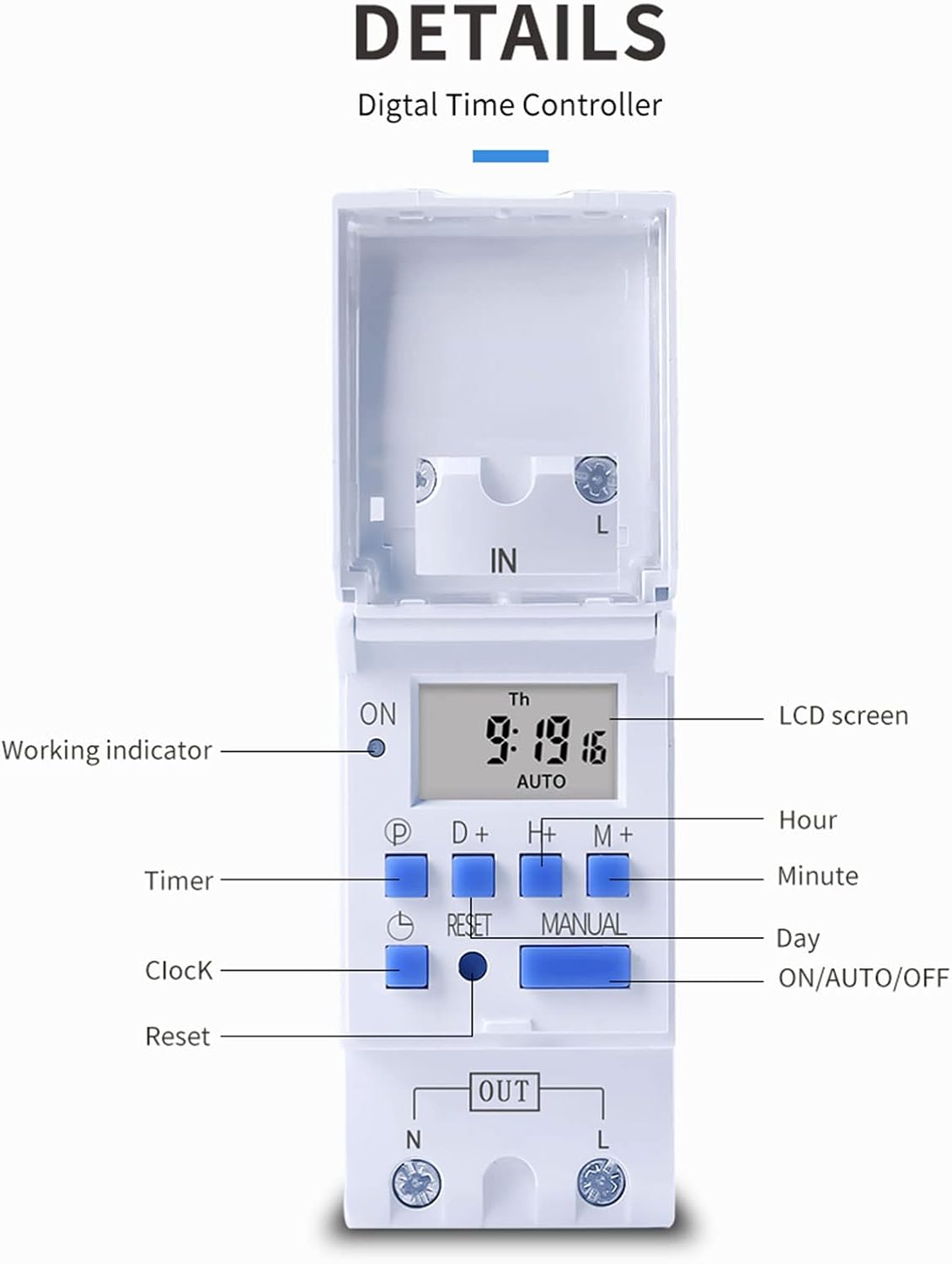
Figura 3: detallada view of the THC30A timer switch's LCD screen and control buttons. Labels include Working indicator, Timer, Clock, Reset, P (Program), D+ (Day), H+ (Hour), M+ (Minute), Manual, and ON/AUTO/OFF status.
- Pantalla LCD: Displays current time, day, and ON/OFF status.
- Indicador de traballo: LED light indicating operation status.
- Botón P: Entra en modo de programación.
- D+ Button: Adjusts day in clock setting or program.
- H+ Button: Adjusts hour in clock setting or program.
- M+ Button: Adjusts minute in clock setting or program.
- Botón do reloxo: Returns to clock display or exits programming mode.
- Botón de reinicio: Clears all settings and resets the timer.
- Botón manual: Alterna entre os modos ON, AUTO e OFF.
Especificacións
| Parámetro | Valor |
|---|---|
| Modelo | THC30A |
| Valoración actual | 30A |
| Clasificación de potencia | 5000 W |
| Voltage Opcións | 12V DC AC, 24V DC AC, 48V DC AC, 110V AC, 220V AC |
| Erro de tempo | ≤2 seconds/day |
| Mostrar | LCD |
| Rango de temporización | 1 minute to 168 hours (7 days) |
| Configuración ON/OFF | 20 grupos |
| Temperatura de funcionamento | -20℃ a 50℃ |
| Dimensións | 86 x 36 x 65mm (3.38 x 1.41 x 2.56 polgadas) |
| Reserva de enerxía | 3V Lithium battery (CR2032 type) for 3 years data retention |

Figure 4: Dimensions of the THC30A timer switch, showing measurements for height, width, and depth for proper installation planning.
Configuración e instalación
1. Montaxe
The THC30A timer switch is designed for DIN rail mounting. Securely attach the device to a standard 35mm DIN rail in an appropriate electrical enclosure.
2. Cableado
AVISO: Ensure all power is disconnected before performing any wiring.
Connect the input power supply to the "IN" terminals (N for Neutral, L for Live). Connect the load (e.g., light, appliance) to the "OUT" terminals (N for Neutral, L for Live). The timer acts as a switch for the live wire. Refer to the wiring diagram below for correct connections.

Figure 5: Simplified wiring diagram for the THC30A timer switch. The new version offers direct power output, simplifying connections compared to older models.
- Entrada (IN): Connect your main power supply (e.g., AC 12V, 24V, 48V, 110V, 220V) to these terminals.
- Saída (OUT): Connect your electrical load (e.g., light, motor) to these terminals. The timer controls the power flow to this output.
Instrucións de funcionamento
1. Initial Setup / Reset
Ao primeiro uso ou despois dun apagado prolongadotage, the display may be blank. Press the Restablecer button (located in a small hole, use a pointed object) to clear all settings and initialize the timer. The LCD will display "0:00" and "AUTO".
2. Axuste da hora e do día actuais
- Manteña premido o Reloxo botón.
- Mentres sostén Reloxo, prema D+ to set the current day (Monday to Sunday).
- Mentres sostén Reloxo, prema H+ to set the current hour (0-23).
- Mentres sostén Reloxo, prema M+ to set the current minute (0-59).
- Soltar o Reloxo botón. A hora xa está axustada.
3. Programación de ciclos de acendido/apagado
O temporizador admite ata 20 programas de acendido/apagado. Cada programa consta dunha hora de acendido e unha hora de apagado.
- Preme o P button once. The display will show "1 ON". This is for the first ON setting.
- Preme D+ to select the day(s) for this ON event. You can choose a single day, specific days, or blocks of days (e.g., Mon-Fri, Sat-Sun, Mon-Sun).
- Preme H+ to set the hour for the first ON event.
- Preme M+ to set the minute for the first ON event.
- Preme o P button again. The display will show "1 OFF". This is for the first OFF setting.
- Repeat steps 2-4 to set the day(s), hour, and minute for the first OFF event.
- Continúa presionando P to cycle through "2 ON", "2 OFF", up to "20 ON", "20 OFF" and set additional programs as needed.
- Despois de configurar todos os programas desexados, prema o botón Reloxo botón para saír do modo de programación e volver á visualización da hora actual.
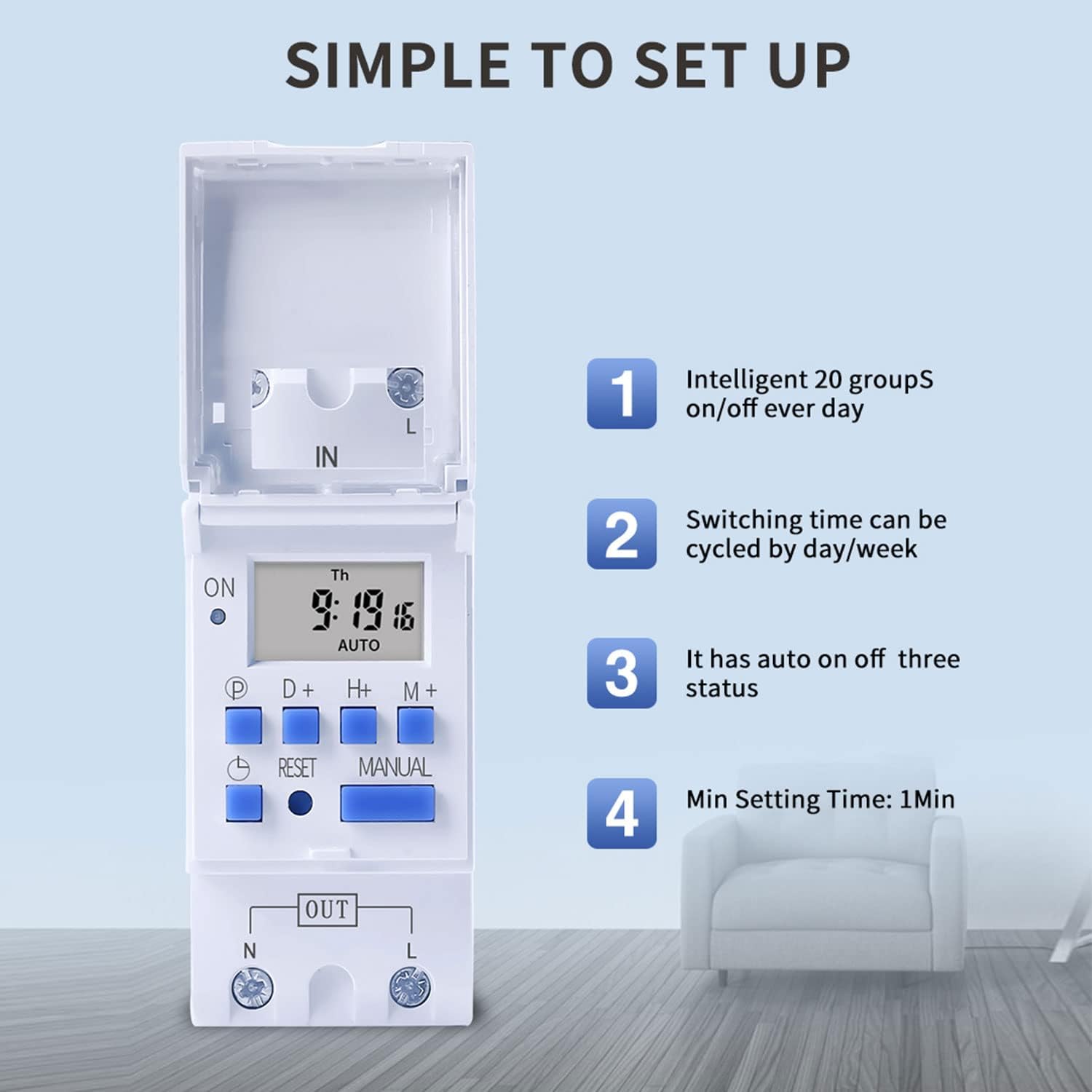
Figure 6: Visual guide to the simple setup of the THC30A timer, highlighting its 20 ON/OFF groups, daily/weekly cycling, auto ON/OFF status, and minimum 1-minute setting time.
4. Anulación manual
Preme o Manual button to cycle through the output modes:
- ACTIVADO: The output is continuously ON, overriding all programs.
- AUTOMÁTICO: The output operates according to the programmed ON/OFF cycles. This is the standard operating mode.
- OFF: The output is continuously OFF, overriding all programs.
Asegúrate de que o temporizador estea activado AUTO mode for programmed operations to function.
Mantemento
- Manteña o temporizador limpo e libre de po. Use un pano seco e suave para limpalo.
- Non use produtos de limpeza ou disolventes abrasivos.
- The internal lithium battery (CR2032) has a long lifespan (up to 3 years). If the display consistently goes blank after power outages, the battery may need replacement. This should be done by a qualified technician.
Resolución de problemas
| Problema | Causa posible | Solución |
|---|---|---|
| A pantalla está en branco. | Sen fonte de alimentación; batería interna esgotada. | Check power connections. Press the Reset button. If problem persists, internal battery may need replacement. |
| Timer does not switch ON/OFF as programmed. | Timer is not in AUTO mode; incorrect program settings; current time/day is wrong. | Preme Manual until "AUTO" is displayed. Verify program settings (ON/OFF times, days). Check and correct current time and day. |
| Output is always ON or always OFF. | Timer is in manual ON or OFF mode. | Preme Manual ata que se mostre "AUTO". |
| Programs are lost after power outage. | Internal backup battery is depleted. | The internal CR2032 battery may need replacement. Contact support if necessary. |
Aplicacións
The TAXNELE THC30A timer switch is versatile and can be used in various applications to automate electrical devices:

Figura 7: Examples of common applications for the THC30A timer switch, including street light control, home appliance control, battery charging control, and advertising light control.
- Street Light Control: Automate the turning ON/OFF of street lights based on time.
- Home Appliance Control: Schedule operation of water heaters, fans, or other household devices.
- Battery Charging Control: Manage charging cycles for batteries to prevent overcharging.
- Advertising Light Control: Program display times for neon signs and advertising boards.
- Production Equipment: Control machinery operation in industrial settings.
Garantía e Soporte
For warranty information or technical support, please refer to the contact details provided with your purchase or visit the official TAXNELE websitio. Garde o recibo da compra como xustificante da mesma.