
FAO Schwarz Thunderbolt Jet X2
FAO Schwarz Thunderbolt Jet X2 Drone User Manual
Model: Thunderbolt Jet X2 | Brand: FAO Schwarz
Introdución
Welcome to the user manual for your new FAO Schwarz Thunderbolt Jet X2 Drone. This manual provides essential information for safe operation, setup, maintenance, and troubleshooting. Please read it thoroughly before operating your drone to ensure a safe and enjoyable experience.
Información de seguridade
- Opera sempre o dron en zonas abertas e despexadas, lonxe de persoas, animais e obstáculos.
- Non voes preto de aeroportos, liñas eléctricas ou espazo aéreo restrinxido.
- Ensure the drone's battery and remote control batteries are fully charged before each flight.
- Manteña os dedos, o cabelo e a roupa solta lonxe das hélices en rotación.
- Non o opere con ventos fortes ou condicións meteorolóxicas adversas.
- Recoméndase a supervisión dun adulto para os usuarios máis novos.
O que hai na caixa
Verifica que estean presentes todos os compoñentes:
- FAO Schwarz Thunderbolt Jet X2 Drone
- Control remoto
- Batería recargable de dron
- Cable de carga USB
- Hélices de reposto (se están incluídas)
- Manual de usuario (este documento)
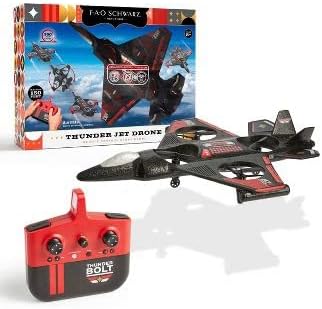
Image: The Thunderbolt Jet X2 Drone, its remote control, and the product packaging, showing the main components included.
Configuración
1. Carga da batería do drón
- Locate the rechargeable drone battery.
- Conecta a batería ao cable de carga USB fornecido.
- Plug the USB cable into a standard USB power source (e.g., computer USB port, USB wall adapter).
- O indicador luminoso do cable USB mostrará o estado de carga (por exemplo, vermello para a carga, apagado para a carga completa).
- A carga adoita tardar entre 60 e 90 minutos. Non a sobrecargues.
2. Instalación das baterías do control remoto
- Abra o compartimento da batería na parte traseira do control remoto.
- Insert 3x AAA batteries (not included) into the compartment, ensuring correct polarity (+/-).
- Pecha o compartimento da batería de forma segura.

Imaxe: Unha detallada view of the remote control for the Thunderbolt Jet X2 Drone, highlighting its buttons and joysticks.
3. Emparellar o drón e o control remoto
- Coloque o dron sobre unha superficie plana e plana.
- Turn on the drone by pressing its power button. The drone's lights will flash.
- Acende o mando a distancia.
- Empuxe o joystick esquerdo (acelerador) completamente cara arriba e despois completamente cara abaixo.
- The drone's lights will become solid, indicating successful pairing.
Operando o dron
Controis básicos
- Joystick esquerdo (acelerador): Up to ascend, down to descend.
- Right Joystick (Directional): Forward to move forward, backward to move backward, left to move left, right to move right.
- Botóns de recorte: Used to fine-tune the drone's stability if it drifts in any direction.
- Botón de engalaxe/aterraxe dun só botón: Prema para engalar ou aterrar automaticamente.
- Botón de xiro de 360°: Press this button, then push the right joystick in any direction to perform a flip.

Image: The Thunderbolt Jet X2 Drone flying in the air, with a hand holding the remote control in the foreground, illustrating active operation.
Primeiro Voo
- Ensure you are in a safe, open area.
- Coloque o dron sobre unha superficie plana.
- Press the One-Key Take-off button, or slowly push the left joystick up to ascend.
- Practice hovering at a low altitude first.
- Use the right joystick for directional control.
- To land, press the One-Key Landing button or slowly pull the left joystick down until the drone lands.

Image: Three Thunderbolt Jet X2 Drones shown in different aerial maneuvers, demonstrating its agility and flight capabilities.
Mantemento
- Limpeza: Use a soft, dry cloth to clean the drone and remote control. Do not use water or harsh chemicals.
- Inspección da hélice: Regularly check propellers for damage (bends, cracks). Replace damaged propellers immediately using the provided spares.
- Coidado da batería: Store batteries in a cool, dry place. Do not leave batteries fully discharged for extended periods.
- Almacenamento: When not in use, store the drone and remote in a safe place, away from direct sunlight and extreme temperatures.
Resolución de problemas
| Problema | Causa posible | Solución |
|---|---|---|
| O dron non responde ao mando a distancia. | Sen emparellamento; batería baixa; fóra de alcance. | Re-pair drone and remote; charge drone battery; replace remote batteries; ensure within 300 feet range. |
| O dron desvíase durante o voo. | Needs trimming; uneven take-off surface. | Use trim buttons to adjust; ensure drone is on a flat surface before take-off. |
| Hélices que non xiran. | Obstruction; damaged propeller; motor issue. | Check for obstructions; replace damaged propellers; contact support if motor issue suspected. |
Especificacións
| Característica | Detalle |
|---|---|
| Marca | FAO Schwarz |
| Nome do modelo | Thunderbolt Jet X2 |
| Cor | Negro |
| Resolución de captura de vídeo | 480 p |
| Tecnoloxía de conectividade | USB |
| Nivel de habilidade | Principiante |
| Capacidade da batería | 850 millónsamp Horario |
| Formato de captura de vídeo | MP4 |
| Rango máximo | 300 pés |
| Material | Plástico |
| Peso do elemento | 1.61 libras |
| Dimensións do paquete | 17.48 x 12.68 x 4.37 polgadas |
Garantía e Soporte
For warranty information or technical support, please refer to the contact details provided on the product packaging or visit the official FAO Schwarz websitio. Garde o recibo da compra como xustificante da mesma.