
1. Introdución
The MOBI CONNECT Smart DualScan Bluetooth Thermometer (Model 700026) is designed for accurate and versatile temperature measurement. It offers multiple reading methods including ear, forehead, room, and object temperature. This device features a backlit screen, LED fever indicators, and memory recall for up to 20 previous readings. It supports both Fahrenheit and Celsius modes and can connect via Bluetooth to the MOBI Smart App for enhanced tracking and management capabilities.

Image: The MOBI CONNECT Smart DualScan Bluetooth Thermometer, its packaging, and a smartphone displaying the companion app.
2. Contido do paquete
Verifica que todos os elementos estean presentes no paquete:
- 1 x MOBI CONNECT Smart DualScan Bluetooth Thermometer
- 1 x Protective Cap (for forehead mode)
- 1 x bolsa de almacenamento
- 1 x Manual de usuario
- 1 x Guía de inicio rápido
- 2 x pilas AAA

Imaxe: Detallada view of the thermometer with its components labeled for easy identification.
3. Configuración
3.1. Instalación da batería
- Open the battery compartment cover located on the back of the thermometer.
- Introduza dúas pilas AAA, asegurándose de manter a polaridade correcta (+/-).
- Pecha a tapa do compartimento da batería de forma segura.
3.2. Acendido/apagado
- Para acender, prema SCAN/Power button. The device will perform a self-test and display the last reading.
- The thermometer will automatically power off after approximately 30 seconds of inactivity to conserve battery life.
3.3. Cambio de unidades de temperatura (Fahrenheit/Celsius)
With the device powered on, press and hold the MODO button for 3 seconds to switch between Fahrenheit (°F) and Celsius (°C).
4. Modos de funcionamento
4.1. Forehead Measurement
- Ensure the protective cap is on the probe.
- Preme o SCAN/Power botón para acender o termómetro.
- Position the thermometer approximately 0.5 to 1 inch (1-2.5 cm) from the center of the forehead.
- Manteña premido o ESCANEAR button. A beep will sound, and the temperature will be displayed on the LCD screen.

Image: Demonstrating forehead temperature measurement.
4.2. Ear Measurement
- Gently remove the protective cap from the probe.
- Preme o SCAN/Power botón para acender o termómetro.
- Carefully insert the probe into the ear canal. For children under 1 year, gently pull the ear straight back. For children over 1 year and adults, gently pull the ear up and back.
- Manteña premido o ESCANEAR button. A beep will sound, and the temperature will be displayed on the LCD screen.

Image: Removing the protective cap for ear measurement.

Image: Demonstrating ear temperature measurement.
4.3. Room and Object Temperature Measurement
The thermometer can also measure ambient room temperature and the temperature of objects (e.g., liquids, surfaces). To switch to these modes, press the MODO button repeatedly until the desired icon (room or object) appears on the display. Then, point the thermometer at the object or area and press ESCANEAR.
4.4. Indicador de febre
The LCD display changes color to indicate temperature status:
- Retroiluminación verde: Indicates a normal body temperature.
- Retroiluminación vermella: Indicates a high body temperature (fever warning).
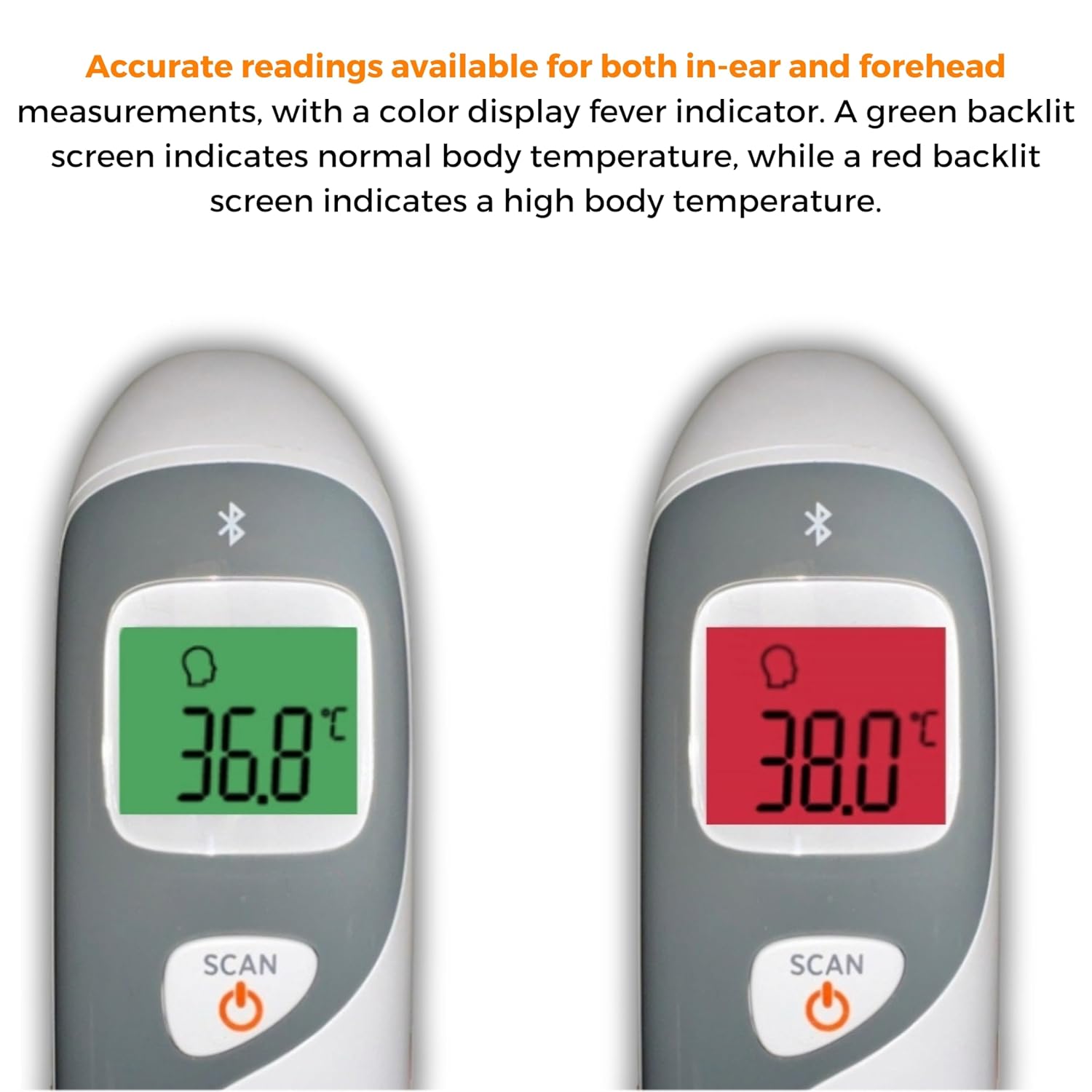
Image: The thermometer's color-changing LCD display indicating normal (green) and high (red) temperatures.
4.5. Recordo de memoria
The thermometer stores the last 20 temperature readings. To access these readings, press the MEM/MUTE button while the device is on. Each press will cycle through the stored readings.
5. Bluetooth Connectivity and MOBI Smart App
The MOBI CONNECT Smart DualScan Thermometer can be used independently or paired with your smartphone via Bluetooth for enhanced tracking and features through the MOBI Smart App.
5.1. Descarga da aplicación e emparellamento
- Download the "MOBI Smart" app from your device's app store (available on iOS and Android).
- Asegúrate de que o Bluetooth estea activado no teu smartphone.
- Open the MOBI Smart App and follow the on-screen instructions to pair your thermometer.
5.2. Funcións da aplicación
- Seguimento automático: Automatically records temperature readings from the thermometer.
- Múltiples usuarios Profiles: Crear e xestionar profesionaisfiles for each family member to track their health data independently.
- Rexistro de datos: Add comments to each reading for context.
- Reporting & Graphs: View powerful reports and graphs for daily, weekly, monthly, or yearly temperature trends.
- Opcións de exportación: Export data for sharing with healthcare professionals.
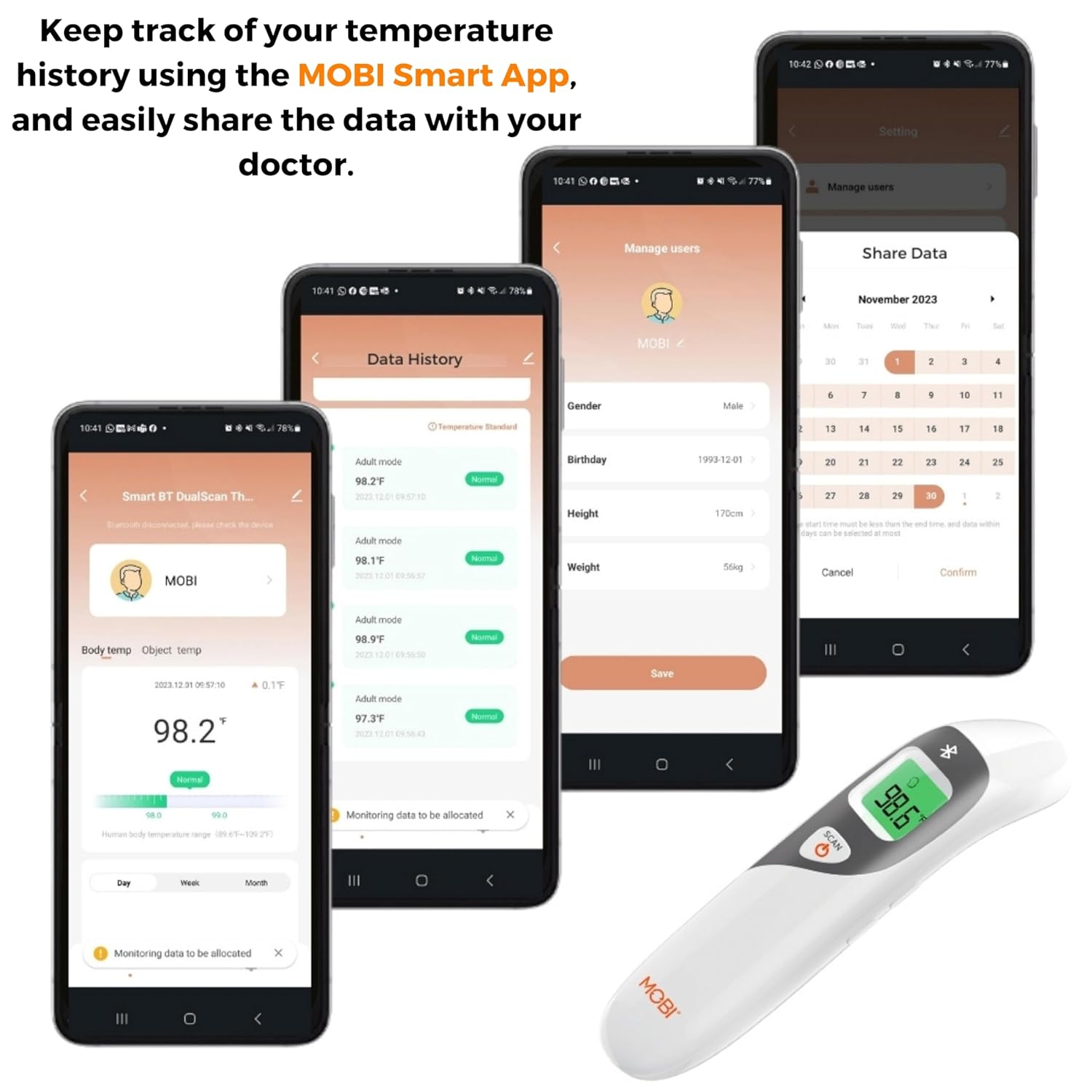
Image: Screenshots of the MOBI Smart App interface, showing data tracking and user management.
5.3. Vídeo oficial do produto
Vídeo: Un funcionario acabouview of the MOBI Smart DualScan Bluetooth Ear & Forehead Thermometer, demonstrating its features and usage.
6. Mantemento
6.1. Limpeza
To clean the thermometer, wipe it with a soft, damp cloth. Do not immerse the device in water or use abrasive cleaners. Ensure the probe is clean before each use, especially for ear measurements.
6.2. Almacenamento
Store the thermometer in its protective pouch in a cool, dry place, away from direct sunlight and extreme temperatures. Remove batteries if the device will not be used for an extended period.
7 Solución de problemas
- "Lo" or "Hi" Reading: Indicates a temperature outside the measurable range. Ensure proper placement and try again.
- Lecturas inexactas:
- Check for proper probe placement (ear or forehead).
- Ensure the probe is clean.
- Verify the correct mode (Adult/Child/Object) is selected if applicable.
- Allow the thermometer to acclimate to room temperature for 30 minutes if it has been in a significantly different environment.
- Problemas de conexión Bluetooth:
- Asegúrate de que o Bluetooth estea activado no teu smartphone.
- Restart the thermometer and the MOBI Smart App.
- Ensure the thermometer is within range of your smartphone.
- Sen visualización: Comprobe a instalación da batería e substitúelas se é necesario.
8. Especificacións
| Número de modelo | 700026 |
| Fonte de enerxía | Alimentado por pilas (2 pilas AAA) |
| Tipo de visualización | LCD con retroiluminación |
| Conectividade | Bluetooth |
| Modos de medición | Ear, Forehead, Room, Object |
| Unidades de temperatura | Fahrenheit (°F) / Celsius (°C) |
| Recuperación da memoria | Últimas 20 lecturas |
| Coidado do produto | Limpar |
| Material | Plástico |
| Fabricante | Mobi Technologies Inc. |
9. Garantía e soporte
For warranty information or technical support, please contact Mobi Technologies Inc. directly. Refer to the product packaging or the official MOBI websitio web para obter os datos de contacto máis actuais.