
Introdución
The Focusrite Scarlett 2i2 4th Gen USB Audio Interface is designed for high-fidelity, studio-quality recording, songwriting, streaming, and podcasting. It features ultra-low-noise mic pres, studio-grade converters, and a comprehensive software bundle to enhance your audio production. This manual provides essential information for setting up, operating, and maintaining your device.
Configuración
O que hai na caixa
- Interface de audio Scarlett 2i2 de 4.ª xeración
- Cable USB-A a C
Connecting Your Scarlett 2i2
Connect the Scarlett 2i2 to your computer using the provided USB-A to C cable. The device is bus-powered, meaning it draws power directly from your computer via the USB connection. For devices requiring additional power, a 5V DC USB-C input is available on the rear panel.

Figura 1: Fronte view of the Scarlett 2i2 4th Gen interface.
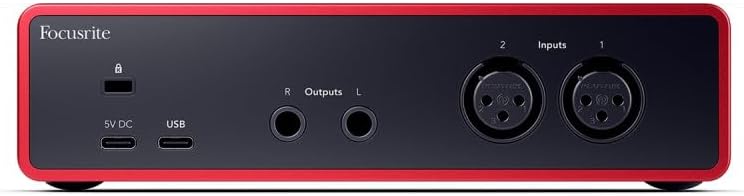
Figura 2: Traseira view showing USB-C ports for connection and optional power.
Instalación de software
To get started, visit the official Focusrite website and download the necessary utility program (driver) for your operating system (Mac OS, Windows OS, iOS, ChromeOS). The Scarlett 2i2 comes with the Hitmaker Expansion software bundle, including Pro Tools Intro+, Ableton Live Lite, Auto-Tune Access for Vocals, Softube Marshall Silver Jubilee 2555 for guitar, Native Instruments MASSIVE synth, and more. Ensure your antivirus software is temporarily disabled during software and plugin downloads to prevent interference.
For detailed step-by-step instructions on software setup, please refer to the official Guía de usuario (PDF).
Initial Connection and Power-Up
Once connected, the LED lights on the interface will illuminate, indicating power. The gain halos around the input knobs will also light up, providing visual feedback on input levels.
En funcionamento
Input and Output Controls
The Scarlett 2i2 features two 4th Gen mic inputs with 69dB of analogue gain, ensuring high-fidelity recording. It also includes Hi-Z instrument inputs for direct guitar connection. Use the gain knobs to adjust input levels for each channel. The gain halos will change color to indicate signal strength (green for good, red for clipping).
The interface offers a powerful 120dB dynamic range and ultra-low distortion design for pure playback through any headphones, controlled by the independent headphone volume knob.
Características clave
- Alimentación phantom de 48 V: Activate for condenser microphones requiring phantom power.
- Inst Button: Toggles between line and instrument level input for optimal recording.
- Ganancia automática: Automatically sets optimal recording levels in seconds, preventing clipping and ensuring a great take every time.
- Seguro para clips: Prevents audio clipping by automatically adjusting gain, ensuring your recordings are always clean.
- Modo de aire: Newly enhanced Air mode brings the character of a big studio console to your sound, adding presence and harmonic richness.
- Monitor directo: Allows you to hear your input signal directly through your headphones or speakers with zero latency.
Mantemento
The Scarlett 2i2 is built with a durable aluminum body. To ensure longevity, keep the device clean and free from dust. Avoid exposing it to extreme temperatures or moisture. Handle cables with care to prevent damage to the ports. For detailed cleaning instructions and long-term storage recommendations, consult the official User Guide.
Resolución de problemas
Problemas comúns e solucións
- Garbled Audio: If you experience distorted or garbled audio, try wiggling or unplugging and replugging the USB-C cable. Ensure all connections are secure.
- Software/Plugin Download Issues: Temporarily disable your antivirus software before downloading and installing the Hitmaker Expansion bundle or any related plugins. Re-enable it after installation is complete.
- Sen saída de son: Check your monitor and headphone volume levels. Ensure the correct input channels are selected and that phantom power (48V) is enabled for condenser microphones if needed. Verify that your computer's audio settings are configured to use the Scarlett 2i2 as the input/output device.
For more in-depth troubleshooting steps and solutions, please refer to the official Guía de usuario (PDF).
Especificacións
| Característica | Detalle |
|---|---|
| Peso do elemento | 1.73 libras |
| Dimensións do produto | 7.09 x 3.9 x 1.79 polgadas |
| Número de modelo do artigo | AMS-SCARLETT-2I2-4G |
| Material do corpo | Aluminio |
| Nome da cor | Vermello |
| Dispositivos compatibles | Micrófono, Instrumento, Ordenador persoal, Tableta, Auriculares, Teléfono intelixente, Monitores de estudio |
| Tipo de conector | USB-C |
| Interface de hardware | USB 2.0 |
| Software compatible | Todo o software de gravación de audio |
| Plataforma de hardware | Interface de audio |
| Sistema Operativo | Mac OS, Windows OS, iOS, ChromeOS |
| Número de canles | 2 |
Garantía e Soporte
The Focusrite Scarlett 2i2 4th Gen comes with a three-year warranty, ensuring peace of mind. For any assistance, technical support is available 24/7/365.
For detailed warranty information, support contacts, and additional resources, please refer to the official Guía de usuario (PDF) ou visita o Focusrite Store on Amazon.