
HOCO S19 Metal Grey
Hoco S19 Small Heartful ENC Noise Reduction Wireless Headphones
Manual de usuario
Introdución
Thank you for choosing the Hoco S19 Small Heartful ENC Noise Reduction Wireless Headphones. This manual provides detailed instructions on how to set up, operate, and maintain your new wireless headphones. Please read this manual carefully before use to ensure optimal performance and longevity of your device.
Información de seguridade
- Non expoñas o dispositivo a temperaturas extremas, humidade nin substancias corrosivas.
- Keep the device away from water and liquids. It is not water resistant.
- Non intente desmontar nin modificar o dispositivo. Isto anulará a garantía.
- Empregue só os cables de carga fornecidos ou certificados.
- Evite escoitar a volume alto durante períodos prolongados para evitar danos auditivos.
Contido do paquete
Comprobe se o paquete contén os seguintes elementos:
- Hoco S19 Wireless Headphone
- Almofadas para orellas
- Cable de carga (USB)
- Manual de usuario

Imaxe: Fronte view of the Hoco S19 retail packaging, showing the headphone and key features.
Produto rematadoview
Familiarize yourself with the components of your Hoco S19 headphone.

Imaxe: Lado dereito view of the Hoco S19 wireless headphone, highlighting the ear hook design and control buttons.
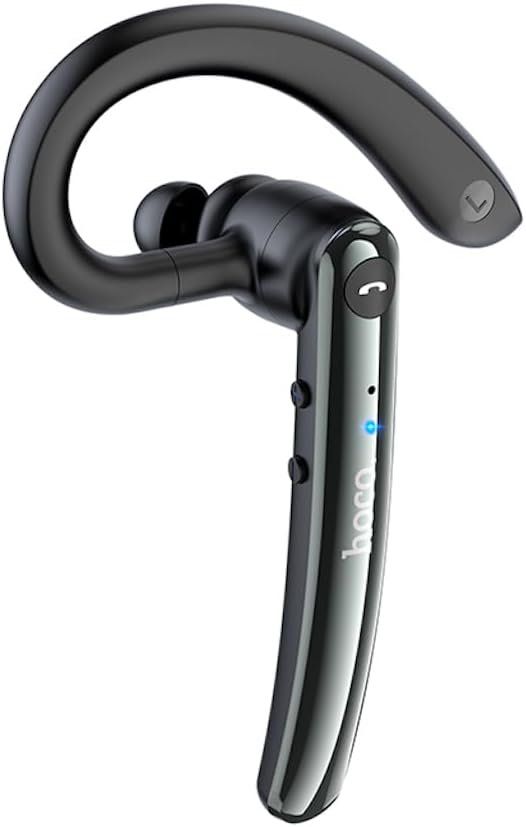
Imaxe: Lado esquerdo view of the Hoco S19 wireless headphone, showing the ergonomic ear hook and main body.

Imaxe: Costas view of the Hoco S19 wireless headphone, displaying the charging port, model number (S19), input voltage, and various certification marks.
Compoñentes clave:
- Gancho para a orella: Designed for secure and comfortable fit.
- Corpo principal: Houses the battery, chip, and controls.
- Botón multifunción: For power, pairing, call management, and music control.
- Botóns de volume: For adjusting audio volume.
- Micrófono: Dual microphones for ENC noise reduction.
- Porto de carga: Para conectar o cable de carga.
- Indicador LED: Mostra o estado de enerxía, emparellamento e carga.

Image: Inside of the Hoco S19 packaging, illustrating the location of the main and auxiliary microphones for enhanced call clarity.
Configuración
1. Carga dos auriculares
Before first use, fully charge the headphone. The battery capacity is 90mAh.
- Connect the charging cable to the headphone's charging port and the other end to a USB power source (e.g., computer, wall adapter).
- The LED indicator will show charging status (e.g., red light).
- Charging takes approximately 1 hour. The LED indicator will change or turn off once fully charged.
2. Pairing with a Device (Bluetooth)
The Hoco S19 uses Bluetooth 5.0 for stable connectivity.
- Encendido: Press and hold the Multi-function Button until the LED indicator flashes blue and red alternately, indicating pairing mode.
- Activar Bluetooth: On your smartphone, tablet, or other Bluetooth-enabled device, go to the Bluetooth settings and turn on Bluetooth.
- Busca Dispositivos: O dispositivo buscará automaticamente dispositivos Bluetooth próximos.
- Select "Hoco S19": From the list of available devices, select "Hoco S19".
- Confirmar emparellamento: Once connected, the LED indicator on the headphone will flash blue slowly or turn off, and you will hear a voice prompt confirming the connection.
If pairing fails, turn off the headphone and your device's Bluetooth, then repeat the steps.
Instrucións de funcionamento
Encendido/apagado
- Encendido: Press and hold the Multi-function Button for approximately 3 seconds until the LED indicator flashes blue and you hear a voice prompt.
- Apagado: Press and hold the Multi-function Button for approximately 5 seconds until the LED indicator turns red and you hear a voice prompt.
Funcións de chamada
- Responder/Finalizar chamada: Press the Multi-function Button once during an incoming call to answer. Press it again during a call to end.
- Rexeitar a chamada: Press and hold the Multi-function Button for approximately 2 seconds during an incoming call to reject.
- Volver a marcar o último número: Prema dúas veces o botón multifunción cando non estea nunha chamada.
Reprodución de música
- Reproducir/Pausa: Press the Multi-function Button once during music playback.
- Próxima pista: Manteña premido o botón Subir volume.
- Pista anterior: Manteña premido o botón para baixar o volume.
Control de volume
- Subir volume: Prema brevemente o botón Subir volume.
- Baixar volume: Prema brevemente o botón para baixar o volume.
Redución de ruído ENC
The Hoco S19 features double-mark ENC (Environmental Noise Cancellation) for clearer calls. This feature is active during calls to reduce background noise.
Language Prompts
The headphone supports Chinese and English voice prompts. To switch languages, triple-click the Multi-function Button when the headphone is not connected to any device.
Mantemento
- Limpeza: Usa un pano suave e seco para limpar os auriculares. Non empregues produtos químicos agresivos nin materiais abrasivos.
- Almacenamento: Garda os auriculares nun lugar fresco e seco, lonxe da luz solar directa e de temperaturas extremas.
- Coidado da batería: To prolong battery life, avoid fully discharging the battery frequently. Charge the headphone regularly, even if not in use for extended periods.
Resolución de problemas
| Problema | Causa posible | Solución |
|---|---|---|
| Os auriculares non se acenderon. | Batería baixa. | Charge the headphone for at least 1 hour. |
| Non se pode emparellar co dispositivo. | Bluetooth not enabled on device; headphone not in pairing mode; too far from device. | Ensure Bluetooth is on. Put headphone in pairing mode (flashing blue/red). Keep devices within 10 meters. |
| Sen son ou mala calidade de son. | Volume too low; headphone not connected; interference. | Increase volume. Reconnect headphone. Move away from sources of interference. |
| A calidade da chamada é mala. | Environmental noise; microphone obstructed. | Ensure microphone is clear. ENC noise reduction should help in noisy environments. |
Especificacións
| Característica | Detalle |
|---|---|
| Nome do modelo | S19 |
| Tecnoloxía de conectividade | Sen fíos (Bluetooth) |
| Versión Bluetooth | 5.0 (Chip: Realtek RTL8763BMF) |
| Capacidade da batería | 90 mAh |
| Tempo de carga | Aproximadamente 1 hora |
| Tempo de conversa/música | Ata 9 horas |
| Tempo de espera | Ata 200 horas |
| Redución de ruído | Double-mark ENC (Environmental Noise Cancellation) |
| Supported Prompts | chinés e inglés |
| Material | Acrilonitrilo Butadieno Estireno (ABS) |
| Peso do elemento | 12 gramos |
| Cor | Gris metálico |
| Nivel de resistencia á auga | Non resistente á auga |
Garantía e Soporte
HOCO products are designed and manufactured to the highest quality standards. For information regarding warranty coverage, please refer to the warranty card included with your purchase or visit the official HOCO websitio.
For technical support, troubleshooting assistance, or service inquiries, please contact your local HOCO distributor or the customer service department through the contact information provided on the HOCO official websitio web ou o seu recibo de compra.
Recursos en liña: For additional information, FAQs, and product updates, please visit the official HOCO websitio.
Ask a question about this manual
Ask about setup, troubleshooting, compatibility, parts, safety, or missing instructions. Manuals+ will review the question and use this page’s manual context to help answer it.