
Pretul SOIN-101MP
Manual de usuario Pretul SOIN-101MP Mini Inverter Solder
Model: SOIN-101MP (29961)
1. Introdución
Thank you for choosing the Pretul SOIN-101MP Mini Inverter Welder. This compact and lightweight welding machine is designed for shielded metal arc welding (SMAW) processes, offering higher efficiency and lower power consumption compared to conventional welders. This manual provides essential information for the safe and effective operation, maintenance, and troubleshooting of your new welder.
Please read this manual thoroughly before operating the machine and keep it for future reference.
2. Información de seguridade
ADVERTENCIA: A soldadura pode ser perigosa. Siga sempre as precaucións de seguridade para evitar lesións graves ou a morte.
- Use sempre o equipo de protección individual (EPI) axeitado, incluíndo un casco de soldador con sombra axeitada, luvas de soldador, roupa protectora e calzado de seguridade.
- Asegurar unha ventilación axeitada na zona de traballo para evitar a inhalación de fumes de soldadura.
- Protect yourself and others from electric shock. Do not touch live electrical parts. Ensure the machine is properly grounded.
- Be aware of fire and explosion hazards. Remove all flammable materials from the welding area. Have a fire extinguisher readily available.
- Arc rays can burn eyes and skin. Use proper eye and face protection.
- Do not operate the welder in wet conditions or near water.
- Desconecte a alimentación antes de realizar calquera mantemento ou axuste.
3. Contido do paquete
Verifique que todos os elementos que se indican a continuación estean incluídos no seu paquete:
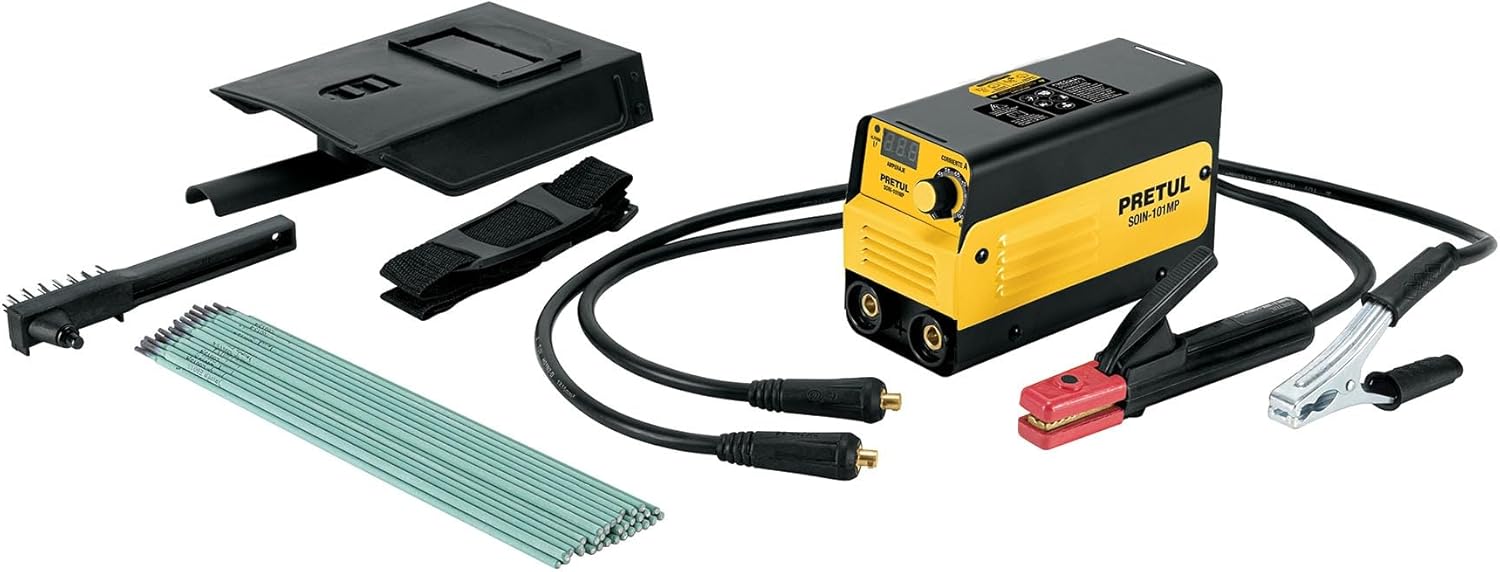
Image: The Pretul SOIN-101MP Mini Inverter Welder shown with all its included accessories: the welding machine, electrode holder cable, ground clamp cable, shoulder strap, protective welding mask, wire brush, power cable with plug, and a pack of welding electrodes.
- 1 x Pretul SOIN-101MP Mini Inverter Welder
- 1 x Electrode Holder Cable (2 m, #7 AWG / 10 mm²)
- 1 x Cl moídoamp Cable (2 m, #7 AWG / 10 mm²)
- 1 x Correa para o ombreiro
- 1 x Protective Welding Mask
- 1 cepillo de arame
- 1 cable de alimentación con enchufe
- 1 x 1 kg pack of 1/8" E6013-4 Electrodes

Image: A visual list of included accessories, detailing the ground clamp cable, electrode holder cable, strap, protective mask, wire brush, power cable, and electrodes.
4. Produto rematadoview
Familiarize yourself with the main components of your Pretul SOIN-101MP welder:

Imaxe: Unha detallada view of the welder, highlighting key components such as the electronic current adjustment control, power cable input, on/off switch, and quick-change terminals.
- Electronic Control for Current Adjustment: Digital display and knob for precise ampconfiguración da era.
- Entrada de cable de alimentación: Connection point for the main power supply.
- Interruptor On/Off: Control de alimentación principal da unidade.
- Quick-Change Terminals (Bornes): 3/8" terminals for connecting the electrode holder and ground clamp cables.
- Ventilador de refrixeración: Located internally to prevent overheating.
5. Configuración
- Colocación: Place the welder on a stable, level surface in a well-ventilated area, away from flammable materials. Ensure there is sufficient space around the unit for air circulation.
- Conectar a terra Clamp: Conecte a terra clamp cable to the appropriate quick-change terminal on the welder. Securely attach the ground clamp á peza de traballo ou a unha parte metálica limpa e espida da mesa de soldadura, garantindo un bo contacto eléctrico.
- Conectar o soporte de electrodos: Connect the electrode holder cable to the other quick-change terminal on the welder. Insert the desired electrode into the electrode holder.
- Conexión de alimentación: Ensure the welder's ON/OFF switch is in the "OFF" position. Plug the power cable into a grounded 127 V, 1-phase power outlet.
- Equipos de protección individual (EPI): Before turning on the welder, put on all necessary PPE, including your welding helmet, gloves, and protective clothing.
6. Instrucións de funcionamento
- Activar: Flip the ON/OFF switch to the "ON" position. The digital display will illuminate.
- Axustar a corrente: Use the current adjustment knob to set the desired amperage. The digital display will show the selected current. Refer to the electrode manufacturer's recommendations for appropriate current settings.
- Selección de eléctrodos: This welder is designed for shielded metal arc welding (SMAW) and is compatible with the following electrode types:
- 6013 (Up to 1/8")
- 6011 (Up to 1/8")
- 7018 (Up to 3/32")

Image: A chart illustrating compatible electrode types (6013, 6011, 7018) and their recommended sizes for 1-phase operation with the SMAW process. It also indicates N/A for TIG tungsten.
- Comezar a soldar: With the electrode in the holder and the ground clamp attached, strike an arc on the workpiece. Maintain a consistent arc length and travel speed for optimal weld quality.
- Post-soldadura: After completing the weld, turn off the welder. Allow the machine to cool down before storing. Clean the workpiece and remove any slag.
7. Mantemento
Un mantemento regular garante a lonxevidade e o rendemento óptimo da súa soldadora.
- Limpeza: Periodically clean the exterior of the welder with a dry, soft cloth. Use compressed air to blow out dust and debris from the ventilation openings. Ensure the machine is unplugged before cleaning.
- Inspección de cables: Regularly inspect all cables (power, electrode, ground) for cuts, fraying, or damaged insulation. Replace any damaged cables immediately.
- Comprobación do terminal: Ensure the quick-change terminals are clean and free of corrosion. Tighten connections as needed.
- Almacenamento: Store the welder in a dry, clean environment, away from direct sunlight and extreme temperatures.
8 Solución de problemas
| Problema | Causa posible | Solución |
|---|---|---|
| Welder does not turn on. | No power supply; faulty power cable; internal fault. | Check power outlet and circuit breaker. Inspect power cable. If problem persists, contact support. |
| Sen arco ou arco débil. | Mala conexión á terra; axuste de corrente incorrecto; damp or incorrect electrode; internal issue. | Asegurar a limpeza do chanamp has good contact. Adjust current. Use dry, appropriate electrodes. |
| Welder overheats and shuts off. | Exceeded duty cycle; blocked ventilation; high ambient temperature. | Allow welder to cool down. Ensure clear ventilation. Reduce welding time or current. |
| O eléctrodo agáchase con frecuencia. | Low current setting; improper arc length; damp electrodo. | Increase current. Maintain proper arc length. Use dry electrodes. The Anti-Stick feature helps prevent this. |
9. Especificacións

Image: The Pretul SOIN-101MP welder with dimensions indicated: 18 cm height, 25 cm depth, and 10 cm base width.
| Característica | Detalle |
|---|---|
| Número de modelo | SOIN-101MP (29961) |
| Vol. De entradatage | 1 Phase (127 V) |
| Rango actual | 20A DC - 100A DC |
| Ciclo de traballo | 60% (at 100A) |
| Compatibilidade de eléctrodos | 6013, 6011 (up to 1/8"), 7018 (up to 3/32") |
| Quick-Change Terminals | 3/8" |
| Dimensións (L x W x H) | 25 cm x 10 cm x 18 cm (approx. 33 x 27 x 20.7 cm package) |
| Peso | 4.8 kg (peso do paquete) |
| Fonte de enerxía | AC/DC |
Características técnicas:

Image: A list of technical features including IGBT Inverter, Thermal Protect, Arc Force, Anti Stick, Hot Start, and Lift TIG, with brief descriptions.
- Tecnoloxía de inversores IGBT: Allows operation at any current level, providing stable and efficient welding.
- Thermal Protect: Thermal protection against overload, automatically shutting down the unit to prevent damage.
- Forza de arco: Adjusts the optimal arc value and allows welding in different positions.
- Anti Stick: Prevents overheating and sticking of the electrode to the workpiece.
- Inicio rápido: Facilitates arc ignition, making it easier to start welding.
- Levante TIG: Facilitates arc ignition with the TIG process (Note: This model is primarily for SMAW, TIG functionality may require additional accessories not included).
10. Garantía e soporte
For warranty information and technical support, please refer to the documentation included with your product or contact Pretul customer service directly. Keep your purchase receipt as proof of purchase for warranty claims.
For further assistance, you may visit the official Pretul brand store on Amazon: Pretul Store
Ask a question about this manual
Ask about setup, troubleshooting, compatibility, parts, safety, or missing instructions. Manuals+ will review the question and use this page’s manual context to help answer it.