
1. Produto rematadoview
The Glocusent Tri-Head Book Light is an innovative reading light designed for optimal illumination and user comfort. Featuring a unique tri-head design, it offers broader and more even lighting compared to traditional book lights. It includes multiple color temperatures, adjustable brightness levels, and a convenient 30-minute timer, making it ideal for various reading environments, including in bed without disturbing others.
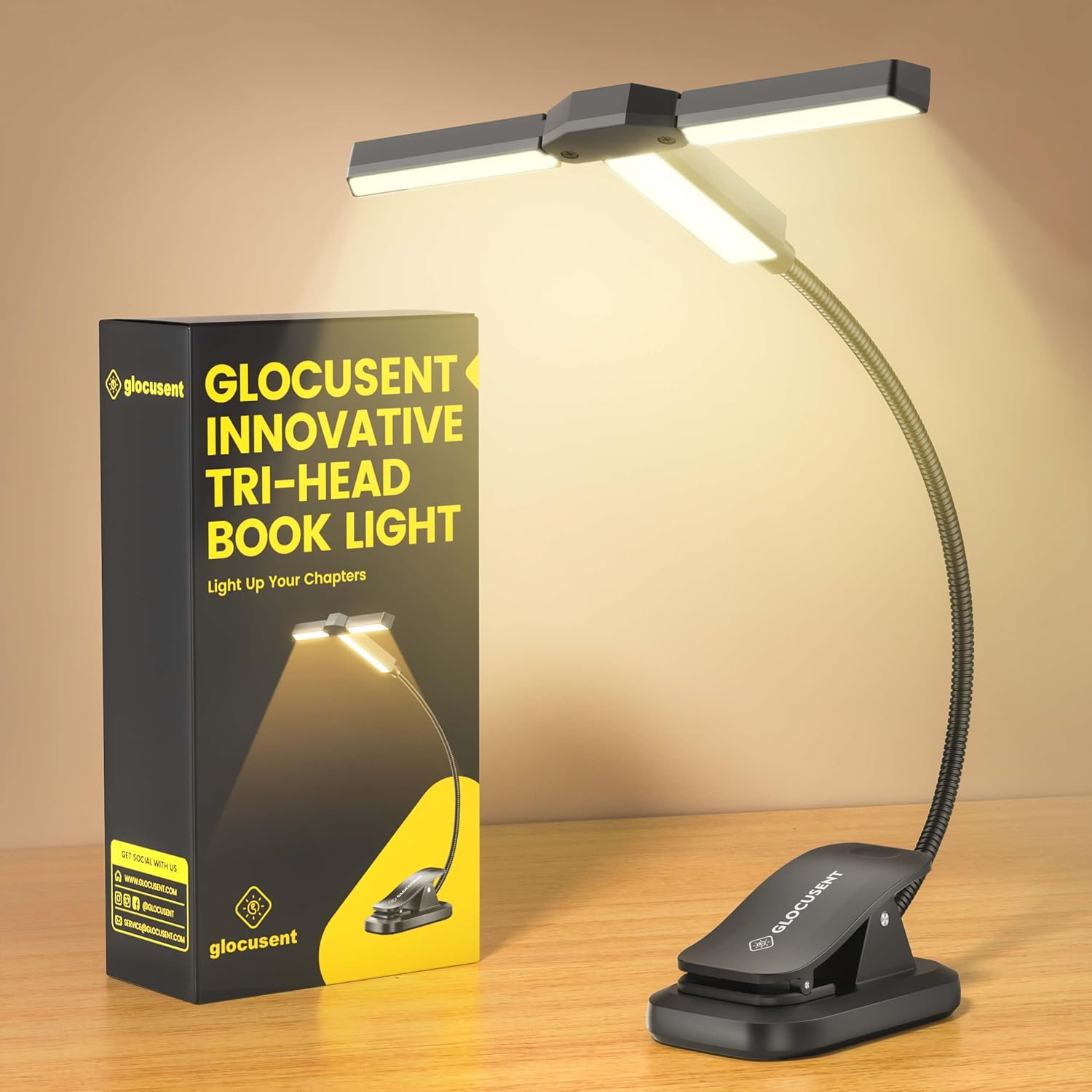
Image 1.1: The Glocusent Tri-Head Book Light and its retail packaging.
2. Que hai na caixa
- 1 x Glocusent Tri-Head Book Light
- 1 x cable de carga USB-C
- 1 x Manual de usuario (este documento)
- 1 x Marcapáxinas
3. Configuración e carga
3.1 Cargo inicial
Before first use, fully charge the book light using the provided USB-C cable. The built-in 1000mAh battery provides up to 10 hours of light on the brightest setting and up to 100 hours on the lowest setting.
3.2 Procedemento de cobro
- Locate the USB-C charging port on the clip base of the book light.
- Connect the provided USB-C cable to the port.
- Plug the other end of the USB-C cable into a compatible USB power adapter (not included) or a computer USB port.
- An indicator light will show charging status (e.g., red for charging, green for fully charged).

Image 3.1: The USB-C charging port located on the clip base.
4. Instrucións de funcionamento
4.1 Attaching the Book Light
The book light features a sturdy clip with a soft, non-slip pad to securely attach to books, e-readers, or other surfaces without causing damage. The flexible gooseneck allows for precise positioning.
4.2 Axuste das cabezas das luces
The unique tri-head design allows for versatile lighting. The two wing-heads are 90° adjustable, enabling you to switch between focused spotlighting and broader illumination. This design provides wider and more even light coverage across both pages of a book.

Image 4.1: The tri-head can be adjusted for focused (0°), wide (90°), or broader (180°) lighting.
4.3 Encendido/apagado
Press the power button located on the light head to turn the device on or off.
4.4 Light Modes and Brightness
The book light offers 3 color temperatures and 5 adjustable brightness levels for each color. This allows for customized lighting to suit individual preferences and environments.
- Temperaturas de cor: 2700K (Amber/Eye-friendly), 4000K (Mild/Calming), 6000K (Natural/Focus-boosting).
- Adjusting Color: Short press the color mode button to cycle through the 3 color temperatures.
- Axuste do brillo: Long press the brightness button to seamlessly adjust through 5 brightness levels. The light will dim or brighten gradually.

Image 4.2: Visual representation of the 3 color temperatures and 5 brightness levels.
4.5 30-Minute Timer
The integrated 30-minute timer automatically turns off the light, preventing prolonged use and conserving battery. This feature is particularly useful for reading before sleep.

Image 4.3: The book light's focused illumination and timer feature are designed to be partner-friendly.
4.6 Vídeo oficial do produto
Video 4.1: An official product video demonstrating the features and benefits of the Glocusent Tri-Head Book Light.
5. Mantemento
- Manteña o dispositivo limpo limpo cun pano suave e seco.
- Avoid exposing the book light to extreme temperatures or moisture.
- Almacene nun lugar fresco e seco cando non se use durante períodos prolongados.
6 Solución de problemas
6.1 A luz non se acende
- Asegúrate de que a batería estea cargada. Conecta o dispositivo a unha fonte de alimentación mediante o cable USB-C.
- Comprobe que o botón de acendido estea premido correctamente.
6.2 Duración curta da batería
- Battery life varies depending on the brightness level used. Higher brightness consumes more power.
- Asegúrese de que o dispositivo estea completamente cargado antes de usalo.
- Se o problema persiste, póñase en contacto co servizo de atención ao cliente.
7. Especificacións
| Característica | Detalle |
|---|---|
| Nome do modelo | A23 |
| Número de modelo do artigo | GLCSNTA2301 |
| Tipo de fonte de luz | LED |
| Número de fontes de luz | 27 |
| Temperaturas de cor | 2700K (Amber), 4000K (Mild), 6000K (Natural) |
| Niveis de brillo | 5 (axustable) |
| Capacidade da batería | 1000 mAh de litio metálico |
| Porto de carga | USB-C |
| Max Battery Life (Lowest Setting) | Ata 100 horas |
| Max Battery Life (Brightest Setting) | Ata 10 horas |
| Característica especial | 30-Min Timer, Cordless, Adjustable Gooseneck |
| Peso do elemento | 2.43 onzas (69 gramos) |
| Dimensións do produto | 12.2" D x 1.3" W x 1.7" H |
| Material | Acrilonitrilo Butadieno Estireno (ABS) |
| Certificacións | FCC, CE, RoHS, PSE & C-TICK certified |
8. Garantía e soporte
Glocusent offers a 30-day return service and a 24-month warranty for this product. For any inquiries or support needs, please contact our Customer Experience Team, available 24/7.
Información de contacto: Refer to the product packaging or the official Glocusent websitio web para obter os datos de contacto máis actualizados.