
1. Introdución
Thank you for choosing the EKSA Wireless Headset H5. This headset is designed to provide clear communication and comfortable wear for various professional environments, including office work, call centers, and trucking. It features AI noise-cancelling technology, dual connectivity options (Bluetooth and USB dongle), and extended battery life. This manual provides detailed instructions for setup, operation, maintenance, and troubleshooting to ensure optimal performance.
2. Contido do paquete
Verifique que todos os elementos estean presentes no seu paquete:
- EKSA Wireless Headset H5
- Dongle USB
- Base de carga
- Cable de carga USB-C
- Manual de usuario
3. Produto rematadoview
Familiarize yourself with the components of your EKSA Wireless Headset H5.
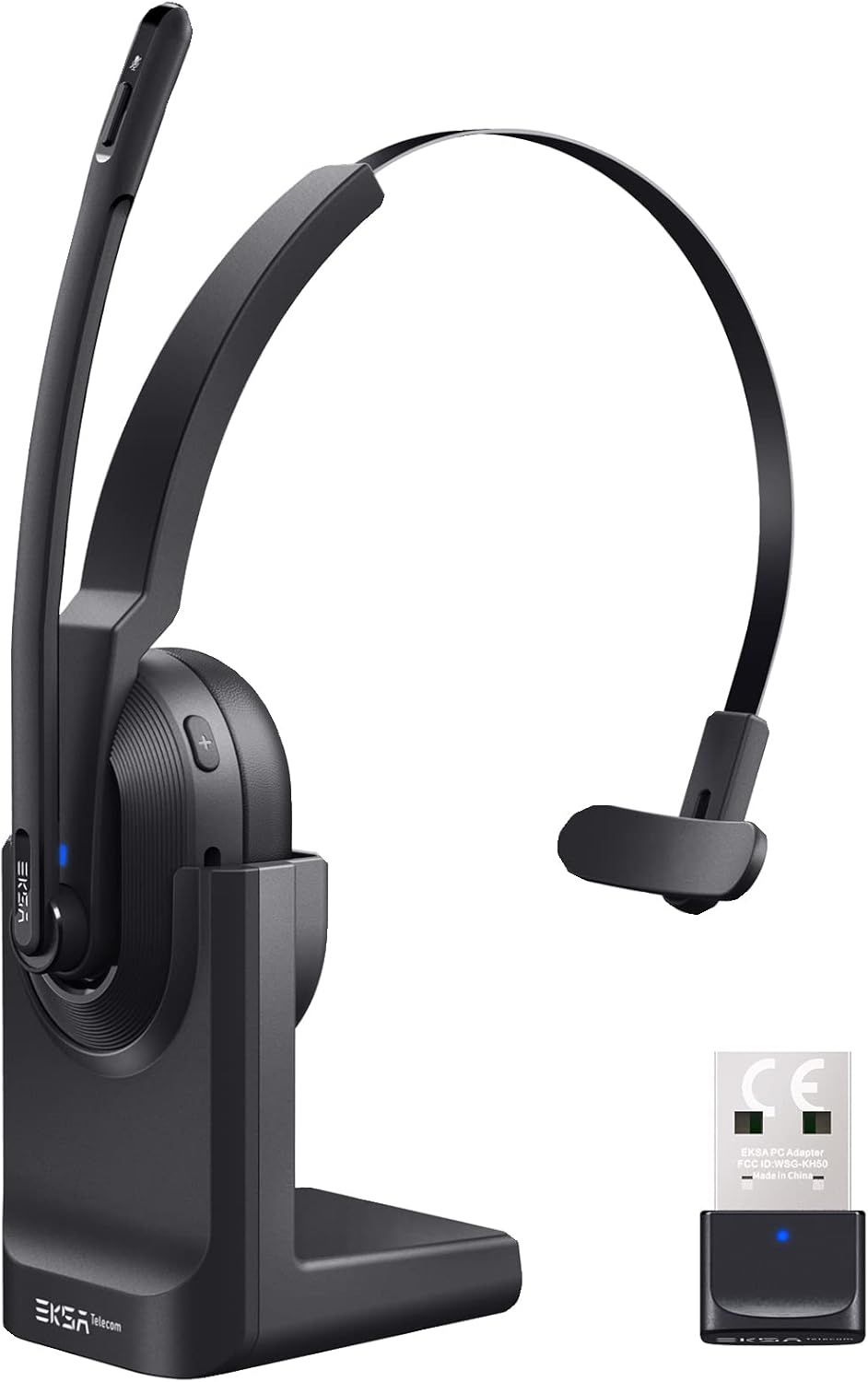

4. Configuración
4.1 Carga dos auriculares
The headset supports two charging methods:
- Carga directa: Connect the USB-C charging cable directly to the headset's Type-C port and a power source.
- Base de carga: Place the headset onto the included charging base. Ensure the charging contacts align. Connect the charging base to a power source using the USB-C cable.

A full charge takes approximately 1.5 hours. The headset provides up to 25 hours of talk time and 45 hours of music playback at 70% volume.

4.2 Connecting via USB Dongle
For PC and laptop connections, the USB dongle provides a stable wireless link.
- Insert the USB dongle into an available USB port on your PC or laptop.
- The LED indicator on the dongle will turn solid blue when successfully paired with the headset.
- On your PC/laptop, navigate to Configuración > Son.
- Establecer EKSA Telecom H5 as both the input and output device.

4.3 Conexión mediante Bluetooth 5.0
The headset can connect to mobile phones, tablets, and other Bluetooth-enabled devices.
- Ensure the headset is powered on and in pairing mode (the Bluetooth indicator will flash).
- No teu dispositivo móbil, vai a Settings > Bluetooth & other devices.
- Seleccione "Engadir Bluetooth ou outro dispositivo" e buscar "EKSA Telecom H5".
- Seleccione EKSA Telecom H5 emparellar.
- Once connected, set EKSA Telecom H5 as the input and output device in your device's sound settings.


4.4 Meeting Application Settings
For applications like Zoom or Skype:
- In the application's audio/video settings, select EKSA Telecom H5 as both the microphone and speaker.

5. Instrucións de funcionamento
5.1 Controis básicos
- Encendido/apagado: Manteña premido o botón multifunción.
- Subir volume / seguinte pista: Press the '+' button. Hold for next track.
- Baixar volume / pista anterior: Press the '-' button. Hold for previous track.
- Responder/Finalizar chamada: Press the Multi-Function Button during an incoming call or active call.
- Rexeitar a chamada: Press and hold the Multi-Function Button during an incoming call.
- Silenciar/Activar o micrófono: Press the Mute Button located on the microphone arm.
5.2 Como usar os auriculares
The headset is designed for comfort and flexibility:
- The microphone arm can be rotated up to 270 degrees, allowing you to wear the headset on either your left or right ear.
- Axusta a diadema para un axuste seguro e cómodo.

Micrófono con cancelación de ruído IA 5.3
The headset features an AI-powered Environmental Noise Cancelling (ENC) microphone with a Qualcomm chip. This technology intelligently suppresses up to 99.6% of environmental noise, ensuring your voice is clear during calls, even in noisy environments.


6. Mantemento
Para garantir a lonxevidade e o rendemento óptimo dos seus auriculares:
- Limpa os auriculares regularmente cun pano suave e seco.
- Evite expoñer os auriculares a temperaturas extremas, humidade ou luz solar directa.
- Non use produtos de limpeza ou disolventes abrasivos.
- Store the headset in a cool, dry place when not in use, preferably on its charging base or in a protective case.
7 Solución de problemas
| Problema | Causa posible | Solución |
|---|---|---|
| O auricular non se acende | Batería baixa | Charge the headset using the USB-C cable or charging base. |
| No sound/microphone not working | Not connected or incorrect audio settings | Ensure the headset is paired via Bluetooth or dongle. Check your device's sound settings to confirm "EKSA Telecom H5" is selected as input/output. |
| Poor sound quality/intermittent connection | Out of range, interference, or low battery | Move closer to the connected device (within 10 meters). Avoid strong electromagnetic interference. Charge the headset. |
| Non se pode emparellar por Bluetooth | Headset not in pairing mode or device already connected | Ensure the headset is in pairing mode (flashing indicator). Disconnect from any other devices. Restart Bluetooth on your device. |
| AI Noise Cancelling not effective | Posición do micrófono | Ensure the microphone is positioned correctly near your mouth for optimal voice pickup and noise suppression. |
8. Especificacións
| Característica | Detalle |
|---|---|
| Nome do modelo | H5 |
| Tecnoloxía de conectividade | Sen fíos (Bluetooth 5.0, llave USB) |
| distancia wireless | Ata 10 metros |
| Duración da batería (Música) | Ata 45 horas (ao 70 % do volume) |
| Duración da batería (Conversa) | Ata 25 horas (ao 70 % do volume) |
| Tempo de carga | Aprox. 1.5 horas |
| Control de ruído | Active Noise Cancellation (AI Environmental Noise Cancelling) |
| Micrófono | 270° Rotatable, AI ENC |
| Peso | Approx. 75g (headset only) / 0.54 kg (packaged) |
| Material | Metal, Plástico |
| Compoñentes incluídos | Charging Base, USB Dongle |
| Rango de frecuencias | 20 Hz - 20,000 Hz |
9. Garantía e soporte
EKSA products come with a standard manufacturer's warranty. For specific warranty details, please refer to the warranty card included in your package or visit the official EKSA website. For technical support, troubleshooting assistance, or any inquiries, please contact EKSA customer service through their official channels. You can find contact information on the EKSA websitio web ou a través da túa plataforma de compra.


