1. Introdución
This manual provides essential information for the proper setup, operation, and maintenance of your new Generic replacement infrared (IR) remote control. This remote is designed to function as a direct replacement for specific Dynex and other compatible television models. Please read this manual thoroughly before use to ensure optimal performance and longevity of your device.

Figura 1: Ángulo frontal view of the replacement remote control.
2. Compatibilidade
This replacement remote control is specifically designed to be compatible with the following television models. Please verify your television's model number against this list to ensure compatibility.
- Dynex LC-42LT46
- Dynex DX-32L-151A11
- Dynex DX-L37-10A
- Dynex DX-L42-10A
- Dynex LC-15KT46
- Dynex DX-37L-130A11
- RC-401-0A (original remote model)
- Other Smart LCD LED DVD TV Television models as specified by the manufacturer.
Important: If your television model number is not included in this list, this remote control may not be compatible. Refer to the product images for the actual remote's appearance.
3. Configuración
3.1 Instalación da batería
The remote control requires two (2) AAA batteries for operation. Batteries are not included with the remote control and must be purchased separately.
- Localice a tapa do compartimento da batería na parte traseira do control remoto.
- Prema a lapela e deslice a tapa cara abaixo para abrir o compartimento.
- Insira dúas pilas AAA novas, asegurándose de que os terminais positivo (+) e negativo (-) estean aliñados correctamente coas marcas do interior do compartimento.
- Deslice a tapa do compartimento da batería de volta ao seu lugar ata que faga clic de forma segura.
Once the batteries are correctly inserted, the remote control is ready for use. No additional programming or setup is typically required for compatible models; simply insert new brand batteries to get it to work.

Figura 2: Compartimento das pilas na parte traseira do mando a distancia.
4. Instrucións de funcionamento
This remote control operates using infrared (IR) technology. Ensure there is a clear line of sight between the remote control and the television's IR receiver for proper functionality. Point the remote directly at the television when pressing buttons.
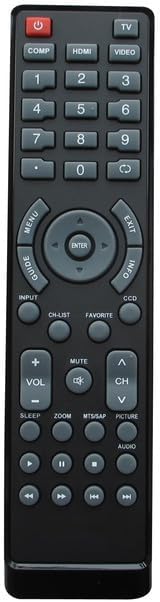
Figure 3: Layout of the remote control buttons.
4.1 Funcións dos botóns anterioresview
| Botón | Función |
|---|---|
| POTENCIA | Turns the television On or Off. |
| TV / VIDEO / HDMI / COMP | Selects input sources (e.g., TV tuner, external video devices, HDMI inputs, Component video). |
| 0-9 Pad numérico | Introduce directamente os números de canle. |
| VOL +/- | Axusta o nivel de volume cara arriba ou cara abaixo. |
| CH +/- | Cambia a canle de televisión cara arriba ou cara abaixo. |
| MUTO | Silencia ou activa o audio da televisión. |
| MENÚ | Accede ao menú principal do televisor. |
| Navigation (Up/Down/Left/Right) & ENTER | Navigates through menu options and confirms selections. |
| SAIR | Sae do menú ou da visualización en pantalla actual. |
| INFO | Mostra información sobre o programa ou a entrada actual. |
| GUIDE / CH-LIST | Accesses the electronic program guide or channel list. |
| PREFERIDOS | Accesses favorite channels or settings. |
| CCD | Activa ou desactiva os subtítulos. |
| DURMIR | Establece un temporizador de suspensión para a televisión. |
| ZOOM | Axusta o nivel de zoom da pantalla. |
| MTS/SAP | Selects Multi-channel Television Sound (MTS) or Secondary Audio Program (SAP) options. |
| IMAXE | Accesses picture settings. |
| AUDIO | Accede á configuración de son. |
| Playback Controls (e.g., Play, Pause, Stop, Rewind, Fast Forward) | Controls playback for integrated DVD players or media functions (if supported by TV). |
Note: Not all buttons may be functional on every compatible television model, as functionality depends on the original remote's capabilities and the television's features.
5. Mantemento
Para garantir a lonxevidade e o correcto funcionamento do seu mando a distancia, siga estas pautas de mantemento:
- Limpeza: Limpe o mando a distancia regularmente cun pano suave e seco. Para a sucidade persistente, limpe lixeiramenteampEnxágüe o pano con auga ou cun limpador suave e non abrasivo. Evite o uso de produtos químicos agresivos ou materiais abrasivos.
- Substitución da batería: Replace batteries when the remote's response becomes sluggish or it stops functioning. Always replace both batteries at the same time with new ones. Do not mix old and new batteries, or different types of batteries.
- Almacenamento: Garda o mando a distancia nun lugar fresco e seco, lonxe da luz solar directa e de temperaturas extremas.
- Evitar líquidos: Do not expose the remote control to water or other liquids.
- Deixando caer: Avoid dropping the remote control, as this can damage internal components.
6 Solución de problemas
If you experience issues with your remote control, please refer to the following common troubleshooting steps:
| Problema | Posible causa/solución |
|---|---|
| Remote is not working at all. |
|
| Algúns botóns non funcionan. |
|
| O control remoto funciona de forma intermitente. |
|
| "Replacement may not work as Original" | This remote is a replacement and may not replicate every single function or the exact responsiveness of the original manufacturer's remote. Its primary function is to provide basic and common controls for the listed compatible models. |
7. Especificacións
| Característica | Detalle |
|---|---|
| Marca | Xenérico |
| Dispositivos compatibles | Television (Specific Dynex models listed in Compatibility section) |
| Tecnoloxía de conectividade | Infravermello (IR) |
| Tipo de controlador | Control de botón |
| Fonte de enerxía | 2 pilas AAA (non incluídas) |
| Fabricante | SZHKHXD |
| País de Orixe | China |
| ASIN | B0C7VF4P31 |
| Data de primeira dispoñibilidade | 13 de xuño de 2023 |
8. Garantía e soporte
Specific warranty details for this Generic replacement remote control are not provided in the product information. For any questions regarding product functionality, compatibility, or potential defects, please contact the seller directly through the platform where the purchase was made.
Manufacturer: SZHKHXD
Seller: SZHKHXD
Garde o seu recibo de compra como comprobante de compra para calquera consulta de soporte.


