
Introdución
Thank you for choosing the AWEI H26 Smart Watch. This device is designed to enhance your daily life with its multi-functional capabilities, including fitness tracking, communication features, and health monitoring. This manual provides essential information for setting up, operating, maintaining, and troubleshooting your smart watch to ensure optimal performance and longevity.
Configuración
1. Carga do reloxo intelixente
Before first use, fully charge your AWEI H26 Smart Watch. The watch is equipped with a 260mAh battery. A full charge typically takes 2-3 hours.
- Conecta o cable de carga magnético aos puntos de carga da parte traseira do reloxo.
- Conecta o extremo USB do cable a un adaptador de corrente USB estándar (recoméndase 5 V/1 A) ou ao porto USB dun ordenador.
- A pantalla do reloxo mostrará un indicador de carga.

Image: The AWEI H26 Smart Watch screen showing a battery charging icon, indicating magnetic charging in progress. The text on the image mentions "22-Day Standby Time Easy Magnetic Charging" and that usage time can last for 3 to 4 days per charge.
2. Emparellamento co teu teléfono intelixente
The AWEI H26 Smart Watch is compatible with both Android and iOS smartphones. To unlock its full potential, you need to pair it with your phone via Bluetooth.
- Descarga a aplicación: Busca the official AWEI H26 companion app in your phone's app store (Google Play Store for Android or Apple App Store for iOS) and install it.
- Activar Bluetooth: Asegúrate de que o Bluetooth estea activado no teu smartphone.
- Abre a aplicación: Launch the installed app on your phone and follow the on-screen instructions to create an account or log in.
- Engadir dispositivo: Within the app, navigate to the 'Add Device' or 'Pair Device' section. The app will search for available Bluetooth devices.
- Selecciona o teu reloxo: Select 'H26' from the list of found devices. Confirm the pairing request on both your phone and the watch if prompted.
- Configuración completa: Follow any remaining prompts in the app to complete the initial setup, including granting necessary permissions for notifications, health data, etc.
Instrucións de funcionamento
1. Navegación básica
The AWEI H26 Smart Watch features a 1.95-inch touchscreen and physical buttons for navigation.
- Pantalla táctil: Desliza o dedo cara á esquerda/dereita, arriba/abaixo para navegar polos menús e as funcións. Toca para seleccionar un elemento.
- Botón(es) lateral(is): Typically, one button serves as a power on/off, back, or home button. Refer to the on-screen prompts for specific functions.

Image: A close-up of the AWEI H26 Smart Watch, showcasing its 1.95-inch HD TFT display. The watch face shows time, date, battery level, and activity tracking icons. The image text highlights "1.95" HD TFT Watch Face Adapt to Different Light Intensities" and its 86.6% screen-to-body ratio for better operating and reading experience in various light conditions.
2. Características clave
- Responder/Facer chamadas: Once paired with your smartphone, the H26 allows you to answer and make calls directly from your wrist using its one-touch Bluetooth calling feature.
- Modos multideporte: The watch supports over 100 sports modes, including running, walking, climbing, cycling, hiking, basketball, badminton, football, yoga, and more. Select a mode before starting your activity to track exercise time, calories burned, and other relevant metrics.

Image: A person wearing the AWEI H26 Smart Watch during an outdoor activity. The watch face displays time, date, and icons for steps, heart rate, and calories burned. The image text states "100+ Sports Modes Create Your Exclusive Sports Style" and mentions heart rate monitoring, calorie consumption, and exercise duration tracking.
- Vixilancia da saúde: The H26 provides all-day monitoring for heart rate, blood pressure, blood oxygen, and sleep patterns. This data helps you maintain a healthy balance and provides insights into your well-being.

Image: A close-up of the AWEI H26 Smart Watch displaying a heart rate graph with a current reading of 108 BPM. The image text highlights "Healthy Living Golden Partner" and mentions all-day heart-rate, blood-pressure, blood-oxygen, and sleep monitoring.
- Esferas de reloxo personalizables: Personalize your watch with a variety of cloud-based watch faces available through the app. You can also upload your own photos to create unique watch faces.
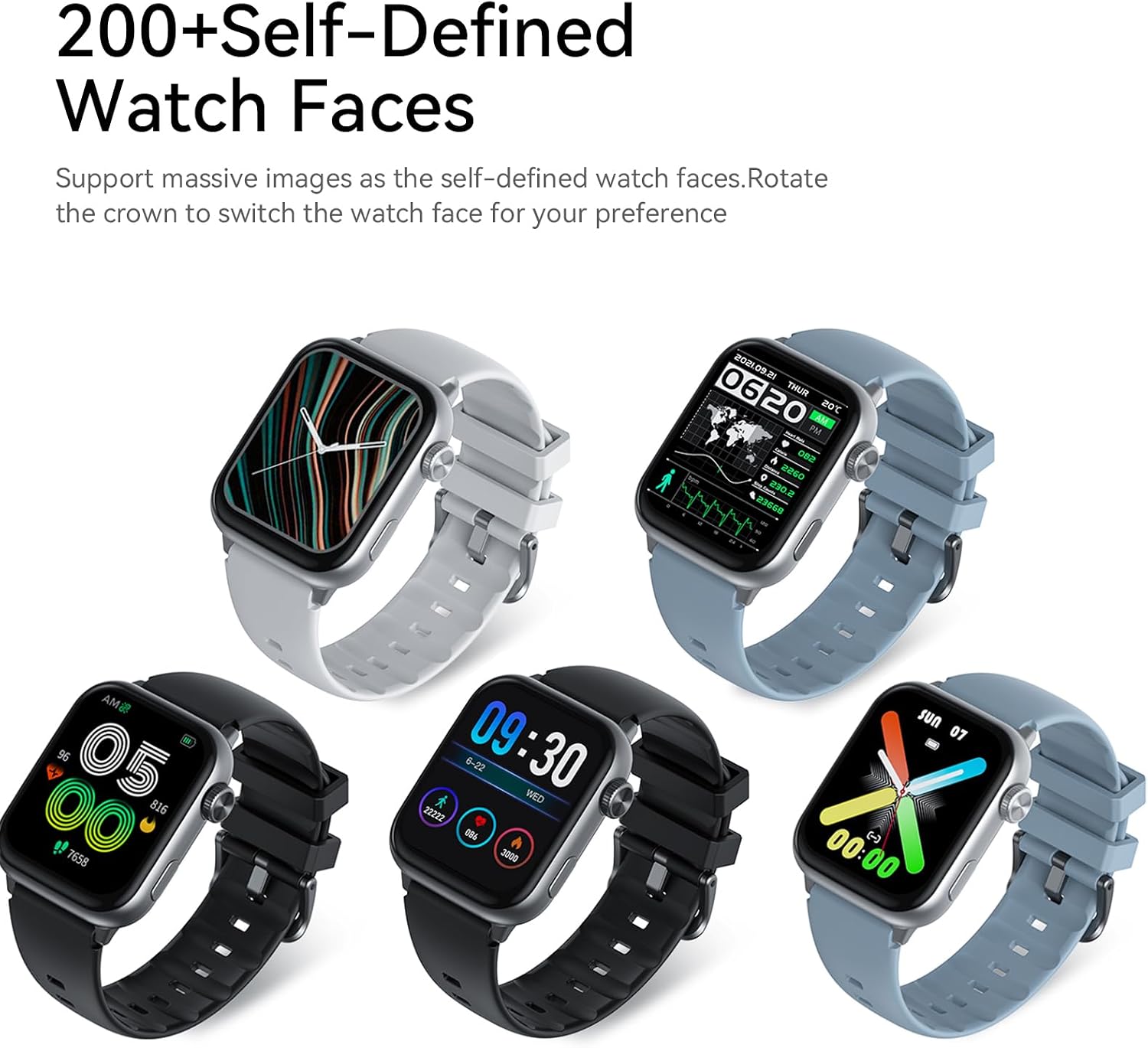
Image: Five AWEI H26 Smart Watches in various colors, each displaying a different customizable watch face. The image text indicates "200+ Self-Defined Watch Faces" and the ability to rotate the crown to switch watch faces.
- Outras funcións: The watch includes features such as female physiological cycle tracking, wrist flip screen activation, time display, sedentary reminders, remote photography control, music control, and alarm clock.
Mantemento
1. Limpeza do reloxo intelixente
Unha limpeza regular axuda a manter a aparencia e a funcionalidade do teu reloxo.
- Limpe a pantalla e a carcasa do reloxo cun pano suave e sen fiapos.
- Para a sucidade persistente, d lixeiramenteampEnxágüe o pano con auga. Evite o uso de produtos químicos agresivos ou materiais abrasivos.
- Limpa os contactos de carga periodicamente para garantir unha boa conexión.
2. Directrices de resistencia á auga
The AWEI H26 Smart Watch has an IP67 waterproof rating, meaning it is resistant to dust and can withstand immersion in water up to 1 meter for 30 minutes. This makes it suitable for daily activities like hand washing, face washing, and sweating during exercise.

Image: The AWEI H26 Smart Watch with water splashing around it, illustrating its water resistance. The image text prominently displays "IP67 Waterproof Rate Fearless of Rain & Sweat" and clarifies that it is waterproof and dustproof.
Importante:
- Non empregues o reloxo en auga quente, saunas ou baños de vapor.
- Avoid using the watch in seawater, as salt can corrode the device.
- The waterproof rating is not permanent and may decrease over time with normal wear and tear.
- Non mergulle o reloxo intencionadamente durante períodos prolongados nin a unha profundidade superior á especificada.
Resolución de problemas
If you encounter issues with your AWEI H26 Smart Watch, try the following solutions:
- O reloxo non se acende: Asegúrate de que o reloxo estea completamente cargado. Conéctao ao cargador e agarda uns minutos antes de tentar acendelo.
- Non se pode emparellar co teléfono:
- Asegúrate de que o Bluetooth estea activado no teu teléfono e de que o reloxo estea dentro do alcance.
- Reinicia tanto o teléfono como o reloxo.
- Comproba se a aplicación está actualizada á última versión.
- Esquece o dispositivo na configuración de Bluetooth do teu teléfono e tenta emparellalo de novo a través da aplicación.
- Datos sanitarios inexactos: Asegúrate de levar o reloxo ben axustado ao pulso, nin demasiado axustado nin demasiado solto. Limpa o sensor da parte traseira do reloxo.
- Notificacións non recibidas: Check app permissions on your phone to ensure the watch app has access to notifications. Verify that notifications are enabled within the watch app settings.
- Autonomía curta da batería: Reduce o brillo da pantalla, desactiva as funcións innecesarias e limita a monitorización frecuente da frecuencia cardíaca se non é necesario.
If the problem persists, please refer to the support section for further assistance.
Especificacións
| Característica | Detalle |
|---|---|
| Nome do modelo | H26 |
| Marca | Awei |
| Tamaño da pantalla | 1.95 polgadas |
| Tipo de visualización | Dixital |
| Sistema Operativo | Android, iOS |
| Tecnoloxía de conectividade | Bluetooth |
| Capacidade da batería | 260 millónsamp Horario |
| Tempo de carga da batería | 2-3 horas |
| Clasificación impermeable | IP67 (1 Meter for 30 Minutes) |
| Entrada da interface humana | Botóns, pantalla táctil |
| Características especiais | 100+ Sports Modes, One-touch Bluetooth Calling, Health Monitoring |
| Tipo de material da banda | Silicona |
| Tipo de material da caixa | Aceiro inoxidable |
| Métricas medidas | Seguidor de actividades |
| GPS | Vía Smartphone |
Garantía e Soporte
Información da garantía
The AWEI H26 Smart Watch comes with a 1 ano de garantía limitada from the date of purchase. This warranty covers manufacturing defects under normal use. It does not cover damage caused by misuse, accidents, unauthorized modifications, or failure to follow the instructions in this manual.
Atención ao cliente
If you have any questions, require technical assistance, or experience issues not covered in the troubleshooting section, please do not hesitate to contact our customer support team. We are committed to providing assistance and will respond to your inquiries within 24 hours.
Please refer to your purchase documentation or the official Awei websitio web para obter datos de contacto específicos.