
Introdución
This manual provides detailed instructions for the operation and maintenance of your TEKMAGIC W64-NCA-BK Digital Sports Watch. Designed for durability and functionality, this watch features 10 ATM (100m) water resistance, a chronograph, stopwatch, timer, countdown, calendar, dual time zone display, and an alarm clock. Please read this manual thoroughly to ensure proper use and to maximize the lifespan of your watch.
Vixíaview e funcións dos botóns
Your TEKMAGIC W64-NCA-BK watch features four primary buttons for navigation and function control. Refer to the diagram below for button identification.
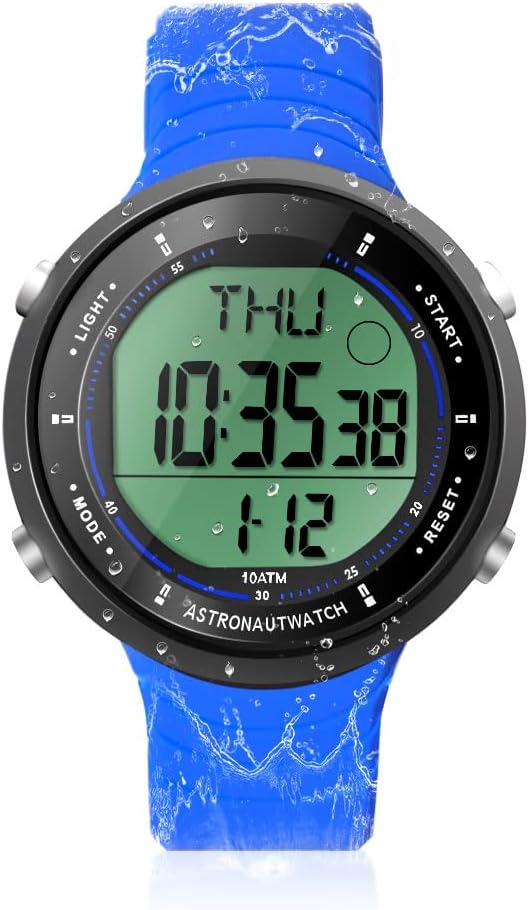
Descrición da imaxe: Unha fronte view of the TEKMAGIC W64-NCA-BK Digital Sports Watch. The watch has a blue silicone strap and a black case with a digital display showing "THU 10:35:38 1-12". Four buttons are visible on the sides, labeled "LIGHT", "MODE", "START", and "RESET".
- Botón LUZ (arriba á esquerda): Activa a retroiluminación para maior visibilidade en condicións de pouca luz.
- Botón MODE (abaixo á esquerda): Cycles through different modes: Time, Chronograph, Timer, Countdown, Alarm, Dual Time.
- Botón START (arriba á dereita): Starts/stops functions in Chronograph, Timer, and Countdown modes. Adjusts values in setting modes.
- Botón RESET (abaixo á dereita): Resets functions in Chronograph, Timer, and Countdown modes. Cycles through digits in setting modes.
Configuración e funcionamento básico
1. Acendido inicial
The watch typically comes pre-installed with a battery. If the display is blank, the battery may need replacement (refer to Maintenance section).
2. Axuste da hora e da data
- No modo Tempo, prema e manteña premido o botón MODO botón ata que os segundos comecen a parpadear. Isto indica o modo de configuración.
- Preme o RESET button to cycle through the setting options: Seconds → Hour → Minute → Year → Month → Day → 12/24 Hour Format.
- Usa o INICIO botón para axustar o valor que parpadea.
- Unha vez completados todos os axustes, prema o botón MODO botón para saír do modo de configuración.
3. Selector de formato de 12/24 horas
During time setting, you can switch between 12-hour (with AM/PM indicator) and 24-hour formats using the INICIO button when the hour format option is flashing.
Funcións operativas
1. Cronógrafo (reloxo)
The chronograph function allows for precise timing of events.

Descrición da imaxe: A close-up of the TEKMAGIC W64-NCA-BK watch face showing the stopwatch function. The display reads "ST 0:00543" with "CHIME" indicated. The image also shows a person swimming with the watch.
- Preme o MODO repetidamente ata que apareza "ST" (Cronómetro) na pantalla.
- Preme INICIO para comezar a cronometrar.
- Preme INICIO de novo para pausar o tempo.
- Preme RESET para poñer o cronómetro a cero.
- Para retomar o tempo despois dunha pausa, prema INICIO.
2. Temporizador de conta atrás
Set a specific time for the watch to count down from.
Descrición da imaxe: A close-up of the TEKMAGIC W64-NCA-BK watch face showing the countdown timer function. The display reads "TR 0:0621". The image also shows a person surfing with the watch.
- Preme o MODO button repeatedly until "TR" (Timer) appears on the display.
- Manteña premido o RESET botón ata que as horas comecen a parpadear.
- Preme INICIO to adjust the flashing hour value.
- Preme RESET to move to minutes, then INICIO to adjust. Repeat for seconds.
- Unha vez configurado o tempo de conta atrás desexado, prema MODO para saír do modo de configuración.
- Preme INICIO para comezar a conta atrás.
- Preme INICIO again to pause the countdown. Press RESET to reset to the set time.
- Soará unha alarma cando a conta atrás chegue a cero.
3. Reloxo espertador
Set a daily alarm to sound at a specific time.

Descrición da imaxe: A composite image showing various watch functions. One quadrant specifically shows the watch face with "AL 12:00" indicating the alarm setting mode.
- Preme o MODO botón repetidamente ata que apareza "AL" (Alarma) na pantalla.
- Manteña premido o RESET botón ata que os díxitos das horas comecen a parpadear.
- Preme INICIO to adjust the flashing hour value.
- Preme RESET to move to minutes, then INICIO para axustar.
- Preme MODO para saír do modo de configuración da alarma.
- Para activar/desactivar a alarma, prema INICIO mentres estea no modo de alarma (non no modo de configuración). Aparecerá/desaparecerá unha icona de alarma.
4. Hourle Chime
O hourly chime provides an audible alert at the top of every hour.
Descrición da imaxe: A composite image showing various watch functions. One quadrant specifically shows the watch face with "CHIME" indicated, signifying the hourlO timbre está activo.
- While in Alarm mode ("AL"), press the RESET botón para alternar o hourly chime ON/OFF. A chime icon will appear/disappear.
5. Dual Time Zone
Display a second time zone for convenience when traveling or communicating across different regions.

Descrición da imaxe: A composite image showing two TEKMAGIC W64-NCA-BK watches side-by-side, one displaying "THU 4:52:23" and the other "T2 16:52:23", illustrating the dual time zone feature. The image also shows people wearing the watch while hiking.
- Preme o MODO button repeatedly until "T2" (Dual Time) appears on the display.
- Manteña premido o RESET botón ata que os díxitos das horas comecen a parpadear.
- Preme INICIO to adjust the flashing hour value.
- Preme RESET to move to minutes, then INICIO para axustar.
- Preme MODO to exit dual time setting mode.
6. Luz de fondo
To illuminate the display, press the LUZ button (top left). The backlight will remain on for a few seconds.
Mantemento
1. Water Resistance (10 ATM / 100m)
This watch is rated for 10 ATM (100 meters / 330 feet) water resistance, making it suitable for swimming, diving, snorkeling, and other water activities. Ensure all buttons are not pressed while underwater to maintain water resistance integrity.

Descrición da imaxe: A composite image demonstrating the watch's 10 ATM waterproof capability. The top shows a diver underwater wearing the watch. The bottom left shows a person's arm with the watch in a swimming pool. The bottom right shows the watch submerged in water with splashes.
2. Substitución da batería
The watch uses a CR2025 battery. If the display becomes dim or the watch stops functioning, it's time to replace the battery. It is recommended to have battery replacement performed by a qualified watch technician to ensure proper sealing and maintain water resistance.
- Carefully remove the back cover of the watch using a suitable tool.
- Retire a antiga batería CR2025.
- Insira unha nova batería CR2025 co lado positivo (+) cara arriba.
- Replace the back cover, ensuring it is securely fastened to maintain water resistance.
3. Limpeza
Limpa o reloxo regularmente cun pano suave eamp cloth. For stubborn dirt, a mild soap solution can be used, followed by rinsing with fresh water and drying thoroughly. Avoid using harsh chemicals or abrasive materials.
Resolución de problemas
| Problema | Causa posible | Solución |
|---|---|---|
| A pantalla está en branco ou escura. | Batería baixa ou esgotada. | Substitúe a batería CR2025. |
| Watch loses time or functions incorrectly. | Batería baixa; avaría interna. | Substitúa a batería. Se o problema persiste, póñase en contacto co servizo de atención ao cliente. |
| Auga dentro do reloxo. | Buttons pressed underwater; back cover not sealed properly after battery change. | Immediately take to a watch repair specialist. Avoid pressing buttons underwater. Ensure proper sealing after maintenance. |
| Alarm or chime not sounding. | Alarm/chime function is turned off. | Ensure alarm/chime is activated in the respective mode. |
Especificacións
| Característica | Detalle |
|---|---|
| Número de modelo | W64-NCA-BK |
| Resistencia á auga | 10 ATM (100m / 330ft) |
| Tipo de movemento | Cuarzo xaponés |
| Tipo de batería | CR2025 |
| Duración da batería en funcionamento | 1.5 a 2 anos |
| Precisión horaria | ± 30 segundos por mes |
| Rango de conta atrás | 23:59'59'' to 0:0'0'' |
| Material do caso | ABS |
| Material da correa | Silicona |
| Diámetro da caixa | 45 mm (1.8 polgadas) |
| Espesor da caixa | 12 mm (0.47 polgadas) |
| Ancho da correa | 22 mm (0.9 polgadas) |
| Max Wrist Circumference | 230 mm (9.1 polgadas) |
| Min Wrist Circumference | 160 mm (6.3 polgadas) |
| Peso do produto | 53 g (0.12 lb) |

Descrición da imaxe: A diagram illustrating the dimensions of the TEKMAGIC W64-NCA-BK Digital Sports Watch. It shows the watch with measurements for case diameter (45mm), case thickness (12mm), strap width (22mm), and minimum/maximum wrist circumference (160mm/230mm).
Atención ao cliente
For further assistance or inquiries, please refer to the product's official support channels or contact your retailer. Keep your purchase receipt for warranty purposes.


