
Hoco WE-1005004459784466-002
Hoco Smart Ear Wireless Bluetooth 5.3 Earbuds User Manual
Model: WE-1005004459784466-002
Produto rematadoview
The Hoco Smart Ear Wireless Bluetooth 5.3 Earbuds offer a seamless audio experience with advanced features. These smart touch stereo earbuds come with a digital LED display charging case, providing convenience and clear battery status at a glance. Designed for comfort and high-quality sound, they are ideal for daily use with mobile phones and other compatible devices.
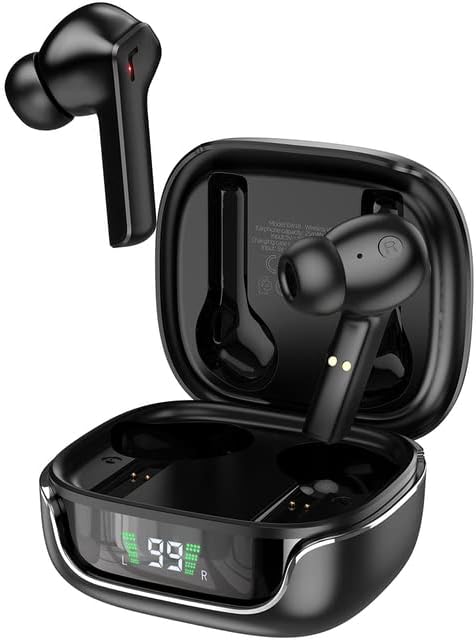
Image: The Hoco Smart Ear Wireless Bluetooth 5.3 Earbuds, showcasing both earbuds and their sleek charging case with a digital LED display.
Contido do paquete
- Hoco Smart Ear Wireless Bluetooth 5.3 Earbuds
- Estuche de carga
- Manual de usuario
- Cable de carga
Configuración
Emparejamento inicial
To pair your Hoco Smart Ear Earbuds for the first time, ensure they are fully charged. Open the charging case; the earbuds will automatically enter pairing mode. On your device (e.g., smartphone), navigate to Bluetooth settings and select 'Hoco EW18' or a similar name from the list of available devices. Once connected, the earbuds are ready for use.

Image: A visual representation of the Hoco earbuds establishing a wireless connection using Bluetooth 5.3 technology, highlighting stable and low-power consumption.

Image: The earbuds and charging case next to a smartphone, illustrating the automatic pairing feature and the ability to switch between devices seamlessly.
Reconectando
After initial pairing, the earbuds will automatically reconnect to the last paired device when taken out of the charging case and Bluetooth is enabled on the device.
Instrucións de funcionamento
The Hoco Smart Ear Earbuds feature intuitive touch controls for various functions:

Image: A detailed diagram illustrating the touch control functions of the Hoco earbuds, including playback, track navigation, call management, power, and voice assistant activation.
- Reproducir/Pausa: Click the touch area once.
- Próxima pista: Double click the touch area.
- Pista anterior: Triple click the touch area.
- Responder chamada: Click the touch area once.
- Chamada colgada: Double click the touch area.
- Rexeitar a chamada: Mantén presionada a área táctil durante 2 segundos.
- Activar: Open the cover of the charging case (automatic boot).
- Activar Siri/Asistente de voz: Mantén presionada a área táctil durante 2 segundos.
Mantemento
Para garantir a lonxevidade e o rendemento óptimo dos seus auriculares, siga estas pautas de mantemento:
- Limpeza: Limpa regularmente os auriculares e a funda de carga cun pano suave, seco e sen pelusa. Non empregues produtos químicos agresivos nin materiais abrasivos.
- Contactos de carga: Periodically clean the charging contacts on both the earbuds and inside the case to ensure a proper connection.
- Almacenamento: Cando non os uses, garda os auriculares na súa funda de carga para protexelos do po e dos danos.
- Evitar a humidade: Keep the earbuds and case away from water and excessive moisture.
- Temperatura: Evite expoñer o produto a temperaturas extremas.
Resolución de problemas
If you encounter issues with your Hoco Smart Ear Earbuds, refer to the following common solutions:
- Sen son:
- Asegúrate de que os auriculares estean cargados.
- Comproba o volume do dispositivo e o volume dos auriculares.
- Verify Bluetooth connection. Try disconnecting and reconnecting.
- Os auriculares non se emparejan:
- Asegúrate de que os auriculares estean en modo de emparellamento (caixa aberta).
- Desactiva e activa o Bluetooth no teu dispositivo.
- Esquece o dispositivo na configuración de Bluetooth do teu teléfono e volve emparellalo.
- Asegúrate de que non haxa outros dispositivos conectados aos auriculares.
- Problemas de carga:
- Comprobe se o cable de carga está conectado correctamente.
- Ensure the charging contacts on both earbuds and case are clean.
- Proba cun cable de carga ou adaptador de corrente diferente.
- Conexión intermitente:
- Asegúrate de estar dentro do alcance efectivo de Bluetooth.
- Minimizar as interferencias doutros dispositivos sen fíos.
Especificacións
Detailed technical specifications for the Hoco Smart Ear Wireless Bluetooth 5.3 Earbuds:
| Característica | Especificación |
|---|---|
| Modelo | WE-1005004459784466-002 |
| Versión Bluetooth | 5.3 |
| Número de Condutores | 2 |
| Diámetro do controlador | 13 mm |
| Distorsión harmónica total | 15 % |
| Impedancia | 32 ohmios |
| Factor de forma dos auriculares | In-Ear |
| Tecnoloxía de conectividade | Bluetooth |
| Tecnoloxía de comunicación sen fíos | Bluetooth |
| Dispositivos compatibles | Teléfonos móbiles |
| Función de cable | Cable-free (Wireless) |
| Cor | Negro |
| Primeira data dispoñible | 6 de xullo de 2023 |

Imaxe: Unha explosión view illustrating the 13mm moving coil driver and bio-carbon fiber composite diaphragm, designed for immersive sound quality.

Image: A person wearing the Hoco earbuds, highlighting the soft silicone ear caps and in-ear ergonomic design for comfortable wear and pure sound enjoyment.
Garantía e Soporte
Hoco is committed to customer satisfaction and product quality. We offer the following:
- 12 meses de garantía: All products come with a 12-month warranty.
- Atención ao cliente: If you experience any issues with defective or incorrect products, please contact us through the Amazon platform. We are dedicated to providing the best solution, including full refunds or product replacements, to ensure 100% customer satisfaction.
- Garantía de entrega: We ensure product delivery within the specified timeframe on our sales page.
Ask a question about this manual
Ask about setup, troubleshooting, compatibility, parts, safety, or missing instructions. Manuals+ will review the question and use this page’s manual context to help answer it.