
1. Introdución
The FITCAMX HD2-6588 is an integrated dual dash camera system designed for specific Mercedes-Benz GLC-Class models. It provides high-definition video recording for both the front and rear of your vehicle, maintaining an original equipment manufacturer (OEM) aesthetic. This manual provides instructions for installation, operation, and maintenance of your dash cam.
Compatibilidade: This model (HD2-6588) is specifically designed for Mercedes-Benz GLC-Class 2023-2026 GLC 300 & GLC 350e Hybrid 2025-2026 vehicles that originally come with two cameras in front of the rearview cuberta do espello.
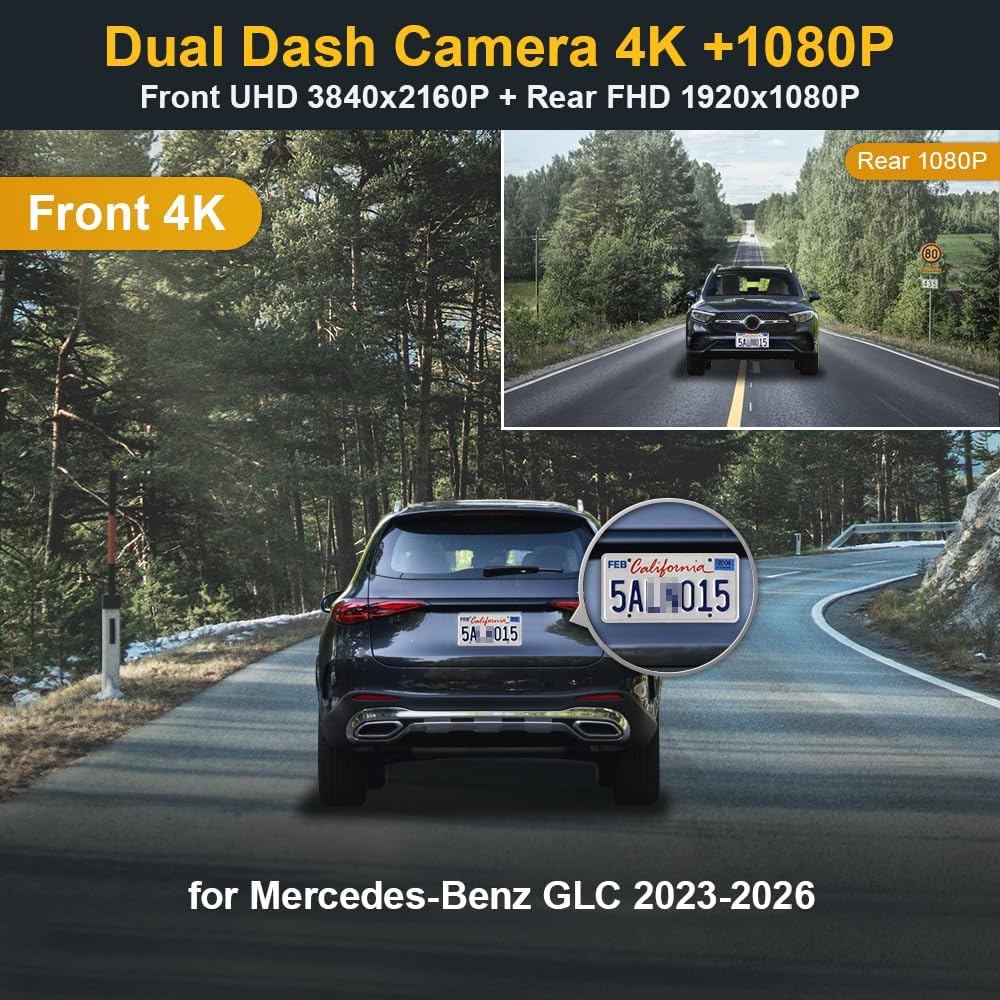
Figure 1.1: FITCAMX HD2-6588 Dual Dash Cam Overview. This image illustrates the 4K front and 1080P rear recording capabilities, along with vehicle compatibility.
2. Contido do paquete
Verifique que todos os elementos que se indican a continuación estean incluídos no seu paquete:
- 4K Dual Dash Cam (Front and Rear Units)
- Power Cable (Y-Cable)
- Manual de usuario
- Tarxeta de memoria de 128 GB
- Ferramenta de extracción de palanca
3. Choosing the Correct Model
It is essential to select the correct dash cam model for your vehicle to ensure proper fit and functionality. Please follow these steps:
- Confirm your vehicle's style and year of manufacture (e.g., Mercedes-Benz GLC 300 2023).
- Identify the number of original cameras located in front of your rearview cuberta do espello.
- If your vehicle has 2 original cameras, select model HD2-6588.
- If your vehicle has 3 original cameras, select model HD2-6595.
- If you are unsure, contact FITCAMX support and provide a picture of your rearview mirror cover for assistance.
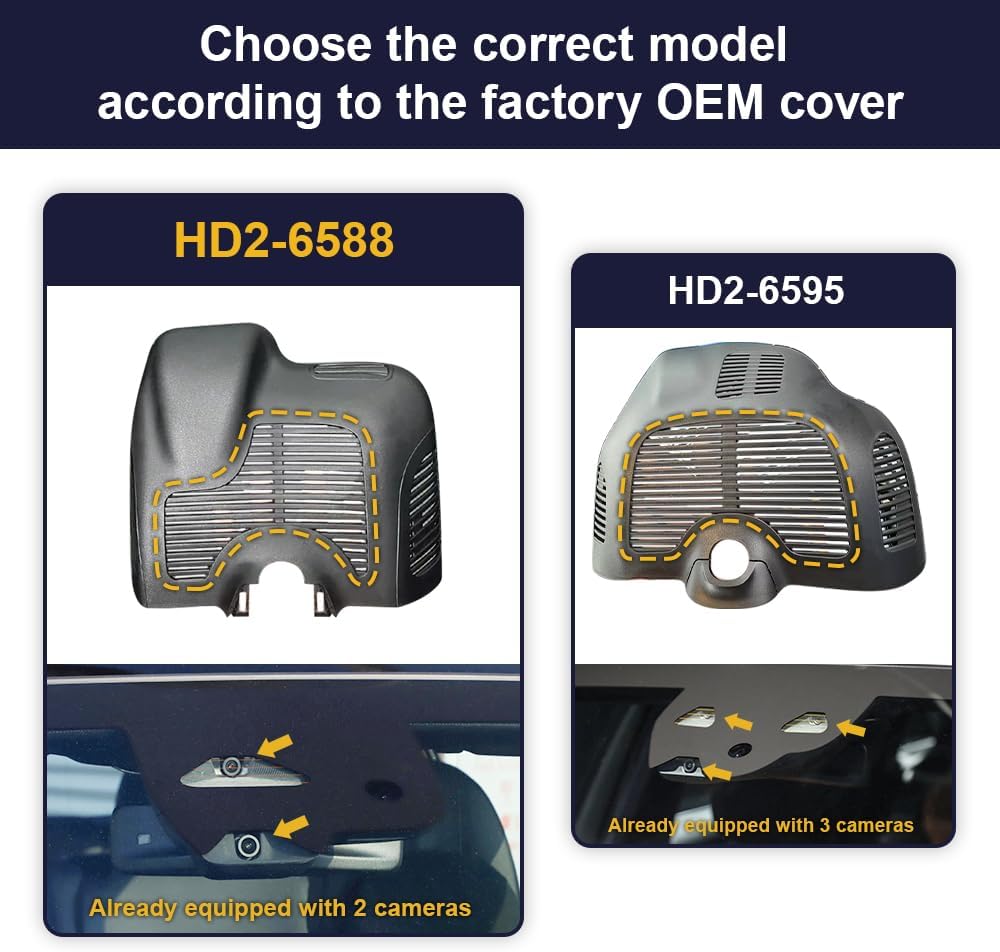
Figure 3.1: Model Selection Guide. This image helps identify the correct dash cam model based on the number of existing cameras near the rearview espello.
4. Configuración e instalación
The FITCAMX dash cam is designed for an OEM-style installation, requiring no visible cable routing. Follow these steps carefully.
4.1 Instalación da cámara frontal
- Use the provided pry tool to gently open the back cover of the original rearview carcasa do espello.
- Retire a tapa traseira.
- Remove the larger cover to expose the internal wiring.
- Locate the rain sensor wiring. Connect the Y-Cable from the dash cam to the rain sensor.
- Mount the FITCAMX dash cam unit into the housing. Ensure it is securely fitted.
- Re-mount the back cover, ensuring all clips are engaged and the fit is flush.

Figure 4.1: Front Camera Installation Steps. This image provides a visual guide for installing the front dash cam unit.

Figure 4.2: OEM Look After Installation. This image demonstrates the seamless integration of the dash cam into the vehicle's interior.
4.2 Rear Camera Wiring
The rear camera connects to the front unit via a cable. Route this cable discreetly along the vehicle's headliner and pillars to the rear of the vehicle. The rear camera can be mounted on the rear windshield or facing the cabin, depending on your preference.

Figure 4.3: Rear Camera Wiring Diagram and Mounting Options. This image illustrates the cable routing and potential mounting positions for the rear camera.
4.3 Guía de vídeo de instalación
Para ver un tutorial do proceso de instalación, consulta o vídeo oficial de instalación:
Video 4.1: Installation Video for Mercedes-Benz. This video demonstrates the step-by-step installation process of the FITCAMX dash cam in a Mercedes-Benz vehicle, including removing covers, connecting cables, and mounting the camera.
5. Instrucións de funcionamento
The FITCAMX dash cam operates automatically upon vehicle startup. For advanced features and settings, use the dedicated FITCAMX mobile application.
5.1 Wi-Fi Connection & App Usage
To connect your dash cam to the FITCAMX app:
- Asegúrate de que a cámara do salpicadero estea acendida (co contacto do vehículo activado). As luces indicadoras da cámara do salpicadero acenderanse.
- On your smartphone, open Configuración e navega ata Wi-Fi.
- Select the Wi-Fi network name starting with "CAR", "LHD", or "CARDV".
- Introduza o contrasinal predeterminado: 12345678.
- Once connected, open the FITCAMX application. You should see a live view desde a cámara do salpicadero.
- Dentro da aplicación, podes view vivir footagacceso rexistrado files, download important videos to your phone, and adjust camera settings.
Nota: You cannot connect to the dash cam's Wi-Fi and use Apple CarPlay/Android Auto simultaneously. However, the camera records automatically, so continuous Wi-Fi connection is not required for recording.

Figure 5.1: FITCAMX App Interface. This image shows the app's live view and connectivity status.
Video 5.2: Wi-Fi Connect and App Usage. This video illustrates how to connect the FITCAMX dash cam to your smartphone via Wi-Fi and use the FITCAMX application for live viewing, playback, and managing settings.
5.3 Gravación en bucle
The dash cam features automatic loop recording. When the memory card is full, the oldest video files will be overwritten by new recordings. You can set the duration of each recording segment (e.g., 1, 3, or 5 minutes) within the FITCAMX app settings.
- A 64GB SD card typically provides approximately 5 hours of recording.
- A 128GB SD card typically provides approximately 10 hours of recording.

Figure 5.3: Loop Recording Feature. This image explains how loop recording manages storage by overwriting older files.
5.4 Sensor G (gravación de emerxencia)
The built-in G-sensor detects sudden movements, impacts, or collisions. When such an event occurs, the dash cam automatically locks the current video segment, preventing it from being overwritten by loop recording. This ensures critical footage consérvase como proba.

Figure 5.4: G-Sensor Functionality. This image demonstrates how the G-sensor protects important video files during incidents.
5.5 Modo de estacionamento (mellora opcional)
The dash cam supports an optional parking mode for continuous surveillance when your vehicle is parked. This feature requires a separate hardwire kit (not included in the standard package) to connect to your vehicle's fuse box or On-Board Diagnostics (OBD) port.
- Cable to Fuse Box: Enables non-24h recording.
- Cable to On Board Diagnostics (OBD): Enables both 24h and non-24h recording.

Figure 5.5: Parking Mode Wiring Options. This image shows the different hardwire kits for parking mode functionality.
5.6 Visión nocturna
Equipped with a CMOS sensor and Wide Dynamic Range (WDR) technology, the FITCAMX dash cam provides clear night vision, ensuring high-quality recordings even in low-light conditions.

Figure 5.6: Night Vision Capability. This image highlights the dash cam's ability to capture clear footage en ambientes escuros.
6. Mantemento
6.1 SD Card Formatting
Regularly formatting the SD card helps maintain optimal recording performance and prevents data corruption. You can format the SD card through the FITCAMX application settings. Aviso: Formatting will erase all data on the SD card. Ensure you have backed up any important files antes de continuar.
6.2 Coidados xerais
- Keep the camera lenses clean using a soft, lint-free cloth.
- Avoid exposing the dash cam to extreme temperatures outside its operating range (-20°C to 85°C / -4°F to 185°F).
- Ensure the dash cam is securely mounted to prevent vibrations or dislodgement.
7 Solución de problemas
Aquí tes solucións para problemas comúns cos que podes atoparte:
- P: Como podo garantir que sexa o modelo correcto?
A: Please compare your vehicle style, year, and the shape of your rearview mirror cover. Alternatively, contact FITCAMX for detailed confirmation. - P: Podo usar CarPlay/Bluetooth mentres conduzo?
A: Yes. Your phone cannot be connected to CarPlay/Bluetooth and the dash cam's Wi-Fi simultaneously. However, the camera records automatically after the car starts, so you do not need to keep Wi-Fi connected to the camera at all times for recording. - Q: Can I add a rear camera if I already have a front cam?
A: No, because the PCB boards are different. If you wish to change video resolution or add a rear camera, you would need to replace the entire set.
8. Especificacións
| Marca | FITCAMX |
| Nome do modelo | HD2-6588 |
| Tipo de servizo do vehículo | GLC-Class 2023-2026, HD2-6588 (*2 Cams Already) |
| Tecnoloxía de conectividade | Liña eléctrica |
| Característica especial | Aplicación FITCAMX, estilo OEM |
| Resolución de captura de vídeo | Front 2160P+Rear 1080P |
| Compoñentes incluídos | 4K Dual Dash Cam, Cable, User Manual, 128GB Memory Card, Removal Pry Tool |
| Tipo de montaxe | Teito |
| Cor | HD2-6588 |
| Campo de View | 170 graos |
| Método de control | Aplicación |
| Tecnoloxía de sensores ópticos | CMOS |
| Tipo de memoria flash | MicroSD |
| Apertura máxima | 1.6 f |
| As pilas están incluídas | Si |
| Estándares admitidos | MP4 |
| Tipo de pila de batería | Litio |
| Dispositivos compatibles | Mercedes-Benz GLC 2023, 2024, 2025 |
| Velocidade de cadros | 30 fps |
| Tamaño máximo admitido da memoria flash | 128 GB |
| Peso do elemento | 2 libras |
9. Garantía e soporte
Garantía: The FITCAMX HD2-6588 dash cam comes with a 1 ano de garantía desde a data de compra, cubrindo defectos de fabricación.
Soporte técnico: For any questions, installation assistance, or technical issues, please do not hesitate to contact FITCAMX customer support. Prompt response technical support is available to assist you.