
1. Introdución
This manual provides essential information for the safe and efficient use of your CUBOT P80 smartphone. Please read it carefully before using the device and keep it for future reference.
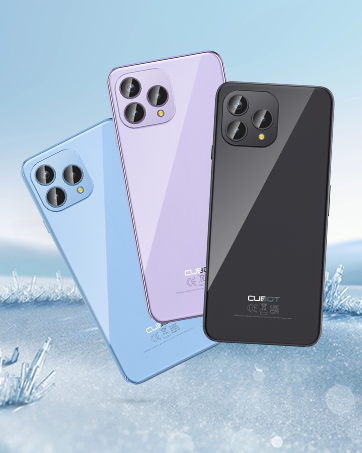
The CUBOT P80 is available in multiple color options.
2. Que hai na caixa
Verifica que todos os elementos estean presentes no paquete do teu produto:
- Smartphone CUBOT P80
- Funda protectora para teléfono
- Phone protection film (pre-applied or separate)
- Cargador (9V2A)
- Cable USB (Tipo-C)
- Type-C headphone
- SIM pin ejector tool
- Guía de inicio rápido
- Compliance regulation document

Included accessories with the CUBOT P80 smartphone.
3. Device Layout and Physical Features
The CUBOT P80 features a sleek design with a 6.58-inch FHD+ display and a triple camera system on the rear.
Dimensións e peso
- Espesor: 9.75 mm
- Peso: 217 g

The CUBOT P80's slim profile and lightweight design.
Escáner de pegadas dixitais
The device includes a side-mounted fingerprint scanner for secure and quick unlocking.

Fingerprint sensor location for convenient unlocking.
4. Configuración
Inserting SIM Cards and TF Card
The CUBOT P80 supports dual SIM functionality or one SIM card with a TF (microSD) card for expanded storage.
- Localiza a bandexa da tarxeta SIM no lateral do teléfono.
- Insira a ferramenta de expulsión da tarxeta SIM no pequeno orificio que hai xunto á bandexa e prema firmemente ata que a bandexa saia.
- Coloque a(s) tarxeta(s) Nano SIM e/ou tarxeta TF nas ranuras designadas da bandexa. Asegúrese de que os contactos dourados estean orientados cara abaixo.
- Empurre con coidado a bandexa de volta no teléfono ata que quede aliñada coa carrocería do dispositivo.

SIM and TF card installation options.
Encendido inicial
Press and hold the power button located on the side of the device until the CUBOT logo appears. Follow the on-screen instructions to complete the initial setup, including language selection, Wi-Fi connection, and Google account login.
5. Instrucións de funcionamento
Sistema operativo Android 13
The CUBOT P80 runs on Android 13, offering a user-friendly interface, enhanced privacy controls, and access to the Google Play Store for applications.

Acabadoview of the Android 13 operating system.
Mostrar características
The device features a 6.58-inch FHD+ Capacitive Touch Screen with a resolution of 2408x1080 pixels, 400 nits peak brightness, and a 20:9 aspect ratio.

Key features of the CUBOT P80 display.
6. Características da cámara
The CUBOT P80 is equipped with an AI Quad Camera System on the rear and a high-resolution front camera.
Especificacións da cámara
- Cámara principal: 48 MP
- Cámara frontal: 24 MP
- Cámara macro: 2 MP

The CUBOT P80's AI Quad Camera System.
Cámara principal
The 48MP main camera captures images with high detail and clarity.

High-resolution capture with the 48MP main camera.
Cámara frontal
The 24MP front camera is designed for clear selfies and video calls, featuring beauty modes.

Selfie capabilities of the 24MP front camera.
Cámara macro
The 2MP macro lens allows for detailed close-up photography of small objects.

Detailed close-up shots with the 2MP macro camera.
Multiple Camera Modes
The camera application includes various modes such as Night View, Portrait, and Panorama to enhance your photography experience.

Explore various photography modes.
7. Conectividade
Rede e Wi-Fi
The CUBOT P80 supports Dual 4G Dual VoLTE for cellular connectivity and 2.4/5GHz Dual Wi-Fi for stable and faster internet access.
- GSM: 850/900/1800/1900MHz
- WCDMA: B1/2/4/5/6/8/19
- FDD: B1/2/3/4/5/7/8/12/13/17/18/19/20/26/28A/28B/66
- TDD: 38/39/40/41
Cellular and Wi-Fi network support.
NFC and GPS
The device includes Multifunctional NFC for cash-free mobile payments and supports GPS, GLONASS, and Galileo for accurate global satellite positioning.
NFC for payments and advanced GPS for navigation.
8. Batería e carga
The CUBOT P80 is equipped with a 5200mAh battery, providing extended usage times. It supports 18W fast charging and OTG (On-The-Go) functionality.
- Modo de espera: Ata 26 días
- Chamadas: Ata 29 horas
- Reprodución de música: Ata 26 horas
- Reprodución de vídeo: Ata 7 horas

Battery life and charging features.
9. Almacenamento e rendemento
The CUBOT P80 is powered by an MT8788 Octa-core processor and features ample memory and storage.
- Procesador: MediaTek MT8788 Octa-core (12nm process, 2.0 GHz clock speed)
- RAM: 8GB + 8GB Expansion RAM (total 16GB)
- Memoria interna (ROM): 256 GB
- Almacenamento ampliable: Ata 1 TB mediante tarxeta TF

Processor and memory details.

RAM expansion technology for enhanced performance.

Internal and expandable storage options.
10. Avisos importantes
Compatibilidade do operador
The CUBOT P80 smartphone does not support AT&T, Cricket, or Verizon networks in the United States. Please confirm your carrier's compatibility before purchasing ou usando este dispositivo.

Important information regarding network compatibility.
11. Especificacións
| Característica | Especificación |
|---|---|
| Número de modelo | P80-schwarz-US |
| Sistema Operativo | Android 13.0 |
| Procesador | MediaTek MT8788 de oito núcleos |
| RAM | 16 GB (8GB + 8GB Expansion) |
| Almacenamento interno | 256 GB |
| Almacenamento ampliable | Ata 1 TB (tarxeta TF) |
| Tamaño da pantalla | 6.58 polgadas |
| Resolución | 1920 x 1080 (FHD+) |
| Cámara principal | 48 MP |
| Cámara frontal | 24 MP |
| Cámara macro | 2 MP |
| Capacidade da batería | 5200 mAh |
| Cargando | Carga rápida de 18 W |
| Conectividade | 4G LTE, Dual SIM, Wi-Fi (2.4/5GHz), NFC, Bluetooth |
| Navegación | GPS, GLONASS, Galileo |
| Jack de audio | 3.5 mm |
| Dimensións | 9.29 x 7.17 x 1.81 polgadas (embalaxe) |
| Peso do elemento | 7.7 onzas |
12 Solución de problemas
Problemas comúns e solucións
- O dispositivo non se acende: Asegúrate de que a batería estea cargada. Conecta o teléfono ao cargador e agarda uns minutos antes de tentar acendelo de novo.
- Sinal de rede deficiente: Check SIM card insertion. Ensure you are within your carrier's coverage area. Note that the CUBOT P80 is not compatible with AT&T, Cricket, or Verizon.
- Fallos das aplicacións: Clear the cache of the problematic app (Settings > Apps > [App Name] > Storage > Clear Cache). If the issue persists, try reinstalling the app or performing a factory reset (backup data first).
- A batería esgotando rapidamente: Reduce screen brightness, close unused apps running in the background, disable unnecessary notifications, and limit location services.
- Fingerprint scanner not working: Asegúrate de que o dedo estea limpo e seco. Rexistra de novo as túas impresións dixitais na configuración de seguridade.
13. Garantía e soporte
For warranty information and technical support, please refer to the official CUBOT websitio web ou póñase en contacto co seu vendedor. Garde o comprobante de compra para reclamacións de garantía.
Recursos en liña:
- Visita o Tenda CUBOT en Amazon para obter información e actualizacións do produto.
14. Vídeo do produtoview
Vídeo de presentación oficial do produtoasing the CUBOT P80's features and design.