
1. Introdución
Thank you for choosing the STRICH SEP-80 88-Key Digital Piano. This portable digital piano is designed for beginners and experienced musicians alike, offering a full-size, touch-sensitive keyboard with a wide range of features. Please read this manual carefully to ensure proper setup, operation, and maintenance of your instrument.

Figure 1: STRICH SEP-80 88-Key Digital Piano with included accessories.
2. Que hai na caixa
Your STRICH SEP-80 package includes the following items:
- STRICH SEP-80 88-Key Digital Piano
- X-shaped Keyboard Stand
- Pedal de sustento
- Atril de partituras
- Adaptador de alimentación USB
- Manual de instrucións

Figure 2: All components included in the SEP-80 package.
3. Configuración
3.1 Assembling the X-Stand
- Unfold the X-shaped keyboard stand.
- Adjust the height to your preferred playing position using the locking mechanism. Ensure the stand is stable before placing the piano.

Figure 3: The X-shaped keyboard stand.
3.2 Placing the Digital Piano on the Stand
Carefully place the SEP-80 digital piano onto the assembled X-stand. Ensure it sits securely on the stand's arms.
3.3 Conexión de accesorios
- Pedal de sustentación: Connect the sustain pedal cable to the 'SUS' jack on the rear panel of the piano.
- Sheet Music Stand: Insert the sheet music stand into the designated slots on the top panel of the piano.
- Potencia: Connect the USB power adapter to the DC 5V port on the rear panel and plug it into a power outlet. The piano also features a built-in rechargeable battery for portable use.

Figura 4: Panel traseiro con varias opcións de conectividade.

Figure 5: The included sustain pedal.

Figure 6: The sheet music stand.

Figure 7: The USB power adapter.
4. Instrucións de funcionamento
4.1 Acendido/apagado e volume
- Preme o Poder botón para acender ou apagar o piano.
- Usa o - e + buttons next to the LED display to adjust the master volume.
4.2 Selección de tons e ritmos
- The SEP-80 features 128 tones and 128 rhythms.
- Preme o Configuración button twice quickly to enter tone selection mode. Use the - e + buttons to browse.
- Preme o Configuración button once to enter rhythm selection mode. Use the - e + buttons to browse.
4.3 Funcións especiais
- Modo dividido: Divides the keyboard into two sections, each with its own tone.
- Vibra: Adds a vibrato effect to the sound.
- Transpoñer: Sube ou baixa o ton do teclado.
- Tempo: Axusta a velocidade dos ritmos e das cancións de demostración.
- Metrónomo: Proporciona un ritmo constante para practicar.
- Rexistro: Allows you to record and playback your performances.
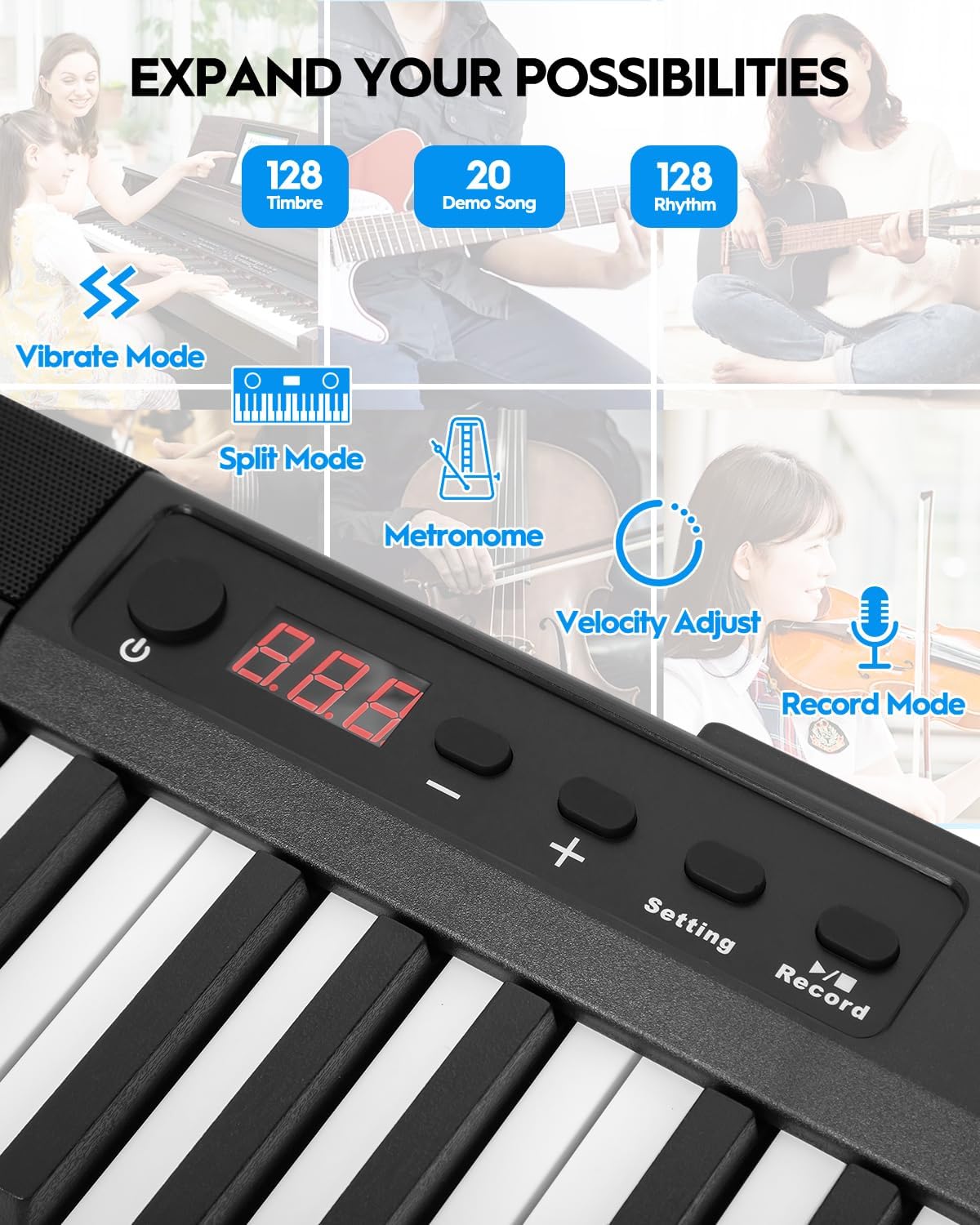
Figure 8: Control panel with various function buttons.
4.4 Conectividade
- Conector para auriculares (3.5 mm): Para consulta privada.
- Audio Input (3.5mm): Conecta fontes de son externas.
- MIDI Interface (via USB port): Connect to external software for learning and practice.
- Wireless Connect (GZUT-MUSIC): For wireless connectivity options.

Figura 9: detallada view of the control panel and connectivity ports.
4.5 Vídeos de produtos
Video 1: STRICH SEP-80 Velocity-Sensitive Piano Keyboard 88 Keys DEMO. This video demonstrates the velocity-sensitive keys and overall sound of the SEP-80 digital piano.
Video 2: STRICH SEP-80 Rechargeable 88-Keys Portable Electric Piano. This video highlights the portability and rechargeable battery feature of the SEP-80.
Video 3: Sound Sample | SEP-80 Comparison of lively and gentle rhythms. This video provides audio samples demonstrating different rhythms and tones.
Video 4: SEP-80 Keyboard Playing Audition. This video showcases a performance on the SEP-80 keyboard.
5. Mantemento
- Limpeza: Use a soft, dry cloth to clean the surface of the piano. Do not use abrasive cleaners or solvents.
- Almacenamento: Store the piano in a dry, cool place away from direct sunlight and extreme temperatures.
- Coidado da batería: Para unha duración óptima da batería, evite descargala completamente con frecuencia. Cárguea regularmente, mesmo se non a usa durante períodos prolongados.
6 Solución de problemas
- Sen son: Check if the volume is turned up. Ensure headphones are not plugged in if you intend to use the built-in speakers. Verify power connection or battery charge.
- As teclas non responden: Asegúrate de que o piano estea acendido. Se algunhas teclas non responden, ponte en contacto co servizo de atención ao cliente.
- Problemas de conectividade: For MIDI via USB, ensure the correct drivers are installed on your computer. For wireless connection, ensure Bluetooth is enabled on your device and select "GZUT-MUSIC".
7. Especificacións
| Característica | Detalle |
|---|---|
| Marca | STRICH |
| Nome do modelo | SEP-80 |
| Número de chaves | 88 |
| Tipo de chave | Touch-Sensitive, Reduced-Weighted |
| Sons/Tons | 128 |
| Ritmos | 128 |
| Cancións de demostración | 20 |
| Conectividade | 3.5mm Headphone Jack, 3.5mm Audio Input, USB (MIDI), Wireless Connect (GZUT-MUSIC) |
| Fonte de enerxía | Corded Electric (USB Adapter), Built-in Rechargeable Battery |
| Duración da batería | Up to 5 hours (built-in battery) |
| Dimensións do produto | 14.76" D x 53.74" W x 5.31" H |
| Peso do elemento | 19.56 libras |
| Características especiais | Built-In Speaker, Portable, Recording, Touch-Sensitive Keys |

Figure 10: Dimensions of the STRICH SEP-80 Digital Piano.
8. Garantía e soporte
The STRICH SEP-80 Digital Piano comes with a standard manufacturer's warranty. For detailed warranty information, product support, or service inquiries, please refer to the contact information provided in your product packaging or visit the official STRICH websitio.


