
Introdución
Thank you for choosing the PETLIBRO 5L Automatic Pet Feeder with 1080P Camera. This device is designed to provide convenient and reliable feeding for your pets, ensuring they receive their meals on schedule while allowing you to monitor and interact with them remotely. This manual provides essential information for setting up, operating, and maintaining your feeder.

The PETLIBRO 5L Automatic Pet Feeder offers a range of features including a 1080p HD camera, night vision, two-way audio, remote feeding, in-app monitoring, and easy cleanup.
Instrucións de seguridade
- Read all instructions carefully before using the feeder.
- Este aparello só é para uso interior.
- Non mergullo a unidade principal en auga ou outros líquidos.
- Manteña o alimentador lonxe da luz solar directa e de fontes de calor.
- Ensure the power cord is not damaged and is placed where pets cannot chew on it.
- Use only the original power adapter provided with the feeder.
- Always supervise children around the feeder.
- Only use dry pet food with a diameter between 2-15mm.
Contido do paquete
Verifica que todos os compoñentes estean presentes no paquete:
- PETLIBRO Automatic Pet Feeder (Main Unit)
- Bol para alimentos de aceiro inoxidable
- Adaptador de alimentación
- Manual de usuario
- Desiccant Bag (may be pre-installed)
Produto rematadoview
Familiarize yourself with the different parts of your PETLIBRO Automatic Pet Feeder.

The main unit of the feeder, featuring the food hopper, dispensing mechanism, 1080P camera, and control panel. A cat is shown eating from the stainless steel bowl, with a smartphone displaying the live camera feed.
- Tolva de comida: Stores dry pet food.
- Lid with Twist-Lock: Secures the food hopper and keeps food fresh.
- Panel de control: Buttons for manual feeding and settings.
- Cámara HD 1080P: Para seguimento e gravación en directo.
- Sensor infravermello: Detects low food levels and blockages.
- Speaker & Microphone: Para comunicación de audio bidireccional.
- Punto de venda de alimentos: Where food is dispensed into the bowl.
- Bol de aceiro inoxidable: Desmontable para facilitar a súa limpeza.
- Porto de alimentación: Para conectar o adaptador de CA.
- Compartimento de batería: Para baterías de reserva (non incluídas).
Configuración
1. Desembalaxe e montaxe
- Retire todos os compoñentes da embalaxe.
- Coloque a unidade alimentadora principal sobre unha superficie plana e estable.
- Insira o recipiente de aceiro inoxidable na ranura designada na base do alimentador.
2. Fonte de alimentación
- Connect the power adapter to the feeder's power port and plug it into a wall outlet.
- Para poder outage protection, install 3 D-cell alkaline batteries (not included) into the battery compartment at the bottom of the feeder. This ensures continuous operation during power interruptions.
3. Encher a tolva de alimentos
- Open the Twist-Lock lid on top of the feeder.
- Pour dry pet food into the hopper. Ensure the food size is between 2-15mm.
- Close the lid securely by twisting it until it locks.
4. Instalación da aplicación e conexión wifi
- Descarga a aplicación PETLIBRO desde a App Store (iOS) ou Google Play Store (Android).
- Crea unha conta e inicia sesión.
- Follow the in-app instructions to add your feeder. Ensure your smartphone is connected to a 2.4GHz or 5GHz Wi-Fi network. The feeder supports both for a more stable connection.
- The app will guide you through connecting the feeder to your home Wi-Fi network.
5. Configuración da cámara
- Once connected to Wi-Fi, the 1080P camera will automatically activate.
- For video recording, insert a Micro SD card (up to 256GB, not included) into the designated slot, usually located near the camera or at the bottom of the unit.
Instrucións de funcionamento
1. Alimentación manual
- Press the manual feed button on the feeder's control panel to dispense one portion of food instantly.
- Alternatively, use the 'Feed Now' option in the PETLIBRO app for immediate dispensing.
2. Scheduling Meals via App
The PETLIBRO app allows you to customize your pet's feeding schedule.

The PETLIBRO app provides an intuitive interface to set custom feeding times and amounts, and to review feeding logs.
- Open the PETLIBRO app and select your feeder.
- Navigate to the 'Feeding Schedule' section.
- Set up to 10 meals per day. For each meal, specify the time and the number of portions (1-50 portions per meal).
- Garda a túa programación. O alimentador dispensará comida automaticamente ás horas programadas.
- Podes view feeding logs within the app to track your pet's meal history.
3. Two-Way Audio & Voice Recording
Communicate with your pet remotely using the two-way audio feature.

The feeder allows two-way audio communication, enabling you to speak to your pet and hear their responses through the app.
- Live Communication: En directo da aplicación view, tap the microphone icon to speak to your pet. Your voice will be played through the feeder's speaker.
- Gravación de voz: Record a personalized voice message (up to 10 seconds) in the app. This message can be set to play at meal times (0-5 times per meal). A new recording will overwrite any previous one.
4. Monitoring with 1080P Camera and Night Vision
The integrated camera allows you to keep an eye on your pet at all times.

The 1080P camera provides clear vision, even at night, allowing you to monitor your pet's meals with high-definition infrared night vision.
- Access the live camera feed through the PETLIBRO app to view a túa mascota en tempo real.
- The 145° wide-angle lens provides a broad view da zona de alimentación.
- Infrared night vision ensures clear visibility even in dark conditions.
- Videos can be stored on a Micro SD card (up to 256GB, not included).
5. Smart Alerts and Notifications
- Detección de movemento e son: The feeder automatically records pet activity and saves video clips (SD card required). You will receive notifications on your phone for detected motion or sounds.
- Low Food Level Alert: The infrared sensor monitors the food level in the hopper. You will receive an alert on your phone when the food supply is low, prompting you to refill.
- Blockage Detection: The sensor also detects potential food blockages in the dispensing mechanism and will send an alert if an issue occurs.
- Wi-Fi Disconnection Alert: If the feeder loses its Wi-Fi connection, you will be notified via the app.
Mantemento
1. Limpeza do alimentador
Unha limpeza regular garante a hixiene e o correcto funcionamento do alimentador.
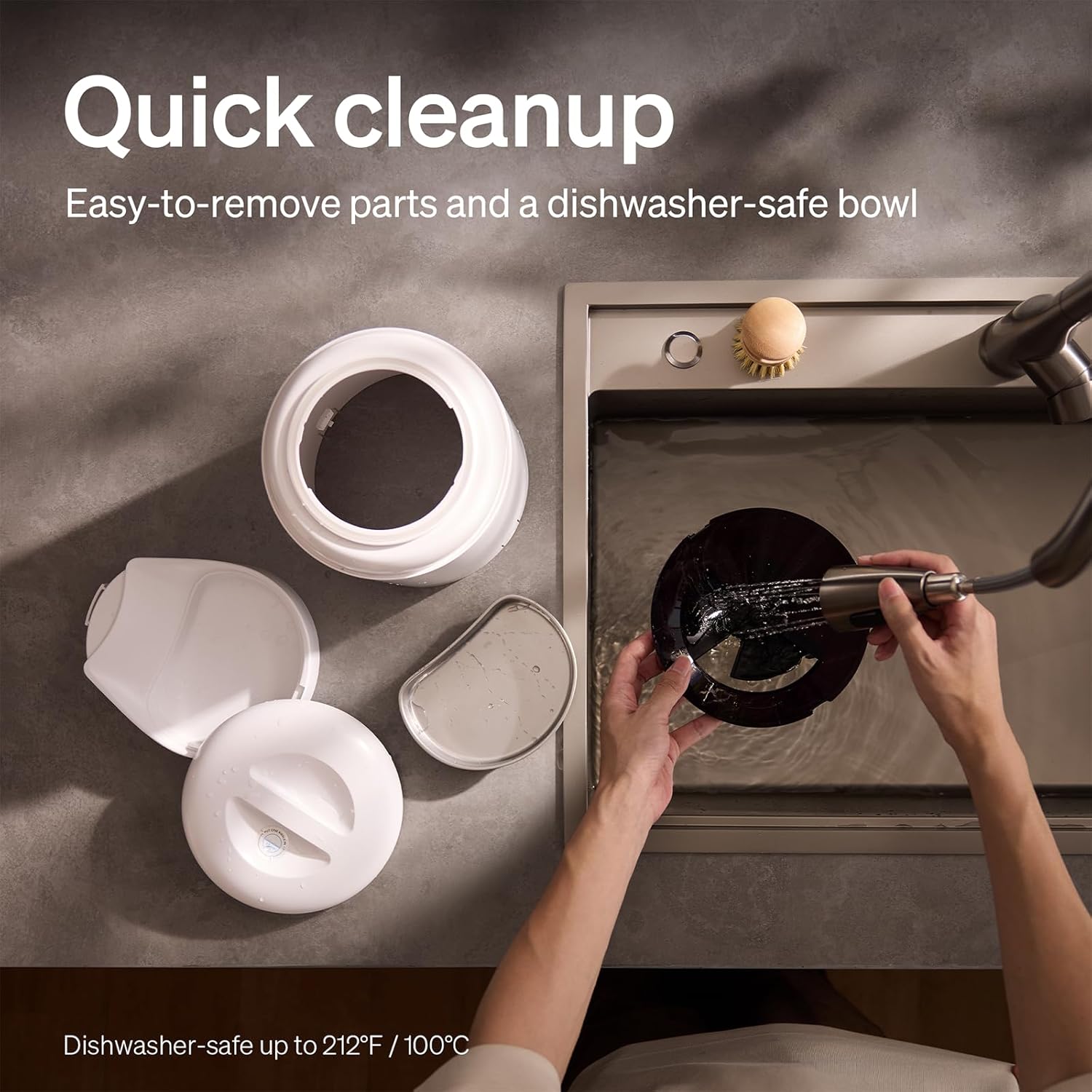
The feeder is designed for quick cleanup with easy-to-remove parts and a dishwasher-safe bowl.
- Desconectar a enerxía: Desconecte sempre o alimentador antes de limpalo.
- Eliminar comida: Empty any remaining food from the hopper.
- Desmontar: Remove the food bowl, lid, and food hopper.
- Pezas lavables: The stainless steel bowl and food hopper are dishwasher-safe (up to 100°C / 212°F) or can be hand-washed with mild soap and water.
- Unidade principal: Limpe a unidade principal cun suave, damp pano. Non o mergullo na auga.
- Secar ben: Asegúrate de que todas as pezas estean completamente secas antes de volvelas montar e enchelas con comida.
2. Substitución do desecante
- The desiccant bag helps keep the food fresh. It is recommended to replace it every 15 days.
- Locate the desiccant compartment, usually under the lid.
- Remove the old desiccant bag and insert a new one.
Resolución de problemas
| Problema | Causa posible | Solución |
|---|---|---|
| O alimentador non dispensa comida. | Food blockage; empty hopper; dispensing mechanism issue. | Check for food blockages and clear them. Refill hopper if empty. Ensure food size is appropriate (2-15mm). |
| Desconexión wifi. | Weak Wi-Fi signal; router issues; incorrect password. | Ensure feeder is within Wi-Fi range. Restart your router. Reconnect the feeder to Wi-Fi via the app, verifying the password. |
| Camera not working or frequently disconnecting. | Poor Wi-Fi connection; app glitch; SD card issue. | Check Wi-Fi stability. Restart the feeder and the app. Ensure the SD card is properly inserted and not full. Consider a system reset if issues persist. |
| App shows "status unknown" or feeding errors. | Wi-Fi disconnection; app synchronization issue. | Verify Wi-Fi connection. Close and reopen the app. Restart the feeder. |
| Non se reproduce a gravación de voz. | No recording saved; volume too low; incorrect schedule. | Ensure a voice message is recorded and saved in the app. Check the playback settings for meal times. |
Especificacións
| Característica | Detalle |
|---|---|
| Número de modelo | AF203 |
| Dimensións (L x W x H) | 12 x 10 x 27 cm |
| Peso | 2.15 kg |
| Material | Aceiro inoxidable (cunca) |
| Capacidade | 5 litros |
| Especie obxectivo | Gato, Can |
| Usos recomendados | Automatic indoor dog/cat feeding |
| Características especiais | 1080P Camera, Smart App, Two-way Audio |
| Cor | Branco |
| Tecnoloxía de conectividade | Wi-Fi (2.4 GHz e 5 GHz) |
| Modo de operación | Automático |
| Instrucións de coidado | Dishwasher safe (bowl) |
| Pilas necesarias | No (for primary operation), Yes (for backup, 3 D-cell, not included) |
Garantía e soporte
PETLIBRO products come with a standard manufacturer's warranty. For detailed warranty information, please refer to the warranty card included in your package or visit the official PETLIBRO websitio.
If you encounter any issues or have questions regarding your PETLIBRO Automatic Pet Feeder, please contact PETLIBRO customer support through the following channels:
- Correo electrónico: Refer to your product packaging or the PETLIBRO websitio para obter o enderezo de correo electrónico de asistencia máis recente.
- Websitio: Visita o sitio web oficial de PETLIBRO websitio con preguntas frecuentes, guías de resolución de problemas e formularios de contacto.
- Soporte na aplicación: The PETLIBRO app may offer a support section for direct assistance.
Please have your model number (AF203) and purchase information ready when contacting support.