
1. Introdución
The Crivit Silvercrest Smart Home Gateway serves as the central hub for your intelligent home network. It enables the connection and control of various Smart Home devices, including lamps, motion sensors, smart plugs, and cameras. This gateway supports the Zigbee 3.0 radio standard, ensuring secure communication and broad compatibility with other Zigbee 3.0 compatible products.
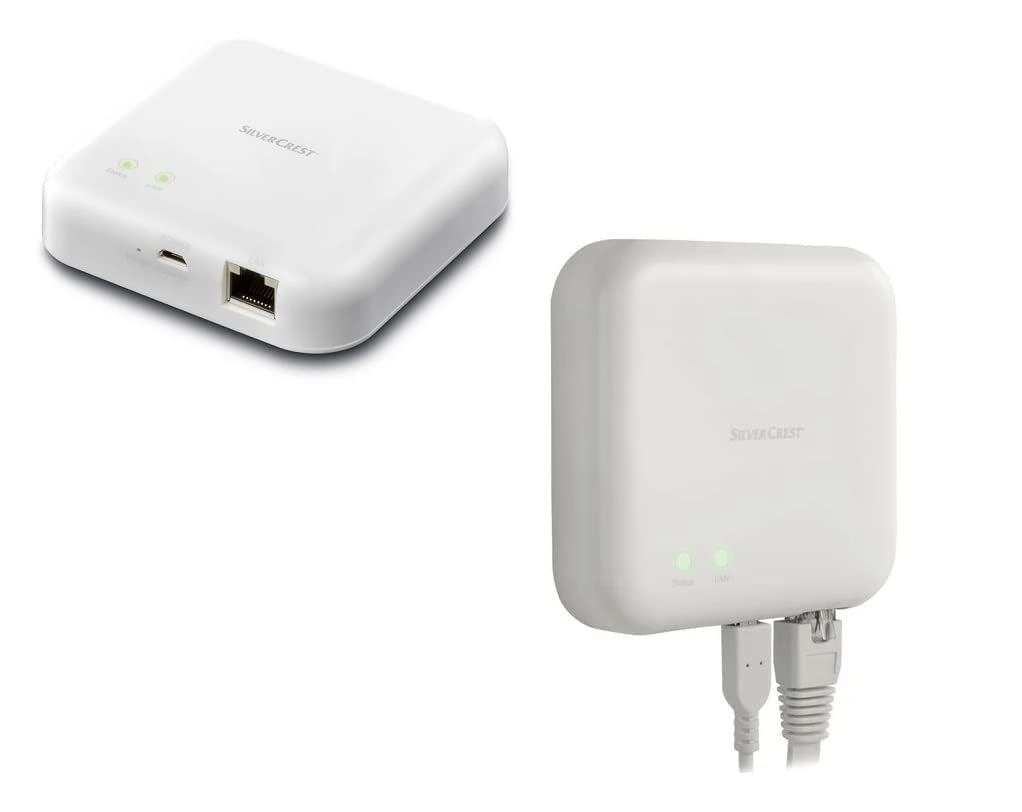
Image 1.1: The Silvercrest Smart Home Gateway, showing its compact design and connectivity ports.
2. Configuración
- Conexión de alimentación: Connect the gateway to a power source using the micro USB input.
- Conexión de rede: Connect the gateway to your home router using an Ethernet cable via the RJ45 Ethernet port.
- Instalación da aplicación: Download and install the Lidl Home App on your smartphone or tablet. The app is essential for controlling and managing your Smart Home devices.
- Emparejamento de dispositivos: Follow the instructions within the Lidl Home App to pair your Zigbee 3.0 compatible devices (e.g., lamps, motion sensors, smart plugs) with the gateway. The gateway facilitates secure, encrypted communication with these devices.
3. En funcionamento
Once set up, the Silvercrest Smart Home Gateway allows you to control your connected devices both from home and remotely.
- Lidl Home App Control: Use the Lidl Home App to monitor the status of your devices (e.g., lights on/off) and control them directly.
- Control de voz: The gateway supports voice control through Google Assistant and Apple Assistant. Ensure your voice assistant is configured to work with the Lidl Home Gateway for seamless operation.
4. Mantemento
The Silvercrest Smart Home Gateway is designed for low maintenance. Keep the device clean and free from dust. Ensure it is placed in a well-ventilated area to prevent overheating. Avoid exposing the device to moisture or extreme temperatures.
5 Solución de problemas
If you encounter issues with your Smart Home Gateway, consider the following:
- Sen conexión: Check if the micro USB power cable and RJ45 Ethernet cable are securely connected. Ensure your internet router is functioning correctly.
- O dispositivo non responde: Verify that the device is properly paired with the gateway via the Lidl Home App. Check the device's power supply and its proximity to the gateway (within 70m in open areas).
- Problemas da aplicación: Ensure your Lidl Home App is updated to the latest version. Try restarting the app or your smartphone.
- Problemas de control de voz: Confirm that your Google Assistant or Apple Assistant is correctly linked to the Lidl Home Gateway and that your commands are clear.
If problems persist, consult the Lidl Home App's help section or contact customer support.
6. Especificacións
| Número de modelo | 15sfd |
| Protocolo de conectividade | Zigbee 3.0 |
| distancia wireless | Approx. 70 m (open area) |
| Ángulo de recepción | 360° |
| Conexións | Micro USB input, RJ45 Ethernet |
| Material | Plástico |
| Dimensións (ancho x longo x alto) | Aprox. 8.9 x 8.9 x 2.35 cm |
| Dimensións do artigo (L x W x H) | 10 x 15 x 4 cm |
| Peso | Aprox. 76 g |
| Vol. Operativotage | 10 voltios |
| Corrente nominal | 2.5 quilosampere |
| Tipo de control | Voice control (Google Assistant, Apple Assistant) |
| Dispositivos compatibles | Zigbee 3.0 compatible devices |
| Clasificación de protección internacional | IP00 |
| Certificacións | TUV |
| Compoñentes incluídos | Pasarela |
7. Garantía e soporte
For warranty information, please refer to the documentation provided at the time of purchase or contact your retailer. For technical support or further assistance, please consult the help section within the Lidl Home App or visit the official Crivit support websitio.