
HOCO EQ1_EARBUDS
HOCO EQ1 Wireless Earbuds User Manual
Model: EQ1_EARBUDS
Introdución
The HOCO EQ1 Wireless Earbuds are designed to provide a superior audio experience with powerful deep bass and crystal-clear highs. Featuring Bluetooth 5.3 connectivity, intuitive touch controls, and a water-resistant design, these earbuds are suitable for various activities, from daily commutes to intense workouts. This manual provides detailed instructions for setup, operation, maintenance, and troubleshooting to ensure optimal performance of your EQ1 earbuds.
O que hai na caixa
- HOCO EQ1 Wireless Earbuds (Left and Right)
- Estuche de carga
- Cable de carga USB
- Almofadas para os oídos (varios tamaños)
- Manual de usuario (este documento)
Produto rematadoview
Familiarize yourself with the components and features of your HOCO EQ1 Earbuds.
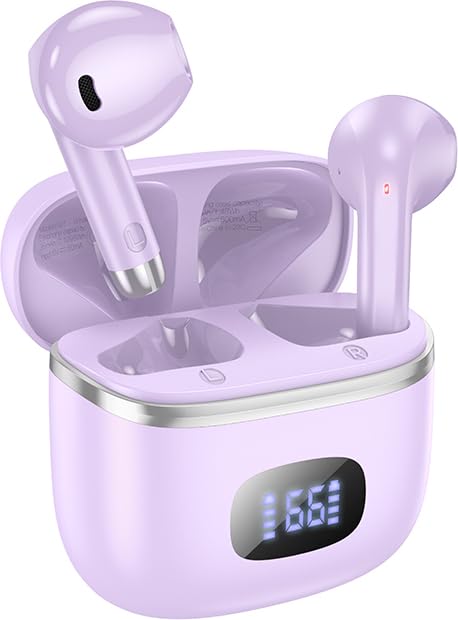
Image: The HOCO EQ1 purple earbuds are shown inside their matching charging case, which features a digital LED display indicating battery levels. The earbuds are partially visible, showcasing o seu elegante deseño.

Image: This graphic highlights the lightweight and rounded design of the earbuds for comfortable wear, alongside a close-up of the charging case's LED digital display, which shows the visible power level.
Características principais:
- Conectividade sen fíos Bluetooth 5.3: Ensures stable and efficient connection with all Bluetooth-enabled devices.
- Graves profundos: Delivers rich and powerful audio for an immersive listening experience.
- Controis táctiles: Intuitive touch-sensitive areas on the earbuds for easy management of music and calls.
- Resistente á auga: Designed to withstand sweat and light splashes, suitable for workouts and outdoor use.
- Tempo de reprodución longo: Ata 50 horas de reprodución total coa caixa de carga.
- Deseño compacto e lixeiro: Comfortable in-ear fit, weighing only 34g.
- TWS (True Wireless Stereo): Independent earbuds for true wireless freedom.
- Modo de xogo: Low latency mode for enhanced gaming performance.
- Pantalla dixital LED: Shows battery status of the charging case and individual earbuds.
- Interruptor magnético: Automatic pairing upon opening the case.
- Composite Diaphragm: 13mm moving coil unit for balanced three-band sound quality.
Configuración
1. Carga inicial
Before first use, fully charge the HOCO EQ1 earbuds and their charging case.
- Coloque os dous auriculares no estoxo de carga.
- Connect the USB charging cable to the charging port on the case and plug the other end into a USB power adapter (not included) or a computer's USB port.
- The LED digital display on the case will show the charging progress. Once fully charged, the display will indicate 100% or a full battery icon.
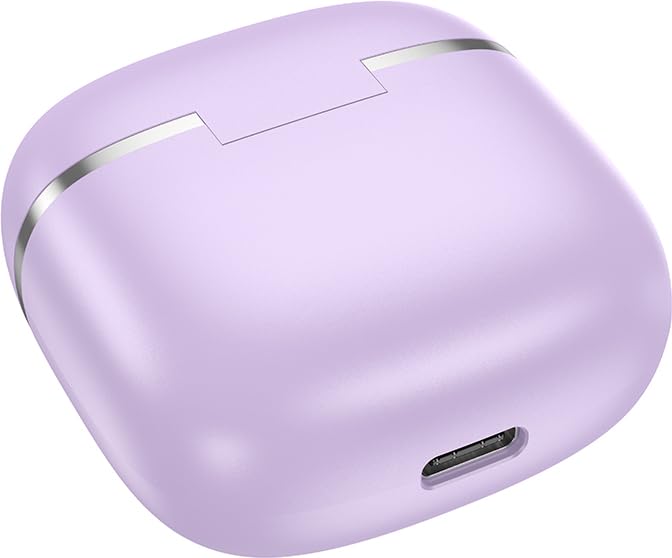
Imaxe: Primeiro plano view of the bottom of the HOCO EQ1 charging case, showing the USB charging port. This port is used to recharge the case and the earbuds.

Image: An infographic detailing the battery life of the HOCO EQ1 earbuds. It shows 35 hours of total working time with the charging case, 7 hours of single headset battery life, and 180 hours of standby time.
2. Emparellamento Bluetooth
Os auriculares entrarán automaticamente no modo de emparellamento ao retiralos da caixa de carga.
- Abre a caixa de carga. Os auriculares acenderanse automaticamente e entrarán no modo de emparellamento.
- No teu dispositivo (teléfono intelixente, tableta, etc.), activa o Bluetooth e busca os dispositivos dispoñibles.
- Select "HOCO EQ1" from the list of found devices.
- Unha vez conectados, escoitarás un ton de confirmación e os auriculares estarán listos para usar.
- Os auriculares admiten a reconexión automática co último dispositivo emparellado ao retiralos da funda.

Image: This graphic illustrates the automatic pairing feature of the HOCO EQ1 earbuds, which activate upon opening the case. It also details the various touch controls for music playback and voice assistant activation.
Instrucións de funcionamento
Controis táctiles:
The HOCO EQ1 earbuds feature intuitive touch controls on both the left (L) and right (R) earbuds.
| Acción | Función |
|---|---|
| Tap the touch area (L/R) | Reproducir/pausar música |
| Double tap the touch area (L/R) | Próxima pista |
| Triple tap the touch area (L/R) | Pista anterior |
| Long press the touch area for 2 seconds (L/R) | Activa o asistente de voz |
| Tap the touch area (L/R) during incoming call | Responder/Finalizar chamada |
| Long press the touch area for 2 seconds (L/R) during incoming call | Rexeitar a chamada |
Modo de xogo:
The HOCO EQ1 earbuds feature a low latency gaming mode for an enhanced gaming experience. Refer to the product packaging or manufacturer's website for specific activation instructions, as this may vary.
Mantemento
Limpeza:
- Limpa regularmente os auriculares e a funda de carga cun pano suave, seco e sen fiapos.
- Non empregue produtos de limpeza abrasivos, alcol nin disolventes químicos.
- Retire con coidado calquera cerumen ou residuos das almofadas e da malla do altofalante cun cepillo pequeno e suave ou un hisopo de algodón.
Almacenamento:
- Cando non estean en uso, garde sempre os auriculares no seu estoxo de carga para protexelos e garantir que sigan cargados.
- Almacenar nun lugar fresco e seco lonxe da luz solar directa e de temperaturas extremas.
Resistencia á auga:
The HOCO EQ1 earbuds are water-resistant and sweat-proof, making them suitable for workouts and light rain. However, they are not designed for submersion in water. Avoid exposing them to heavy rain, showering, swimming, or prolonged contact with water.
Resolución de problemas
| Problema | Causa posible | Solución |
|---|---|---|
| Os auriculares non se emparejan | Low battery; not in pairing mode; device Bluetooth off; interference. | Charge earbuds and case. Ensure earbuds are out of case. Turn device Bluetooth off/on. Move closer to device. |
| Só funciona un auricular | Un auricular non está cargado; non está conectado correctamente entre si. | Place both earbuds back in case, close, then reopen. Ensure both are charged. |
| Sen son nin baixo volume | Device volume too low; earbud volume too low; earbud dirty; not connected. | Increase volume on device and earbuds. Clean earbud speaker mesh. Re-pair earbuds. |
| O estuche de carga non se está cargando | Cable/adaptador defectuoso; porto de carga sucio. | Proba cun cable USB e un adaptador de corrente diferentes. Limpa o porto de carga con coidado. |
| A conexión cae con frecuencia | Demasiado lonxe do dispositivo; interferencias; batería baixa. | Stay within 10 meters of your device. Avoid strong electromagnetic interference. Charge earbuds. |
Especificacións
| Característica | Detalle |
|---|---|
| Nome do modelo | EQ1_EARBUDS |
| Tecnoloxía de conectividade | Sen fíos (Bluetooth 5.3) |
| Tecnoloxía de comunicación sen fíos | Bluetooth |
| Jack para auriculares | USB (para a caixa de carga) |
| Tipo de control | Táctil, control de volume |
| Formato de micrófono | Mans libres |
| Nivel de resistencia á auga | Resistente á auga |
| Peso do elemento | 50 gramos (total) |
| Dimensións do produto | 11 x 11 x 5 cm |
| Material | Plástico |
| Colocación do oído | En Orella |
| Impedancia | 140 ohmios |
| Battery Life (Single Headset) | Ata 7 horas |
| Tempo total de reprodución (con estuche) | Ata 35-50 horas (dependendo do uso) |
| Tempo de espera | Ata 180 horas |
Garantía e Soporte
The HOCO EQ1 Wireless Earbuds come with a 1 ano de garantía desde a data de compra. Esta garantía cobre defectos de fabricación. Conserve o comprobante de compra para reclamacións de garantía.
For technical support, warranty claims, or further assistance, please contact HOCO customer service through their official website or the retailer from whom you purchased the product. Refer to the product packaging for specific contact details.
Nota: A garantía non cobre os danos causados por mal uso, accidentes, modificacións non autorizadas ou desgaste normal.
Ask a question about this manual
Ask about setup, troubleshooting, compatibility, parts, safety, or missing instructions. Manuals+ will review the question and use this page’s manual context to help answer it.