
1. Rematadoview
The TOMASHI Portable AM/FM Radio Model 6107 is a compact and lightweight device designed for convenient audio listening. It features a digital display, a built-in speaker, and a headphone jack for personal use. This manual provides essential information for setting up, operating, and maintaining your radio.
- Deseño compacto: Small and lightweight, ideal for portability.
- Recepción mellorada: Equipped with a DSP chip for improved signal clarity.
- Saída de audio: Features a loud speaker and a 3.5mm headphone jack.
- Estacións predefinidas: Allows saving up to 5 favorite radio stations for quick access.
- Alimentado por batería: Funciona con 2 pilas AAA (non incluídas).

Fronte view of the TOMASHI Portable AM/FM Radio, highlighting the digital display and controls.
2. Configuración
2.1 Instalación da batería
- Localiza a tapa do compartimento da batería na parte traseira da radio.
- Deslice a tapa para abrir.
- Insira dúas (2) pilas AAA, asegurándose de manter a polaridade correcta (+ e -) como se indica no interior do compartimento.
- Pecha a tapa do compartimento da batería de forma segura.
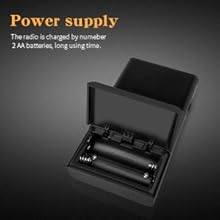
Illustration of the battery compartment for AAA battery installation.
2.2 Axuste da antena
- Para óptimo Recepción FM, fully extend the telescopic antenna.
- Para Recepción AM, the radio uses an internal antenna. Rotating the radio may improve signal strength.
3. Instrucións de funcionamento
3.1 Encendido/apagado
Desliza o Interruptor ON/OFF located on the side of the radio to power it on or off.
3.2 Selección de bandas
Preme o FM or AM button on the front panel to switch between the FM and AM frequency bands.
3.3 Afinación
- Sintonización manual: Usa o Sintonizar + or Sintonizar - buttons to adjust the frequency incrementally.
- Automatic Scan (ATS): Manteña premido o ATS button. The radio will automatically scan for and save available stations to the preset memory slots (P01, P02, etc.).

Detallado view of the radio's control panel, including ATS, band selection, and tuning buttons.
3.4 Preset Stations (M1-M5)
- Gardando presets: Tune to your desired station. Press and hold one of the preset buttons (M1, M2, M3, M4, or M5) until the display confirms the station is saved (e.g., "P01").
- Recordando presets: Briefly press one of the preset buttons (M1-M5) to quickly switch to a saved station.
3.5 Control de volume
Axuste o nivel de saída de son usando o botón disco de volume located on the side of the radio.
3.6 Uso de auriculares
Insert standard 3.5mm headphones into the conector para auriculares on the top of the radio for private listening. The internal speaker will automatically mute when headphones are connected.

The radio features a 3.5mm headphone jack for personal audio enjoyment.
4. Mantemento
- Limpeza: Wipe the radio's exterior with a soft, dry cloth. Do not use liquid cleaners, aerosols, or abrasive solvents.
- Coidado da batería: Remove batteries if the radio will not be used for an extended period to prevent potential battery leakage and damage. Replace batteries promptly when the low battery indicator appears.
- Almacenamento: Store the radio in a cool, dry environment, away from direct sunlight, high temperatures, and humidity.
5 Solución de problemas
| Problema | Causa posible | Solución |
|---|---|---|
| A radio non se acende | Batteries incorrectly inserted or depleted | Comprobe a polaridade das pilas; substitúaas por pilas AAA novas. |
| Mala recepción de radio | Antenna not extended (FM) or radio orientation (AM) | Fully extend FM antenna. Rotate radio for better AM signal. Move away from interference sources. |
| Non se escoita son do altofalante/auriculares | Volume too low or headphones not fully inserted | Increase volume. Ensure headphones are securely plugged in. |
| Cannot save preset stations | Preset button not held long enough | Press and hold the desired preset button until the display confirms saving. |
6. Especificacións
| Característica | Detalle |
|---|---|
| Dimensións do produto | 2.2" de longo x 0.79" de ancho x 3.9" de alto (5.59 cm de longo x 2.01 cm de ancho x 9.91 cm de alto) |
| Peso do elemento | 2.78 onzas (78.8 gramos) |
| Banda FM | 64/87 - 108 MHz |
| Banda AM | 520/522 - 1710 KHz |
| Fonte de enerxía | 2 pilas AAA (non incluídas) |
| Conector para auriculares | 3.5 mm |
| Característica especial | Portátil |
| Tecnoloxía de sintonizador | AM/FM |
| Número de modelo | 6107 |
7. Garantía e soporte
For detailed warranty information, product registration, or technical support, please refer to the documentation included with your purchase or visit the official TOMASHI websitio. Garde o recibo da compra como xustificante de compra para reclamacións de garantía.