
1. Introdución
This manual provides detailed instructions for the installation, operation, and maintenance of your Ctronics CTIPC-790C-EU 5MP PTZ Wi-Fi Security Camera. Please read this manual thoroughly before using the product to ensure proper function and safety. This camera is designed for both indoor and outdoor surveillance, offering high-resolution video, advanced detection features, and flexible connectivity.

Figura 1: Fronte view of the Ctronics 5MP PTZ Wi-Fi Security Camera. This image displays the camera's dome shape, lens, and LED illuminators.
2. Contido do paquete
Verifique que todos os elementos que se indican a continuación estean incluídos no seu paquete. Se falta algún elemento ou está danado, póñase en contacto co servizo de atención ao cliente.
- Ctronics CTIPC-790C-EU 5MP PTZ Wi-Fi Security Camera
- Adaptador de alimentación
- Cable de carga
- Manual de instrucións
- Soporte de montaxe
- Parafusos de montaxe
3. Produto rematadoview
The Ctronics CTIPC-790C-EU camera offers advanced surveillance capabilities:
- Resolución Ultra HD de 5 MP: Provides clear 2560x1920 pixel video and images, offering more detail than 1080P or 4MP cameras.
- Dual-Band Wi-Fi (2.4/5GHz): Supports both 2.4GHz for extended range and better penetration, and 5GHz for faster transmission and reduced interference.
- PTZ Functionality: Pan 355° and Tilt 90° for comprehensive area coverage.
- AI Human Detection & Auto Tracking: Intelligent technology reduces false alarms by up to 95% and automatically tracks detected human movement.
- Visión nocturna en cor: Achieves full-color night vision up to 25 meters or infrared night vision up to 30 meters for clear visibility in low-light conditions.
- Audio bidireccional: Micrófono e altofalante integrados para comunicación remota.
- Resistente ás inclemencias do tempo IP66: Durable construction suitable for outdoor use in various weather conditions.
- Opcións de almacenamento flexibles: Supports continuous 24/7 recording to a microSD card (up to 128GB), cloud storage, or FTP.

Figure 2: This image illustrates the superior clarity of 5MP resolution compared to 2MP, highlighting finer details in a vehicle.
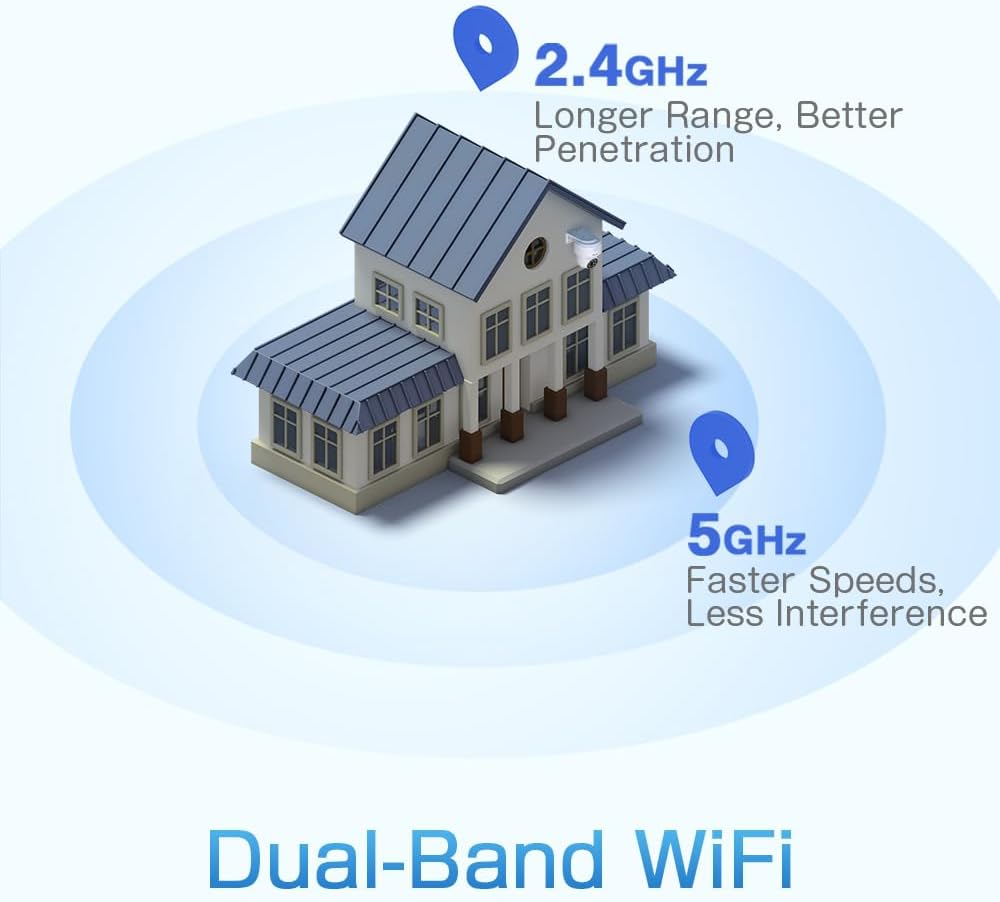
Figure 3: A diagram depicting a house with Wi-Fi signals. The 2.4GHz signal offers longer range and better penetration, while the 5GHz signal provides faster speeds and less interference.
4. Configuración
4.1 Instalación física
The camera can be mounted on a wall or ceiling. Ensure the mounting location provides a clear field of view e está dentro do alcance da wifi.
- Escolle unha localización: Select a suitable indoor or outdoor location. The camera is IP66 waterproof, making it resistant to dust and water jets.
- Montaxe:
- Montaxe na parede: Use the provided mounting bracket and screws to secure the camera to a wall.
- Montaxe no teito: The camera can also be mounted directly to a ceiling.
- Axustar ángulo: After mounting, adjust the camera's orientation as needed.

Figure 4: This image displays two installation methods: wall mounting using a bracket and ceiling mounting.

Figure 5: This image illustrates both ceiling and wall installation options, emphasizing the camera's IP66 waterproof rating by showing it under simulated rain.
4.2 Conexión de alimentación
Connect the provided power adapter to the camera's power input and then plug it into a standard electrical outlet. Ensure the connection is secure.
4.3 Conexión de rede
The camera supports both 2.4GHz and 5GHz Wi-Fi networks. For initial setup, it is recommended to place the camera near your Wi-Fi router.
- Descarga a aplicación: Download the Ctronics Pro or CamHi Pro app from your smartphone's app store (available for iOS and Android). For PC, use HiP2P Client software.
- Rexistrar conta: Abre a aplicación e rexistra unha nova conta ou inicia sesión se xa tes unha.
- Engadir cámara: Segue as instrucións da aplicación para engadir a túa cámara. Isto normalmente implica escanear un código QR na cámara ou introducir manualmente o seu ID.
- Conectar a wifi: Select your desired 2.4GHz or 5GHz Wi-Fi network and enter the password. The camera will connect to the network.
5. Instrucións de funcionamento
5.1 En directo View e control PTZ
Once connected, you can access the live video feed through the Ctronics app or PC software.
- Feed en directo: Tap on the camera in the app to view the real-time video stream.
- Panorama/inclinación: Use the directional controls within the app to rotate the camera horizontally (pan 355°) and vertically (tilt 90°).
- Zoom: Digital zoom is available through the app.
- Posicións predefinidas: Set up to 8 preset positions for quick navigation to specific areas.
5.2 Detección humana e seguimento automático por IA
The camera's intelligent detection system can identify human shapes and track their movement.
- Activar a detección: In the app settings, enable AI Human Detection.
- Adjust Sensitivity & Area: Customize the detection sensitivity and define specific detection zones to minimize false alarms.
- Seguimento automático: When enabled, the camera will automatically follow detected human movement within its field of view.
- Alertas: Receive instant notifications via the app or email when motion is detected. The camera can also trigger customizable sound and light alarms.

Figure 6: This image shows the camera detecting a person at night, with an alarm notification displayed on a smartphone, illustrating the human detection and auto-tracking features.
5.3 Visión nocturna
The camera offers enhanced night vision capabilities:
- Visión nocturna a toda cor: When spotlights are activated, the camera can provide full-color video in low-light conditions up to 25 meters.
- Visión nocturna por infravermellos: In complete darkness, the camera automatically switches to infrared mode, providing clear black and white video up to 30 meters.

Figure 7: An image showing the camera mounted outdoors at night, with its spotlights illuminated to provide full-color night vision. A smartphone displays the live feed.
5.4 Audio bidireccional
Use the two-way audio feature to communicate with individuals near the camera.
- Fala: Press and hold the microphone icon in the app to speak through the camera's speaker.
- Escoitar: Enable the speaker icon to listen to audio from the camera's microphone.
5.5 Gravación e almacenamento
The camera supports various recording and storage methods:
- Tarxeta MicroSD: Insert a microSD card (up to 128GB, not included) into the designated slot for local 24/7 continuous recording.
- Almacenamento na nube: Subscribe to a cloud storage service (if available) for off-site video backup.
- FTP: Configure FTP settings in the app to upload recordings to an FTP server.

Figure 8: This image illustrates the camera's 24/7 recording capability and various recording modes, including a timeline view on a smartphone and a filmstrip showing recorded events.
6. Mantemento
6.1 Limpeza
Regularly clean the camera lens and housing to ensure optimal image quality and performance.
- Use un suave, damp cloth to wipe the camera's exterior.
- Para a lente, use un pano e unha solución de limpeza de lentes especializados para evitar rabuñaduras.
- Non empregue produtos químicos duros nin limpadores abrasivos.
6.2 Actualizacións de firmware
Periodically check for firmware updates through the Ctronics app. Keeping your camera's firmware updated ensures access to the latest features and security enhancements.
7 Solución de problemas
Se tes problemas coa túa cámara, consulta as seguintes solucións habituais:
| Problema | Posible Solución |
|---|---|
| A cámara non se conecta á wifi |
|
| Mala calidade de imaxe |
|
| Non hai alertas de detección de movemento |
|
| A tarxeta microSD non grava |
|
For further assistance, please contact Ctronics customer support.
8. Especificacións
Key technical specifications for the Ctronics CTIPC-790C-EU camera:
| Característica | Especificación |
|---|---|
| Nome do modelo | CTIPC-790C-EU |
| Resolución | 5MP (2560x1920) |
| Tecnoloxía sen fíos | Wi-Fi (2.4 GHz/5 GHz) |
| Ángulo panorámico | 355 graos |
| Ángulo de inclinación | 90 graos |
| Range de visión nocturna | 25 Meters (Color), 30 Meters (IR) |
| Nivel de resistencia á auga | IP66 (Impermeable) |
| Opcións de almacenamento | MicroSD (up to 128GB), Cloud, FTP |
| Fonte de enerxía | Electric Cable (12 Volts, 12 Watts) |
| Tipo de montaxe | Wall Mount, Screw-in |
| Material | Acrilonitrilo Butadieno Estireno (ABS) |
| Dispositivos compatibles | Ordenador, Smartphone, Tablet |
| Soporte do sistema operativo | Android, iOS, Windows, Mac OS |
9. Garantía e soporte
Ctronics products are designed for reliability and performance. For warranty information and technical support, please refer to the official Ctronics websitio web ou póñase en contacto directamente co servizo de atención ao cliente. Garde o recibo da compra como proba de compra para reclamacións de garantía.
- Soporte en liña: Visit the Ctronics official websitio web con preguntas frecuentes, guías de resolución de problemas e descargas de software.
- Soporte por correo electrónico: Contact Ctronics customer service via email for technical assistance.